
Omnichannel Customer Care on Power Platform: AI Agents that Deflect Tickets, Personalize at Scale, and Lift NPS
Executive summary
If your contact center still measures success by “tickets closed,” you’re missing the signal. Customers judge you on speed, personalization, and how little work they have to do. Microsoft’s Power Platform and Dynamics 365 stack now let you deploy AI agents across chat, email, and voice that route, summarize, and resolve—while staying fully inside your governance guardrails. In this guide, we map a Microsoft-first reference architecture, the controls you’ll need, the KPIs that matter, and a practical build path from pilot to production. Outcome: higher containment and CSAT/NPS without sacrificing control, privacy, or your brand voice.
Why Omnichannel AI Customer Care Now: From Ticket Volume to Experience KPIs
Customer expectations have shifted from “get me an answer eventually” to “solve it now, in my channel, like you know me.” The technology has caught up. Dynamics 365 Omnichannel brings chat, voice, SMS, email, and social into one agent desktop with case and knowledge context, creating a native foundation for true omnichannel care inside your CRM. See Microsoft’s overview of Omnichannel for Customer Service.
Economically, the case for AI assist and automation is strong. Gartner forecasts conversational AI will reduce contact center agent labor costs by $80B by 2026, as deployments accelerate across the industry (Gartner forecast). On the ground, a large field study found a 14% boost in agent productivity (issues resolved per hour) from access to a generative AI assistant, with bigger gains for less-experienced agents—plus reductions in handle time and improved sentiment (NBER: Generative AI at Work).
Translation for your scorecard: stop optimizing for raw volumes or “tickets per rep” and start instrumenting the experience metrics—Containment Rate, CSAT/NPS, First Contact Resolution (FCR), and Average Handle Time (AHT). AI agents and agent-assist can move all four when they’re grounded in CRM context and governed well.
What an AI Agent Actually Does Across Channels (Chat, Email, Voice)
– Chat and messaging: Answer product and policy questions with retrieval-augmented generation (RAG) from your knowledge base, authenticate the user, check entitlements, perform actions (refund, status, rebook), and escalate cleanly with a short, factual summary and next-best steps for the human. Omnichannel routes and surfaces the entire transcript in the same agent desktop (Omnichannel for Customer Service).
– Email: Triage inbound mail, classify intent, summarize long threads, draft brand-safe replies, and attach the right knowledge article or policy. In the agent desktop, Copilot can summarize cases and draft/refine responses to speed wrap-up (Copilot for Dynamics 365 Customer Service).
– Voice: The voice channel in Dynamics 365 Customer Service is built on Azure Communication Services, enabling call routing, real-time transcription, and AI summarization that lands in the case record (Dynamics 365 voice channel on ACS). The same AI agent can recognize intents, handle self-service flows via IVR/chatbot, and hand off to a human with the transcript and context intact.
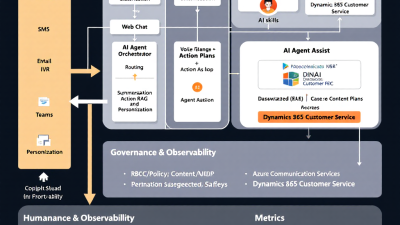
Microsoft Reference Architecture: Dynamics 365 + Omnichannel, Copilot Studio, Dataverse, Azure OpenAI
A Microsoft-first blueprint keeps data where it belongs and shortens time-to-value:
– Engagement and case backbone: Dynamics 365 Customer Service with Omnichannel provides a unified desktop, knowledge, and case timeline across chat, email, voice, SMS, and social (Omnichannel overview).
– Routing brain: Unified routing uses machine learning to classify, prioritize, and assign work based on skills, capacity, and rules—improving SLA adherence and FCR (Unified routing).
– AI agent layer: Microsoft Copilot Studio builds generative bots, connects to Dataverse/Dynamics for data, calls Power Automate flows for actions, and publishes to web, Teams, SMS/WhatsApp, and more (What is Copilot Studio?; Add channels; Add actions).
– Knowledge and data: Dataverse holds cases, contacts, entitlements, and consent flags; knowledge lives in Dataverse or SharePoint. RAG grounds the model in your approved content.
– Generative foundation: Azure OpenAI provides enterprise LLMs with content filtering and data privacy—customer data isn’t used to train foundation models, and you can enable private networking and regional residency (Azure OpenAI privacy and security).
– Voice and PSTN: Azure Communication Services powers inbound and outbound voice, IVR, and recording/transcription integrated with Dynamics 365 (Voice on ACS).
– Reference pattern: Microsoft’s architecture center shows how to integrate ACS, conversational AI/bots, cognitive services, and CRM into an omnichannel contact center (Omnichannel contact center solution idea).
Personalization with CRM Context: Consent-aware Profiles, Segments, and Tone
AI agents get smarter—and safer—when they know who they’re serving and what they’re allowed to say:
– Consent-aware profiles: Store and honor communication preferences and data-processing consent in Dataverse. Segment logic can tailor offers and messaging, but the agent must guardrail against using restricted attributes in responses or decisions.
– Real-time context: Use authenticated identity to pull order status, entitlements, SLAs, and case history. Responses change when a VIP with an expiring SLA writes in versus an anonymous prospect.
– Brand voice on tap: Use prompt templates to set brand tone and reading level for replies and summaries. Copilot can draft and refine responses inline with your style guide (Copilot for Customer Service).
– Privacy-first generation: Keep sensitive data in your tenant; Azure OpenAI enforces enterprise data handling and offers content safety systems to filter harmful or policy-violating outputs (Azure OpenAI privacy and safety).
Core Skills That Move the Needle: Route, Summarize, Resolve, and Handoff
– Route: ML-driven unified routing auto-classifies and prioritizes across chat, email, and voice based on skills and capacity, improving first-contact matching and SLA compliance (Unified routing).
– Summarize: Copilot produces concise conversation and case summaries, which reduce AHT and increase consistency in wrap-ups and escalations (Copilot capabilities).
– Resolve: Generative answers grounded in your knowledge base deflect common inquiries; Power Automate actions execute real tasks (refunds, resets, reships) directly from the bot (Copilot Studio actions).
– Handoff: When human help is needed, pass the transcript, intent, customer context, and a suggested reply/next step to the agent—lifting FCR and CSAT without repeating questions.
Build It Step-by-Step on Power Platform
— Configure channels in Omnichannel for Customer Service (chat, SMS, voice/IVR)
– Stand up chat widgets on web/mobile; connect SMS/WhatsApp; enable email queues; light up the first-party voice channel built on Azure Communication Services. Use workstreams, queues, and capacity profiles to prepare for unified routing across channels (Omnichannel overview; Voice on ACS).
— Create a Copilot Studio bot with generative answers (RAG from Dataverse/SharePoint KB)
– Build a bot that uses generative answers grounded in your approved knowledge sources. Connect to Dataverse for customer/case data and add authentication. Publish to web, Teams, or messaging channels as needed (Copilot Studio; Add channels).
— Wire actions with Power Automate (refunds, order status, entitlement checks)
– Turn intents into outcomes: call cloud flows for order lookups, entitlement checks, refunds, credit memos, appointment reschedules, and more. Expose these flows as bot actions with parameters and role checks (Add actions).
— Enable Agent Assist in Dynamics 365 (summaries, suggested replies, knowledge)
– Enable Copilot in the agent workspace to summarize long threads, propose reply drafts, and surface relevant knowledge—speeding AHT and standardizing tone (Copilot for Customer Service).
— Add voice: Azure Communication Services + bot + transcription + intent
– Integrate ACS for telephony, IVR flows, and call recording/transcription. Route calls through Omnichannel, invoke the bot for self-service intent handling, and hand off with transcript and notes when needed (Omnichannel contact center pattern; Voice on ACS).
Governance First: RBAC, DLP, Data Residency, Prompt/Content Safety, Audit Trails
– RBAC and environment strategy: Isolate development, test, and production in separate Power Platform environments; use Azure AD groups and least-privileged access for makers and admins.
– DLP policies: Control which connectors can be used together, enforce tenant isolation, and ensure data from customer systems isn’t exfiltrated via unmanaged connectors (Power Platform DLP).
– Managed Environments: Turn on solution checker, sharing limits, and environment insights, and require approvals for risky operations (Managed Environments).
– Data residency and network controls: Keep data in-region and on private networks with Azure OpenAI; understand and document that your prompts and completions aren’t used to train foundation models (Azure OpenAI privacy).
– Prompt and content safety: Apply content filters, jailbreak detection, and allow/deny lists for URLs and actions; centralize prompt templates and version them with change control.
– Audit trails: Enable Dataverse auditing on cases, knowledge, and bot/flow invocations; retain chat/voice transcripts per policy for QA and compliance.
Observability and Reliability: Tracing, Canary Deployments, Rollback, Spend Controls
– Tracing and KPIs: Use Copilot Studio’s built-in analytics to monitor engagement, resolution, and escalation—key inputs to containment rate (Copilot Studio analytics). Combine with Omnichannel and case metrics in Power BI for a full-funnel view.
– Canary releases: Ship new prompts, knowledge sources, and actions to 5–10% of traffic or a single channel first. Monitor containment and CSAT before ramping.
– Rollback: Version bot content and flows; keep a “known good” configuration ready. Use feature flags to disable risky actions quickly.
– Spend controls: Set Azure budgets and OpenAI quotas; cap tokens per request and per session; track ACS transcription minutes. Alert on anomalous spikes.
– Resilience: Add timeouts and graceful degradation (e.g., fall back to FAQ search) and circuit-breaker patterns for downstream systems.
Measuring Impact: Containment Rate, CSAT/NPS, FCR, AHT—and how to instrument them
– Containment Rate: Percent of sessions resolved by the bot without human handoff. Measure with Copilot Studio resolution/escalation metrics and Omnichannel transfer flags (Bot analytics).
– CSAT/NPS: Trigger microsurveys post-resolution in chat/email; for voice, use IVR or SMS follow-up. Track NPS change among cohorts exposed to AI-first flows.
– FCR: Percentage of issues resolved without reopening within a defined window (e.g., 72 hours). Derive from case reopen events and follow-up contacts linked to the same customer/intent.
– AHT: Time from contact start to resolution or handoff completion; include agent wrap time. Expect reductions especially where Copilot summarizes and drafts replies (NBER study).
– Quality: Add accuracy and safety checks via spot reviews, knowledge coverage, and action success rates.
Experimentation Framework: Offline evals, A/B routing, guardrail tests before go-live
– Offline evaluations: Build a gold set of real inquiries and expected answers; test retrieval accuracy, answer quality, and safety against new prompts or KB changes.
– A/B routing: Randomly assign a percentage of traffic (or intents) to the new bot version or action set. Monitor containment, CSAT, and error rates with statistical significance before full rollout.
– Guardrail testing: Include jailbreak prompts, ambiguous queries, and sensitive scenarios (refunds, personal data) in preflight tests. Require red-team signoff for high-risk intents.
– Readiness gates: No-go if containment drops >X%, CSAT dips >Y points, or safety flags exceed threshold.
SMB vs Enterprise Playbook: Start Small, Prove Value, Scale Safely
– SMB: Start with your top 10 intents (e.g., order status, returns, billing questions). Use one environment, but enforce DLP from day one. Publish chat first, then email assist, then voice IVR. Weekly iterate on prompts and KB.
– Enterprise: Multi-environment strategy (Dev/Test/Prod), Managed Environments, change advisory board for prompts/actions, and central prompt library. Begin with a controlled channel or region, integrate with identity and consent systems, and plan for multi-lingual support.
ROI Model: Sample assumptions to quantify deflection and CSAT lift
– Baseline: 100,000 monthly contacts across channels; cost per assisted contact = $7 (fully loaded).
– Pilot goal: 25% bot containment in top intents, rising to 40% with iteration.
– Savings: At 25% containment, 25,000 deflected contacts x $7 = $175,000/month. At 40%: $280,000/month.
– Assist uplift: AHT reduction of 10% via Copilot summaries and drafts; on 60,000 assisted contacts/month at 6 minutes each, saving 36,000 minutes (~600 hours). At $35/hour, ~$21,000/month.
– Offsets: Platform licenses, Azure OpenAI tokens, ACS minutes, and setup/ops—assume $60,000/month at scale.
– Net: ~$136,000–$241,000/month, plus NPS lift associated with higher FCR and faster service. Industry evidence suggests meaningful gains in sentiment alongside handle-time reductions (NBER study; Gartner forecast).
Implementation Checklist and Common Pitfalls to Avoid
Checklist
– Define top intents, outcomes, and KPIs (containment, CSAT/NPS, FCR, AHT)
– Stand up Omnichannel channels and unified routing
– Build Copilot Studio bot with RAG and authentication
– Wire critical actions via Power Automate with role checks
– Enable Copilot Agent Assist in Dynamics 365
– Add voice with ACS and IVR flows
– Implement DLP and Managed Environment guardrails
– Configure Azure OpenAI network/privacy controls and content filters
– Instrument analytics and budgets; set alerts
– Pilot with canary routing; A/B test and iterate
Pitfalls
– Training the bot on stale or ungoverned content
– Skipping authentication and then hitting privacy walls later
– Exposing high-risk actions without approvals and rate limits
– Treating prompts as code but not versioning them like code
– Launching voice without real-world noise/transcription testing
– Measuring “tickets deflected” without validating customer satisfaction
How B. Cobra Systems Can Help: Accelerator, Governance Blueprint, and Quickstart
B. Cobra Systems, LLC specializes in AI agents and business process automation on Microsoft Power Platform. We bring:
– Omnichannel accelerator: Prebuilt Copilot Studio bot with RAG, authenticated actions (refunds, order status, entitlement checks), and Dynamics 365 integrations tuned for high containment.
– Governance blueprint: DLP policies, Managed Environments setup, prompt/content safety patterns, and Azure OpenAI privacy configuration aligned to your compliance needs (Power Platform DLP; Managed Environments; Azure OpenAI privacy).
– Agent-assist quickstart: Enable Copilot in Dynamics 365, configure suggested replies and summaries, and train your team to use it effectively (Copilot for Customer Service).
– Pilot-to-production playbook: KPI instrumentation, A/B routing, canary rollouts, and rollback plans—plus a pragmatic ROI model tailored to your volume and intent mix.
Closing thought
Omnichannel AI customer care isn’t about replacing humans; it’s about removing the friction that frustrates customers and burns out agents. With Dynamics 365, Copilot Studio, Power Automate, Dataverse, Azure OpenAI, and ACS, you can automate the predictable, assist the complex, and keep governance intact. Start small, iterate quickly, and let the KPIs tell the story.






