
AI Agents for Field Service: Dynamic Scheduling, Parts Forecasting, and Zero‑Touch Work Orders
Why Field Service Is Ripe for AI Agents: Speed, Accuracy, and Lower Truck Rolls
Field service is a game of minutes, miles, and materials. Every extra mile driven, every missing part, and every delayed decision compounds into missed SLAs and cost. That’s why AI agents—specialized, autonomous helpers that collaborate with humans—are so potent here. Predictive maintenance alone can reduce maintenance costs by 10–40%, cut downtime by 50%, and increase asset life by 20–40%, according to research from McKinsey. On the operations side, optimized scheduling reduces travel time by 15–20% and boosts technician productivity by 20–30% in typical field service organizations, per Gartner. Those savings land directly in OPEX, where each truck roll can cost from $150 to over $1,000 depending on complexity and industry, as summarized by ZK Research via SDxCentral.
The business north star is first-time fix rate (FTFR). Leading organizations target 80%+ FTFR, and every percentage point improvement drives measurable reductions in repeat visits and higher CSAT, according to Field Service News. AI agents that make better routing decisions, anticipate parts needs, and open zero-touch work orders when assets self-report issues are uniquely positioned to lift FTFR, cut truck rolls, and hit SLAs—consistently.
Agentic Pattern Overview: Dispatcher, Parts Planner, Work Order Scribe, and Exception Handler
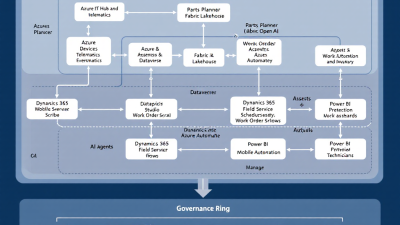
A practical way to apply AI in field service is a multi-agent pattern where each agent is great at one job and collaborates with the others:
– Dispatcher Agent: Continuously optimizes the schedule board against skills, location, SLAs, travel time, and capacity; re-optimizes when traffic, cancellations, or urgent alerts hit.
– Parts Planner Agent: Forecasts van stock and depot inventory, factors lead times and returns, attaches a first-time fix probability to each job, and recommends pre-picks or reassignments when parts are constrained.
– Work Order Scribe Agent: Auto-creates and summarizes work orders from IoT anomalies, phone calls, or email; generates checklists and safety steps; drafts technician notes and customer-ready summaries.
– Exception Handler Agent: Routes edge cases—low-confidence predictions, warranty or regulatory constraints, high-priority outages—to human dispatchers with recommended actions and evidence.
Together they create a closed loop: detect, plan, assign, execute, learn. Each agent stays in its lane, shares context via Dataverse, and always leaves room for human approvals.
Microsoft Reference Architecture: D365 Field Service + Dataverse + Power Platform + Azure OpenAI
This pattern lands cleanly on Microsoft’s stack:
– Dynamics 365 Field Service for work orders, assets, incidents, inventory, skills, and the schedule board with optimization tuned to skills, location, and SLAs as documented in Optimize resource scheduling.
– Dataverse as the enterprise data backbone for standardized schemas, relationships, security roles, and auditability. Low-code teams can build quickly and safely, as outlined in Microsoft Dataverse and Power Platform overview.
– Connected Field Service integrates with Azure IoT Hub to ingest telemetry and create rule-driven incidents and work orders—supporting bi-directional device commands for remediation per Connected Field Service and Azure IoT Hub integration.
– Azure OpenAI and Copilot capabilities to summarize, recommend next steps, and assist dispatchers and technicians—capabilities introduced in Copilot for Dynamics 365 Field Service.
– Power Automate, Power Apps, and Copilot Studio to orchestrate agent workflows, approvals, and mobile experiences with SMB-friendly time-to-value, backed by Power Platform’s low-code approach.
Data Foundation: Telemetry, Service History, Asset Hierarchies, and Technician Constraints
Start with clean, connected data:
– Assets and hierarchies: Model parent-child equipment, locations, and configurations in Dataverse; map serials, models, warranties, and regulatory tags.
– Telemetry: Stream device metrics and anomalies from IoT Hub into Connected Field Service rules that map to incidents or work orders per Azure IoT Hub + CFS.
– Service history and knowledge: Standardize incident types, resolution codes, and notes; index manuals and service bulletins for retrieval-augmented generation (RAG).
– Technician constraints: Skills, certifications, calendars, territories, travel speeds, and current van stock.
– Inventory and purchasing: Synchronize multi-warehouse inventory and van stock, enabled by Field Service inventory features described in Inventory and purchasing.
This foundation lets agents make decisions with context and confidence.
Dynamic Scheduling Agent: Routing, Capacity, SLAs, and Real-Time Re-optimization
Your Dispatcher Agent consumes Dataverse data and invokes the Field Service schedule optimization engine to minimize travel and honor SLAs, as supported by Microsoft’s resource scheduling optimization. It plans the day, then continuously re-optimizes as new jobs arrive or traffic spikes. The agent:
– Scores each assignment on SLA risk, travel time, skill fit, and first-time fix probability (from the Parts Planner).
– Offers “what-if” scenarios: re-sequence stops, split long jobs, or swap technicians to protect high-penalty SLAs.
– Triggers human-in-the-loop approvals when changes impact VIP customers or regulatory jobs.
Expect measurable gains; optimized routing consistently yields double-digit improvements in travel reduction and productivity according to Gartner.
Parts Forecasting Agent: Van Stock, Lead Times, Returns, and First-Time Fix Probability
FTFR lives or dies on parts availability. The Parts Planner Agent forecasts demand for common failure codes, reconciles with van stock and depots, and recommends pre-picks for tomorrow’s routes. It learns from service history and warranty replacements to predict which parts will be needed, when, and where. With Field Service’s inventory visibility and multi-warehouse support in Inventory and purchasing, the agent can:
– Calculate FTFR likelihood per work order based on required parts in stock vs. lead time.
– Suggest depot transfers or vendor orders and nudge scheduling to technicians carrying the right parts.
– Flag return opportunities to control carrying cost.
Because FTFR is the top KPI—leaders target 80%+—these recommendations directly influence results, per Field Service News.
Zero‑Touch Work Orders: IoT Anomaly Detection to Pre‑Populate Work Orders and Checklists
When assets can ask for help, service gets faster and cheaper. Connected Field Service can proactively identify and respond to alerts from customer assets and automatically create and assign work orders—without customer intervention—as documented in Connected Field Service. With IoT Hub integration, you can ingest telemetry, apply rules, and trigger incidents with pre-populated work details, as enabled by Azure IoT Hub + CFS.
Real-world organizations have moved from break/fix to predictive service at scale—Tetra Pak remotely monitors thousands of machines to improve uptime and efficiency with Azure IoT and Dynamics 365, as described in the Tetra Pak customer story. As you adopt this pattern, you capture the benefits McKinsey quantified for predictive maintenance—less downtime, lower maintenance cost, longer asset life—outlined in their IoT value research.
Technician Experience: Power Apps Mobile, Offline Mode, Copilot Prompts, and Safety Steps
A brilliant plan still fails if technicians can’t execute it easily. Deliver a mobile-first experience with Power Apps (Field Service mobile or a tailored canvas app) that works offline, preloads route and parts picks, and surfaces:
– Copilot prompts to summarize prior visits, highlight likely fixes, and generate notes—aligned with the capabilities in Dynamics 365 Field Service Copilot.
– Safety checklists that adapt to job type, environment, and regulatory requirements.
– One-tap parts consumption and photo capture that feeds the Scribe Agent for crisp, customer-ready documentation.
– Offline sync that respects poor connectivity zones and keeps SLAs on track.
Human‑in‑the‑Loop: Dispatcher Approval Gates, Confidence Thresholds, and Escalation Playbooks
AI agents should recommend, not run rogue. Implement:
– Confidence thresholds: Auto-approve low-risk actions above 0.85 confidence; require dispatcher approval between 0.6–0.85; auto-escalate below 0.6.
– Approval gates: For VIP accounts, high-cost parts, or safety-critical work, always require human review.
– Escalation playbooks: The Exception Handler Agent packages recommended options, rationale, and expected KPI impact, then routes to the right human queue.
These align to Microsoft’s Responsible AI principles—human oversight, transparency, and incident handling—outlined in the Microsoft Responsible AI Standard.
Governance and Security: DLP Policies, Environment Strategy, RBAC, and Auditability
Treat AI agents like production systems:
– Environment strategy: Separate Dev/Test/Prod in Power Platform; promote via solutions and ALM pipelines.
– DLP policies: Restrict connectors and data movement; prevent cross-tenant leaks; require approvals for generative outputs touching regulated data.
– RBAC and data security: Use Dataverse security roles, field-level security, and Azure AD group assignment. Limit who can execute agent actions like schedule overrides or parts orders.
– Audit and logging: Capture prompts, responses, actions taken, and who approved them; retain for compliance and post-incident analysis.
– Content safety: Apply Azure OpenAI content filters and prompt-shielding patterns; review in accordance with the Responsible AI Standard.
KPIs and ROI: First‑Time Fix Rate, Travel Time, SLA Hit Rate, Truck Rolls, and Parts Carrying Cost
Anchor your business case in a before/after baseline:
– First-Time Fix Rate (FTFR): Target 80%+ as noted by Field Service News. Drivers: parts availability, right technician, right time.
– Travel Time per Job and Miles per Day: Expect reductions from dynamic scheduling supported by Gartner best practices.
– SLA Attainment: % of commitments met; model financial penalties avoided.
– Truck Rolls per Incident: Track zero-touch resolutions and remote remediations; each avoided roll saves $150–$1,000+ per ZK Research/SDxCentral.
– Parts Carrying Cost and Returns: Measure inventory turns and aging; attribute improvements to Parts Planner recommendations.
– Predictive Maintenance Wins: Capture downtime avoided and maintenance costs reduced, contextualized by McKinsey’s benchmarks.
Tie ROI to agent actions: miles saved by re-optimization, FTFR lift from pre-picked parts, SLA penalties avoided via escalations.
Implementation Blueprint (6–8 Weeks): Discovery, Data Prep, MVP Agents, Pilot, and Scale‑Out
Week 1: Discovery and success plan
– Identify top incident types, SLA policies, and high-cost failure modes.
– Baseline KPIs (FTFR, travel time, SLA hit rate, truck rolls).
– Prioritize two agents for MVP (typically Dispatcher + Scribe or Dispatcher + Parts Planner).
Week 2: Data foundation
– Clean asset records, hierarchies, skills, calendars, and inventory in Dataverse.
– Connect IoT Hub and set initial CFS rules for one asset class per CFS + IoT Hub guidance.
Weeks 3–4: MVP agents and mobile
– Build Dispatcher Agent using Field Service optimization and Power Automate orchestrations as described in Optimize resource scheduling.
– Build Scribe Agent with Azure OpenAI to summarize work orders and generate checklists; integrate with Copilot capabilities from Dynamics 365 Field Service Copilot.
– Enable Power Apps mobile with offline capability; add safety and parts consumption.
Week 5: Pilot
– Run with a subset of technicians and a single region.
– Configure human-in-the-loop thresholds and approval gates per the Responsible AI Standard.
– Measure KPI deltas and gather feedback.
Weeks 6–8: Add Parts Planner and zero-touch
– Deploy Parts Planner; connect inventory data per inventory guidance.
– Turn on zero-touch work orders for one IoT-enabled asset using Connected Field Service.
– Harden governance (DLP, RBAC, audit), then scale to more assets/regions.
Developer How‑To: Copilot Studio Agent Skills, Power Automate Orchestration, and Vector Search
– Copilot Studio agent skills:
– Dataverse skill: Retrieve work orders, assets, incidents, and inventory.
– Scheduling skill: Invoke Field Service optimization to propose reassignments and re-sequencing.
– Scribe skill: Summarize notes and generate customer-facing updates using Azure OpenAI grounded on knowledge articles.
– Exception skill: Package alternatives with KPI impact and route to approval queues.
– Power Automate orchestration:
– Event-driven flows: IoT alert → incident → agent triage → draft work order → dispatcher approval.
– Long-running flows: Pre-pick parts, trigger transfers, send technician notifications, update mobile tasks.
– Approval connectors: Route decisions to dispatch leads; capture rationale for auditing.
– Vector search and RAG:
– Index service manuals, bulletins, and historical resolutions in Azure AI Search with embeddings from Azure OpenAI.
– Store citation IDs; when the Scribe or Technician Copilot drafts steps, ground responses with retrieved snippets and link back to sources.
– Cache frequent answers in Dataverse to reduce token usage and latency.
This stack plays natively with Power Platform and Dataverse’s low-code model described in Microsoft’s overview.
SMB Start Here: No‑Regrets Minimum Stack, Cost Controls, and Phased Adoption Options
– Minimum stack:
– Dynamics 365 Field Service with Connected Field Service features enabled.
– Dataverse environments for Dev/Test/Prod; Power Automate for orchestration.
– Azure OpenAI for summarization and recommendations; Azure AI Search for vector retrieval.
– Power Apps mobile (Field Service mobile or a tailored canvas app).
– Cost controls:
– Start with one or two asset classes and a single region to constrain IoT and AI usage.
– Implement token budgets and rate limits for Azure OpenAI; cache frequent answers.
– Use incremental rollouts—first Dispatcher and Scribe, then Parts Planner, then IoT zero-touch.
– Phased adoption:
– Phase 1: Dispatcher + Scribe with human approvals.
– Phase 2: Add Parts Planner and van stock policies.
– Phase 3: Zero-touch work orders for a subset of monitored assets.
– Phase 4: Expand to more regions, add remote remediation commands via CFS + IoT Hub.
Case Example: Predictive Water Heater Service—From Telemetry Alert to Completed Visit
– Telemetry: A commercial water heater reports rising vibration and temperature drift. IoT Hub ingests the signal; Connected Field Service interprets the anomaly and triggers an incident with probable failure mode per Connected Field Service.
– Scribe Agent: Drafts a work order with pre-populated steps and safety checklist; summarizes prior service history and similar fixes using RAG.
– Parts Planner: Predicts a circulation pump and gasket set will be needed; checks van stock and depot; recommends dispatching a technician who has both in van stock.
– Dispatcher Agent: Re-optimizes the schedule board to slot the job within the SLA window with minimal travel per resource scheduling optimization. A VIP flag triggers a human approval.
– Technician Experience: Mobile app syncs route offline, loads the checklist, shows likely fix steps, and captures photos and parts consumption.
– Completion: Scribe Agent composes a customer summary, attaches citations, and updates resolution codes. FTFR achieved; truck rolls avoided for a follow-up. Over time, patterns feed back into the model, echoing the predictive service improvements seen in the Tetra Pak story and McKinsey’s predictive maintenance benchmarks.
Next Steps with B. Cobra Systems: Field Service AI Readiness Workshop and Pilot Kit
If you’re an SMB operations leader or Power Platform team, we’ll help you stand up this multi-agent pattern quickly and safely:
– Field Service AI Readiness Workshop: Map your asset classes, SLAs, and data readiness; identify quick wins; align governance to the Responsible AI Standard.
– 6–8 Week Pilot Kit: Prebuilt Dispatcher and Scribe Agents; reference Power Automate flows; Copilot Studio skills; mobile templates; zero-touch starter for one asset class; KPI dashboard and ROI model.
– Scale Plan: Rollout blueprint for agents, regions, and asset types; cost-control guardrails; training for dispatchers and technicians.
AI agents don’t replace your people—they give them superpowers. When your assets raise their hands, your schedules adapt instantly, and your vans carry exactly what’s needed, your FTFR climbs, truck rolls fall, and SLAs stop being cliffhangers. Let’s get your first agents into the field.






