
Procurement Without the Ping-Pong: AI Agents for Autonomous Sourcing, RFx, and Contract Redlines
Why Procurement Needs Fewer Email Loops and More Automation
Procurement shouldn’t feel like a never-ending email rally. Yet so much of the process still runs on manual intake forms, scattered attachments, and long threads where everyone is cc’d and no one is accountable. The result: cycle times drag, policy exceptions slip through, and the business loses leverage. The cost is not theoretical—organizations can lose up to 9.2% of annual revenue due to poor contract management, according to research from World Commerce & Contracting (WorldCC research). At the same time, the market is moving decisively toward AI-assisted procurement. Leaders like SAP are infusing SAP Business AI (Joule) across SAP Ariba to assist with sourcing tasks and supplier discovery (SAP Business AI), while Coupa highlights AI to accelerate sourcing decisions inside its spend management suite (Coupa AI). The opportunity is clear: pair AI-native experiences with strong governance and human-in-the-loop controls to reduce email loops, standardize quality, and speed outcomes—without losing control.
What AI Agents Do in Sourcing: From Intake to Award
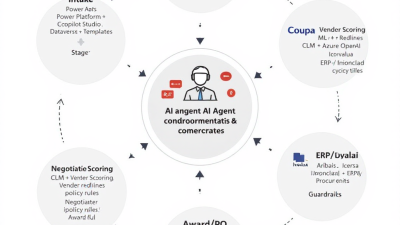
Modern procurement agents do more than chat. They orchestrate end-to-end work, invoking systems, enforcing policy, and teeing up humans only when needed. Microsoft’s guidance is explicit: “Use Microsoft Copilot Studio to build copilots that can take actions with your data and systems using connectors, plugins, and Power Automate flows.” (Microsoft Copilot Studio) In a sourcing context, that means agents can:
– Triage intake: parse emails and attachments, extract requirements, detect category/urgency, and route requests.
– Auto-build RFx: create RFI/RFP/RFQ packages from templates, fill in boilerplate, generate dynamic questions, and publish to sourcing platforms.
– Discover suppliers: enrich and validate supplier profiles, pre-qualify based on policy and risk, and invite vendors.
– Score responses: summarize proposals, apply weighted scoring rules, and produce explainable rationales.
– Negotiate: suggest playbook-compliant terms, draft counterproposals, and orchestrate reviews.
– Redline contracts: propose changes, call out risky clauses, and sync with CLM systems—always with human sign-off.
– Keep control: log every action, manage SLAs, escalate exceptions, and collect approvals using auditable patterns like Power Automate Approvals (Power Automate Approvals).
Reference Architecture on Microsoft Power Platform
Under the hood, a Power Platform–native procurement agent combines orchestration, content AI, and robust governance:
– Orchestration layer: Copilot Studio for natural language experiences that call Power Automate, connectors, and plugins (Copilot Studio).
– Automation and integration: Power Automate to run flows, approvals, and event-handling across systems.
– Data backbone: Microsoft Dataverse to model intake requests, sourcing events, suppliers, questions, responses, scorings, approvals, and contract artifacts.
– Content AI: Azure OpenAI Service via the Power Platform connector for summarization, classification, and content generation within enterprise controls (Azure OpenAI connector).
– Document AI: AI Builder to extract key fields from PDFs and emails for intake and RFx assembly (AI Builder document processing).
– Human-in-the-loop: Approvals integrated with Teams and Outlook for auditable checkpoints (Power Automate Approvals).
– Connectors: Certified connectors for Coupa and DocuSign CLM/agreements, and custom connectors for SAP Ariba and Ivalua APIs (Coupa connector, DocuSign CLM connector, Custom connectors, SAP APIs, Ivalua Developer).
– Governance: Data loss prevention (DLP) to segment connectors and block endpoints (Power Platform DLP), Managed Environments for guardrails and analytics (Managed Environments), and the CoE Starter Kit to operationalize best practices (CoE Starter Kit).
Intake Triage: Power Apps + Copilot Studio with Policy Guardrails
Start where the work arrives. A simple Power Apps portal or Teams app captures requests, while a Copilot Studio agent monitors an intake mailbox and chat channel. AI Builder extracts essentials—category, spend estimate, due date, specs—from emails and attachments and drops them into Dataverse (AI Builder document processing). An Azure OpenAI prompt then summarizes the need, flags potential scope gaps, and suggests the appropriate path (catalog buy, RFQ, or RFP) (Azure OpenAI connector). Policy guardrails kick in via DLP, ensuring the agent uses only approved connectors for intake and cannot exfiltrate data to non-business services (DLP policies). Finally, a pre-RFx approval is requested through Power Automate Approvals with all extracted context, so a category manager can approve or return with comments—leaving a complete audit trail (Approvals).
RFx Auto-Build: Dataverse Schemas, Templates, and Dynamic Questions
RFx assembly is where automation shines. Use Dataverse to model:
– Intake Request, Sourcing Event (RFI/RFP/RFQ)
– Requirements and Line Items
– Questions and Weightings
– Supplier Invitations
– Response Packages, Attachments, and Clarifications
– Scoring Rubrics and Evaluation Notes
With this backbone, the agent composes RFx packages from templates and category playbooks. Azure OpenAI drafts scope narratives, service levels, evaluation criteria, and supplier instructions. It also proposes dynamic questions based on the category and risk profile—for example, data residency or accessibility questions for SaaS (Azure OpenAI connector). Before release, a “policy lint” check compares the RFx against corporate standards (payment terms, diversity requirements, security controls) and triggers a quick Approvals step when exceptions are detected.
Supplier Discovery and Pre-Qualification: Enrich, Verify, and Risk Score
Agents can enrich supplier records with firmographics, certifications, and compliance data and cross-check eligibility by category, region, and risk posture. Native AI in sourcing suites is heading in the same direction—SAP is bringing AI-assisted supplier discovery into workflows (SAP Business AI), and Coupa highlights recommendations and anomaly detection for spend decisions (Coupa AI). Power Platform agents complement these by orchestrating the pre-qualification loop across systems: verifying insurance coverage dates, security questionnaires, sustainability attestations, or diversity documentation. If a supplier fails a required criterion, the agent can either request remediation automatically or route to risk management for a waiver approval.
Scoring Vendor Responses: Weighted Criteria, Rules, and Explainable AI
Scoring is traditionally a meeting-heavy ritual. An agent accelerates without turning judgment into a black box:
– Weighted criteria: Dataverse stores the scoring rubric; each criterion has a weight, minimum compliance thresholds, and evidence requirements.
– AI summarization: The Azure OpenAI connector produces concise summaries of vendor responses by criterion, with citations back to response sections (Azure OpenAI connector).
– Rule checks: Hard requirements (e.g., SOC 2 Type II within last 12 months) are validated before scores are considered.
– Explainability: The agent logs rationale text for every suggested score, highlighting the quoted evidence and disclosing any detected gaps or ambiguities.
– Collaboration: Evaluators receive a Teams task list with pre-filled draft scores they can adjust; all overrides capture reasons, creating a transparent audit trail.
Negotiation Assist: Playbook-Aware Term Suggestions and Counterproposals
Once finalists are chosen, the agent acts like a negotiation aide. It draws from your legal and procurement playbooks to suggest positions (preferred, fallback, walk-away) and drafts counterproposals that trade concessions intelligently—e.g., extended payment terms in exchange for price protection. CLM platforms have leaned into this: Icertis AI surfaces clauses, obligations, and risks and recommends language to accelerate review (Icertis AI), while Ironclad’s AI Assist and Playbooks help teams apply playbooked positions and generate redlines automatically (Ironclad AI). The Power Platform agent orchestrates the workflow around these tools—preparing suggested terms, requesting legal approval via Approvals, and pushing updates back into the sourcing/CLM systems with traceability.
Contract Redlines: CLM Integrations (Icertis, Ironclad, DocuSign CLM) with Azure OpenAI
Redlining is where procurement value is cemented—or leaked. An agent can:
– Ingest the vendor paper and extract clause-level structure.
– Compare to your standard positions and risk flags.
– Generate suggested redlines and side-by-side rationales using Azure OpenAI, confined to your environment under enterprise-grade controls (Azure OpenAI connector).
– Invoke CLM-native AI to analyze clauses and obligations (Icertis AI) or to apply AI Playbooks in Ironclad (Icertis AI, Ironclad AI).
– Route high-risk deviations for legal approval via Approvals and maintain a complete record (Approvals).
– For DocuSign CLM customers, use the connector to attach drafts, manage clause libraries, and progress lifecycle stages (DocuSign CLM connector).
– Analyze legacy agreements at scale with DocuSign Insight to inform negotiation strategy and post-award compliance (DocuSign Insight).
Shaving days off redlines matters: the WorldCC revenue leakage statistic underlines why strong, policy-aware redlining is a top-shelf use case (WorldCC research).
Escalations and Human-in-the-Loop Approvals: Keeping Control and Auditability
Autonomy without accountability is a nonstarter in procurement. Power Automate Approvals provides time-bound, auditable checkpoints with Teams and Outlook integration, plus escalation if SLAs are breached (Power Automate Approvals). Use approvals for:
– RFx release to market
– Shortlist and award decisions
– High-risk term acceptance
– Contract redline exceptions
Each approval card includes the AI agent’s rationale, highlighted excerpts, and policy references, so approvers can make fast, informed decisions. All approvals and overrides are immutably logged.
Coupa/Ariba/Ivalua Integration Patterns: Connectors, APIs, and Webhooks
Your agent should meet the business where it works today:
– Coupa: A certified connector enables interactions with sourcing events, requisitions, and approvals from flows (Coupa connector).
– SAP Ariba: Use the custom connectors framework to reach SAP Business Network APIs for event creation, supplier data sync, or RFx document exchange (Custom connectors, SAP APIs).
– Ivalua: Similarly, build a custom connector against Ivalua’s published APIs/SDK for sourcing, suppliers, and contract actions (Ivalua Developer).
– CLM and agreements: Use DocuSign and DocuSign CLM connectors to handle agreements, clause operations, and lifecycle triggers (DocuSign connector, DocuSign CLM connector).
– Event handling: Where platforms support webhooks, route callbacks into Power Automate to refresh status in Dataverse, notify stakeholders in Teams, and prompt the agent to act on changes.
Security, Compliance, and Data Residency: Responsible AI on Azure
Trust is built into the architecture:
– Data residency: Deploy environments in the appropriate Azure region; Dataverse retains data in-region per your policy.
– Enterprise AI controls: Use the Azure OpenAI connector to call models with enterprise-grade controls and logging (Azure OpenAI connector).
– DLP segmentation: Separate “business” vs. “non-business” connectors and block risky endpoints to prevent exfiltration (DLP policies).
– Managed Environments: Enforce solution checker, sharing limits, usage analytics, and maker onboarding for scale and hygiene (Managed Environments).
– Auditing and RBAC: Use Dataverse auditing, field-level security, and Azure AD groups; ensure every AI action logs its input, output, and reason code.
– Prompt and content governance: Maintain approved prompt templates, protect PII in prompts, and standardize temperature/length settings per use case.
KPIs to Track: Cycle Time, Savings, Compliance, and Stakeholder NPS
Measure relentlessly to prove value and tune the loop. Suggested KPIs:
– Intake-to-RFx and RFx-to-award cycle time
– Touchless rate (% of steps completed without human intervention)
– First-pass yield (RFx or redlines accepted without rework)
– Realized savings vs. baseline and target
– Policy compliance rate (must-have clauses, risk thresholds)
– Supplier and stakeholder NPS (experience quality)
– Contracting leakage (price protection, SLAs, renewal discipline)
Power Automate process mining can ingest logs and surface process variants, bottlenecks, and KPIs to quantify impact over time (Process mining).
SMB Quick-Start: Low-Lift Blueprint in 4–6 Weeks
A pragmatic starter that delivers value fast:
Weeks 1–2: Foundation
– Stand up a Managed Environment and baseline DLP policy (Managed Environments, DLP).
– Install the CoE Starter Kit for environment insights and governance templates (CoE Starter Kit).
– Create Dataverse tables for Intake, Sourcing Event, Supplier, Question, Response, Score, Approval.
Weeks 3–4: MVP flows
– Build a Power Apps intake form and a Copilot Studio triage bot (Copilot Studio).
– Add AI Builder to parse attachments and Azure OpenAI to summarize/route (AI Builder, Azure OpenAI connector).
– Implement Approvals for RFx release and award decisions (Approvals).
Weeks 5–6: Integrations and pilot
– Connect to your sourcing platform (Coupa connector or a custom connector to Ariba/Ivalua) (Coupa connector, Custom connectors).
– Pilot in one category (e.g., marketing services) with 3–5 events; track cycle time and touchless rate via process mining (Process mining).
Enterprise Playbook: Scaling Across Categories and Regions
For complex portfolios, treat this like a product:
– Environment strategy: One Managed Environment per region/business unit; shared Dataverse schema with local extensions (Managed Environments).
– DLP tiers: Strict segmentation for production vs. dev; business-only connectors in prod; explicit allowlists for CLM and ERP (DLP).
– Model governance: Standardize RFx templates, scoring rubrics, and negotiation playbooks by category; run solution checker and code reviews.
– Human-in-the-loop operating model: Define who approves what, SLA targets, and escalation paths by risk.
– Multi-CLM and multi-ERP: Abstract via Power Automate flows and connector layers; map a canonical contract data model in Dataverse.
– Continuous improvement: Use process mining and feedback loops to tune prompts, templates, and rules by category and region.
Costing and ROI Model: Where the Savings Come From
Savings stack up across the lifecycle:
– Labor efficiency: Hours saved per event in intake triage, RFx assembly, scoring, and redlines; multiply by event volume and loaded cost.
– Cycle-time compression: Faster awards bring earlier price realization and reduce soft costs (e.g., bridge contracts).
– Quality and compliance: Fewer errors and exceptions; less revenue leakage from weak terms—material in light of WorldCC’s 9.2% leakage benchmark (WorldCC research).
– Scale: Higher throughput per category manager enables more competitive events and better savings capture.
Costs to model:
– Power Platform licenses and Azure OpenAI consumption (Azure OpenAI connector)
– Connector subscriptions (if applicable)
– Implementation/configuration and change management
– Ongoing governance (Managed Environments/CoE) (Managed Environments, CoE Starter Kit)
A simple breakeven view: If you run 300 events/year and save 12 hours/event across intake, RFx, and redlines at a $90/hour loaded cost, that’s ~$324k in labor alone—before counting earlier savings realization or leakage reduction.
Common Pitfalls and How to Avoid Them
– Over-automation: Don’t remove humans from policy-critical decisions; enforce Approvals at key points (Approvals).
– Prompt sprawl: Manage prompts like code; version, test, and restrict who can change them.
– Data quality debt: RFx templates, supplier master, and clause libraries must be clean; automate checks and bake in a “policy lint” pass.
– Connector risk: Use DLP to segment and block unvetted endpoints; keep prod connectors on allowlists (DLP policies).
– Shadow IT: Scale through Managed Environments and the CoE to prevent one-off bots without guardrails (Managed Environments, CoE Starter Kit).
– Ignoring supplier experience: Automate communications clearly; provide a supplier portal and predictable timelines.
– No metrics: Instrument everything; use process mining to find bottlenecks and measure improvements (Process mining).
Case Snapshot: From Intake Chaos to Contract in Days
A global SaaS company faced spiraling marketing services requests: unclear scopes, lost attachments, and month-long RFPs. They deployed a Power Platform agent:
– Intake: A Teams app captured requests; AI Builder parsed SOWs and budgets; Azure OpenAI summarized and routed by category.
– RFx: The agent auto-built RFPs from templates, proposed 12 dynamic questions on data usage and creative rights, and published via a Coupa integration (Coupa connector).
– Scoring: Evaluators received pre-scored responses with rationale and quotes; overrides were captured in-line.
– Redlines: Azure OpenAI suggested edits; Icertis AI flagged IP ownership risks and recommended fallback language (Azure OpenAI connector, Icertis AI).
– Governance: Approvals gated release, shortlist, and high-risk clauses; DLP enforced connector boundaries (Approvals, DLP policies).
Outcomes after 90 days: intake-to-award cycle time dropped 42%, touchless steps rose to 63%, and approver satisfaction improved thanks to explanation-rich tasks. Legal reported fewer escalations due to playbook-consistent drafts.
Next Steps: Solution Accelerator, Templates, and Governance Checklist
Ready to stop the email ping-pong?
– Install governance: Managed Environment, DLP policy, and CoE Starter Kit (Managed Environments, DLP, CoE Starter Kit).
– Dataverse accelerator: Stand up a canonical schema for Intake, Sourcing Event, Supplier, RFx Items, Responses, Scores, Approvals, and Contract Artifacts.
– Copilot Studio agent: Deploy an intake triage bot integrated with Power Automate and AI Builder (Copilot Studio, AI Builder).
– Content AI: Configure Azure OpenAI prompts for RFx drafting, response summarization, and redline suggestions (Azure OpenAI connector).
– Integrations: Choose Coupa connector or build custom connectors for SAP Ariba/Ivalua; wire CLM (Icertis, Ironclad, or DocuSign CLM) (Coupa connector, Custom connectors, SAP APIs, Ivalua Developer, DocuSign CLM connector).
– Approvals and KPIs: Define human-in-the-loop gates and instrument process mining for baseline and benefits tracking (Approvals, Process mining).
B. Cobra Systems, LLC can help you implement this blueprint with reference architectures, RFx and negotiation playbook templates, and a governance checklist tailored to your risk posture. Procurement without the ping-pong isn’t just possible—it’s the new standard.






