
Beyond Chatbots: AI Agents Reshaping Contact Centers with Intent Routing, Real-Time QA, and Agent Assist
Why “Beyond Chatbots” Matters: From Scripts to Agentic CX
Static chatbots solved FAQs. Agentic systems solve outcomes. In 2025, the contact center edge comes from orchestrated AI agents that understand intent, ground every answer in trusted knowledge, enforce policy as interactions unfold, and deliver next-best actions to human agents—without breaking compliance. The business case is compelling: generative AI can reduce customer service and sales costs by 30% to 45% while increasing customer satisfaction, according to McKinsey. Microsoft’s own service stack shows measurable gains where AI assistance is grounded in company data—agents resolve issues faster with higher CSAT using Copilot for Service.
Moving beyond menu-driven bots doesn’t mean replacing your ACD/IVR. It means layering AI agents—built with Microsoft Power Platform, Dynamics 365 Customer Service, and Azure AI—on top of your existing ecosystem (Genesys, Five9, Twilio, Amazon Connect), routing intent to the right skill at the right time, and auditing everything. Agentic CX turns channels into outcomes.
The KPIs That Count: Baseline and Targets for AHT, FCR, and CSAT
What you measure, improves. Three metrics tell the truth about agentic value:
– Average Handle Time (AHT): Track per channel, queue, and intent. Targets: reduce by 10–25% via real-time assist, guided workflows, and intent pre-classification.
– First Contact Resolution (FCR): Each 1% increase in FCR can yield a 1% CSAT lift, per SQM Group. Targets: 3–7 point FCR increase by grounding answers in your knowledge and surfacing next-best actions.
– Customer Satisfaction (CSAT): Targets vary by vertical, but a 3–5 point lift is common when resolution times fall and first-contact fixes rise. Microsoft customer stories show double-digit gains in speed and satisfaction with Dynamics 365 Customer Service and AI-driven knowledge suggestions (Microsoft Customer Stories).
Baseline first. Capture pre-AI metric slices by queue, intent, and channel over 4–6 weeks. Then set targets and a phased AI rollout to isolate lift.
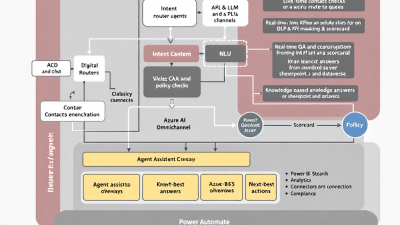
Reference Architecture on Microsoft Power Platform and Azure AI
The reference design unifies voice and digital workloads in Dynamics 365 Customer Service (Omnichannel), while orchestrating AI with Azure and Power Automate:
– Channels and routing: Dynamics 365 Omnichannel for Customer Service provides unified voice and digital channels, skills-based routing, and extensibility, including Azure Communication Services integration.
– Telephony interop: Use the Channel Integration Framework (CIF) to embed third-party ACD controls (Genesys, Five9, Twilio, Amazon Connect) for screen pop, call control, and event-based orchestration.
– AI agent layer: Build orchestrators and skills in Copilot Studio, calling back-end APIs, Dataverse, and Power Automate flows. Use “Generative Answers” to ground responses in enterprise data sources like SharePoint and Dataverse.
– Grounded generation: Implement Retrieval Augmented Generation (RAG) with Azure OpenAI “use your data” and Azure AI Search to minimize hallucinations.
– Real-time QA: Transcribe voice with Azure AI Speech, filter PII with Azure AI Language PII, and apply Azure AI Content Safety—before suggestions reach customers or agents.
– Orchestration and actions: Trigger back-end workflows, CRM updates, and next-best actions via Power Automate connectors and HTTP/webhooks.
Intent Routing: Orchestrating with ACD/IVR and Digital Channels
Agentic routing starts the moment a customer speaks or types. Key building blocks:
– Intent classification: Use Conversational Language Understanding (CLU) to infer intent and entities from the first utterance. Route to self-service skills, specialized queues, or high-priority agents.
– ACD/IVR interop: Keep your existing IVR, but elevate it. CIF surfaces telephony events and context for screen pop in Dynamics; flows can call IVR APIs to update call data, swap queues, or escalate based on intent confidence.
– Generative triage: If confidence is medium, a Copilot Studio agent asks one or two clarifying questions, then routes decisively. If confidence is low or risk is high (billing disputes, cancellation threats), bypass automation to a specialized queue.
– Dataverse-driven rules: Store routing rules and thresholds in Dataverse for admin-friendly changes without redeploying code.
Real-Time QA and Policy Enforcement with Live Transcription
Real-time QA is your superpower for AHT and compliance:
– Live transcription: Stream voice to Azure AI Speech with profanity filtering and custom lexicons for product names. For digital channels, you already have text.
– In-stream PII control: Run each partial transcript through Azure AI Language PII to detect and redact sensitive info (SSNs, cards). Mask before display or storage to reduce risk and training time for agents.
– Content safety: Scan both customer and AI-generated text with Azure AI Content Safety to block harassment, self-harm cues, or disallowed categories—automatically pivot to human agents as needed.
– Policy checks: Use rules (Dataverse tables) that evaluate utterances in real time—e.g., “no refunds over $500 without supervisor approval.” Flag violations, prompt the agent with the correct script, or trigger a supervisor whisper.
– Guardrails in the model: Constrain responses using system messages, content filters, and tool-use policies from Azure OpenAI safety guidance. If the answer isn’t grounded, the model declines and proposes a human handoff.
Agent Assist: Summaries, Knowledge Grounding, and Next-Best Actions
Agent assist is where the seconds melt away:
– Grounded answers: Copilot for Service surfaces AI-powered answers grounded in company knowledge, reducing resolution time and improving CSAT (Microsoft Copilot for Service). Answers cite sources and respect your permissions model.
– Smart summaries: Generate call/chat summaries, disposition suggestions, and wrap-up notes. Store summaries in Dataverse for audit and training.
– Next-best actions (NBA): Use CLU + RAG context to recommend steps (reset password, issue credit, schedule technician) with one-click automation via Power Automate. Present structured, clickable cards in the agent desktop.
– Cross-vendor proof: Real-time agent assistance patterns have proven to reduce handle time elsewhere too; Amazon Connect’s agent assist reports productivity gains and lower AHT with knowledge lookup (AWS Agent Assist example). The mechanism—retrieve, ground, suggest—translates directly to Azure + Dynamics.
Knowledge and Retrieval: Dataverse, SharePoint, and Azure AI Search
Great assist needs great grounding:
– Content sources: Centralize knowledge in SharePoint and Dataverse. Use metadata (products, regions, entitlements) to scope retrieval.
– Indexing and RAG: Ingest with Azure AI Search and enable Azure OpenAI “use your data” to answer only from approved content, minimizing hallucinations (use your data).
– No-hallucination prompts: Instruct the model to respond “I don’t know” when sources are insufficient, and show source excerpts to agents for trust.
– Freshness: Automate nightly or event-driven re-indexing. When policies change at 10 a.m., your AI should know by 10:05.
Safety and Compliance: PII Controls, Content Safety, and Audit Trails
Compliance is an architecture choice, not an afterthought:
– PII pipeline: Redact sensitive data using Azure AI Language PII before storing transcripts; store only masked text in Dataverse.
– Content safety gates: Apply Azure AI Content Safety on user inputs, agent outputs, and model suggestions with escalating thresholds for self-service vs. agent-visible content.
– Speech settings: Use Azure AI Speech profanity filters and custom vocabulary to avoid accidental risks during transcription.
– Audit trails: Log transcripts, redaction events, prompts, model versions, grounding sources, and human overrides in Dataverse for audits and post-incident analysis.
– Responsible AI: Enforce Azure OpenAI safety controls and policy-compliant prompts with well-scoped tools and least-privilege data access (Azure OpenAI safety).
Implementation Blueprint: Build, Integrate, and Test with Power Automate
A pragmatic path to production:
– Build the core: Stand up Dynamics 365 Customer Service (Omnichannel). Embed your telephony with CIF. Create Dataverse tables for intents, policies, NBA rules, and audit records.
– Orchestrate AI agents: In Copilot Studio, build skills for knowledge Q&A, data lookups, and action execution. Connect SharePoint and Dataverse for grounding.
– RAG and search: Provision Azure AI Search and Azure OpenAI “use your data.” Configure indexers for SharePoint and Dataverse. Add guardrail prompts (“answer only from sources; otherwise ask to connect to an agent”).
– Real-time QA: For voice, stream audio from your ACD/IVR or embedded softphone to Azure AI Speech; for chat, intercept messages in Omnichannel. Chain PII, content safety, and policy checks. Route alerts to the agent desktop and supervisors.
– Actions and handoffs: Use Power Automate connectors and HTTP actions to drive CRM updates, refunds, appointments, and IVR changes. Ensure every bot action can hand off—with context—to a human.
– Test and tune: A/B test prompts and retrieval scopes. Validate that the AI declines to answer when grounding is weak. Hard-test policy edge cases (refund limits, vulnerable customers).
Measuring Impact: Scorecards and Power BI Dashboards
Operationalize measurement from day one:
– Scorecard design: Track AHT, FCR, CSAT, containment rate (self-service completion), deflection-to-agent, policy violation rate, grounded-answer rate, and recontact within 7 days.
– Attribution: Tag every interaction with “AI exposure” flags (intent router, agent assist, QA). Use control groups to isolate lift.
– Power BI dashboards: Build executive overviews (trend lines, variance vs. baseline) and operational views (by queue, agent, intent). Add drill-throughs to call summaries and transcripts.
– Continuous improvement: Feed low-confidence intents and unresolved cases back into CLU training and knowledge updates. Review violation heatmaps to refine prompts and rules.
Cost and Licensing Considerations for SMBs
Budget where impact lives:
– Dynamics 365 Customer Service: Choose the right tier and consider Omnichannel add-ons for voice/digital. Validate Copilot for Service entitlements and prerequisites in your licensing plan (Copilot for Service overview).
– Azure AI services: Consumption for Azure OpenAI (tokens), Azure AI Search (indexes/queries), Azure AI Speech (transcription minutes), and Language PII. Right-size capacity and cache frequent queries.
– Power Platform: Power Automate per-flow or per-user plans for orchestration; Dataverse storage for transcripts and audit logs; connectors for line-of-business apps (connectors catalog).
– Telephony/ACD: Ongoing provider costs (minutes, recording, streaming APIs). Use CIF to protect your ACD investment (CIF overview).
– Analytics: Power BI licensing for scorecards; consider incremental refresh for large transcript datasets.
Rollout Plan: Pilot, Human-in-the-Loop, and Scaling
De-risk with a staged rollout:
– Phase 0 – Baseline and readiness: Capture 4–6 weeks of KPI baselines. Harden identity, DLP, and environment strategy. Map policies (refunds, privacy) into machine-enforceable rules.
– Phase 1 – Intent routing and knowledge grounding: Launch in one queue and one digital channel. Copilot answers are grounded and cite sources; unknowns hand off to agents. Score impact on containment and AHT.
– Phase 2 – Agent assist and summaries: Add real-time suggestions, summaries, and NBAs for the same queue. Enable supervisor review for the first two weeks (human-in-the-loop).
– Phase 3 – Real-time QA and policy enforcement: Turn on in-stream PII masking and content safety. Enable alerting for violations and calibrate false positives/negatives.
– Phase 4 – Scale to voice and additional queues: Integrate voice transcription with your ACD provider’s streaming. Expand to top-5 intents. Automate wrap-up codes and case creation.
– Phase 5 – Optimize and automate: Promote high-confidence NBAs to one-click automations. Add proactive outreach flows (e.g., appointment reminders) where appropriate.
– Governance cadence: Weekly triage on prompts, knowledge gaps, safety logs; monthly KPI and ROI reviews with stakeholders.
Why this works
– It grounds AI in your truth. Azure OpenAI with Azure AI Search and Copilot Studio keeps answers anchored to approved content.
– It blends automation with accountability. Real-time QA and policy checks enforce compliance while empowering agents.
– It meets you where you are. Dynamics 365 Omnichannel, CIF, and Power Automate integrate cleanly with existing ACD/IVR ecosystems.
– It’s proven. Microsoft and industry case studies report significant reductions in handle time and uplift in CSAT using similar patterns (Customer stories; agent assist evidence). And the macroeconomics favor it (McKinsey).
Call to action
If you’re ready to move beyond chatbots to agentic CX, start with one queue, one channel, and your top five intents. Baseline ruthlessly, ground everything, and let real-time QA keep you safe. With Dynamics 365 Omnichannel, Copilot Studio, Power Automate, Azure OpenAI, Azure AI Speech, and Azure AI Search, your contact center can deliver faster resolutions, higher first-contact fixes, and happier customers—without replacing the systems you already trust.






