
Deflect, Triage, Resolve: AI Agents for Customer Service Automation That Lift CSAT and Cut AHT
Executive summary: Why AI agents now for CS—and what Deflect, Triage, Resolve means for SMBs and dev teams
Why now
– Generative AI is no longer a science project. Deployed well, it can reduce average handle time (AHT) by up to 40% and increase issue resolution by 14%, according to McKinsey. At the same time, self-service is both faster and dramatically cheaper than live channels—2.2x faster and 80–100x less cost per contact—per Gartner.
– Customer behavior is ready: by 2027, chatbots will be the primary customer service channel for a quarter of organizations, notes Gartner.
– Organizations that scale AI effectively see a 3–15% revenue uplift and 10–20% cost reduction, per McKinsey. This isn’t about shiny demos—it’s about operations.
The Deflect, Triage, Resolve model
– Deflect: Answer the customer’s question immediately—grounded in your own knowledge—to maximize containment rate and first contact resolution (FCR).
– Triage: Understand intent, sentiment, priority, and language, then route to the right workflow, queue, or human with SLA awareness.
– Resolve: Execute the fix. Let AI agents trigger secure workflows (refunds, status checks, appointment changes) with approvals and audit.
What’s in it for SMBs and dev teams
– SMBs: Start with a single journey, prove value in 30 days, and scale channel-by-channel. A 10% gain in FCR can materially lower operating cost—every 1% improvement in FCR can reduce operating costs by 1% per SQM Group.
– Dev teams: Build on the Microsoft stack you already own—Copilot Studio, Power Automate, Dataverse, Dynamics 365 Customer Service, Azure OpenAI, Azure AI Search, and Azure Communication Services—for an end-to-end solution with governance and safety baked in. Microsoft reports customers improving call deflection up to 40% and reducing AHT up to 20% using this stack (Dynamics 365 Digital Contact Center Platform).
– Benchmarks: Aim for 40–60% containment in early phases; leaders hit higher—Vodafone’s assistant achieved 68% containment in some markets (Vodafone TOBi case study).
Reference architecture on Microsoft
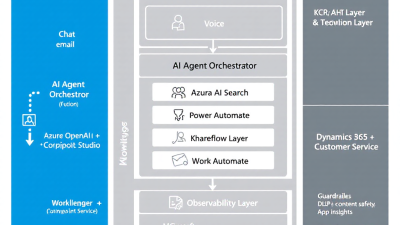
Core components and roles
– Copilot Studio (chat): Designs topics, orchestration, and channel adapters for web, mobile, Teams, and social chat. Integrates with Power Automate for actions and Dataverse for context (Copilot Studio).
– Power Automate (flows): Secure tool use—API calls, approvals, data updates, and long-running workflows with retry and auditing.
– Dataverse (records): Source of truth for cases, customers, entitlements, KB metadata, and interaction transcripts.
– Azure OpenAI (reasoning): Natural language understanding, summarization, and tool selection; optimized prompts for safety and determinism with token budgets (Azure OpenAI safety system).
– Azure AI Search (RAG): Indexes SharePoint, Confluence, Dataverse, and public docs; hybrid keyword+vector retrieval for grounded answers (Retrieval Augmented Generation with Azure OpenAI).
– Dynamics 365 Customer Service (handoff): Omnichannel routing, agent desktop, sentiment, and CSAT prediction; Copilot suggests grounded responses (Dynamics 365 Customer Service).
– Azure Communication Services (voice): PSTN, IVR, call automation, and handoff to agents or bots (ACS call automation).
– Outlook/Graph (email): Inbound processing, intent extraction, and auto-replies via Copilot Studio and Power Automate.
Flow of a typical interaction
1) Customer messages via chat, email, or voice. Identity and consent captured.
2) Intent and language recognized by LLM and/or classifier; sentiment scored.
3) Knowledge grounding with Azure AI Search (RAG) retrieves relevant passages and citations.
4) If confidence ≥ threshold, respond with citations; if low, safely fallback to triage or human handoff.
5) If an action is needed, invoke Power Automate flows using least-privilege connectors; log to Dataverse.
6) Escalation goes to Dynamics 365 queues with full transcript, summary, and next-best actions; agent Copilot continues with grounded assistance.
Channel setup playbook
Chatbots in Copilot Studio
– Configure topics: Deflect (FAQ), Triage (reason-for-contact), Resolve (workflow triggers).
– Connect knowledge: Enable “use your data” via Azure AI Search with SharePoint, Confluence, and Dataverse indexes.
– Add actions: Call Power Automate flows for status checks, changes, refunds, and appointments.
– Publish: Embed on web/mobile/Teams and wire to Dynamics omnichannel.
Email triage with Graph + Power Automate
– Ingest: Use Graph mail subscriptions to trigger a flow on inbound messages.
– Classify: Extract intent, urgency, language, and sentiment with Azure OpenAI; or use AI Builder classifiers when you have historical labels.
– Route: Create or update Dataverse cases, assign SLA-aware queues in Dynamics, or auto-reply with grounded answers via Copilot Studio connectors (Copilot Studio).
– Learn: Capture outcomes (solved, reopened) to retrain classifiers and refine prompts.
Voice IVR with ACS + Bot Framework + Speech
– Provision ACS numbers and call automation; front a Bot Framework bot that leverages Copilot Studio topics for consistency.
– Add speech-to-text/telephony tuning; support dtmf fallback for accessibility.
– Implement sentiment-aware routing and warm transfer to Dynamics agents with summaries and KB suggestions (ACS voice; Dynamics 365 Customer Service).
Deflect: Knowledge-grounded answers with RAG
Indexing enterprise knowledge
– Sources: SharePoint articles, Confluence spaces, Dataverse KB, product docs, policy PDFs.
– Processing: Chunk content, add semantic embeddings, and store in Azure AI Search with metadata (region, language, product).
– Governance: Tag content with lifecycle state (draft, approved, expired) to filter retrieval.
Answer generation with safety
– Use the RAG pattern—retrieve relevant passages and ask Azure OpenAI to answer strictly from those passages—to improve accuracy and reduce hallucinations (RAG with Azure OpenAI).
– Include citations in every answer; show confidence indicators to the user.
– Apply confidence thresholds: if below threshold, offer disambiguation or seamlessly route to an agent.
Why deflection matters
– Self-service is faster and far cheaper than live channels, which directly lowers AHT and increases CSAT (Gartner). As adoption grows, expect bots to become a primary service channel for many organizations (Gartner).
Triage: Intent detection and routing
Choosing the brain
– LLM prompts: Great for cold-start and nuanced intents; pair with few-shot examples and tool-choice guardrails.
– AI Builder/classical classifiers: Best when you have labeled history and need deterministic routing at scale.
Routing rules that respect SLAs
– Apply SLA-aware queues in Dynamics 365; combine customer tier, sentiment, and issue severity to set priority.
– Detect language and directionally route to multilingual topics or human agents with native support.
Quality signals
– Use real-time sentiment and intent prediction from Dynamics 365 to escalate or reassure as needed (Dynamics 365 Customer Service).
– Capture outcome labels (resolved, escalated, reopened) to continuously tune both prompts and classifiers.
Resolve: Tool-using agents that execute workflows
High-frequency use cases
– Order status and delivery changes
– Refunds and credits with approvals
– Password resets and MFA unlocks
– Appointment booking and rescheduling
How it works on Power Platform
– Copilot Studio orchestrates conversation; when action is needed, it invokes Power Automate flows.
– Flows call back-end systems via secure connectors, apply business rules, and record events in Dataverse.
– Approvals and exception handling are built-in; sensitive actions require step-up authentication.
Impact on KPIs
– Generative AI copilots can cut AHT substantially and lift resolution rates, driving higher FCR and CSAT (McKinsey).
– Microsoft customers report up to 40% call deflection and 20% AHT reduction when pairing virtual agents with omnichannel routing (Microsoft customer service modernization).
Sentiment-based escalation
Real-time empathy at scale
– Continuously score sentiment and customer effort. If sentiment drops or effort rises, gracefully escalate to a human and change the tone.
– Dynamics 365 provides real-time sentiment, intent, and even CSAT prediction, with Copilot suggesting grounded responses (Dynamics 365 Customer Service).
Smart handoff
– Send the full transcript, a succinct summary, detected intent, and suggested next-best actions to the agent desktop.
– Keep the customer on the same channel when possible; avoid “start over” moments that tank CSAT.
Quality monitoring
Automated QA that makes everyone better
– Score interactions against policy: greeting, verification, compliance disclosures, resolution, empathy.
– Use Conversation Intelligence signals—sentiment trends, keyword detection, talk-listen ratios—to coach agents and improve CSAT (Conversation Intelligence).
Redaction and safety
– Automatically redact PII in transcripts stored in Dataverse; enforce retention windows.
– Apply Azure OpenAI content filters and abuse monitoring to mitigate harmful outputs, coupled with RAG grounding to reduce hallucinations (Azure OpenAI safety; RAG grounding).
Continuous improvement loop
– Feed unresolved topics back into KB authoring; prioritize by volume and sentiment impact.
– A/B test prompts, thresholds, and response styles; promote winners to production weekly.
KPI framework
Define the north stars
– FCR: Share of contacts resolved in the first interaction. Strongly predictive of CSAT; every 1% improvement can reduce operating costs by 1% (SQM Group).
– AHT: Target reductions through deflection and workflow automation; McKinsey cites up to 40% reductions with genAI (McKinsey).
– CSAT: Lift via faster, grounded answers; use Dynamics predictions to detect risk early (Dynamics 365 Customer Service).
– Containment rate: Share of interactions resolved in self-service without agent.
– Volume deflection: Calls and emails shifted to chat and self-service.
Measure and optimize
– Baseline 4 weeks pre-pilot; instrument journeys end-to-end.
– Use Power BI dashboards to monitor FCR, AHT, CSAT, containment, and cost-to-serve; run A/B tests per channel to isolate gains.
Governance and safety
Environment strategy
– Use separate Dev/Test/Prod Power Platform environments with Managed Environments for guardrails, monitoring, and solution quality gates (Managed Environments).
DLP and data residency
– Enforce Power Platform DLP policies that segregate business and non-business connectors; keep sensitive data in approved boundaries (Power Platform DLP).
– Align Azure regions to residency requirements; log cross-border data flows.
Safety controls
– Prompt controls and system messages to constrain tone and citations.
– Azure AI Content Safety and Azure OpenAI content filters; human-in-the-loop for sensitive actions and policy decisions (Azure OpenAI safety system).
– End-to-end audit logs in Dataverse and Azure Monitor.
Security and compliance
Principle of least privilege
– Use service principals and environment-level security roles; scope connectors to only the required actions.
– Store secrets in Azure Key Vault; reference from Power Automate and custom connectors.
Data governance
– Pseudonymize and redact transcripts for analytics; define retention and right-to-erasure processes.
– Maintain evidence for SOC/ISO: data flow diagrams, DLP policies, access reviews, change logs, and incident playbooks stored in a controlled repository.
On the agent desktop
– Enforce RBAC in Dynamics 365; restrict sensitive columns and activities by security role; audit every access.
Cost and performance
Token and latency budgets
– Cap model context windows; summarize long threads; cache RAG results for FAQs.
– Prefer retrieval + small completion over long, free-form generation.
Channel economics
– Push to chat and self-service first; voice is costliest. Intelligent IVR with containment pays back quickly (Gartner).
– Use proactive notifications (SMS/email) to deflect inbound volume when appropriate.
Licensing considerations
– Copilot Studio: per tenant/capacity for sessions and message volume.
– Power Platform: per-user/per-app as needed for makers and runtime.
– Azure OpenAI: per token usage; choose models and rate limits aligned to volume.
– ACS: per-minute voice/PSTN and call automation events (ACS pricing concepts).
– Dynamics 365 Customer Service: agent licenses; Omnichannel add-on for digital channels.
– Benchmarking suggests meaningful savings from deflection and AHT reduction; leaders see 10–20% cost reduction overall with scaled AI (McKinsey).
Implementation roadmap (30/60/90)
Day 0–30: MVP for one journey
– Choose a high-volume, low-risk intent (e.g., order status).
– Build chat in Copilot Studio with RAG to approved KB; add one Resolve flow.
– Set confidence thresholds and safe fallbacks; wire to Dynamics for escalation.
– Baseline metrics; launch to 10–20% traffic. Goal: 20–30% containment.
Day 31–60: Pilot metrics and channels
– Expand to email triage (Graph + Power Automate) and add two more intents.
– Introduce sentiment-based escalation; publish Power BI dashboards.
– A/B test prompts and KB chunks; target: +10 pts containment, −10–15% AHT.
Day 61–90: Scale and change management
– Add IVR with ACS; roll out to 50–100% traffic for the initial journeys.
– Train agents on Copilot-assisted workflows; establish weekly QA review.
– Formalize governance (DLP, ALM) and create a backlog of intents by ROI.
– Target: 40–60% containment; measurable lift in CSAT and FCR.
Developer quick-start
Solution structure
– Dataverse: Tables for Interactions, KnowledgeSources, PolicyViolations, PromptConfigs, and Escalations.
– Copilot Studio: Topics for Deflect (FAQ), Triage (intent/language), and Resolve (workflow invokes).
– Power Automate: Flows per action (CheckOrder, IssueRefund with approval, ResetPassword, ChangeAppointment) with robust error handling.
– Azure AI Search: Indexes with chunking, embeddings, and metadata filters (locale, product, lifecycle).
ALM and testing
– Use solution-aware components; deploy via Azure DevOps or GitHub actions with environment variables and connection references.
– Test harnesses: Bot Framework Emulator for chat, mocked Graph mailboxes for email, ACS sandbox numbers for IVR; load-test with synthetic data.
– Observability: Centralize logs in Dataverse and Azure Application Insights; alert on error rates and drift.
SMB checklist
– Start small: one journey, one channel, one success metric.
– Measure weekly: containment, AHT, FCR, CSAT; review 10 transcripts.
– Tighten guardrails: lower confidence thresholds until safe; add more citations.
– Expand intents: prioritize by volume x negative sentiment.
– Close the loop: fix top KB gaps every sprint; republish.
– Celebrate wins: publish improvements to stakeholders; reinvest savings into next journeys.
B. Cobra Systems accelerators
Accelerate with proven patterns
– Prebuilt flows for common Resolve actions (order status, refunds with approvals, appointment changes) using least-privilege connectors.
– Prompt packs for Triage and Summarization tuned to Azure OpenAI with safety rails and token budgets.
– RAG starter templates for Azure AI Search with ready-made chunking, embeddings, filters, and citation formatting.
– Governance policies and ALM pipelines aligned to Power Platform Managed Environments and DLP best practices.
Your path to AI agents transforming business operations starts with a single well-instrumented journey. With a Power Platform–first approach, grounded knowledge, and sentiment-aware escalation, you can lift CSAT, cut AHT, and scale responsibly—today. And if you want to move faster, we’re ready to help with accelerators that are as practical as they are safe.
Citations and further reading
– Generative AI impact on AHT and resolution: McKinsey
– Chatbots as primary channel: Gartner
– Self-service speed and cost: Gartner
– Vodafone containment benchmark: Vodafone TOBi
– Dynamics 365 capabilities and outcomes: Dynamics 365 Customer Service, Microsoft modernization blog
– RAG pattern on Microsoft: Azure OpenAI + Azure AI Search
– Power Platform governance and DLP: DLP, Managed Environments
– Conversation Intelligence: Microsoft Learn
– ACS voice and call automation: Azure Communication Services
– FCR and cost impact: SQM Group
– Copilot Studio for email and orchestration: Copilot Studio
– Azure OpenAI safety system: Microsoft Learn






