
From BPMN to Bot Army: Turning Process Maps into Executable AI Agents
The BPMN Graveyard: Why Static Maps Don’t Run Your Business
Most organizations have immaculate BPMN or Visio diagrams gathering dust while real work happens in email threads, spreadsheets, and improvised chats. BPMN 2.0 did its job: it gave us a common visual language—tasks, events, gateways, pools/lanes, and message flows—to describe how work should move across roles and systems. But diagrams don’t enforce policy, track SLAs, or file a ticket when an exception hits. They’re aspirations, not operations.
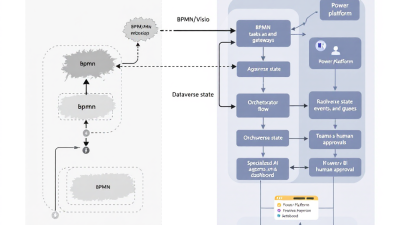
The shift is to make those squiggles executable. You already have the canonical building blocks. Tasks become automations and agent skills. Events become triggers. Gateways become rules. Lanes become permissions and ownership. Message flows become integrations. The opportunity is to translate that BPMN into a running, governed, measurable system—without overhauling your stack. The standard itself gives us the map: BPMN’s primitives—events, gateways, pools/lanes, and message flows—define the most important runtime capabilities to implement on a modern platform like Microsoft Power Platform, grounded in the BPMN 2.0 specification.
From Diagrams to Dynamics: What an Agentic Process Looks Like
An agentic process doesn’t just “run a flow.” It pursues goals, retains memory across steps, coordinates people and automations, and adapts to events. In Microsoft Copilot Studio, “agents” can be given objectives, talk to users, call actions (Power Automate flows and connectors), and manage long-running interactions as part of a business process. That means your “Review Contract” lane in BPMN is no longer a box—it’s a working capability with dialogs, approvals, and data updates, orchestrated by an agent that understands context. See Microsoft’s overview of agents in Copilot Studio to understand how goals, actions, and memory come together in production workloads: What are agents in Microsoft Copilot Studio?.
Reference Architecture on Microsoft Power Platform
– Dataverse is the system of record and the event backbone. It holds state, enforces security, and emits change events.
– Power Automate implements unit-of-work steps, orchestrations, and recovery playbooks, triggered by Dataverse, webhooks, or schedules.
– Copilot Studio hosts the conversational and goal-seeking agents that coordinate humans and automations.
– Microsoft Teams is the human touchpoint—approvals and Adaptive Cards collect decisions and data in context.
– Power Apps deliver role-specific apps for exception handling, back-office tasks, and guided work.
– Process Mining and Power BI quantify what’s really happening, from conformance to cycle time and SLA attainment.
The glue is event-driven orchestration: business events in Dataverse kick off flows; agents invoke actions; humans respond in Teams; and every state transition is stored and reportable.
Mapping BPMN Primitives to Agent Roles and Patterns
– Pools/Lanes → Security boundaries and ownership. Model each lane as a security role or team in Dataverse so only the right agents and people can act. Dataverse’s role-based security—roles, teams, business units, and even field-level security—implements least privilege across lanes: Use role-based security to control access to records.
– Tasks → Agent skills and flows. Each atomic task becomes a Power Automate flow (or a Copilot Studio action) that reads/writes Dataverse and external systems.
– User Tasks → Approvals/Adaptive Cards. Replace “hand off” boxes with auditable Approvals and in-context Teams cards. Power Automate Approvals capture decisions, comments, and timestamps: Approvals in Power Automate. Adaptive Cards make it actionable in chat, waiting for a user response: Post adaptive card and wait for a response.
– Events (Start/Intermediate/Boundary) → Dataverse triggers and webhooks. Use Dataverse’s event triggers for “row added/updated/deleted” to start and advance processes: Microsoft Dataverse connector. For message events to other systems, publish/subscribe via Dataverse webhooks: Use webhooks (Dataverse).
– Gateways (XOR/AND) → Flow conditions and parallel branches. Model decision logic and parallelization directly in flows and agent policies.
– Message Flows → Connectors and custom connectors. Standardize external calls through OpenAPI-based custom connectors to keep contracts portable and avoid lock-in: Create a custom connector from an OpenAPI definition.
– Boundary Events/Compensation → Scopes, “run after,” and child flows. Capture exceptions, retries, and compensating actions using robust error-handling patterns: Configure run after conditions and reusable child flows as “recovery playbooks”: Use child flows.
Event-Driven Orchestration: Triggers, Queues, and State in Dataverse
Think in events and state. A “New Hire Created” event in Dataverse triggers your onboarding agent; status moves from Draft → In Progress → Completed, updated by flows and human approvals. Use the Dataverse connector’s “When a row is added, modified or deleted” to react near real time: Dataverse triggers. For cross-system choreography, emit webhooks or subscribe to them to keep integrations loosely coupled: Dataverse webhooks.
When things go sideways, don’t ping a random inbox. Route work to queues in Dataverse with owners, priority, and SLA workflows—this is your safety net for exceptions, escalations, and manual triage: Create and manage queues.
Policy Constraints in Practice: Environments, DLP, and RBAC (No Vendor Lock-In)
Your process is only as safe as its guardrails:
– Environments and ALM: Separate dev/test/prod with solution-based pipelines for safe iteration, isolation by sensitivity or business unit, and repeatable releases: Environment strategy and ALM with Power Platform.
– DLP policies: Control which connectors can share data and block risky paths across business/non-business groups: Data loss prevention (DLP) policies.
– RBAC in Dataverse: Assign roles, teams, and field-level access aligned to BPMN lanes; grant agents least privilege: Role-based security.
– Open APIs and custom connectors: Model external integrations with OpenAPI contracts to keep your options open and prevent hard coupling to one vendor or tooling: OpenAPI custom connectors.
Humans-in-the-Loop: Approvals and Adaptive Cards in Microsoft Teams
User tasks are where automation meets reality. Implement them with:
– Approvals for auditable decisions (approved/rejected, comments, timestamps) that sync with Outlook and Teams: Power Automate Approvals.
– Adaptive Cards posted into chats/channels that collect structured inputs and wait for responses—perfect for data capture, exceptions, and clarifications: Adaptive Cards with response.
Best practices:
– Always set timeouts and escalation paths.
– Provide contextual data in the card, not just a link.
– Write back the decision to Dataverse for audit and analytics.
– Allow delegates and mobile-first interactions to reduce latency.
Exception Routing and Recovery Playbooks (Retries, Escalations, Rollbacks)
Treat exceptions as first-class citizens:
– Routing: Use Dataverse queues as your dead-letter and triage mechanism, with owners and priorities: Dataverse queues.
– Recovery playbooks: Encapsulate retries, compensations, and cleanups in child flows. Leverage Scopes and “Configure run after” to separate happy-path, retry, and failure branches: Child flows and run-after.
– SLAs and timers: Track elapsed time and trigger escalations using Dataverse SLAs (e.g., “manager approval within 24 hours”), then surface attainment in BI: Define SLAs.
Measuring Process Adherence vs. Business Outcomes with Process Mining + Power BI
You can’t improve what you don’t observe. Process mining in Power Automate ingests event logs (e.g., Dataverse status changes) to reveal variants, bottlenecks, cycle time, and conformance against your reference model. Use conformance analysis to quantify deviations—how often reality strays from the BPMN ideal—and correlate that with outcomes like error rate and SLA misses. Start here: Process mining overview and Conformance analysis.
Key KPIs to put in Power BI:
– Conformance rate: % of cases that follow the reference path.
– Cycle time: Start-to-finish duration and per-activity latency.
– SLA attainment: % of timers met vs. breached, sourced from Dataverse SLA records: SLAs in Dataverse.
– Error rate: Exceptions per 1,000 cases and mean time to recover.
– Rework loops: Count and duration of loops that indicate waste.
Implementation Path: Import, Scaffold, and Iterate from MVP to Scale
1) Baseline the model
– Start from your BPMN diagram and annotate data entities, events, decisions, and handoffs. If the map is outdated, run process mining on existing logs to discover the “as-is” and define your “to-be”: Process mining.
2) Scaffold the solution
– Create solution(s) in a dev environment. Establish Dataverse tables for cases, activities, and audit history. Add SLAs if applicable: SLAs.
– Build triggers on Dataverse events: Dataverse triggers.
– Implement user tasks with Approvals and Teams Adaptive Cards: Approvals and Adaptive Cards.
– Wrap external calls with standard connectors or OpenAPI custom connectors: OpenAPI custom connectors.
3) Make it resilient
– Add queues for exceptions, and child-flow recovery playbooks with run-after rules: Queues, Child flows, Run-after.
4) Govern and release
– Enforce DLP, set up environments and ALM pipelines for dev/test/prod: Environment strategy, ALM, DLP.
– Assign roles/teams to align with BPMN lanes: Role-based security.
5) Instrument and iterate
– Wire telemetry to Process Mining and Power BI for conformance and outcomes: Conformance.
– Expand with Copilot Studio agents to manage goals and complex conversations: Copilot Studio agents.
Walkthrough Example: Employee Onboarding as a Living Agentic Workflow
Start event: HR creates a New Hire in Dataverse. A “New Hire Created” trigger fires: Dataverse trigger.
Agent orchestration: A Copilot Studio onboarding agent reviews role, location, and start date; it spawns tasks for IT access, hardware, payroll, and facilities: Copilot Studio agents.
User tasks:
– Manager approval for role-based access via Power Automate Approvals with comments: Approvals.
– Equipment choice captured through a Teams Adaptive Card that writes selection back to Dataverse: Adaptive Cards.
Automated tasks:
– Provision accounts via custom connector calling your IAM API, defined with OpenAPI for portability: OpenAPI custom connector.
– Notify third-party systems using Dataverse webhooks: Webhooks.
Exceptions:
– If provisioning fails twice, send to the “IT Onboarding Exceptions” queue with priority High, and kick off a child-flow recovery playbook (rollback partial accounts, notify owner): Queues, Child flows.
SLAs and metrics:
– SLA: Complete badge + accounts 48 hours before start; Dataverse tracks timers and escalations: SLAs.
– Process Mining shows cycle time by department and conformance to the reference path, surfaced in Power BI: Process mining.
Observability and Health: Telemetry, Alerts, and Continuous Improvement
Operationalize your “bot army” with:
– Central telemetry and inventory via the Power Platform CoE Starter Kit for app/flow insights, environment usage, and DLP auditing: CoE Starter Kit.
– Health checks in flows: instrument Scope outcomes, log failures to Dataverse, and alert owners when thresholds breach.
– Business-level dashboards in Power BI combining process KPIs (conformance, cycle time) with outcomes (SLA attainment, error rate).
– Feedback loops: agents propose improvements based on repeated exceptions; product owners triage backlog monthly.
SMB Rollout Tips: Cost-Aware Design, Change Readiness, and Governance-Lite
– Start with seeded capability, add premium where ROI is clear. Use Teams + Approvals and Dataverse tables judiciously; wrap premium connectors behind shared, reusable custom connectors.
– Keep human touchpoints minimal and mobile-friendly to cut cycle times.
– Governance-lite: one dev/test/prod trio of environments, a handful of DLP policies, and role-based access tied to real job functions. Use the CoE Starter Kit templates to scale when adoption grows: CoE Starter Kit.
– Train champions—1–2 per function—to own their lane’s agentic workflows and metrics.
What Success Looks Like: Conformance %, Cycle Time, SLA Attainment, Error Rate
– Conformance rate: From 52% to 88% following the intended path after introducing approvals and queues, per conformance analysis: Conformance analysis.
– Cycle time: Median onboarding from 10 to 4 business days by replacing email handoffs with Adaptive Cards and automations.
– SLA attainment: 96% of onboarding cases meet “ready 48h before start,” tracked via Dataverse SLA timers: SLAs.
– Error rate: Exceptions per 1,000 cases down 60% after introducing recovery playbooks and Dataverse queues.
These aren’t vanity metrics—they correlate to real business outcomes: faster revenue ramp for hires, fewer compliance breaches, and happier stakeholders.
How B. Cobra Systems Can Help: Blueprints, Accelerators, and Build-With Support
We specialize in turning static BPMN into living, governed agentic workflows on Microsoft Power Platform—without vendor lock-in.
– Blueprints: BPMN-to-Agent mapping playbooks tailored to your roles, data model, and compliance posture.
– Accelerators: Prebuilt Dataverse schemas, approval templates, queue + recovery patterns, and observability dashboards aligned to best practices from environment strategy, DLP, and process mining.
– Build-with: Pair your team with our architects to stand up Copilot Studio agents, Dataverse event models, Teams-based human-in-the-loop, and OpenAPI connectors that keep your integrations portable.
– Scale & govern: We help implement solution ALM and the CoE Starter Kit so you can iterate safely as adoption grows: ALM with Power Platform and CoE Starter Kit.
From diagram to deployment, the path is clear: model the events, wire the roles, automate the handoffs, and measure the outcomes. Your BPMN doesn’t have to sit on a shelf anymore—it can run your business.






