
Zero-Trust for Autonomous AI Systems in Business: Identity, Guardrails, and Approval Patterns
Executive summary
Autonomous AI systems can create real business value—but only when bound by Zero-Trust principles that continuously verify identity, constrain data and tools, and provide human oversight for sensitive actions. This blueprint shows how to deploy AI agents on Microsoft Power Platform and Azure with strong service identities, least-privilege access, DLP boundaries, prompt-injection defenses, human-in-the-loop approvals, and end-to-end auditability so your organization can scale safely and compliantly.
Why Zero-Trust Matters for AI Agents Now
Zero Trust is more than a security slogan; it is the operating system for safe autonomy. The National Institute of Standards and Technology defines Zero Trust as “a cybersecurity paradigm focused on resource protection and the premise that trust is never granted implicitly but must be continually evaluated.” See NIST SP 800‑207, Zero Trust Architecture. For AI agents that make decisions, call tools, and touch sensitive data, “assume breach,” least privilege, and continuous verification are non-negotiable. Without them, risks compound: a single prompt injection can cascade into data exfiltration, or a misconfigured connector can leak customer data across tenants.
Microsoft’s cloud offers the controls to enforce Zero Trust not only for people, but also for the nonhuman identities that power autonomous systems. Conditional Access applies to workload identities, enabling contextual, policy-driven access checks for service principals and managed identities—see Microsoft Entra Conditional Access for workload identities. Combine that with Power Platform’s DLP policies and Dataverse security roles to put durable guardrails around what agents can see and do. The result: autonomy that’s productive, governable, and fit for audit.
Threat Model for Enterprise AI Agents (Data Exfiltration, Prompt Injection, Tool Abuse, Privilege Escalation)
Designing agents begins with the threats:
– Data exfiltration: Agents reading regulated data and “helpfully” posting it to external systems. Combat with DLP connector boundaries, tenant isolation, sensitivity labels, scoped connections, and environment strategy.
– Prompt injection: Adversarial inputs that override instructions and induce harmful tool calls or data leaks. The OWASP LLM Top 10 lists LLM01: Prompt Injection as the top risk—see OWASP Top 10 for LLM Applications.
– Tool abuse: Over-broad permissions let an agent write to finance systems or send external emails without checks. Solve with least-privilege roles, allowlists, and human approvals on sensitive actions.
– Privilege escalation: Agents pivot to higher-privileged identities or environments. Mitigate with isolated environments, per-environment identities, Conditional Access for workload identities, and deny-by-default policies.
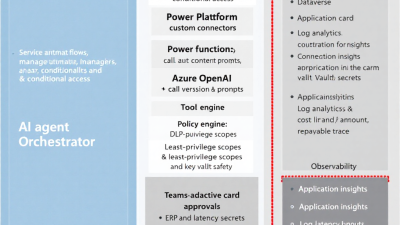
Reference Architecture on Microsoft: Power Platform, Azure OpenAI, Dataverse, and Microsoft Entra
A pragmatic architecture for Zero-Trust autonomy on Microsoft:
– Interface and orchestration: Power Apps and Power Automate host the workflow; copilots and custom connectors expose tools with connection references bound to least-privilege identities.
– Intelligence: Azure OpenAI for reasoning with network isolation (Private Endpoints, disabled public access) and access governed by Azure RBAC and Entra—see Secure Azure OpenAI with network isolation. Customer prompts/completions aren’t used to retrain models—see Azure OpenAI data, privacy, and security FAQ.
– Data: Dataverse as the system of record with role-based access; auditing enabled; optionally augment with Azure SQL/Storage and Microsoft Purview for classification, labeling, and audit.
– Identity: Microsoft Entra for users and service identities; Conditional Access for workload identities to enforce context-aware access; managed identities for Azure-hosted services.
– Governance: Power Platform DLP and tenant isolation policies, CoE Starter Kit for inventory and analytics, and Purview Audit plus Dataverse auditing for end-to-end logs.
Service Identity Patterns: Managed Identity vs. Service Principal vs. On‑Behalf‑Of (OBO)
– Managed identity: Best for Azure-hosted components (Functions, Logic Apps, Web Apps). No secrets in code, lifecycle managed by Azure, and supports Entra authentication across services—see Managed identities overview. Use when the compute is in Azure and you control the resource boundary.
– Service principal (application registration): Suited for cross-platform or Power Platform connectors that need app-based auth. In Dataverse, register as an application user and assign granular security roles—see Manage application users in Dataverse. Store any required secrets in Key Vault and bind via environment variables or connection references.
– On-behalf-of (OBO) / delegated user flows: The agent acts with the user’s privileges. Use sparingly and only for user-scoped actions requiring their consent; combine with strict tool allowlists, step-up approvals, and scoping to prevent horizontal escalation.
Apply Conditional Access to workload identities for network/location or risk-based checks, throttling, or enforced device/network boundaries—see Conditional Access for workload identities.
Least‑Privilege Tool Access: Dataverse Security Roles, Connector Scopes, and Key Vault Secrets
– Dataverse roles: Create custom, minimal roles for each agent. Grant only the tables/columns/actions required, often read-only plus specific append/append-to. Use application users for non-interactive access—see Dataverse application users.
– Connector scopes: Prefer connectors that support granular permission scopes (e.g., Microsoft Graph) and restrict connections via DLP. Bind connection references to service identities with the minimal scopes needed for the flow or plugin.
– Secrets: Eliminate secrets with managed identities where possible. When secrets are unavoidable (legacy APIs), store them in Azure Key Vault and rotate regularly; never embed in flows or code. Managed identities help you avoid credential sprawl—see Managed identities.
Data Boundaries and DLP: Tenant/Environment Strategy, Connector Grouping, Purview, Sensitivity Labels
– Environment strategy: Separate Production, Pre‑Production, and Dev environments. Use dedicated environments for high-risk data domains (e.g., Finance, PHI).
– DLP policies: Group connectors into Business, Non‑Business, and Blocked to prevent cross-boundary data movement—see Power Platform DLP policies. Block risky consumer/social connectors from business environments by default.
– Tenant isolation: Disable cross-tenant connections unless explicitly required—see Tenant isolation for Power Platform.
– Labeling and cataloging: Use Microsoft Purview to classify data, apply sensitivity labels, and govern retention. Map labels to DLP policies to keep regulated data inside approved connectors and environments.
Prompt‑Injection and Supply‑Chain Defenses: System Prompts, Tool Allowlists, Content Safety, and Input/Output Filters
Treat all external content as hostile until proven otherwise. The OWASP LLM Top 10 flags prompt injection as the top risk—see OWASP LLM Top 10. Apply Microsoft’s guidance to constrain and validate tool use—see Defend against prompt injection:
– Immutable system prompts: Keep system prompts versioned, signed, and uneditable by users. Inject context via structured variables, not free text.
– Tool allowlists: Expose only safe tools to the model. Require explicit tool selection via function call schemas and block “arbitrary URL fetch” behaviors.
– Content safety and filters: Scan inputs and outputs for harmful content, secrets, and policy violations. Reject or route to human review when risks are detected.
– Structured validation: Use schemas for tool inputs and outputs; enforce type checks, regex validation, and business rules before execution or commit.
– Context compartmentalization: Isolate untrusted content in a separate context window from system instructions; never let retrieved content rewrite the agent’s goals.
Safe Retrieval (RAG): Row‑Level Security, Vector Index Scoping, PII Redaction, and Grounding Guarantees
– Scope first, then ask: Filter retrieval by tenant, business unit, and data domain before embedding/vector search. Keep separate indices per environment or label; never cross-load sensitive domains.
– Row-level security: Enforce Dataverse security roles at the retrieval layer; agents should request only what their service identity can read.
– PII redaction: Redact personal data in retrieved chunks and model outputs when it’s not needed for the task. Use deterministic masking to support auditability without exposing originals.
– Grounding guarantees: Require the agent to cite retrieved sources for any factual claim or action justification. Block responses lacking citations (“ungrounded”) or route them for human review.
Human‑in‑the‑Loop Approval Patterns: Teams Adaptive Cards, Power Automate Approvals, Thresholds, and Escalations
Autonomy should be proportional to risk. Use adaptive approvals for high-impact actions:
– Power Automate Approvals support sequential/parallel approvals, tracking outcomes, and timeouts—see Approvals in Power Automate.
– Teams Adaptive Cards provide rich context for approvers: what the agent will do, why, source citations, estimated financial impact, and rollback path.
– Thresholds: Encode rules like “auto-approve under $100,” “manager approval up to $5,000,” and “controller plus legal over $50,000.”
– Escalations and SLAs: Reassign stalled approvals, notify via Teams and email, and auto-cancel actions if SLAs are breached.
Cost, Latency, and Concurrency Budgets: Circuit Breakers, Rate Limits, and Per‑Run Spend Caps
– Budgets: Set per-run token and connector call budgets; abort or degrade gracefully when exceeded.
– Circuit breakers: If an external dependency fails or error rate spikes, trip a breaker to stop tool calls and switch the agent to “explain-and-wait” mode.
– Concurrency limits: Cap parallel runs per environment and per identity to protect downstream systems.
– Rate limits and backoff: Honor model and API quotas; implement exponential backoff and jitter to avoid thundering herds.
– Cost controls: Track per-run cost estimates, alert on anomalies, and enforce daily/weekly spend caps per environment.
Observability and Auditability: Trace Tool Calls, Versioned Prompts, Replayable Sessions, KPIs, and SOC 2 Evidence
– End-to-end activity logs: Enable Power Platform activity logging and stream to Microsoft Purview Audit (M365 unified audit log) for investigations—see Power Platform activity logging.
– Dataverse auditing: Turn on table/column auditing for create/update/delete and access patterns—see Enable and configure Dataverse auditing.
– Version everything: Store system prompt versions, tool schemas, model configuration (model, temperature), and connection references with each run. Make sessions replayable with deterministic settings where feasible.
– Traceability: Log every tool call, inputs/outputs (with redaction), and decision rationale. Correlate with a run ID across apps, flows, and Azure functions.
– KPIs and quality: Measure approval turnaround, first-pass yield, action success rate, safety incident rate, cost per transaction, and customer effort. These support SOC 2 evidence collection by demonstrating controls are designed and operating effectively.
Change Management: Canary Releases, Feature Flags, Offline Evaluations, and A/B Testing for Agents
– Canary and rings: Roll new prompts, tools, or models to a small cohort first; monitor KPIs and safety signals before broad release.
– Feature flags: Toggle behaviors, tools, and approval thresholds without redeploying; allow rapid rollback.
– Offline evals: Use held-out datasets and red-team prompts to benchmark safety and task success before going live.
– A/B tests: Compare prompt variants and policies; promote only if safety and outcome KPIs improve.
Compliance by Design: GDPR, Data Residency, Retention, Export Controls, and Model/Data Access Logs
– Data minimization: Collect and process only what’s needed; redact PII in logs and prompts when not required.
– Residency and sovereignty: Keep data in approved regions and isolate environments as needed. Azure OpenAI supports network isolation and controlled access—see network isolation—and it does not use customer data to retrain models, supporting privacy commitments—see Azure OpenAI privacy FAQ.
– Retention: Define retention for prompts, outputs, and logs; implement automated purge consistent with policy and regulation.
– Export controls: Mark and constrain regulated datasets; enforce DLP that blocks egress via noncompliant connectors.
– Access logs: Centralize model access logs, Power Platform activity logs, and Dataverse audits for audit readiness.
Operational Runbooks: Incident Response, Rollback, Break‑Glass Access, and Secret Rotation
– Incident response: Triage playbooks for prompt injection, data leaks, and tool misfires. Include immediate containment (disable connectors, DLP tighten), forensics steps, and communications templates.
– Rollback: One-click rollback for prompts, tools, and model versions via feature flags or deployment slots.
– Break-glass: Time-bound elevated access for responders using a separate identity; log all actions. Remove access automatically after resolution.
– Secret rotation: Prefer managed identities; otherwise schedule rotation in Key Vault with alerting and test failover paths.
Quick Start for SMBs on Power Platform: Minimal Viable Guardrails You Can Enable This Week
– Enable a tenant-wide default DLP policy: Allow only business connectors in production environments; block consumer connectors—see Power Platform DLP.
– Turn on tenant isolation to block cross-tenant connections—see Tenant isolation.
– Create a dedicated Production environment for AI automations; disable maker access except for approved owners.
– Use application users with minimal Dataverse roles for each agent—see Dataverse application users.
– Add Power Automate Approvals for any action that changes money, customer records, or external communications—see Approvals.
– Log everything: Enable Power Platform activity logging and Dataverse auditing—see activity logging and Dataverse auditing.
– For Azure components (Functions/Logic Apps), switch to managed identities and restrict Azure OpenAI with Private Endpoints—see Azure OpenAI network isolation.
Artifacts and Checklists: DLP Policy Templates, Entra App Registration Checklist, Approval Templates, and Logging Dashboard
– DLP policy template
– Business group: Dataverse, Office 365, Microsoft Graph, Azure OpenAI, Azure Key Vault
– Non-business: General productivity connectors
– Blocked: Social, personal storage, email-to-consumer, webhooks to unknown domains
– Tenant isolation: Enabled; exceptions documented and time-bound
– Entra app/identity checklist
– Choose identity type: Managed identity (preferred) or service principal
– Assign minimal roles/scopes; document purpose and owner
– Conditional Access policy for workload identity applied—see Conditional Access for workload identities
– Secrets stored in Key Vault; rotation schedule documented (or none for managed identity)
– Approval templates
– Amount-based approval with dynamic thresholds
– Adaptive Card includes action summary, sources, diffs/changes, and rollback steps
– SLA, escalation, and timeout behaviors defined
– Logging dashboard
– Run volumes, approval conversion, error/circuit-breaker events
– Cost per run and per workflow
– Safety incidents (blocked prompts, policy violations)
– Audit completeness (percentage of runs with full trace)
Case Study Pattern: Invoice Refund Agent with Amount‑Based Approvals and Full Audit Trail
Scenario: A customer support agent in Power Apps triggers an autonomous “Invoice Refund Agent” to process refunds.
– Identity and permissions: The agent runs as a Dataverse application user with a custom role that can read invoices, create refund requests, and update status—nothing else—see Dataverse application users.
– Guardrails: DLP blocks non-business connectors; tenant isolation prevents cross-tenant posting—see Power Platform DLP and tenant isolation. Azure OpenAI is accessed via Private Endpoint with a managed identity—see network isolation and managed identities.
– Prompt defenses: The system prompt is versioned and instructs the model to propose, not execute, payment actions; tool calls require schema-validated inputs. The agent cites invoice records and policy text; if citations are missing, it requests approval instead of acting—see prompt injection guidance.
– Approvals: Refunds under $100 auto-execute; $100–$1,000 require team lead approval; above $1,000 require finance approval in parallel. Power Automate Approvals manage routing and SLAs—see Approvals.
– Auditability: Every run logs the system prompt version, retrieved invoice references, tool calls, approvers, and timestamps. Power Platform activity logging and Dataverse auditing provide end-to-end evidence—see activity logging and Dataverse auditing.
– Outcome: Refund cycle time drops from days to minutes, with full traceability for finance and compliance.
How B. Cobra Systems Can Help: Assessments, Reference Implementations, and Managed Enablement
B. Cobra Systems, LLC specializes in AI agents and business process automation on Microsoft Power Platform and Azure. We deliver:
– Zero-Trust readiness assessments and environment hardening (DLP, tenant isolation, Conditional Access for workload identities).
– Reference architectures and implementation kits for agent identity, tool allowlists, RAG safety patterns, and human-in-the-loop approvals.
– Observability and audit solutions integrated with Purview Audit and Dataverse; dashboards for KPIs, cost, and safety metrics.
– Change management programs: canary pipelines, feature flags, and evaluation harnesses.
– Managed enablement: training for makers and security teams, plus ongoing governance with the Power Platform CoE Starter Kit—see CoE Starter Kit.
Closing thought
Zero Trust for AI isn’t about slowing teams down—it’s about giving them brakes powerful enough to go fast. With Microsoft’s identity, data, and governance controls—and a pragmatic blueprint that balances autonomy with oversight—you can scale intelligent automation confidently, compliantly, and with measurable business impact.






