
Field Service 2.0: IoT-Triggered AI Agents Orchestrate Predictive Maintenance and Parts Logistics
Why Field Service 2.0 Now: IoT + AI Agents + Power Platform
Predictive maintenance has matured from a pilot buzzword into a proven lever for uptime, customer satisfaction, and cost control. The ingredients have aligned: affordable sensors, cloud-scale IoT ingestion, and AI agents that can reason over events and take action inside business systems. Microsoft’s stack brings these pieces together with out-of-the-box integrations—Dynamics 365 Field Service’s Connected Field Service links Azure IoT to work orders, remote diagnostics, and dispatch so technicians roll only when needed, not just because an SLA says so. See how Microsoft frames this capability in Connected Field Service.
On the AI side, the Power Platform has evolved from low-code apps and flows into a platform for autonomous orchestration. With new agent capabilities in Copilot Studio, makers can define agents that monitor signals, call actions via Dataverse and Power Automate, and coordinate multi-step workflows with guardrails—a perfect fit for telemetry-driven triage and logistics. Review Microsoft’s announcement of next-generation capabilities in Copilot Studio agents.
The business case is now difficult to ignore. McKinsey reports that predictive maintenance reduces downtime by 30–50%, lowers maintenance costs by 10–40%, and boosts asset life by 20–40%—value levers that land directly on your P&L. Explore the analysis in McKinsey’s predictive maintenance insight. Real-world examples back it up: TK Elevator’s MAX solution, built on Microsoft Azure IoT and Dynamics 365, proactively services elevators to reduce outages and accelerate response. Read the customer story: TK Elevator’s Azure-powered predictive maintenance.
Business Outcomes to Target: Lower MTTR, Fewer Truck Rolls, Higher First-Time-Fix
Start with outcomes and work backward. A telemetry-driven, agent-orchestrated model should move the needles that matter:
– Mean time to repair (MTTR): Use IoT-driven pre-diagnosis and pre-positioned parts to compress repair time at the customer site.
– Truck rolls: Close issues remotely when safe and feasible; send technicians only when an on-site visit is required. Organizations pairing guided remote support with automation reduced visits and resolved issues faster—validated in Forrester’s Total Economic Impact study of Dynamics 365 Remote Assist. See Forrester’s TEI on Remote Assist.
– First-time-fix rate (FTFR): Use the agent to reserve the right part, assign a tech with the right skills, and attach a tailored playbook and safety checklist to the work order.
– Inventory turns and expedite costs: Predict demand, soft-reserve critical parts, and automate supplier POs so you carry less dead stock and spend less on rush shipping.
– SLA adherence and customer satisfaction: Predictive actions turn “breach risk” into “proactive service.”
Reference Architecture: Azure IoT Hub, Event Grid, Dataverse, and an AI Orchestrator
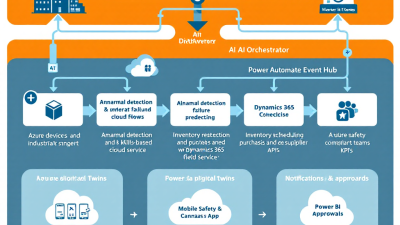
At the heart of Field Service 2.0 is a clean, scalable eventing backbone that speaks fluent Power Platform:
– Device to cloud: Devices send telemetry to Azure IoT Hub.
– Event distribution: IoT Hub publishes events (telemetry thresholds, lifecycle changes) to Azure Event Grid for low-latency fan-out. This is a durable, cloud-native pattern documented by Microsoft; see IoT Hub as an Event Grid source.
– Triggering automation: Event Grid routes to a Logic App or HTTPS endpoint that triggers a Power Automate flow. For low-code-first teams using Azure IoT Central, rules can directly trigger Power Automate flows when telemetry crosses a threshold via the IoT Central connector—no custom glue required. Learn more about rules in IoT Central rules and the Azure IoT Central connector.
– System of record: The flow writes standardized alerts and asset state into Dataverse.
– Orchestration: A Copilot Studio agent observes Dataverse events (new anomaly alerts, risk scores), reasons over playbooks, calls Power Automate actions to create or update Dynamics 365 Field Service work orders, and requests scheduling optimization.
– Field execution: Technicians work in Dynamics 365 Field Service Mobile with inspections, parts, and SLAs linked to the work order. This end-to-end integration is the essence of Connected Field Service.
Designing Agent Behaviors: Alert Triage, Failure Scoring, and Playbook Selection
Agents need a brain, not just triggers. We recommend three layers:
1) Triage and de-duplication
– Suppress alert storms with correlation windows (e.g., group duplicate alarms for 15 minutes per device).
– Check for existing active incidents on the asset; merge rather than create new records.
– Validate against device twin or configuration to avoid false positives.
2) Failure risk scoring
– Combine threshold breaches, rate-of-change, and asset criticality into a score.
– Incorporate historical mean time between failures and recent maintenance actions.
– Use an LLM to summarize multi-signal context but ratify decisions with deterministic rules to keep guardrails.
3) Playbook selection
– Map risk bands to actions: remote restart, firmware check, parts pre-reservation, on-site urgent dispatch.
– Attach a specific Field Service Inspection template, required skills, and SLA target.
– Choose whether to request Auto-Schedule or hold for dispatcher review based on severity and customer preference.
Copilot Studio agents excel at this “reason over context then call actions” pattern with policy guardrails. See Microsoft’s direction for autonomous orchestration in Copilot Studio agents.
Building the Agent Brain on Power Platform: Copilot Studio, Power Automate, Plugins
A Power Platform–first approach keeps complexity low while giving you enterprise-grade control:
– Copilot Studio agent: Configure goals (reduce outages, enforce safety), define tools (Power Automate flows, Dataverse actions), and constrain behavior (who it can notify, which tables it can write).
– Dataverse as the fabric: Model assets, telemetry alerts, incidents, parts, and vendors. Persist risk scores and triage decisions as auditable fields.
– Power Automate: Implement deterministic actions—create/update work orders, post Teams approvals, call Inventory Visibility, and generate POs. Use child flows for reusable steps (e.g., “Reserve Part,” “Request Dispatch”).
– Plugins or Power Fx in Dataverse: Embed critical business rules (e.g., SLA calculations, duplicate detection) where they belong—close to the data—for performance and consistency.
– Telemetry connectors: If you use IoT Central, leverage its connector for low-code integration; otherwise, accept Event Grid posts via a secure HTTP action. See Azure IoT Central connector.
– Guardrails: Keep AI free-form reasoning to classification, summarization, and playbook selection. All irreversible actions (PO creation, dispatch) should be deterministic flows with parameter validation and audit logging.
Work Orders and Scheduling in Dynamics 365 Field Service: Skills, Routes, SLAs
Once the agent decides a truck roll is warranted, it should create a richly structured work order and request optimized scheduling:
– Work order details: Populate incident type, asset, symptoms, pre-diagnosis notes, and the selected inspection checklist. Add the required skills and tools so schedulers see the full context.
– Scheduling optimization: Use the Field Service schedule board’s optimization to auto-match jobs to technicians based on skills, location, shift, and SLA targets while minimizing travel time. Microsoft documents the board’s capabilities here: Field Service schedule board.
– Route efficiency: Cluster nearby jobs and consider parts pickup points. For critical SLAs, request a higher optimization score for travel minimization.
– Connected Field Service flow: For some faults, Connected Field Service can directly create and triage IoT-driven work orders without manual intervention, as outlined in Connected Field Service.
Parts Logistics Automation: Inventory Checks, Reservations, and Supplier POs
First-time-fix hinges on the right parts arriving with the right tech at the right time. Let the agent handle that choreography:
– Availability and reservations: Query real-time availability across warehouses, vans, and depots. If you run Dynamics 365 Supply Chain Management, the Inventory Visibility add-in provides a high-scale, near-real-time inventory service with soft reservations and available-to-promise—perfect for pre-reserving parts against upcoming work orders. Read more in Inventory Visibility.
– Purchase orders and returns: If on-hand falls short, create a supplier PO from Dynamics 365 Field Service, track receipts, and manage returns after the job. Microsoft’s Field Service purchasing model is documented here: Field Service purchase orders.
– Truck stock optimization: Nudge van inventory based on predicted demand and upcoming scheduled jobs—soft-reserve parts to technicians the day prior.
– Exceptions: If a critical part can’t arrive before SLA breach, the agent can reschedule, request a loaner, or trigger a customer comms workflow.
Safety and Compliance Automation: Mobile Checklists, Photos, and Audit Trails
Safety is never optional and compliance is audit-bound. Bake both into every autonomous workflow:
– Inspections on mobile: Use Dynamics 365 Field Service Inspections to enforce mandatory steps, collect photos and signatures, and support offline work. These can be bound to incident type or asset class so the right checklist follows the work order automatically. See Field Service Inspections.
– Evidence and traceability: Require photographic evidence for critical steps (e.g., lockout/tagout), capture serial numbers and torque values, and record GPS and timestamps.
– Automated gating: The agent should not mark a job complete or release the invoice if required inspection steps are missing or failed.
Human-in-the-Loop: Teams Approvals, Escalations, and Exception Handling
Autonomy doesn’t mean an absence of humans; it means humans engage where they add the most value.
– Approvable moments: High-cost POs, emergency dispatch outside business hours, and safety overrides route to Teams for a one-click approval with context—asset history, risk score, and SLA impact.
– Escalations: If an agent can’t confidently choose a playbook or if runbooks conflict (e.g., firmware update vs. immediate shutdown), escalate to a supervisor channel.
– Assisted resolution: Offer remote guidance with annotated photos or mixed reality when possible. As Forrester’s TEI on Remote Assist notes, this approach reduces truck rolls and shortens time to resolution. Reference: Forrester TEI of Remote Assist.
Data Quality and Telemetry Governance: Schemas, Device Twins, and Monitoring
Great agents live on great data. Put a governance layer in front of your automation:
– Standard schemas: Normalize telemetry units and names (°C vs. F, psi vs. bar). Define a canonical alert payload in Dataverse (device ID, asset link, severity, signal, threshold, time window).
– Device twins as truth: Use device twin properties for firmware, configuration, and maintenance windows so agents don’t attempt updates at the wrong time or misdiagnose outdated firmware.
– Noise control: Implement de-duplication windows, median/mean filters, and hysteresis thresholds to avoid oscillating alerts.
– Observability: Track flow success rates, agent decisions, and exception rates in a telemetry table. If false positives rise, revisit thresholds or retrain classification prompts.
Security and Environment Strategy: Entra ID, DLP Policies, and Least Privilege
Security cannot be an afterthought—your agents are making real decisions:
– Identity: Use Entra ID service principals for automation, assign least-privilege roles in Dataverse and Dynamics 365 (no more permissions than required).
– Environment strategy: Separate Dev/Test/Prod environments, with solutions promoting changes forward. Use environment variables for endpoints and secrets.
– Data loss prevention (DLP): Enforce Power Platform DLP policies to segregate business vs. non-business connectors. Explicitly allow IoT, Dataverse, Teams, and approved ERP connectors; block personal storage.
– Audit: Enable auditing for work orders, inventory transactions, and approvals. Tie agent decisions to immutable logs with input context and action result.
Implementation Roadmap for SMBs: Pilot Scope, Phased Rollout, Change Management
You don’t need a moonshot to start. Use a crawl-walk-run roadmap:
– Pilot (6–10 weeks)
– Pick one asset family and 2–3 failure modes with clear telemetry signals.
– Stand up IoT ingestion (IoT Central or Hub + Event Grid), Dataverse alert schema, and a minimal agent that triages and creates work orders.
– Enable Inspections for the chosen incident type; turn on basic parts checks and reservations.
– Measure MTTR and truck rolls against a control group.
– Phase 2 (8–12 weeks)
– Add scheduling optimization, Inventory Visibility soft reservations, and automated POs for critical parts.
– Expand to 5–8 failure modes; introduce Teams approvals for high-impact actions.
– Build a Power BI dashboard for MTTR, FTFR, and SLA adherence.
– Phase 3 (ongoing)
– Scale to additional asset families, predictive models, and cross-warehouse inventory orchestration.
– Tighten governance: DLP, audit, and model monitoring.
– Institutionalize continuous improvement with a monthly “agent review board.”
Change management tips:
– Engage dispatchers and technicians early—co-design playbooks and checklists.
– Use champions in each region or depot.
– Incentivize adoption with “first-time-fix hero” recognition and KPIs tied to data quality.
Cost and ROI Model: Licensing, Cloud Costs, Downtime Avoidance, Inventory Turns
Approach ROI with a simple model and conservative assumptions:
– Cost inputs
– Licenses: Dynamics 365 Field Service, Power Platform (Power Automate/Copilot Studio as needed), and optional Supply Chain Management + Inventory Visibility for advanced inventory.
– Azure: IoT Hub messages, Event Grid operations, storage/compute for logic apps/flows.
– Implementation and change management: One-time setup and training.
– Benefit buckets
– Downtime avoided: Multiply average downtime hours avoided per asset × cost per hour of downtime × asset count.
– Reduced truck rolls: On-site visit cost savings × number of avoided visits, supported by Forrester’s TEI on reduced travel and faster resolution for remote assist-guided workflows (Forrester TEI).
– Parts and inventory: Lower expedite fees, improved turns from pre-reservation and better forecasts.
– Labor productivity: Time saved in triage/scheduling and higher FTFR.
Use McKinsey’s ranges as an upper bound for directional validation—30–50% downtime reduction and 10–40% maintenance cost savings are possible when predictive programs mature (McKinsey). Start small, measure, then compound.
Operational Analytics: Power BI Dashboards for MTTR, First-Time-Fix, SLA Adherence
Put insights where action happens:
– Core KPIs: MTTR (by asset/region/tech), MTTD, first-time-fix rate, SLA adherence, ratio of remote vs. on-site resolutions, average parts lead time, parts stockouts, agent-initiated vs. manual work orders.
– Drilldowns: Asset-level health, alert volume by signal, repeated failures within 30 days, technician skill gaps tied to rework.
– Operational views: Dispatcher board overlay with current-day SLA risks; inventory heatmaps for vans and depots.
– Data sources: Dataverse (work orders, inspections, parts), IoT time series (aggregated), Inventory Visibility for ATP/soft reservations, and agent decision logs.
– Closed-loop: Use insights to retrain thresholds, re-balance inventory, and refine scheduling rules.
Getting Started: Templates, Reusable Components, and How B. Cobra Systems Can Help
You can bootstrap quickly with proven patterns and reusable components:
– Templates we recommend
– Dataverse schema pack for Assets, Telemetry Alert, Incident, Part Reservation, and Agent Decision.
– Power Automate flow kit: Ingest Alert, Triage & Score, Create/Update Work Order, Reserve Part, Create PO, Notify & Approve, Request Optimization.
– Copilot Studio agent template with playbook selection and guardrails.
– Field Service Inspection templates for top safety scenarios.
– Power BI starter dashboard for MTTR, FTFR, SLA, and parts KPIs.
– Fast paths if you’re starting from IoT Central
– Configure device rules to trigger Power Automate and flow into the same Dataverse schema (IoT Central rules; IoT Central connector).
– Leverage Field Service’s Connected Field Service integration where suitable to auto-generate and triage alerts (Connected Field Service).
How B. Cobra Systems can help
– Architecture and setup: We design and implement the IoT-to-Dataverse-to-Field Service backbone using Azure IoT Hub/Event Grid and Power Platform best practices.
– Agent design: We build Copilot Studio agents with deterministic guardrails, clear playbooks, and human-in-the-loop controls.
– Logistics automation: We wire up Inventory Visibility, soft reservations, and purchase flows so parts meet technicians—on time.
– Safety and compliance: We craft inspection templates that satisfy regulators and protect teams.
– Analytics and governance: We deliver dashboards, DLP policies, and security posture hardening.
– SMB-friendly rollout: Fixed-scope pilots, phased expansion, and change management that sticks.
Ready to cut MTTR, slash truck rolls, and boost first-time-fix without heavy custom code? Let’s co-build your Field Service 2.0 blueprint—starting with one asset family, one playbook, and measurable results in weeks, not months.
Citations and additional resources referenced in this blueprint:
– Dynamics 365 Field Service Connected Field Service overview: Connected Field Service
– Azure IoT Central rules and connector for Power Automate: IoT Central rules and Azure IoT Central connector
– Field Service Inspections (mobile checklists): Inspections
– Field Service purchasing and parts: Purchase orders
– Inventory Visibility add-in: Inventory Visibility
– Scheduling and optimization (schedule board): Schedule board
– Copilot Studio agents announcement: Copilot Studio agents
– Azure IoT Hub + Event Grid pattern: IoT Hub with Event Grid
– TK Elevator predictive maintenance case study: TK Elevator’s Azure story
– McKinsey predictive maintenance impact: McKinsey
– Forrester TEI: Dynamics 365 Remote Assist: Forrester TEI






