
From Bots to Brains: A Practical Migration Path from RPA to Agentic Automation on Microsoft Power Platform
Introduction: Your Bots Are Working—Until They Don’t
The first generation of RPA delivered quick wins by clicking where people clicked. Then applications changed, selectors broke, passwords expired, and suddenly your “automation” needed more babysitting than your toddler. You’re not alone. Analysts forecast that while the vast majority of organizations will adopt RPA or intelligent automation, roughly half will struggle to scale due to brittle scripts, siloed bots, and governance gaps—a pain that modern agentic automation is designed to relieve. See the perspective from Gartner.
Microsoft’s Power Platform provides a pragmatic way forward: keep what works in RPA, augment it with APIs and AI, and replace it where agentic orchestration is safer, cheaper, and easier to run. With Copilot Studio’s new agent capabilities, Azure OpenAI function calling, and solution-based governance, you can evolve from point bots to resilient, measurable, end-to-end automations—without rewriting your universe overnight. Microsoft introduced Copilot agents that can reason over context, remember state, call APIs and Power Automate flows, and run unattended under governance. And Azure OpenAI’s function calling gives you a reliable, structured way to bind models to tools and workflows.
This article is a Power Platform–first playbook for developers and SMB leaders to make that move—safely, incrementally, and with clear ROI.
Why Move Beyond Classic RPA Now
– The business case: Maintenance drag and fragility. Screen scraping and selector-based automations are brittle by design. API-first and agentic patterns dramatically reduce breakage while covering judgment tasks (classification, summarization, matching) that RPA alone can’t.
– The scale case: Orchestration and governance. Organizations struggle to scale without shared guardrails for environments, DLP, ALM, and observability. The Power Platform couples automation with platform-level controls like Managed Environments and rich telemetry.
– The capability case: Beyond clicks to cognition. Combining APIs, RPA, and generative AI expands the scope of what’s automatable from repetitive keystrokes to end-to-end processes. The McKinsey Global Institute estimates 60–70% of time in some functions is automatable—agentic orchestration helps you capture the full envelope.
– The ROI case: Measurable payback. Organizations using Power Automate report substantial savings and up to 199% ROI over three years in a Forrester Total Economic Impact study.
Keep, Augment, or Replace: The Decision Framework
Use this triage to decide each bot’s fate:
Keep (stabilize with guardrails)
– Criteria: Stable legacy UI with slow change cadence; no API available; deterministic logic; acceptable runtime costs.
– Actions: Move to unattended/hosted RPA to reduce infrastructure overhead; wrap in robust retries and timeouts; add monitoring, DLP, and ALM. Power Automate’s hosted and unattended RPA reduces ops friction.
Augment (hybridize with APIs/AI)
– Criteria: Part of the flow can use APIs or standard connectors; some steps need classification, extraction, or summarization; human approvals or routing involved.
– Actions: Replace brittle steps with cloud flows via Power Automate connectors. Employ AI for unstructured inputs (email triage, document extraction) and keep RPA only where UI is the only option. Orchestrate with Copilot agents.
Replace (go API-first with agent orchestration)
– Criteria: System offers reliable APIs or a standard connector; UI is volatile; high failure rates; high license/maintenance cost.
– Actions: Migrate to cloud flows and agentic workflows. Leverage the catalog of standard connectors and function calling to trigger well-defined actions.
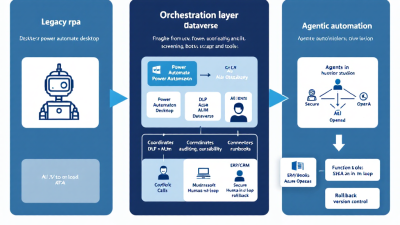
Reference Architecture: Agentic Orchestration on Microsoft Power Platform
Core layers:
– Experience and agent layer
– Copilot Studio agents as the orchestrator for user interactions and background automations. Agents reason over context, maintain memory, and call Power Automate flows and APIs with governance. See Copilot agents.
– AI cognition layer
– Azure OpenAI for reasoning, classification, and generation with structured tool invocation via function calling.
– Workflow and integration layer
– Power Automate cloud flows for API-first automation, and desktop flows for legacy UI interactions. Both governed by environments, DLP, and ALM. Reference: Power Automate overview.
– Data and state layer
– Microsoft Dataverse for durable state, queues, audit logs, and human-in-the-loop work items; optional vector store (e.g., Azure AI Search) for retrieval-augmented prompts.
– Security and identity
– Managed identities for flows and runbooks to call Azure services and APIs securely—no secrets in code. See managed identity.
– Observability and governance
– Managed Environments for guardrails; CoE Starter Kit for inventory, telemetry, ALM, and adoption. See Center of Excellence (CoE) Starter Kit.
System context:
– Upstream/Downstream systems: Dynamics 365, SAP, Salesforce, ServiceNow, SharePoint via connectors; custom APIs via Azure Functions/Logic Apps.
– Reliability: Design to published Service Level Agreements for cloud components, with internal SLOs for flows and agents.
Coexistence Patterns: Deterministic Bots + Autonomous Agents
– Orchestrated handoff: Agents perform triage/classification, then invoke a cloud flow. If API gaps exist, hand off to a desktop flow for a specific UI task, then return to the agent.
– Queue and ticket pattern: Agent posts work to a Dataverse queue; a cloud flow fans out to RPA bots; results return to the queue for agent summarization and notification.
– “API when possible, RPA by exception”: Default to connectors; only call RPA for systems without APIs. Maintain a living catalog of API coverage to reduce RPA surface over time.
– Hosted RPA pools: Use unattended/hosted machines for peak smoothing and isolation, consolidating desktop flows under central governance. Reference: hosted machines.
Governance and Controls: Environments, DLP, ALM, and Prompt/Version Management
– Environment strategy: Segment by Dev/Test/Prod and by business unit or data sensitivity. Enable Managed Environments for solution checker, usage insights, and onboarding controls.
– DLP guardrails: Create Data Loss Prevention (DLP) policies to:
– Classify connectors (Business vs. Non-Business)
– Block risky connector actions
– Enforce tenant isolation to prevent data exfiltration
– ALM with CI/CD: Package agents, flows, environment variables, and prompts in solutions; use Azure DevOps or GitHub pipelines for export/import and approvals. Reference: ALM guidance.
– Prompt/version control: Store prompts as solution assets or configuration; version in source control; test via environments. For model-side lifecycles, use Azure AI Studio’s prompt flow for prompt experiments, evaluation, and versioning.
Reliability by Design: SLAs, Idempotency, Retries, and Observability
– SLOs and SLAs: Align internal SLOs for flows/agents with Microsoft’s published SLAs. Define success rates, latency budgets, and time-to-recover targets.
– Idempotency: Generate and carry correlation IDs; write-against Dataverse with “upsert” semantics; design flows so retries don’t duplicate records or side effects.
– Retries and backoff: Use Power Automate’s retry policies, scoped try/catch, and exponential backoff for transient faults; circuit-breaker patterns for persistent failures. See error handling and retry.
– Observability: Centralize run telemetry in Dataverse; tag runs with process IDs; expose dashboards for throughput, success, and lag; alert on SLO burn rates.
Exception Handling and Human-in-the-Loop Safety Rails
– Structured exception paths: Use Try/Catch scopes; on failure, dead-letter to a Dataverse “Exception” table with payload, error, and remediation steps for an approver or analyst to resolve. Reference: Power Automate troubleshooting.
– Human approvals and escalation: For ambiguous AI output, request clarifications via Teams adaptive cards; enforce dual-control for high-risk actions.
– Safe fallbacks: If a tool or RPA step is unavailable, the agent presents options: pause, re-route to human, or switch to an alternate connector.
– Memory with hygiene: Agents store necessary context in Dataverse with explicit TTL and privacy classification; purge PII per policy.
Data and Model Layers: Dataverse, Vector Stores, and Retrieval Patterns
– System of record and queueing: Dataverse tables for Work Items, Exceptions, Approvals, and Audit. Use change tracking to trigger flows; store state transitions with correlation IDs.
– Retrieval-augmented prompting: Use a vector store to ground the agent in policies, SOPs, and customer history; include citations in agent messages for traceability.
– Structured tool use: Favor function calling to request structured inputs and outputs with schemas and validation—reduces hallucinations and parsing errors via function calling.
– Data minimization: Only fetch fields the agent needs; redact PII in prompts; log prompt/response metadata (not sensitive content) for analytics.
Tooling the Agent: Connectors, Function Calling, and Secure Runbooks
– API-first execution: Prefer standard connectors to ERP/CRM and SaaS. Where gaps exist, publish custom connectors.
– Function calling: Define tools for “Create Invoice in D365,” “Post Journal,” “Create ServiceNow Incident,” etc. The agent selects tools and passes JSON that your flows validate before execution. Backed by Azure OpenAI function calling.
– Secure runbooks: Run privileged tasks via Azure Automation or Functions behind managed identity; never embed credentials. See managed identity.
– RPA as a tool: Wrap desktop flows as callable tools; enforce timeouts, retries, and output schema to rejoin agent context.
Cost and Value Modeling: Licenses, Tokens, Run Time, and TCO
– Cost inputs
– Platform: Power Platform licenses (per-user/per-flow), RPA unattended add-ons, Copilot Studio capacity.
– AI: Token usage for prompts and responses; cost per 1K tokens; caching and grounding to reduce token spend.
– Runtime: Hosted RPA minutes, VM cost if self-hosted, network egress for external APIs.
– Value drivers
– Hourly savings per task; failure rate reduction; cycle-time compression; deflection from human queues; improved first-contact resolution.
– Risk reduction from DLP and least-privilege execution.
– Modeling approach
– Baseline the “as-is” bot portfolio: run counts, duration, failure/MTTR, rework rate.
– Estimate “to-be” with API/agent mix: reduced failure rates, shorter runtimes, lower maintenance.
– Validate ROI using the structure from Forrester Total Economic Impact.
Migration Playbook: Inventory, Segmentation, and Phased Rollouts
– Inventory and discovery (Weeks 0–2)
– Use the CoE Starter Kit to catalog flows, connectors, owners, and usage.
– Classify data sensitivity and access patterns; map each bot’s dependencies and schedules.
– Segmentation (Weeks 2–4)
– Score each automation against the Keep–Augment–Replace criteria: API availability, UI stability, business criticality, failure impact.
– Identify “quick wins” for replacement (pure API), high-value hybrids (AI + API + RPA), and “keepers” (UI-only legacy).
– Phased rollouts (Months 2–6)
– Replace API-ready automations first; stand up agentic orchestrations for cross-system processes; leave UI-only tail to RPA pools.
– Parallel-run critical processes; cut over with canary releases and feature flags.
– Governance first, then scale
– Stand up environments, DLP, ALM pipelines early; publish patterns and templates.
Testing at Scale: Synthetic Data, Canary Releases, and A/B for Automation
– Synthetic and anonymized data: Generate diverse test cases for edge conditions; mask PII before prompts.
– Canary releases: Route a small percentage of cases to the new automation; compare error rates and cycle times; roll forward based on SLOs.
– A/B for agent prompts: Evaluate different prompt variants and tool sequences using Azure AI Studio’s prompt flow.
– Failure drills: Game-day exercises that deliberately break upstream systems or credentials to validate fallbacks and human escalation.
Security and Compliance: PII, Secrets, Tenant Boundaries, and Auditability
– Least privilege and identity: Use managed identities and service principals; avoid user-credential runs in production. Reference managed identity.
– DLP and tenant isolation: Enforce DLP policies to prevent cross-boundary data movement; block high-risk connectors or actions.
– Prompt hygiene: Minimize PII in prompts; use redaction; store prompt/response metadata only. Control prompts and model versions via solutions and ALM.
– Auditability: Log every agent decision, tool call, and human override in Dataverse with time and actor stamps.
KPIs That Matter: Success Rates, MTTR, Deflection, Cycle Time, and Quality
– Operational: Automation success rate, mean time to recovery (MTTR), retry counts, exception rate per thousand runs.
– Experience: Cycle time per case, first-contact resolution, backlog age.
– Business: Cost per transaction, deflection rate from human queues, SLA adherence, quality accuracy (extraction and classification precision).
– Governance: Policy compliance rate, change lead time, deployment frequency.
Scenario Blueprints: Invoice-to-Pay, Order Ops, and ITSM Triage
– Invoice-to-Pay (Finance)
– Capture and extract: Use AI-driven document processing; Dynamics 365 Finance offers invoice automation.
– Agentic validation: Copilot agent verifies vendor, PO match, and tax logic via Dataverse and ERP connector; flags exceptions to AP analysts.
– Posting and payment: Cloud flow posts to ERP; if a legacy portal is needed, a desktop flow posts entries; agent summarizes outcomes and alerts.
– Order Operations
– Order intake: Agent classifies emails/orders, validates inventory through API, and creates orders via connector; exceptions route to Sales Ops.
– Change requests: Agent simulates impact (shipping dates, pricing), requests approval, and updates ERP/CRM.
– ITSM Triage
– Channel capture: Copilot Studio bot in Teams or web triages user issues; classifies severity and category; creates tickets via Power Automate.
– Orchestrated remediation: Agent executes runbooks (password reset, cache flush) using managed identity; unresolved issues escalate to live agents. Use Copilot Studio’s integration with flows as documented in advanced flow guidance.
Quick Start for SMBs: Templates, Pipelines, and a 30–60–90 Day Plan
– 0–30 days: Foundation
– Stand up Dev/Test/Prod environments; enable Managed Environments and DLP.
– Install the CoE Starter Kit; inventory your bots and flows.
– Establish ALM pipelines and solution templates for flows, connectors, and prompts. Reference ALM.
– 31–60 days: First wins
– Replace 2–3 brittle RPA paths with API-first flows; add an agent for triage/approvals.
– Stand up hosted RPA for one legacy system; codify exception handling and dead-letter queues.
– Define KPIs and dashboards; begin canary releases.
– 61–90 days: Scale and optimize
– Expand agentic orchestration to cross-system processes (e.g., invoice-to-pay).
– Tune prompts using prompt flow; optimize token usage and caching.
– Formalize SLAs/SLOs aligned to Microsoft SLAs; publish a process backlog and roadmap.
Pitfalls and Anti-Patterns to Avoid
– LLMs without tools: Free-text agents that cannot call deterministic tools will hallucinate and stall. Always pair with function calling and validated flows.
– Everything-is-a-bot thinking: If a standard connector exists, avoid screen scraping. Check the connector catalog first.
– Prompts in people’s heads: Treat prompts as code. Version, test, and review them in solutions and source control with formal approvals.
– “Shadow” credentials: Stop using personal accounts for production automations. Use managed identity and enterprise secrets management.
– Governance as an afterthought: Turn on DLP and Managed Environments up front or you’ll pay later.
What’s Next: Autonomous Workcells and the Continuous Improvement Loop
The destination isn’t a single mega-agent. It’s a network of small, reliable agents—each with clear tools and responsibilities—working alongside deterministic flows and, where necessary, RPA. With continuous telemetry, A/B testing, and ALM, your automations get smarter and more robust every sprint.
Microsoft’s stack is ready for this future: Copilot Studio agents that act and remember, Power Automate for resilient workflows across cloud and desktop, Dataverse for state and audit, plus model-governed execution via function calling. Stitch them together with governance, and you’ll move from bots that click to brains that work.
Appendix: Quick Reference Links
– Gartner perspective on automation adoption and scaling: Gartner automation insights
– Copilot Studio agent capabilities: Copilot agents
– Azure OpenAI function calling: Function calling docs
– Power Automate overview: Power Automate
– Managed Environments: Managed Environments overview
– Power Platform DLP policies: DLP documentation
– Forrester TEI for Power Automate: TEI study
– Microsoft Online Services SLAs: SLA documentation
– Managed identity for flows: Managed identity
– CoE Starter Kit: CoE kit
– Dynamics 365 Finance invoice automation: Invoice automation overview
– Copilot Studio + Power Automate integration: Advanced flow
– ALM overview for Power Platform: ALM guidance
– Hosted/unattended RPA: Hosted machines
– McKinsey’s view on automatable work: MGI report
– Power Automate connectors catalog: Connector reference
– Power Automate error handling: Troubleshooting and retries






