
FinOps Autopilot: AI Agents that Detect Cloud Cost Anomalies, Rightsize Workloads, and Lock In Savings
The New Cloud Tax: Why FinOps Needs Autonomy Now
Cloud spend is the new tax—and it compounds every sprint. The average organization leaks money through idle, overprovisioned, or forgotten resources, with waste accounting for roughly a third of total spend. According to the Flexera 2024 State of the Cloud Report, 32% of cloud budgets are wasted—an eye-watering baseline that makes the business case for automation obvious. Meanwhile, the noise is rising: FinOps teams report 8–12% median month-to-month cost variance, and anomaly detection is the top automation capability in development, per the State of FinOps 2024.
Humans can’t babysit every subscription, project, and account. A modern FinOps function needs always-on agents that watch spend in real time, triage anomalies, recommend rightsizing, and—critically—execute savings actions safely with human-in-the-loop approvals. The good news: the clouds already emit the signals we need, and Microsoft Power Platform gives us the orchestration, auditing, and user experience to turn signal into sustained savings. This post lays out a practical, multi-cloud pattern your team can implement quickly.
Outcomes First: What SMBs and Platform Teams Should Expect (Savings, Speed, Control)
Before we build, define “done.” SMBs and platform teams should expect:
– Savings: 20–35% run-rate reduction within 60–90 days, driven by automated rightsizing (often 20–50% on compute and databases) and commitment optimization. See the AWS Well-Architected guidance on rightsizing impact in the Cost Optimization Pillar.
– Speed: Detect anomalies in near real time, cut Mean Time to Acknowledge (MTTA) from days to minutes, and move from “advice” to “approved action” in hours, not sprints.
– Control: Approvals in Microsoft Teams, evidence in Dataverse, and policy guardrails that prevent over-commitment or risky changes.
Savings levers are substantial and well-documented:
– AWS Savings Plans can reduce compute costs by up to 66% versus On-Demand, with Reserved Instances offering similar savings when constraints fit; see the AWS Savings Plans overview.
– Azure Reservations can save up to 72%, and Azure Savings Plan for Compute offers flexible savings up to 65%; see Microsoft’s docs on Azure Reservations and the Savings Plan for Compute.
– Google Cloud’s Committed Use Discounts (CUDs) and Sustained Use Discounts (SUDs) can deliver 20–57% savings depending on service and term; see Google Cloud billing docs on Committed Use Discounts.
Reference Architecture on Microsoft Power Platform
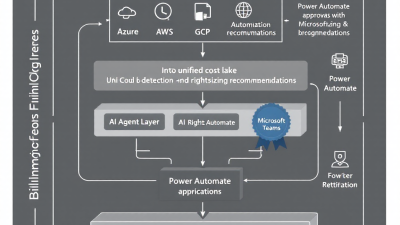
Our FinOps Autopilot pattern is built to be simple, auditable, and cloud-agnostic.
– Signals and data: Ingest daily detailed cost and usage exports (Azure, AWS, GCP), plus native anomaly alerts for real-time signals.
– Brain: AI agents orchestrated in Microsoft Power Automate with policy logic in Dataverse. Agents evaluate anomalies, compute recommendations, and gate actions behind approvals.
– Hands: Automated remedial actions (rightsizing, schedules, reservations/savings plan purchases) executed via cloud APIs with least-privilege service principals.
– Eyes: Power BI dashboards for KPIs, coverage, and trends.
– Controls and audit: Approvals in Teams, immutable audit trails in Dataverse, and cloud-native guardrails (budgets, policies, SCPs) to enforce safe change windows and spend caps.
Microsoft provides the plumbing for repeatability: export Azure cost to storage, trigger Flows, and persist decisions. See Microsoft Learn on exporting cost data, Power Automate Approvals, and Dataverse auditing.
Ingest and Normalize Multi‑Cloud Cost Data (Azure, AWS, GCP)
– Azure: Schedule Cost Management exports to Azure Storage or Log Analytics. This produces daily granular cost line items (subscription, resource group, tag dimensions) suitable for Power Query ingestion. See Export cost data.
– AWS: Enable the Cost and Usage Report (CUR) to S3 and (optionally) Athena or Redshift. For near-term insights, query Cost Explorer via API during anomaly investigations.
– GCP: Export Cloud Billing data to BigQuery for rich dimensioning (project, SKU, label). Use budgets and anomaly alerts for real-time triggers.
Normalize into a common schema in Dataverse or a Fabric/Lakehouse: billing_account_id, provider, subscription/account/project, service/SKU, usage_amount, effective_cost, tags/labels, commitment_applied, and timestamps. This layer powers consistent KPIs and policy checks across clouds. Refresh detail data daily; stream “event” signals (anomaly alerts, budget threshold crossings) in near real time for rapid triage.
Detecting Anomalies: Models, Signals, and Guardrails
Start with native anomaly detectors from each cloud; they’re tuned to billing idiosyncrasies and produce actionable alerts.
– AWS: Cost Anomaly Detection uses ML to flag unexpected spend at service/account/dimension level and can route alerts via SNS or ChatOps.
– Azure: Cost Analysis includes anomaly detection, and Advisor flags idle/overprovisioned resources. See Analyze costs and anomalies.
– GCP: Cloud Billing offers Cost Anomaly Detection and Budget Alerts for threshold-based signals.
Pipeline design:
1) Receive alerts (webhook/SNS/email -> Power Automate). 2) Enrich with cost line items and historical baseline (e.g., lookback of 30–90 days). 3) Classify: true anomaly vs planned event (deploy/release/training job). 4) Propose next steps with confidence and projected impact. 5) Route to the right owner in Teams.
Guardrails matter: FinOps teams see 8–12% monthly variance, so agents should use dynamic thresholds, approval tiers by impact, and cooldown periods to prevent alert fatigue. Align with the FinOps Framework’s guidance on automated detection, triage workflows, and closed-loop remediation in Anomaly Management.
Rightsizing and Purchase Optimization: From Advice to Action
Rightsizing is the fastest path to savings. Combine native recommendations with utilization telemetry and policy checks:
– Azure Advisor highlights idle or underutilized VMs, disks, and databases; see Advisor cost recommendations.
– AWS guidance shows rightsizing can deliver 20–50% reductions on compute and data stores; see the Cost Optimization Pillar.
– GCP label hygiene plus machine types/Autoscaler tuning drive quick wins alongside CUDs.
Commitment automation converts steady baseload into durable discounts:
– AWS: Detect stable 30/60/90-day usage patterns; recommend Savings Plans (up to 66% off) with utilization forecasts, break-even analysis, and dollar-risk limits. See Savings Plans.
– Azure: For consistent compute, propose Reservations (up to 72% off) or flexible Savings Plan (up to 65%), tied to approved term and max commitment envelope. See Azure Reservations and the Savings Plan for Compute.
– GCP: Recommend CUDs for predictable vCPU/RAM or service-level commits, and incorporate SUD effects in forecasts; see Committed Use Discounts.
Your agents should attach a business case to each recommendation: utilization history, projected monthly savings, payback period, residual risk, and an “undo” plan (marketplace resale where applicable or natural attrition strategies).
Human‑in‑the‑Loop Approvals in Teams with Full Auditability
FinOps isn’t “set and forget”—it’s “detect and decide fast.” Use adaptive cards in Microsoft Teams to present the anomaly or recommendation, proposed action, and impact forecast. Power Automate Approvals provide decision capture, timeouts, and escalations; see Approvals.
Every decision, comment, and attachment should write to Dataverse with immutable audit trails and who-approved-what-when lineage. See Dataverse auditing. This satisfies internal control requirements and creates a knowledge base of change outcomes that agents can learn from over time.
Automated Remediation Patterns (Azure/AWS/GCP) with Safe Change Controls
Your agents should execute “safe-by-default” playbooks with rollback:
– Cost containment
– Pause or downsize non-prod outside business hours; tag-based schedules.
– Quarantine untagged resources; move to low-cost tiers until tagged.
– Enforce storage lifecycle policies for infrequently accessed data.
– Rightsizing and hygiene
– Apply instance family downgrades where headroom >40%.
– Tune autoscaling min/max bounds to match diurnal patterns.
– Delete unattached disks, orphaned IPs, idle load balancers.
– Commitment actions
– Purchase Savings Plans/Reservations/CUDs within policy limits and preapproved caps.
– Monitor utilization; alert when coverage drifts or commitments approach expiration.
– Policy guardrails and budgets
– AWS: Use AWS Budgets for alerts and Service Control Policies (SCPs) to restrict risky actions in non-approved contexts. AWS anomaly alerts can route via SNS/ChatOps as described in Cost Anomaly Detection.
– Azure: Use Azure Policy and RBAC to enforce regions, SKUs, and tag standards; pair with Cost Management budgets and exports for early warning.
– GCP: Enforce budgets and programmatic alerts; see Budget Alerts.
KPIs and Dashboards: Measuring Savings, Coverage, and MTTA
A FinOps Autopilot is only as good as the outcomes it proves. Track:
– Realized savings: month-over-month and annualized, segmented by rightsizing vs. commitments.
– Coverage: percent of steady-state compute under Savings Plans/Reservations/CUDs; expiration runway.
– Anomaly MTTA/MTTR: median time to acknowledge and resolve; escalation rates.
– Detection quality: precision/recall of anomaly alerts; percent auto-closed as planned events.
– Rightsizing adoption: recommendation acceptance rate and realized vs forecasted savings.
– Policy compliance: tagged resource coverage; budget adherence; exceptions over time.
Publish these in Power BI, with drill-through to the underlying Dataverse records for full traceability and a near-real-time “spend health” score.
Security, Compliance, and FinOps Governance by Design
Bake controls into the design, not as afterthoughts:
– Least privilege service principals per cloud and per action domain.
– Dual-control for commitment purchases: agent proposes, budget owner approves.
– Immutable audit logs in Dataverse, with retention aligned to policy.
– Segregation of duties: agents execute change; different role approves; separate role tunes policy.
– Change windows and blast-radius limits (e.g., cap per-approval spend and per-day aggregate).
– Alignment with the FinOps Framework for automation with governance; see Rightsizing and Anomaly Management capabilities.
Build It Fast: 30‑60‑90 Day Implementation Plan
Days 0–30: Foundation and visibility
– Stand up cost exports (Azure, AWS CUR, GCP BigQuery) and normalize in Dataverse/Lake.
– Enable native anomaly detection in all clouds.
– Stand up Power BI baseline dashboards; define KPIs and tag strategy.
– Pilot Teams approvals; integrate with a sandbox Flow.
– Establish policies: approval thresholds, commitment caps, and SLAs.
Days 31–60: Pilot automation and savings capture
– Launch anomaly triage agent with Teams approvals.
– Automate top 5 rightsizing playbooks in non-prod, then prod with guardrails.
– Model commitment opportunities; execute first approved purchases (small but meaningful).
– Start weekly FinOps standup reporting realized savings and open actions.
Days 61–90: Scale, harden, and optimize
– Expand playbooks to data platforms and managed services.
– Implement continuous commitment management (coverage and utilization guardrails).
– Add policy-as-code (Azure Policy, AWS SCPs, org-level constraints).
– Tune detection thresholds and introduce noise suppression based on decisions history.
– Formalize runbooks, RACI, and quarterly optimization cadences.
Case Study Snapshot: 25–35% Savings in 60 Days for an SMB
An SMB SaaS company spending mid six-figures per year across Azure and AWS engaged the FinOps Autopilot pattern:
– Week 2: Anomaly agent flagged a 42% spike tied to a logging misconfiguration—rolled back within two hours; $7,800 avoided.
– Week 4: Rightsizing playbooks cut nonprod VM footprints by 38%; storage lifecycle policies archived 12 TB of infrequently accessed data.
– Week 6: Approved a modest AWS Savings Plan and Azure Savings Plan after 60-day stability proof, covering 55% of steady compute.
– Result: 29% run-rate reduction by Day 60, on track to 34% by Day 90.
Commitments work when paired with workload optimization. External proof points abound: Adobe reported a 31% reduction in BigQuery costs by leveraging committed use and workload tuning, as described in the Google Cloud Adobe case study.
B. Cobra Systems Blueprint: Services, Accelerators, and Next Steps
B. Cobra Systems helps you ship FinOps Autopilot fast and safely:
– Multi-cloud cost unification accelerator: Dataverse schema, dataflows, and mapping templates for Azure/AWS/GCP cost data.
– Anomaly triage agent: Power Automate flow pack with Teams adaptive cards, enrichment, and tiered approvals.
– Rightsizing playbook library: Parameterized actions for top resource types with rollback and evidence capture.
– Commitment optimizer: Policy-driven recommender for Savings Plans, Reservations, and CUDs with payback math and risk caps.
– Governance and audit kit: Dataverse tables, Power BI reports, and Power Platform COE patterns for change control.
– Change enablement: Workshops for FinOps operating model, KPIs, and ongoing optimization cadence.
Ready to lower your cloud tax? We’ll start with a free assessment of savings potential and a tailored 90-day plan.
Appendix: Connectors, Tools, and SEO Keywords
Connectors and APIs
– Microsoft: Power Automate, Power Apps, Dataverse, Power BI, Azure DevOps, HTTP with Azure AD.
– Azure APIs: Cost Management exports, Consumption and Resource Graph, Advisor, Policy.
– AWS APIs: Cost Explorer, Budgets, Cost Anomaly Detection (SNS), Compute Optimizer, Organizations/SCPs.
– GCP APIs: Cloud Billing (Budgets and alerts), BigQuery export, Recommender APIs where applicable.
– Integration: Email/Webhooks/SNS to Teams; custom connectors for AWS and GCP REST endpoints.
Tools and services
– Power Platform components: Flows (cloud), Approvals, Dataverse auditing, Power BI datasets.
– Optional: Azure Functions for transformation, Azure OpenAI/ML for advanced forecasting and classification.
SEO keywords
– FinOps automation, cloud cost anomaly detection, rightsizing workloads, AWS Savings Plans, Azure Reservations, GCP Committed Use Discounts, Microsoft Power Platform FinOps, Dataverse audit, Teams approvals, cost optimization AI agents.
Citations at a glance
– Cloud waste and variance: Flexera 2024 State of the Cloud Report, State of FinOps 2024
– Native anomaly detection and recommendations: AWS Cost Anomaly Detection, Azure cost anomalies, GCP anomaly detection, Azure Advisor
– Commitment savings: AWS Savings Plans, Azure Reservations, Azure Savings Plan, GCP Committed Use Discounts
– FinOps framework: Anomaly Management, Rightsizing
– Power Platform governance: Export cost data, Approvals, Dataverse auditing
– Guardrails: AWS Budgets, AWS SCPs; Alerts: GCP Budgets
– Outcome example: Adobe on Google Cloud
Bottom line: With the signals the clouds already provide and the orchestration Power Platform excels at, you can put cloud costs on autopilot—detect, decide, and deliver savings with control and confidence.






