
Service Desk Sentinel: AI Agents that Auto‑Triage Incidents, Orchestrate Runbooks, and Slash MTTR
The MTTR Squeeze: Why AI Agents Belong in Your Service Desk Now
Every minute your team spends reading noisy alerts or manually pushing the same remediation buttons adds latency to recovery and cost to the business. Elite DevOps teams treat mean time to recover (MTTR) as a board-level metric for operational excellence—one of the core DORA measures that separates top performers from the rest. If you want to move the needle on MTTR, you need a reliable way to classify, prioritize, and resolve incidents faster and more consistently than humans alone can manage. That is exactly where AI agents shine.
Across the industry, the evidence is consistent: automation and AI shorten triage and resolution. Organizations using runbook automation report meaningful drops in incident load and time-to-fix—up to a 90% reduction in MTTR and 95% fewer incidents in some contexts, according to PagerDuty’s automation ROI data (PagerDuty Automation ROI). A commissioned Forrester analysis also found a 20% reduction in major incidents and a 50% reduction in incident duration when teams implemented runbook automation at scale (Forrester TEI: PagerDuty). Broader AIOps research echoes the same pattern—earlier detection, fewer false positives, and 20–40% improvements in incident response (McKinsey on AI-enabled operations). And in adjacent domains like security operations, copilots that summarize alerts and suggest next steps have demonstrably reduced triage time (Microsoft Security Copilot).
The takeaway: if MTTR, first-contact resolution, and consistency matter, AI agents and automation belong in your service desk—now.
What Is the Service Desk Sentinel? A Multi‑Agent Pattern for ITSM
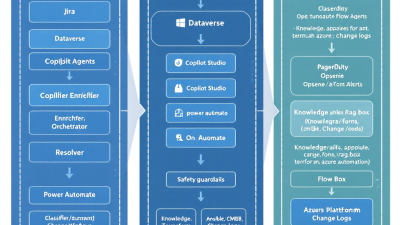
Think of the Service Desk Sentinel as your always-on Level 0.5 analyst: a federation of cooperating agents that classify, enrich, and orchestrate safe actions—before humans have to. The pattern consists of:
– Triage Agent: Classifies incoming incidents, assigns severity, and predicts routing queues. It also fills structured fields and flags probable runbooks.
– Enrichment Agent: Performs retrieval-augmented generation (RAG) across your knowledge base (KB), CMDB, and change logs to create concise, linked context for responders.
– Orchestrator Agent: Invokes approved tools and runbooks (PagerDuty/Opsgenie actions, Ansible playbooks, Terraform plans) with guardrails and human approvals as needed.
– Communications Agent: Posts updates to tickets, notifies on-call, summarizes war-room context, and drafts post-incident notes.
– Safety and Policy Agent: Enforces RBAC, DLP, change windows, and policy-as-code; blocks unsafe actions; requires approvals for high-risk steps.
– Auditor Agent: Captures a complete audit trail of prompts, actions, inputs, outputs, and approvals to support compliance and continuous improvement.
This is not science fiction—commercial ITSM platforms already validate components of this pattern. ServiceNow’s Now Assist demonstrates automated classification, summarization, and suggested next-best-actions, reducing handling time and boosting first-contact resolution (ServiceNow Now Assist for ITSM; ServiceNow Now Assist). Opsgenie and Jira Service Management emphasize automated routing, escalations, and runbook integrations to accelerate response (Atlassian Opsgenie). The Service Desk Sentinel pulls these capabilities together—and extends them—through a Microsoft-first approach that gives you control over data, policy, and cost.
Reference Architecture on Microsoft Power Platform
The reference architecture maps cleanly to the Microsoft stack:
– Conversation and Orchestration: Microsoft Copilot Studio hosts the primary “Sentinel” copilot and subagents (skills) that handle triage, enrichment, and execution. It orchestrates actions across systems via connectors and custom APIs with approval steps and governance baked in (Microsoft Copilot Studio).
– Intelligence and Grounding: Azure OpenAI for classification/summarization, RAG, and tool/function calling. “On your data,” content filters, and Azure AI Content Safety keep prompts grounded and policy-aligned (Azure OpenAI Service).
– Automation and Integrations: Power Automate flows invoke certified connectors for ServiceNow, Jira, PagerDuty, and hundreds more; they support approvals, RBAC, and complete audit trails (Power Automate connectors).
– Runbook Runners: Ansible Automation Platform (via AWX/Tower or API) for procedural fixes; Terraform Cloud/Enterprise for infrastructure-as-code with policy-as-code (HashiCorp Sentinel) and RBAC (Terraform Enterprise and Sentinel).
– Data Layer: Dataverse for conversational transcripts, action logs, metrics, and feature store (e.g., classification labels). Optionally cache embeddings and document chunks for RAG.
– Identity, Secrets, and Governance: Entra ID (Azure AD) for app registrations, service principals, and conditional access; Azure Key Vault for secrets; Power Platform DLP policies for data movement boundaries; environments (Dev/Test/Prod) for change control.
Grounding and Knowledge: KB, CMDB, Change Logs, and RAG
Agents are only as smart as the context they see. The Sentinel uses a layered grounding strategy:
– RAG over curated sources: Knowledge articles, runbooks, known-error database (KEDB), CMDB CIs and relationships, recent change requests, and observability notes. The Enrichment Agent retrieves relevant snippets and cites them in every ticket update.
– Hygiene-first ingestion: Sanitize PDFs, wikis, and tickets; segment into atomic chunks with metadata (system, service, environment, sensitivity); embed and index with vector search.
– Freshness and correctness: Prioritize recent changes and incident postmortems; tag deprecated steps; expire stale content automatically.
– Deterministic fields: Where possible, generate structured outputs (component, suspected cause, confidence score, recommended runbook ID) with schemas that downstream flows can validate.
– Zero-trust grounding: The model may propose actions, but only approved runbooks on an allowlist can be invoked—and only within a clearly defined blast radius.
Core Agent Skills: Classify, Enrich, Orchestrate, Resolve
– Classify: Assign category/subcategory, service/component, severity, and likely resolver group. ServiceNow shows how AI classification boosts first-contact resolution and reduces handling time (Now Assist for ITSM).
– Enrich: Summarize symptoms; attach relevant KB; pull CMDB relationships (e.g., business service → dependent DB → recent change); propose next steps with confidence.
– Orchestrate: Map intent to tools—page the right on-call, run diagnostics, execute safe remediations, open change requests, or propose a Terraform plan.
– Resolve: When confidence ≥ threshold and blast radius is small, execute an approved runbook autonomously; otherwise, collect evidence and request human approval.
Safe Automation: Guardrails, Human‑in‑the‑Loop, and Auditability
Safety is a feature. Implement it in layers:
– Policy-as-code: Terraform Sentinel and Ansible RBAC limit what changes are possible, by whom, and where (Terraform policy-as-code).
– Function calling with allowlists: Azure OpenAI function calling only exposes permitted tools; each tool validates inputs and enforces least privilege (Azure OpenAI function calling).
– Approvals and change windows: Power Automate approval steps for medium/high risk actions with CAB or on-call approvals; respect maintenance windows.
– Content safety and DLP: Use Azure AI Content Safety plus Power Platform DLP policies to block sensitive data egress and prompt injection (Copilot Studio governance).
– Progressive escalation: Start with diagnostics, then low-risk remediations, then request approval for higher-impact changes.
– Audit trails: Log every prompt, tool call, input, output, and decision. Store in Dataverse; export to a SIEM if required.
Integrations That Matter: ServiceNow/Jira, PagerDuty/Opsgenie, Ansible/Terraform
– ITSM systems: Read/create/update incidents, problems, and changes; enrich incidents with summaries and KB links; route to the right group. Now Assist’s capabilities validate the value of AI-driven field population and suggested actions (ServiceNow Now Assist).
– On-call and event ops: Create incidents/alerts, trigger escalations, and kick off runbooks or maintenance modes in Opsgenie/PagerDuty. Opsgenie’s automated routing and runbook integrations reduce human latency (Opsgenie overview). PagerDuty’s automation data underlines the MTTR impact (PagerDuty Automation ROI; Forrester TEI).
– Automation engines: Execute Ansible playbooks for known fixes; invoke Terraform plans/applies with human approvals and policy gates. Ansible customers report faster provisioning and quicker issue resolution with short payback periods (IDC on Ansible value).
Implementation Guide: An MVP You Can Ship in 30 Days
Week 1: Foundations
– Environments and governance: Create Dev/Test/Prod in Power Platform; define DLP policies; set up Azure Key Vault and service principals.
– Connectors: Configure ServiceNow or Jira, Opsgenie or PagerDuty, and your runbook endpoints (Ansible/Terraform).
– Data prep: Identify top 10 incident categories and 15–20 high-value KB/runbooks; tag with service/component; load into a RAG index.
Week 2: Triage and Enrichment
– Build a Copilot Studio agent that classifies incidents and produces a structured JSON output (category, service, severity, confidence, recommended runbook).
– Create Power Automate flows to enrich incidents: fetch CMDB relationships, attach KB, summarize symptoms and changes in the last 24–72 hours.
– Instrument logging in Dataverse for all actions and model outputs.
Week 3: Orchestration and Guardrails
– Implement diagnostic runbooks (readonly): health checks, log snapshots, metrics dumps.
– Implement 3–5 low-risk remediations: restart service, clear cache/temp, rotate pod, recycle app pool. Require approval above a confidence threshold or outside maintenance windows.
– Approvals and policy: Add approval steps for medium/high risk, enforce change calendar, and limit blast radius via allowlists.
Week 4: Pilot and Iterate
– Run a controlled pilot on one queue/service with on-call champions.
– Track metrics (baseline vs. pilot) and tune thresholds.
– Document the operating playbook and handoff plan for support.
Deliverable at day 30: An AI-assisted triage and enrichment copilot plus a guarded automation path that safely resolves a defined subset of incidents end-to-end.
Runbook Patterns: From Known‑Error Playbooks to Safe Remediations
– Known error playbooks: Deterministic sequences for recurring faults (e.g., disk space reclaimed by log rotation + service restart) with pre/post checks.
– Diagnostics-first bundles: Health check → capture logs → cache results → propose next actions.
– Idempotent fixes: Make remediations safe to rerun; include rollbacks.
– Terraform “plan-first” changes: Generate plan, attach diff back to the ticket, require approval, then apply within policy constraints (Terraform Sentinel policies).
– Canary and rate-limited actions: Apply to a single node or small subset; expand if metrics improve.
– Evidence-based closure: Every runbook posts before/after metrics and links to telemetry so resolvers trust the automation.
Monitoring and Metrics: MTTR, FCR, Auto‑Resolve Rate, and Quality
Measure, don’t guess. Align to DORA and add service-desk specifics (DORA Accelerate):
– MTTR: Mean time from incident open to resolved. Track per service and severity.
– Time to Triage: Creation to first actionable classification.
– First-Contact Resolution (FCR): Incidents resolved without escalation beyond L1/automation.
– Auto-Resolve Rate: Percentage closed by Sentinel without human intervention.
– Deflection and Duplication: Reduced volume from automated suppression or deduplication.
– Quality and Safety: False positive/negative rates on classification; rollback rate; number of blocked unsafe actions; approver satisfaction.
– Business Impact: Major incident frequency and cumulative downtime.
Cost and Licensing Considerations for SMBs
– Power Platform: Copilot Studio and Power Automate use premium connectors and may be licensed per user or per flow—choose per-flow for shared service accounts with predictable workloads. Use environments to limit sprawl and maximize reuse of flows across services.
– Azure OpenAI: Pay-as-you-go based on model tokens and feature usage; rein in cost with prompt templates, response size limits, and retrieval scopes (Azure OpenAI overview).
– Integrations: Certified connectors reduce build time and maintenance overhead (Connector catalog).
– Runbook engines: Factor Ansible/Terraform platform licensing, but remember the ROI. IDC reports meaningful time savings and short payback for Ansible deployments (IDC on Ansible value).
– Practical levers: Start with a single queue and a handful of high-frequency runbooks; cap concurrency; use “diagnostics-only” in off-hours; review telemetry weekly to right-size resources.
Security and Governance on Power Platform (RBAC, DLP, Secrets)
– Identity and RBAC: Use Entra ID app registrations and service principals with least privilege. Map Sentinel roles to runbook scopes (e.g., “WebApp-Restart” vs. “Prod-DB-Changes”).
– DLP and environments: Separate Dev/Test/Prod; define DLP policies that prevent mixing business and social connectors; audit flows and connections quarterly.
– Secrets: Store all API keys and credentials in Azure Key Vault; reference at runtime. Prefer OAuth and managed identities over static keys.
– Change control: Log versioned prompt templates and runbooks; require approvals for runbook updates; maintain a dry-run environment for tests.
– Data handling: Mask PII in transcripts; redact sensitive content before embedding; define retention policies for prompts and logs.
Scaling Up: From One Queue to Enterprise‑Wide Intelligent Automation
– Expand coverage: Add services by similarity (shared stack, same on-call). Reuse runbooks and taxonomies; scale the RAG corpus with tagging and ownership.
– Broaden actions: Move from diagnostics and restarts to safe infra changes via Terraform with policy gates and staged rollouts (Terraform policies).
– Integrate AIOps: Correlate events to reduce noise and prioritize business-impacting incidents, leveraging patterns highlighted by McKinsey’s AIOps findings (AI-enabled operations).
– Optimize people loop: Let Sentinel handle level-0 tasks while specialists focus on complex recovery and preventative engineering.
– Standardize metrics: Publish MTTR and auto-resolve dashboards; hold quarterly “automation game days” to find the next 10% improvement.
Case‑Style Walkthrough: Auto‑Triage a Noisy Incident and Resolve Safely
Scenario: At 02:17, Opsgenie receives a CPU saturation alert on the payment API. Incidents begin to flood Jira Service Management.
– Detect and Classify: The Triage Agent correlates duplicate alerts, opens a single incident with severity P2, and classifies “Payments API → Compute Saturation.” Opsgenie escalations and routing align automatically (Opsgenie routing and escalations).
– Enrich: The Enrichment Agent pulls the CMDB service map (API → Kubernetes deployment), the change log (new canary build deployed 45 minutes ago), and relevant KB (“Pod CPU leak known issue”). It summarizes the context with links and proposes diagnostics + a safe pod recycle.
– Orchestrate Diagnostics: The Orchestrator Agent runs an Ansible playbook to collect pod CPU/memory metrics and top processes. Output is posted to the incident with a summary. Ansible’s speed and consistency help here (IDC on Ansible value).
– Propose Remediation: Confidence is high; blast radius is minimal. The agent requests approval to cordon one node and recycle two pods. A Power Automate approval goes to the on-call, who accepts.
– Execute with Guardrails: The runbook drains and recreates pods, monitors error rates, and posts before/after telemetry. If metrics worsen, the Safety Agent auto-aborts.
– Communicate and Close: PagerDuty/Opsgenie updates the on-call; Jira is updated with a resolution summary, KB links, and a proposed PR for a permanent fix. Time to triage and resolution drop substantially—consistent with automation impacts identified by PagerDuty and Forrester (Automation ROI; Forrester TEI).
Checklist and Next Steps: Templates, Connectors, and a Go‑Live Plan
Quick-start checklist
– Governance
– Create Dev/Test/Prod environments; enforce DLP policies.
– Set up Entra ID app registrations, service principals, and Key Vault.
– Data and RAG
– Curate top 20 KB/runbooks and 50–100 recent incidents; chunk and embed.
– Wire CMDB and change logs as RAG sources with freshness tags.
– Copilot Studio
– Build skill templates: classify(), enrich(), propose_runbook(), summarize().
– Configure function calling with allowlisted tools and JSON schemas.
– Power Automate
– Connectors: ServiceNow or Jira; PagerDuty or Opsgenie; custom connectors for Ansible/Terraform APIs (Connector catalog).
– Approval flows and logging to Dataverse; route high-risk actions to CAB.
– Runbooks
– Diagnostics: health checks, log collection.
– Low-risk remediations: restart/recycle, cache clear, feature-flag toggle.
– Infrastructure changes: Terraform plan → approval → apply with Sentinel policies (Terraform Sentinel).
– Metrics
– Baseline MTTR, time-to-triage, FCR, auto-resolve rate.
– Set weekly review cadence; tune thresholds.
Go-live plan (30 days)
– Pilot scope: One queue, two services, five runbooks.
– Training: 90-minute enablement for on-call; “how to approve/abort” and trust-building practices.
– Safety net: Start in observe mode (no-op remediations), then enable low-risk automations with approvals, then selective autonomy.
– Review: After two weeks, expand to a second service; add one medium-risk remediation with change controls.
Why act now
You don’t need to boil the ocean to see value. With Power Platform, Copilot Studio, and Azure OpenAI, you can stand up a Service Desk Sentinel in a month, leveraging out-of-the-box connectors and enterprise guardrails. As industry data shows—from reductions in incident duration and volume to gains in first-contact resolution—automation and AI are proven levers to cut MTTR without adding headcount (PagerDuty Automation ROI; Forrester TEI; ServiceNow Now Assist results; DORA metrics; McKinsey AIOps).
Ready to build your Sentinel? Start small, automate safely, measure relentlessly—and let the machines handle the midnight toil so your team can focus on engineering the next outage out of existence.






