
Master Data, Master Results: AI Agents for Clean ERP/CRM Records and Bulletproof Decisions
The Cost of Dirty Data: Why Good AI Fails Without Clean ERP/CRM
AI is only as sharp as the data it ingests. If your ERP/CRM is riddled with duplicates, incomplete fields, and stale attributes, your AI forecasts, personalization, and automation routines will confidently make the wrong call. The business cost is not theoretical: Gartner pegs the average annual cost of poor data quality at $12.9 million per organization, spanning rework, missed revenue, and compliance exposure. See: Gartner’s analysis of the state of data quality. In customer-facing systems, the decay is relentless—B2B contact data can degrade by ~30% per year through job changes, mergers, and churn, creating pipeline drag and wasted campaign spend; reference the findings in Validity’s State of CRM Data Health. Unsurprisingly, forecast confidence suffers: only about a quarter of sales professionals are completely confident in their forecasts, with data quality and pipeline hygiene among the culprits, per the Salesforce State of Sales report. The upside is equally real: organizations that get personalization right—made possible by clean, enriched, unified customer profiles—see 5–15% revenue lift and 10–30% improvements in marketing efficiency, according to McKinsey’s research on personalization value. In short: dirty data taxes every decision; clean data multiplies every initiative.
Always‑On MDM: From Periodic Cleanups to Autonomous AI Agents
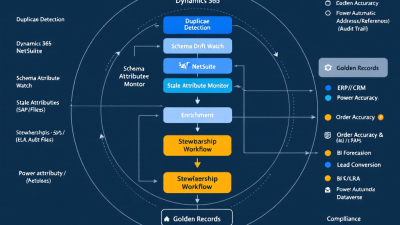
Traditional Master Data Management (MDM) projects resemble spring cleaning: intense, expensive, and quickly undone by daily operations. Always‑on MDM flips the model. AI agents continuously profile, deduplicate, enrich, and monitor ERP/CRM data—proactively detecting schema drift and attribute decay, and orchestrating human-in-the-loop stewardship where needed. Instead of quarterly “data quality sprints,” you get a 24/7 fabric that:
– Watches for anomalies, null creep, and outliers in key entities (accounts, contacts, products, suppliers).
– Scores recency and completeness, then triggers targeted refresh or enrichment.
– Resolves duplicates using tiered matching strategies (deterministic + probabilistic + LLM-assisted review).
– Detects upstream schema changes and contract violations before they break downstream analytics and automations.
– Captures auditable, reversible changes to maintain trust with compliance and business stakeholders.
On Microsoft Power Platform, this fabric is pragmatic: it uses Dataverse as a governed master layer, Power Automate for orchestration, AI Builder/Azure OpenAI for intelligence, and native connectors to keep Dynamics 365, Salesforce, NetSuite, and SAP in lockstep.
Reference Architecture on Microsoft Power Platform (Dataverse, Power Automate, AI Builder/Azure OpenAI)
At a glance:
– System of Record and Stewardship Hub: Dataverse hosts golden records, survivorship policies, match status, lineage, and audit logs. Its built-in auditing and change tracking provide durable governance; see Dataverse auditing and change tracking.
– Ingestion and Profiling: Dataflows and Power Query ingest from ERP/CRM and run continuous data profiling (column quality, distribution, cardinality) to surface drift and quality regressions; reference Power Query data profiling.
– Matching and Unification: Combine deterministic keys (tax ID, email, DUNS) with fuzzy matching. Power Query supports approximate joins via fuzzy merge, while Customer Insights adds configurable, AI-assisted identity resolution; see Microsoft Customer Insights unification.
– Orchestration and HITL: Power Automate coordinates jobs, approvals, and exception flows using Approvals for human-in-the-loop stewardship and SLA tracking.
– AI Services and Reasoning: Use AI Builder’s Create text with GPT and the Azure OpenAI connector for normalization (e.g., industry tags), similarity scoring, anomaly explanations, and dedupe rationales embedded right into flows and apps.
– Schema Drift Guardrails: For upstream pipelines, Azure Data Factory/Synapse mapping data flows detect and handle schema drift, keeping your mappings resilient; see schema drift handling.
– Governance and Policy: Power Platform DLP policies enforce safe data movement and connector usage across environments; see Data Loss Prevention policies.
Connecting Your Stack: Dynamics 365, Salesforce, NetSuite, SAP, and Custom LOB via Connectors
Always‑on MDM only works if it reaches every system that creates or consumes customer and product data. Power Platform ships with native connectors to the major players, enabling bi-directional sync and stewardship at the edge:
– Dynamics 365/Dataverse via the Dataverse connector.
– Salesforce via the Salesforce connector.
– NetSuite via the NetSuite connector.
– SAP via the SAP ERP connector.
For bespoke line-of-business apps, use custom connectors or Azure Functions behind secure APIs. The pattern: pull deltas via change tracking, stage in Dataverse, run matching/enrichment, route exceptions to stewards, then write back canonical updates with full audit trails.
Deduplication at Scale: Deterministic Rules + Probabilistic Matching + LLM‑Assisted Review
Entity resolution is not a single algorithm—it’s a choreography:
– Deterministic rules: Exact keys (VAT/EIN, domain + email, Sku + GTIN) resolve a large, low-risk portion.
– Probabilistic matching: For the ambiguous middle, leverage fuzzy similarity on names, addresses, and phone numbers. Power Query’s fuzzy merge accelerates approximate joins, while Customer Insights can apply AI-assisted matching and survivorship across sources; see Customer Insights unification.
– LLM‑assisted review: For near-ties, AI Builder and the Azure OpenAI connector can summarize differences (“These two ‘Acme’ records share FEIN and address; recommend merge; prefer billing data from SAP.”) and generate an explainable recommendation. Final decisions flow through Power Automate Approvals for auditable sign-off; see Approvals.
– Survivorship policies: Attribute-level rules pick winners (e.g., tax fields from ERP, emails from CRM), with weighted freshness and source trust scores. All merges and survivorship outcomes are versioned in Dataverse for rollback and lineage.
Schema Drift Detection: Monitoring Field Changes, Missing Attributes, and Contract Violations
Fields change names. Required status toggles. New picklist values sneak in. Without a watchtower, downstream models silently degrade. Azure Data Factory/Synapse mapping flows offer built-in schema drift detection and handling, enabling agents to:
– Detect unexpected columns or type changes and quarantine affected records.
– Auto-adjust tolerant mappings where safe, or open an Approval to data owners when a contract is violated (e.g., currency type changed).
– Notify system owners and log the incident with a remediation plan.
Meanwhile, Dataverse change tracking captures source deltas so the drift response is incremental and quick.
Stale Attribute Watch: Recency scoring, decay policies, and automated refresh prompts
If contact titles, phone numbers, or ship‑to addresses are out of date, everything from routing to fraud checks suffers. With B2B contact data often decaying ~30% yearly (Validity), your AI agents should:
– Maintain recency/freshness scores per attribute. Use decay functions (e.g., exponential) to lower trust over time.
– Trigger targeted refreshes: when a key field crosses a staleness threshold, open a task in a Power App for the account owner, or auto‑enrich from trusted sources.
– Use LLMs via AI Builder to normalize job titles and standardize industries, and to generate concise “why this needs update” notes that boost completion rates.
Enrichment Pipelines: Firmographics, addresses, sanctions/PEP checks, and product catalogs
Great master data is enriched, not just cleaned. Build tiered pipelines that:
– Validate and standardize addresses (postal standards, geocodes).
– Append firmographics (industry, employee count, revenue) to enable segmentation and routing that fuel personalization gains highlighted by McKinsey.
– Run sanctions/PEP screenings to reduce risk in vendor/customer onboarding.
– Normalize product attributes and unify catalogs across ERP instances.
LLMs (via Azure OpenAI or AI Builder) assist with classification, attribute inference from descriptions, and unit conversions, while human stewards approve changes through Power Automate Approvals.
Stewardship Workflows: Human‑in‑the‑Loop Approvals, SLAs, and Audit Trails in Power Automate
AI should do the heavy lifting, but people make the final calls that carry risk. Use Power Automate Approvals to:
– Route ambiguous merges and schema changes to data owners with clear, AI‑generated rationales and side‑by‑side diffs.
– Enforce SLAs by data domain (e.g., contacts in 24h, product attributes in 48h) with escalations to domain leads.
– Capture decision metadata (who, what, why, when) and store it in Dataverse for audit and analytics.
A lightweight Power App gives stewards a queue, rich context, and one‑click decisions. This is governance users actually want to use.
Governance and Auditability: Data lineage, versioned merges, rollback, and explainability
Trust is built on traceability:
– Dataverse auditing logs every change with before/after values and who/what initiated it (agent, flow, human).
– Merges are versioned, with the ability to unmerge/rollback and reapply survivorship policies if rules evolve.
– Lineage links source records to golden records and downstream systems written back, enabling “where did this come from?” answers in seconds.
– DLP policies (Power Platform DLP) fence off risky connector combinations and enforce data movement rules across environments.
Measuring Impact: Order Accuracy, Forecast Reliability (MAPE), Lead Conversion, and NRR
If it doesn’t move the numbers, it’s housekeeping, not MDM. Establish baselines and track:
– Order accuracy: Percentage of orders that ship right the first time (address/product correctness). Target 1–3 point improvement in the first 90 days as duplicates and stale addresses fall.
– Forecast reliability: Mean Absolute Percentage Error (MAPE) for bookings/revenue forecasts. Clean, deduped pipeline data and consistent definitions improve reliability; this addresses the confidence gap highlighted by Salesforce.
– Lead conversion rate: Better firmographics, territory routing, and personalization (supported by McKinsey’s personalization uplift) typically translate to meaningful lift.
– Net Revenue Retention (NRR): Unified accounts reduce churn identifiers and improve cross‑sell targeting, nudging NRR up over 2–4 quarters.
Instrument the program: log each AI-assisted remediation and tie it to downstream KPIs. A monthly governance review should correlate interventions to outcomes.
Implementation Blueprint: 30‑60‑90 Day Plan for SMBs and Enterprise Rollouts
Day 0–30: Prove the value
– Stand up Dataverse environment, DLP policies, and baseline security roles.
– Ingest two core domains (e.g., Accounts, Contacts) from one CRM via Dataflows; enable profiling with Power Query.
– Implement deterministic dedupe rules; pilot fuzzy matching on a subset; build a stewardship Power App and Approvals workflow.
– Turn on Dataverse auditing and define survivorship policies.
– Baseline KPIs: duplicate rate, completeness score, order accuracy, forecast MAPE, lead conversion.
Day 31–60: Scale and secure
– Add a second system of record (e.g., Salesforce via the Salesforce connector or SAP via the SAP ERP connector); turn on change-delta ingestion.
– Introduce fuzzy matching and LLM‑assisted review with AI Builder or the Azure OpenAI connector.
– Implement schema drift monitoring with ADF/Synapse; route contract violations to Approvals.
– Launch enrichment for firmographics and address standardization; embed explainability in steward queues.
Day 61–90: Optimize and operationalize
– Expand to Products/Vendors and add a second ERP (e.g., NetSuite via the NetSuite connector).
– Tighten policies: refine survivorship weights, freshness thresholds, and SLAs.
– Automate write‑backs to source systems with full lineage; add dashboards for KPI improvements and audit health.
– Plan phase 2: Customer Insights unification for advanced identity resolution and real‑time personalization across channels; see Customer Insights.
Security & Compliance: Role‑based access, data minimization, PII handling, and policy controls
– Least privilege: Use Dataverse security roles and field‑level security; restrict PII fields in apps and flows to need‑to‑know personas.
– Data minimization: Only ingest attributes required for matching/enrichment; mask or tokenize sensitive fields for AI prompts when possible.
– Policy guardrails: Enforce connector rules and data movement boundaries with Power Platform DLP policies and environment isolation (dev/test/prod).
– Audit & retention: Keep auditing on in Dataverse and retain logs per your regulatory baseline (SOX/ISO/GDPR). Every AI action should be explainable with inputs, model, prompt, and outputs captured.
Cost & Licensing: Optimizing Power Platform, Azure consumption, and enrichment vendor spend
– Power Platform: Right‑size with per‑flow plans for shared automations and per‑user for stewardship apps. Consolidate flows, favor batch where real‑time is not required, and reuse connections across environments.
– Azure OpenAI/AI Builder: Control token usage with concise prompts, few‑shot examples, and caching of enrichment outcomes. Use lower‑cost embeddings for similarity and reserve generative calls for explainability or classification.
– Enrichment vendors: Tier usage—batch refresh of long‑tail accounts quarterly, real‑time checks only for high‑value segments. Measure conversion lift per attribute to prune low‑ROI enrichments.
– Infrastructure: Use delta loads via change tracking and incremental pipelines to reduce compute costs.
Anti‑Patterns to Avoid: Over‑merging, opaque models, and workflow sprawl
– Over‑merging: Aggressive fuzzy thresholds can collapse distinct customers. Require human review for near‑ties and keep unmerge capability.
– Opaque models: Black‑box LLM decisions erode trust. Always present rationales and confidence, and log the prompt/response.
– Workflow sprawl: Dozens of one‑off flows are hard to govern. Centralize patterns, templatize, and route through a shared orchestration layer.
– Set‑and‑forget: Data changes daily. Without continuous profiling and freshness policies, you’re back to spring cleaning.
Mini Case Study: Reducing duplicates from 12% to <1% and boosting forecast accuracy by 8 pts A mid‑market distributor running Dynamics 365 Sales and SAP ERP suffered from a 12% duplicate account rate and inconsistent product attributes across regions. We implemented Dataverse as a stewardship hub, deterministic + fuzzy matching (with LLM‑assisted reviews), and ADF schema drift monitoring. Within 90 days: - Duplicate rate fell below 1%; order rework dropped 18% as ship‑to mismatches disappeared. - Forecast MAPE improved by 8 percentage points as pipeline counts normalized and aging became consistent. - Lead conversion rose 11% after enrichment and territory routing improvements influenced by standardized firmographics. Every change was logged in Dataverse, with Approvals ensuring business ownership—and audit reports were produced in minutes, not days. Call to Action: Launch Your Always‑On MDM with B. Cobra Systems, LLC If your AI ambitions are tripping over messy ERP/CRM data, it’s time to make clean data an always‑on capability. B. Cobra Systems designs and deploys Power Platform‑based AI agents that profile, dedupe, enrich, and govern your master data—across Dynamics 365, Salesforce, NetSuite, SAP, and beyond. Let’s turn better data into better decisions. Contact us to start your 30‑day pilot and see measurable lift in accuracy, reliability, and conversion.






