
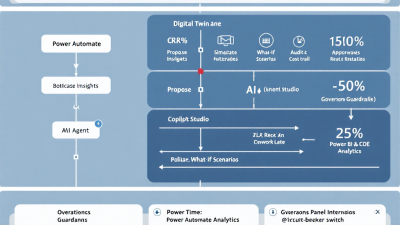
From Process Mining to Autonomous Execution: How AI Agents Finally Close the BPM Loop
Dashboards don’t fix processes—agents do. If your organization has squeezed all the insight it can out of dashboards and weekly ops reviews, the biggest gains now come from closing the loop: turning insights into safe, autonomous action. With Microsoft Power Automate Process Mining surfacing bottlenecks and what‑if scenarios, and AI agents built with Copilot Studio orchestrating execution across your stack, you can propose, simulate, and implement improvements in near real time—with guardrails. The upside isn’t theoretical: generative AI is projected to add $2.6–$4.4 trillion in value annually, and the winners will be those who operationalize it, not just analyze it (McKinsey Global Institute).
Stop Staring at Dashboards: Why BPM Needs Autonomous Execution
Dashboards tell you where you’re bleeding; autonomous execution stops the bleeding. Traditional BPM initiatives often stall at “insight theater”—beautiful charts, recurring meetings, and a backlog of “someday” improvements. Meanwhile, customers wait, SLAs slip, and costs creep. The reality is that processes operate continuously, so interventions must too. Autonomous agents provide that always‑on layer: machines propose changes based on observed patterns, simulate expected impact, and execute tightly scoped actions with human oversight where it matters. The result is not a wild leap into automation, but deliberate, evidence-based micro‑changes that compound into outsized gains.
Closed-Loop BPM Explained: From Insight to Safe Action
Closed‑loop BPM is a control system for your business:
– Observe: Ingest event logs from systems of record, visualize actual variants, and quantify pain (cycle time, rework, on‑time performance).
– Decide: Use simulations to test hypotheses—prioritize changes with the highest expected ROI and lowest risk.
– Act: Execute via low‑code automations, RPA, or agent‑driven workflows; insert approvals at risk points.
– Learn: Measure post‑change KPIs and conformance; keep or roll back; feed learnings into the next cycle.
On the Power Platform, the loop tightens because the tools are integrated: you analyze with Power Automate Process Mining, and you operationalize by triggering cloud flows, desktop flows, and connectors that touch your business systems—all under enterprise governance.
Reference Architecture on Microsoft Power Platform
A pragmatic reference architecture to close the loop:
– Data and insights: Process event logs are ingested and analyzed in Power Automate Process Mining to discover bottlenecks, root causes, and simulate what‑ifs.
– Decisioning and orchestration: A Copilot/agent built in Microsoft Copilot Studio proposes actions, runs simulations, and orchestrates multi‑step flows via plugins and 1,000+ connectors.
– Execution: Power Automate cloud flows handle API‑first work; desktop flows (RPA) address legacy UIs; human‑in‑the‑loop appears via Approvals in Teams/Outlook when needed (Power Automate Approvals).
– Data backbone: Dataverse stores proposals, simulations, guardrails, audit trails, and KPI snapshots for traceability.
– Governance: Data Loss Prevention policies restrict connector combinations (Power Platform DLP); Managed Environments enforce solution quality, sharing controls, and ALM pipelines (Managed Environments).
– ALM and rollback: Managed solutions and deployment pipelines enable versioning and rollback; environment backups provide last‑resort recovery (Solutions overview; Backup and restore).
– Security: Azure AD for identity, role‑based access; content safety and data boundaries for AI calls via Azure OpenAI Service.
From Event Logs to Insights: Power Automate Process Mining 101
Process mining converts raw event logs (case ID, activity, timestamp, actor) into a living map of how work actually flows—variations and all. With Power Automate Process Mining, you can:
– Discover: Expose variants, queues, and handoff delays; quantify rework loops and bottlenecks.
– Diagnose: Perform root‑cause analysis to see which attributes (e.g., product line, channel, team) drive delay or rework.
– Simulate: Run “what‑if” scenarios—e.g., auto‑approve low‑risk requests, rebalance workload, or remove a manual check—and estimate impact on KPIs before you change production.
This simulation capability is foundational: it lets you prioritize the right improvements, build business cases, and prove expected benefits up front.
Designing the Agent: Propose, Simulate, Execute
An effective agent follows a three‑stage pattern:
– Propose: The agent translates insights into concrete change proposals (e.g., “Auto‑approve returns under $50 with no prior rework”). It states the hypothesis, expected KPI movement, and blast radius.
– Simulate: It programmatically requests a what‑if run in Process Mining and records predicted effects on cycle time, on‑time rate, and rework. Proposals that don’t clear thresholds are dropped.
– Execute: For approved proposals, the agent deploys or toggles targeted flows, feature flags, and rules in a managed solution. It sets guardrails (SLA thresholds, volume caps, business hours) and subscribes to real‑time metrics.
Copilot Studio makes this orchestration practical by letting you create agents that call Power Automate flows, invoke plugins, and integrate across 1,000+ connectors with enterprise controls (Copilot Studio). Insights then translate to automations via the same ecosystem that Process Mining already understands (Process Mining product page).
Simulation First: Digital Twins, What-Ifs, and Guarded Rollouts
Treat your process as a digital twin. Before touching production, the agent runs simulations to test scenarios like:
– Threshold adjustments (e.g., risk scores or amount limits)
– Work routing and queue balancing
– Removing non‑value‑add steps for specific segments
Armed with predicted KPI shifts from Process Mining’s simulation, you can:
– Start with canary cohorts (one store, one region, or 5% of cases)
– Apply time‑boxed rollouts (business hours only)
– Set automatic abort conditions (e.g., rework up >2% or SLA attainment down >1%)
Execution Paths: Power Automate Cloud Flows, RPA, and Human-in-the-Loop
Closing the loop requires the right tool for the right task:
– Cloud flows: Best for API‑enabled systems; batch or event‑driven; great for record updates, notifications, and micro‑services choreography across hundreds of connectors (Power Automate ecosystem).
– Desktop flows (RPA): For legacy or air‑gapped apps; employ resilient selectors, retries, and idempotent design.
– Human‑in‑the‑loop: Insert checkpoints with Power Automate Approvals. Decisions are notified in Teams/Outlook, recorded with timestamps and comments, and auditable. Use them sparingly for edge cases and policy‑sensitive steps.
Governance & AgentOps: DLP, RBAC, Approvals, and Cost Controls
AgentOps is DevOps for autonomous processes:
– DLP segmentation: Create separate business and non‑business connector groups, and restrict cross‑group data movement using DLP policies. This prevents exfiltration and keeps agents in safe lanes.
– Environment strategy: Use Managed Environments for guardrails—solution checker, sharing controls, and deployment pipelines for predictable ALM.
– RBAC and least privilege: Assign maker and runtime roles per environment; gate production changes behind pipelines and approvals.
– Human checkpoints: Bake Approvals into high‑risk changes or first‑time automations.
– Cost controls: Cap concurrency, set flow run limits, monitor API call consumption; tag resources for show‑back/charge‑back.
– Telemetry: Centralize run outcomes, exceptions, and KPI deltas in Dataverse; alert on anomalies; review weekly in an AgentOps forum.
Rollback by Design: Idempotency, Compensations, and Kill Switches
Autonomy without reversibility is a risk. Design for rollback:
– Idempotency: Ensure re‑running a flow produces the same result; use natural keys and “upsert” patterns.
– Compensating actions: For non‑reversible steps, define explicit compensations (e.g., issue a credit memo when a refund must be reversed).
– Feature flags and kill switches: Toggle rules per cohort; include an emergency off switch for each agent policy.
– ALM rollback: Keep every change in a managed solution; to roll back, import the prior version using Power Platform ALM (Solutions).
– Environment restore: For systemic issues, restore an environment to a prior point in time within retention windows (Backup and restore).
Measuring Impact: Cycle Time, SLA Attainment, Rework, and A/B Tests
Define success in operational terms:
– Cycle/throughput time: Primary indicator of flow efficiency
– On‑time performance/SLA attainment: Customer‑facing reliability
– Variants: Are we converging toward the desired path?
– Rework/loops: Is automation eliminating or creating churn?
– Conformance: Gap between actual and target model
These are native concepts in Process Mining, which also supports conformance checking. Pair this with A/B tests: hold out a control cohort, run an agent on a treatment cohort, and compare KPI deltas with guardrails. Bake the post‑change measurement into the agent’s playbook so it can self‑validate and, if necessary, self‑revert.
Security and Compliance: Data Boundaries, Content Safety, and Audit Trails
Autonomy must respect boundaries:
– AI safety and privacy: When using generative AI behind your copilot, Azure OpenAI Service ensures prompts and completions aren’t used to train foundation models and applies content filtering for safer outputs.
– Connector hygiene: Enforce DLP policies to control data egress and connector pairings.
– Human decisions: Log all approvals and comments for auditability using Power Automate Approvals.
– Environment guardrails: Use Managed Environments for solution quality checks and controlled rollout.
Blueprint: A 90-Day Plan to Close the Loop (Pilot to Scale)
Days 0–30: Discover and design
– Select one process with clear pain (e.g., returns, onboarding).
– Ingest event logs; baseline KPIs in Process Mining.
– Draft 3–5 candidate interventions; run simulations; prioritize one canary change.
– Stand up environments, DLP, and Managed Environments guardrails.
Days 31–60: Build and pilot
– Build the agent in Copilot Studio with actions to run simulations, toggle flows, and log decisions.
– Implement cloud/desktop flows; insert Approvals for edge cases.
– Package in a managed solution; deploy via pipelines.
– Launch a canary cohort with kill switch and auto‑abort conditions.
Days 61–90: Prove and scale
– Run A/B measurement; validate KPI improvements in Process Mining.
– Harden with compensations, rate limits, and observability.
– Document rollback drills; train AgentOps rotation.
– Expand to additional cohorts; prepare the second process.
Power Platform Build Notes: Copilot Studio Actions, Dataverse, and CoE Toolkit
– Copilot Studio actions: Expose discrete, testable actions—RunSimulation, ProposeChange, TogglePolicy, GetKpiDelta, RequestApproval. Each action should validate preconditions and return structured results.
– Dataverse schema: Tables for Proposals, Simulations, Policies, Approvals, Executions, and KpiSnapshots. Use relationships to tie every execution to its originating insight and approval.
– Flow design: Idempotent cloud flows with retry policies, circuit breakers, and feature flag checks. Desktop flows use robust selectors and evidence capture (screenshots) for audit.
– Telemetry: Log every decision and outcome; send anomalies to Teams/Email; maintain a daily AgentOps report.
– Governance: Package in managed solutions; use solution checker; deploy via pipelines within Managed Environments. Maintain DLP policies from day one (DLP).
Case Vignette: Returns Management Without Touch Time Bloat
A mid‑market retailer struggled with slow refunds and high agent touch time in returns. Process Mining revealed two patterns: 35% of cases under $50 with no prior rework still triggered manual reviews, and reprints of shipping labels created a rework loop.
– Propose: The copilot suggested auto‑approving low‑risk refunds under $50 and auto‑generating labels once per case, with an agent check only on anomaly scores above a threshold.
– Simulate: In Process Mining, the what‑if showed a predicted 22% cycle‑time reduction and 18% fewer touches, with negligible rework increase.
– Execute: A managed solution deployed a cloud flow to auto‑approve eligible cases, an RPA step for a legacy label system, and an Approval step for anomalies via Teams (Approvals).
– Guardrails: Limited to two regions for two weeks, business hours only, with kill switch on a Dataverse policy record.
– Result: Post‑change KPIs confirmed a 20% cycle‑time drop, 15% touch reduction, and flat rework. One spike in label failures triggered automatic compensations and a temporary rollback—no customer impact.
Common Pitfalls and How to Avoid Them
– Automating noise: Don’t act on week‑over‑week blips. Require simulation and confidence intervals before changes.
– Over‑broad rollouts: Start with canaries and cohorts. Define auto‑abort thresholds in policy.
– Missing guardrails: Ship every change behind a feature flag and a kill switch. Run rollback drills.
– Connector risk: Enforce DLP before the first flow run.
– Human approvals everywhere: Reserve Approvals for material risk points; otherwise, you reintroduce queues.
– Siloed ALM: Use managed solutions and pipelines in Managed Environments for repeatability and rollback.
– No audit trail: Log proposals, simulations, approvals, and outcomes in Dataverse; you’ll need it for compliance and continuous improvement.
Checklist and Next Steps: From POC to Enterprise Rollout
– Select a process with rich event logs and clear KPIs.
– Baseline and simulate in Process Mining.
– Stand up DLP and Managed Environments.
– Build a Copilot Studio agent with explicit actions and Dataverse logging (Copilot Studio).
– Implement flows and RPA with idempotency and compensations.
– Insert targeted Approvals for risk gates.
– Package in managed solutions; deploy via pipelines.
– Launch a canary; monitor KPIs; be ready to rollback (Solutions; Backup and restore).
– Institutionalize AgentOps and scale to the next process.
– Keep the loop closed: observe, decide, act, learn—repeat.
Dashboards are great for seeing. Agents are for doing. With Power Automate Process Mining to illuminate the path and Copilot‑driven agents to walk it—under governance—you can turn continuous insight into continuous improvement, safely and at scale.






