
AgentOps for Intelligent Automation: Observability, Testing, and Incident Response for AI Workflow Automation Tools
Why AgentOps Matters Now: From Demos to Durable AI Automation
AI demos are dazzling; production is unforgiving. As soon as you connect Power Automate flows, Copilot Studio bots, Dataverse plugins, and third-party automations to your core operations, reliability stops being a “nice to have” and becomes a business requirement. The cost of getting it wrong is steep—91% of organizations report that one hour of downtime costs over $300,000, and 44% say it exceeds $1 million, according to the ITIC Global Reliability Report. See the research from the ITIC 2023 Global Server Hardware, Server OS Reliability Report.
AgentOps is the discipline that keeps your AI-driven automation trustworthy. It blends SRE-grade practices—SLOs and error budgets, end-to-end tracing, evaluation harnesses, chaos testing, and incident response—with the practical realities of Power Platform and no/low-code tools. This guide lays out the how: concrete patterns for Power Automate, Copilot Studio, and Dataverse; reliability controls for n8n, Make, and Zapier; and templates you can adopt today. By the end, you’ll know how to transform “AI optimization” into measurable reliability, backed by dashboards, alerts, and runbooks.
Reference Architecture: Power Platform + AI Agents + Workflow Tools
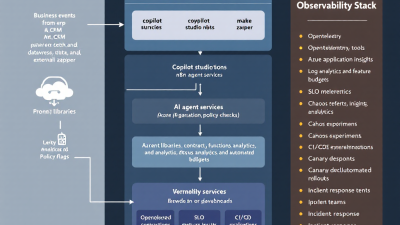
A practical AgentOps architecture for Microsoft-centric stacks has four planes:
– Experience and agents: Copilot Studio bots, Power Apps, and custom chat front ends.
– Automation and orchestration: Power Automate flows for system-to-system work; n8n/Make/Zapier for partner or SMB integrations; custom microservices for bespoke logic.
– Knowledge and data: Dataverse as a system of record, plus files and knowledge bases feeding RAG pipelines; Azure OpenAI or other LLMs.
– Observability and governance: Application Insights, Azure Monitor Logs, Power Platform CoE, Power BI, and incident management.
Key integration points:
– Correlation IDs propagate from the entry point (e.g., chat session ID) through flows and plugins. Dataverse and custom code emit telemetry to Application Insights for distributed tracing. See Microsoft’s guidance on Dataverse telemetry with Application Insights.
– Power Automate implements durable error handling, retries, and compensating actions with scopes and run-after conditions. Microsoft documents robust patterns in Power Automate error handling.
– Tenant-wide governance, inventory, and DLP policies are centralized through the Center of Excellence (CoE) Starter Kit outlined in the Power Platform CoE Starter Kit.
– Evaluation and experimentation services (for prompts, tools, and agent behavior) run offline and in production via Azure AI Studio’s Prompt flow and/or LangSmith. See Azure AI Studio Prompt flow evaluations and LangSmith observability and evaluation.
This layered approach makes it easier to define clear SLOs, implement guardrails, and roll out changes safely across multiple tools.
Defining Reliability: SLOs, Error Budgets, and Business-Level Success
Start with what reliability means to the business. The Azure Well-Architected Framework recommends measuring user-centric SLIs and governing releases with SLOs and error budgets, and designing for graceful degradation and automated recovery. Review the Azure Well-Architected Framework: Reliability. Google SRE’s approach is similar: “An error budget is 1 – SLO,” which aligns the pace of change with reliability targets. See Google SRE on SLOs and error budgets.
Practical SLO examples for AI automations:
– Task success rate: 99.3% p30d at the business step (e.g., invoice processed end-to-end).
– Escalation rate: ≤ 0.7% of tasks require human intervention.
– Latency: p95 ≤ 6 seconds for synchronous actions, p99 ≤ 2 minutes for batch flows.
– Cost per task: p95 cost ≤ $0.08 for a given automation.
– CSAT/QA: ≥ 4.6/5 quality rating on sampled agent outputs.
Error budget policy template:
– If monthly SLO is breached or remaining error budget < 25%: freeze new feature rollouts; focus on reliability improvements.
- If error budget depletion is acute (≥ 50% within a week): trigger release rollback and incident review.
- Re-open releases once the service stays within SLO for seven consecutive days.
Tie these to dashboards, alerts, and on-call runbooks so they’re not just words on a wiki.
End-to-End Tracing and Telemetry: OpenTelemetry, App Insights, and Dataverse Logs
You cannot fix what you cannot see. For Power Platform-centric stacks:
- Instrument Dataverse plugins and custom code to emit spans, logs, and metrics to Application Insights. Microsoft explains setup and correlation in Dataverse + Application Insights.
– In Power Automate, add correlation IDs at the trigger and include them in downstream HTTP headers, AI prompts, and Dataverse records. Use Compose actions to stamp and propagate IDs; store them in custom columns for traceability.
– Use tracked properties or structured Compose payloads to log key decision points (model choice, prompt version, tool calls, retry counts) to a centralized log sink (e.g., Azure Monitor Logs via an HTTP Data Collector).
– For Copilot Studio, review built-in analytics (engagement, resolution, transcripts), then export key events for cross-system correlation. See Copilot Studio analytics and monitoring.
For LLM/agent layers:
– Use Azure AI Studio’s Prompt flow for trace capture and run histories alongside offline and online evaluations, version control, and CI/CD hooks documented in Prompt flow evaluations and tracing.
– For custom agents, adopt LangSmith for step-by-step traces, dataset runs, and regression testing as described in LangSmith tracing and evaluation.
When you can follow a single business request across bots, flows, plugins, and LLM calls, you’ll diagnose incidents in minutes instead of hours.
Operational Metrics That Matter: Task Success, Escalation, Latency, CSAT/QA, Cost per Task
Create a compact scorecard that leadership and engineers both trust:
– Task success rate: Percentage of end-to-end tasks that completed without human intervention.
– Escalation rate: Portion that required manual rework or agent handoff.
– Latency: p50/p95 per step and overall.
– Quality/CSAT: Regular human-in-the-loop sampling of outputs against rubrics; include groundedness/coherence where applicable.
– Cost per task: All-in run cost including LLM tokens, API calls, and platform execution.
Azure AI Studio’s built-in evaluation metrics—groundedness, coherence, relevance—and human review loops provide a strong starting point for quality and safety scoring; see Azure AI Studio evaluation metrics. For conversational services, Copilot Studio’s analytics around session resolution and escalation rates are key; see Copilot Studio analytics.
Evaluation Harnesses: Offline Golden Sets, Rubric Scoring, and Shadow/A–B in Production
Treat your agents like products, not projects. Build an evaluation harness that supports:
– Offline golden sets: Curated inputs with expected outputs and rubrics (e.g., “Correct vendor selected,” “Tone appropriate,” “No PII leakage”).
– Automated scoring: Mix model-based metrics (e.g., groundedness/coherence) with human ratings on a sampled subset. Azure AI Studio’s Prompt flow supports both offline and online evaluations and human-in-the-loop review, per Microsoft’s documentation.
– In-production experiments: Shadow traffic to a new prompt or tool, or A/B between versions; gate rollouts on eval outcomes and error budgets. Prompt flow and LangSmith both enable experiment tracking and regression testing; see LangSmith evaluation.
Keep the harness close to CI/CD: new prompt or tool versions should run against the golden set automatically, with results published to a dashboard and used for release gating.
Guardrails and Policies: Prompt Versioning, Tool Permissions, and Data Boundaries
Guardrails prevent preventable incidents:
– Prompt versioning and approval: Maintain prompts in version control; require reviews and link each production flow or bot to a specific prompt version. Azure AI Studio supports versioning and CI/CD for prompt flows documented in Prompt flow guidance.
– Data loss prevention (DLP) and boundaries: Enforce Power Platform DLP policies via CoE and Admin Center so risky connectors can’t be used in production environments; see the CoE Starter Kit overview.
– Content safety: Apply filters, jailbreak shields, and monitoring to AI endpoints. Azure AI Content Safety provides policy controls and alerts; consult Azure AI Content Safety.
– Least privilege tool permissions: Constrain API keys, scopes, and environment variables; rotate secrets; audit connector usage regularly through CoE dashboards and environment insights.
Testing Strategy: Unit, Contract, Load, and Chaos Testing for Agents and Flows
Comprehensive testing blends software engineering and operational resilience:
– Unit tests: Validate prompt templates and tool functions with deterministic inputs; run golden set checks on PRs using Prompt flow or LangSmith evaluations cited earlier.
– Contract tests: Ensure external APIs and connectors behave as expected; catch schema changes before they hit production.
– Load tests: Simulate bursty workloads and concurrency; validate Power Automate concurrency controls and retry policies as outlined in Power Automate error handling.
– Chaos testing: Inject latency, network faults, and resource pressure into dependent Azure services to validate runbooks and auto-recovery. Azure Chaos Studio is purpose-built for this; see the Azure Chaos Studio overview.
Run chaos in pre-prod first, then controlled production experiments during low-risk windows—always with a clear abort condition and dashboards ready.
Release Engineering for AI: Rings, Canaries, Feature Flags, and Safe Rollbacks
AI changes are frequent; control the blast radius:
– Release rings and canaries: Roll out to development, test, staging, then a small production segment. For prompts/agents, use audience targeting or routing rules; for flows, deploy staged versions and enable on a subset of triggers.
– Feature flags: Toggle new tools, prompts, or safety policies on/off without redeploying.
– Pipelines and rollback: Use Power Platform Pipelines and managed solution versioning for controlled deployments; re-import the prior version to rollback rapidly. Microsoft details this in Power Platform Pipelines. For larger incidents, environment backups and restores are documented in backup/restore guidance.
– Error budgets as release gates: If the error budget is close to zero, pause rollouts; a ten-minute “fast follow” is not worth a two-day incident. Both Azure Well-Architected Reliability and Google SRE back this approach.
Incident Response: Detection, Triage, Runbooks, and Automated Mitigations
When something breaks, speed matters. Structure your response:
– Detection: Alerts on SLO breaches, sudden error spikes, unusual retries, or content safety violations.
– Triage: Assign roles—Incident Commander, Operations Lead, Communications Lead—with clear SLAs for acknowledgment and response. See PagerDuty Incident Response best practices for standardized roles and timelines.
– Runbooks: For each top failure mode (e.g., vendor API outage, LLM rate limit, connector auth expiration), document steps: check health, scale or back off, switch to fallback model or cached answers, and execute automated compensations.
– Automated mitigations: Circuit breakers for flaky providers; reroute to backup flows; disable risky prompts; reduce concurrency; or fall back to human queues.
– Post-incident review: Blameless, with action items tied to owners and due dates, feeding into the backlog.
Bake runbook steps into tooling so they’re one-click or fully automated wherever possible.
Power Platform Patterns: Telemetry in Power Automate, Copilot Studio, and Dataverse
– Power Automate: Use Scope actions plus “Configure run after” for try/catch/finally patterns, and set retries/concurrency on actions. Microsoft’s error handling guidance is the reference. Add telemetry steps to emit structured events to Azure Monitor Logs or Application Insights via an HTTP endpoint.
– Copilot Studio: Monitor session resolution, abandonment, and escalation. Review transcripts for quality drift and annotate examples for your eval harness. Refer to Copilot Studio analytics.
– Dataverse: Instrument plugins and custom actions with Application Insights telemetry for distributed tracing and performance analysis as detailed in Dataverse + App Insights.
– CoE and Admin Center: Use CoE dashboards for inventory, usage, DLP compliance, and environment insights to detect risky patterns early. The CoE Starter Kit overview explains the analytics available.
Cross-Tool Orchestration: n8n/Make/Zapier Reliability Patterns and Webhook Hardening
If your automation estate spans multiple tools, standardize resilience patterns:
– n8n: Use Execution Logs, retries, and Error Workflows to trigger notifications, compensations, or rollbacks on failure. See the n8n Error Workflow documentation.
– Make (Integromat): Configure scenario Error Handling routes and automatic retries with notifications. Refer to Make error handling.
– Zapier: Use Autoreplay for transient errors and monitor Zap run histories and alerts. See Zapier Autoreplay.
Webhook hardening tips:
– Idempotency: Require idempotency keys and dedupe on receipt to avoid double-processing.
– Retries and backoff: Use exponential backoff, jitter, and DLQs for permanent failures.
– Authentication and signatures: Validate HMAC signatures or shared secrets; rotate keys.
– Timeouts and circuit breakers: Fail fast on slow dependencies; trip breakers on elevated error rates; auto-recover with cool-downs.
– Payload contracts: Version payloads and implement contract tests to catch breaking changes early.
Cost and Performance Controls: Caching, RAG Quality, Model/Tool Selection, and Rate Limits
Control variance before it controls you:
– Caching and memoization: Cache stable answers, embeddings, and expensive tool results; enforce TTLs; bias to reuse under load.
– RAG quality: Use high-quality chunking, metadata, and retrieval evaluation; monitor groundedness and hallucination rates with Prompt flow evaluations, per Azure AI Studio guidance.
– Model/tool selection: Route by complexity and price-performance (e.g., small model for simple tasks; larger for long context). Track cost per task on dashboards.
– Throttling and rate limits: Respect provider quotas; apply per-tenant or per-flow limits to avoid brownouts.
– Parallelism with limits: Increase throughput carefully; cap concurrency in Power Automate actions where applicable, as covered in Microsoft’s handling errors and retries.
Security and Compliance, Pragmatically: Audit Trails without Slowing Delivery
Make compliance a feature:
– Audit trails: Persist who changed what and when for prompts, connectors, and flows. Link version IDs to deployments and incidents.
– Data governance: Enforce environment separation (Dev/Test/Prod), DLP policies via CoE, least-privilege connectors, and content safety monitors. See the CoE Starter Kit and Azure AI Content Safety.
– Secrets management: Centralize secrets, rotate regularly, avoid embedding keys in flows or prompts.
– Access reviews and approvals: Require sign-offs for moving prompts/flows between environments via Pipelines; rollback plans are a compliance win, not just an ops tool per Power Platform Pipelines and environment backup/restore.
Dashboards and Alerts: Building SLO Views in Azure Monitor and Power BI
Turn telemetry into decisions:
– Azure Monitor/App Insights: Ingest logs and metrics from Dataverse plugins, Power Automate, AI evaluations, and content safety. Create alerts on SLO thresholds, anomaly spikes, and dependency health. See Dataverse + App Insights.
– Power BI SLO dashboard:
– Service health: Task success, escalations, latency p95, cost per task.
– Quality: Groundedness/coherence; human QA pass rate from Prompt flow or LangSmith runs.
– Release status: Current prompt/flow versions and flags.
– Error budget burn-down by week.
– CoE views: Track connector usage, DLP violations, orphaned flows, and environment drift via the CoE Starter Kit analytics.
Ensure alerts route to the right channels—Teams for heads-up, PagerDuty or equivalent for paging—and include runbook links.
SMB-Friendly Starter Kit: Minimal Viable AgentOps on a Budget
If you’re an SMB, start small and compound:
– Observability:
– Power Automate: Add basic telemetry steps to post run results to a central Log Analytics workspace.
– Copilot Studio: Use built-in analytics; export key events monthly to Power BI.
– SLOs: Track just three SLIs to start: task success, latency p95, and escalation rate; review weekly.
– Evaluations: Maintain a 20–50-item golden set; run Prompt flow offline evals on each change using Azure AI Studio.
– Error handling: Implement Scope try/catch in Power Automate with retries, plus a fallback route; see Power Automate error handling.
– Incident process: One-page runbook; Teams channel alerts; 24-hour response SLA.
– Governance: CoE Starter Kit light—inventory flows monthly, enforce a basic DLP policy as recommended in the CoE Starter Kit.
This gets you 80% of the benefit with minimal overhead, and it scales as you grow.
Case Snapshot: Reducing Incident MTTR for an AI-Driven Ops Workflow
A mid-market logistics firm used a Copilot to triage customer emails and trigger Power Automate flows to update Dataverse and notify carriers. Incidents often took hours to diagnose.
What changed:
– Correlation IDs: Added a conversation_id to every message and propagated it across flows, Dataverse updates, and AI calls.
– Error handling: Implemented Scope try/catch, retries, and a compensating “queue to human” branch per Microsoft’s error handling.
– Telemetry: Emitted structured events to Application Insights from Dataverse plugins; created Azure Monitor alerts on escalation spikes using Dataverse + App Insights.
– Evaluation harness: Weekly offline evals using Prompt flow groundedness/coherence scoring with spot human review, as in Prompt flow evaluations.
– Runbooks and rollback: Defined “LLM rate limit” and “carrier API outage” runbooks; added feature flags to switch to a lighter model and a cached FAQ set.
Results:
– MTTR dropped from 2 hours to 18 minutes.
– Escalation rate fell from 3.1% to 0.9%.
– Cost per task reduced by 22% via smarter model routing and caching.
Leadership didn’t just see fewer incidents—they saw reliable, explainable operations.
Implementation Checklist and Templates
Use this as your rollout companion:
– SLOs and error budgets
– Define SLIs: task success, escalation, latency p95, cost per task, QA score.
– Set SLO targets and budget policy; publish in Confluence/SharePoint.
– Telemetry and tracing
– Establish correlation IDs end-to-end.
– Emit events from Dataverse plugins to App Insights; centralize Power Automate run logs.
– Create Azure Monitor alerts on SLO and anomaly thresholds.
– Evaluation harness
– Build a golden set; automate offline evals in Prompt flow; track results over time.
– Enable shadow/A–B for new prompts and tools; gate releases on eval outcomes.
– Guardrails
– Version prompts; require approvals.
– Enforce DLP policies and least privilege via CoE; enable content safety filters.
– Testing
– Unit and contract tests on PR; basic load test monthly; chaos drill quarterly with Azure Chaos Studio.
– Release engineering
– Adopt Power Platform Pipelines; ring-based rollouts; maintain a rollback plan using Pipelines and environment backup/restore.
– Incident response
– Define roles, SLAs, and runbooks; conduct monthly tabletop drills; follow PagerDuty best practices.
– Dashboards
– Build Power BI SLO dashboard; integrate Prompt flow and Copilot Studio metrics; surface error budget burn-down.
– SMB starter kit
– Minimum viable telemetry, SLOs, and runbooks; grow over time.
Templates you can copy:
– SLO policy: “Service X will maintain 99.3% monthly task success and p95 latency ≤ 6s. Error budget 0.7%. If budget burn ≥ 50% in a week, pause releases and initiate reliability sprint.”
– Incident runbook: Trigger, detection signals, roles, diagnostics steps, mitigations (flags, fallbacks), comms, exit criteria, post-incident tasks.
– Eval rubric: Correctness, groundedness, tone, PII safety, escalation necessity; 1–5 scale; pass if ≥ 4 on all criteria.
– Release checklist: Tests passed, eval score delta ≤ 2%, error budget ≥ 50%, rollback validated, alerts updated.
Companion LinkedIn Summary: Key Takeaways and Call-to-Action
Headline: AgentOps for AI Automation: From Flashy Demos to Durable Production
AI agents and automations won’t earn trust without reliability. In our new playbook, we show how to operationalize Power Platform and AI workflows with SLOs/error budgets, end-to-end tracing, offline and in-prod evaluations, chaos testing, and incident runbooks. We cover Power Automate, Copilot Studio, Dataverse, and cross-tool patterns for n8n/Make/Zapier—plus release rings, feature flags, and safe rollbacks. The result: measurable reliability, lower cost per task, and faster MTTR.
Top takeaways:
– Define business-aligned SLOs; govern change with error budgets.
– Instrument everything—Dataverse to prompts—with correlation IDs and App Insights.
– Use Prompt flow/LangSmith for golden sets, shadow traffic, and regression tests.
– Harden flows with scope-based retries, fallbacks, and compensating actions.
– Operationalize incident response with dashboards, alerts, and runbooks.
Ready to make your AI operations boring—in the best way? Let’s talk about deploying an AgentOps starter kit tailored to your Power Platform and automation stack.
Citations and Further Reading
– Azure AI Studio Prompt flow evaluations, tracing, CI/CD: Microsoft documentation
– Power Automate error handling, retries, concurrency: Microsoft documentation
– Power Platform CoE Starter Kit (analytics, governance): Microsoft CoE Starter Kit overview
– Azure Well-Architected Framework – Reliability: Microsoft guidance
– Azure Chaos Studio for resilience validation: Microsoft overview
– Azure AI Content Safety: Microsoft documentation
– Dataverse observability with Application Insights: Microsoft documentation
– Google SRE: SLOs and error budgets: SRE Book
– PagerDuty Incident Response practices: PagerDuty guide
– n8n Error Workflows: n8n docs
– Make (Integromat) error handling: Make Help Center
– Zapier Autoreplay: Zapier Help
– Copilot Studio analytics: Microsoft documentation
– Power Platform Pipelines and backup/restore: Pipelines and Backup/Restore
– LangSmith for LLM tracing and evaluation: LangSmith docs
– Cost of downtime statistic: ITIC 2023 report
About B. Cobra Systems, LLC
We help organizations ship reliable AI agents and automation on Microsoft Power Platform and beyond. From SLOs and telemetry to eval harnesses and incident runbooks, our AgentOps accelerators make AI operations measurable—and boring—in the best way. Reach out to tailor this playbook to your stack.






