
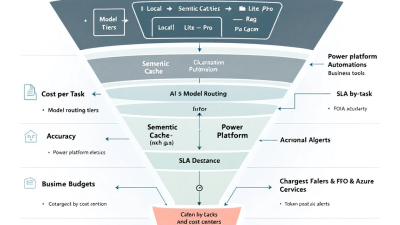
Title: FinOps for Autonomous AI Systems: Unit Economics and Cost Guardrails for Intelligent Automation
Executive Summary (LinkedIn-ready TL;DR)
– AI is moving from pilots to production. Treat your AI agents like revenue-generating products with unit economics: cost-per-successful-task and cost-per-minute-saved.
– Set budget guardrails at the token, workflow, and environment level: token quotas, maximum reasoning depth, timeouts, and stop conditions.
– Route work across a tiered model stack and cache aggressively. Combine scoped RAG, semantic caching, prompt hygiene, and tool-call batching to cut spend 20–50% without hitting SLAs.
– Instrument everything: tokens, latency, accuracy, and failure reasons per run. Use Azure Monitor, Dataverse, Cost Management, and Power BI to create showback/chargeback.
– Adopt a 30/60/90-day playbook to roll out FinOps: define KPIs, implement guardrails, and publish dashboards. Programs using FinOps practices commonly unlock 20–30% cloud savings while improving accountability and governance (FinOps State of FinOps).
Why AI FinOps Now: From Experiments to Production Outcomes
The economics of AI-driven automation can swing wildly between a great deal and a budget surprise. As generative AI moves from experimentation into core processes, finance leaders need predictability, and engineering leaders need safety rails that preserve accuracy and SLAs.
FinOps provides a common language to align engineering choices to business value. The discipline encourages teams to establish unit economics (e.g., cost per prediction, cost per successful task) and trace spend to outcomes and KPIs, not just infrastructure line items (FinOps for ML). Mature programs report 20–30% savings through rightsizing, governance, and accountability—savings you can reinvest into quality and velocity (FinOps State of FinOps).
Unit Economics for Autonomous AI: Measuring Cost per Outcome
Treat every agent-run like a miniature P&L.
Core formulas:
– Cost per successful task = Total agent cost / Count of tasks marked successful (measured against a defined success rubric)
– Cost per minute saved = Total agent cost / Minutes saved (baseline time – automated time)
– Cost to accuracy ratio = Total agent cost / Aggregate accuracy score (weighted by business criticality)
– $/completed workflow = Total workflow cost / Count of completed workflows (including human-in-the-loop steps)
Input costs:
– Token costs per 1,000 tokens by model family and tier (prompt + completion), priced by Azure OpenAI (Azure OpenAI pricing)
– Power Automate per-run or capacity-based charges (Power Automate pricing)
– Storage, retrieval, and vector DB costs (for RAG and caching)
– Engineering/operations overhead (percent allocation)
– Human-review costs (minutes per review x loaded labor rate)
Output/benefit measurement:
– Minutes saved per task (validated with time-and-motion samples)
– Error rate reduction and rework avoided
– Cycle-time reduction, SLA compliance rate (e.g., same-day processing)
– Business outcome value (e.g., faster quote-to-cash)
Benchmarks and context:
– Leading automation programs quantify value as “cost-per-minute-saved” and track time saved, error rates, and cost-to-serve (Gartner hyperautomation metrics).
– Early enterprise results show 10+ minutes saved per task and 29% faster completion in targeted workflows—use these as directional baselines for your business case (Microsoft Copilot Early Access results).
– FinOps guidance emphasizes cost-per-inference/prediction as a foundational unit metric—extend it to cost-per-successful-task for agentic workflows (FinOps for ML).
Map Business Outcomes to SLAs, Accuracy Targets, and Spend Caps
Start with the business outcome (e.g., reduce invoice processing time by 50%). Then specify:
– SLA: e.g., 95% of invoices processed within 4 hours
– Accuracy: e.g., 98% field extraction accuracy on critical fields
– Spend caps: e.g., max $0.35 per invoice and $7,500/month for the department
Use SRE-style SLOs and error budgets to formalize acceptable failure rates and guide spending decisions: invest when you are burning error budget; optimize when you’re not (Google SRE SLOs). Tie each SLA/accuracy target to specific guardrails (token caps, maximum number of tools called, timeouts) so engineering choices remain finance-aligned.
Reference Architecture: Power Platform + Azure for Cost-Managed Agents
A pragmatic, enterprise-grade pattern for SMBs and mid-market:
Core components:
– Power Automate for orchestrating workflows and approvals
– Power Apps for business-facing interfaces
– Power Virtual Agents (Copilot Studio) for conversational entry points
– Dataverse as the operational data backbone (runs, costs, metadata, cost centers)
– Azure OpenAI for model inference, managed via Azure AI Studio (Prompt Flow, evaluations, safety)
– Azure Monitor and Application Insights for telemetry (tokens, latency, errors)
– Azure Cost Management + Billing for budgets, alerts, and allocation
– Power BI for FinOps reporting and showback/chargeback dashboards
– Azure API Management as the governed front door for AI services
– Optional Azure Functions/Logic Apps for custom middleware and tool adapters
Why this stack:
– Azure AI Studio provides prompt flow, evaluations (quality, cost, latency), trace data, and safety checks to measure model performance and cost across the lifecycle (Azure AI Studio evaluations).
– Azure Monitor and Application Insights capture token usage, latency, and errors; logs can be analyzed in Log Analytics for cost and performance insights (Monitor Azure OpenAI).
– Azure Cost Management supports budgets, alerts, cost allocation, and exports—critical for enforcing guardrails and chargeback (Azure Cost Management).
– This pattern aligns with Microsoft’s reference architectures for governed, observable generative AI on Azure (Azure gen AI reference architectures).
Instrumentation & Telemetry: Token, Latency, Accuracy per Run
What to log per run (Dataverse schema):
– Request: agent ID, model, version, prompt hash, tools used, RAG corpus version, requested SLA
– Usage: input tokens, output tokens, total tokens, tool calls, latency (p50/p95), retries
– Outcomes: success/failure, accuracy score (task-specific rubric), human review minutes, minutes saved, error category
– Cost: model cost, Power Automate run cost, storage/vector cost, total cost-per-run
– Finance: cost center, project, department, tags for allocation
How to capture:
– Emit tokens, latency, and errors from Azure OpenAI to Application Insights and Log Analytics via Azure Monitor (Monitor Azure OpenAI).
– Use Azure AI Studio evaluations to run periodic tests that measure quality, cost, and latency; store eval results in Dataverse alongside production metrics (Azure AI Studio evaluations).
– Use the Power Platform CoE Starter Kit for environment analytics, DLP policy visibility, and automation telemetry (Power Platform CoE).
Budget Guardrails: Token Quotas, Max Reasoning Depth, Timeouts, and Stop Conditions
Enforce hard stops and soft ramps:
– Token budgets: per-run token cap (e.g., 12k), per-day per-agent token quota (e.g., 15M), and per-environment monthly ceiling tied to Azure budgets
– Reasoning depth: limit tool invocation count, step depth, and recursion; set max chain length for planner/executor patterns
– Timeouts and stop conditions: hard timeouts per call (e.g., 20s), per-run SLA cutoff (e.g., 90s), abort patterns on cascading tool errors
– Retry strategy: capped, exponential backoff—log retries separately to surface noisy workflows
– Rate limits: align to Azure OpenAI limits; use API Management to throttle bursts and protect budget
– Human-in-the-loop: when a run crosses guardrails (token or time threshold), route to an approval step in Power Automate and downgrade model or pause
Why this works:
– Predictable ceilings are achievable because Azure OpenAI uses published per-1,000 token pricing and enforces rate/token limits that can be modeled up-front (Azure OpenAI pricing).
– Azure Cost Management budgets/alerts enforce environment-level caps and early warnings (Azure Cost Management).
Model Routing Strategy: Tiered Models, Confidence Thresholds, and Task Complexity
Adopt a cascade:
– Tier 0: cache check (semantic cache and deterministic templates)
– Tier 1: small/fast model for simple intents, summaries, and deterministic transforms
– Tier 2: medium model with tools (RAG, extraction, code)
– Tier 3: large/advanced model for ambiguous, critical tasks or when confidence is low
Routing signals:
– Confidence thresholds from classifier or evaluator models
– Task complexity score: prompt length, entity count, tool needs
– SLA tier: criticality determines permissible upgrade to Tier 3
– Budget remaining: avoid expensive routes when nearing budget ceilings
This approach is a proven pattern to reduce cost with minimal quality loss (Model routing and cascading). Calibrate thresholds with Azure AI Studio evaluations so routing choices are backed by quality/cost evidence (Azure AI Studio evaluations).
Cost-Reduction Tactics: Semantic Caching, Scoped RAG, Tool-Call Batching, and Prompt Hygiene
– Semantic caching: store prior Q/A pairs and reuse when similarity exceeds a threshold (e.g., cosine > 0.9). Studies show 30–70% token savings depending on workload (Semantic caching).
– Scoped RAG: restrict retrieval to the smallest relevant corpus; chunk and index with domain-specific metadata; cap top-k; use short citations rather than full documents.
– Tool-call batching: group related extraction or enrichment calls; prefer vectorized operations where possible to avoid many small tool invocations.
– Prompt hygiene: compress system prompts, remove redundant instructions, favor structured outputs (JSON schema) to cut verbose completions. Version and hash prompts to prevent prompt sprawl.
– Deterministic preprocessors: use rules/regex or Power Automate expressions before invoking the model to reduce token-heavy tasks.
– Response reuse TTLs: cache stable outputs (policies, FAQs) with appropriate time-to-live; invalidate on source updates.
Chargeback/Showback: Dataverse Tags, Cost Centers, and Power BI FinOps Reporting
– Tagging and allocation: enforce Azure tags (CostCenter, Product, Environment, Owner) and Dataverse columns for the same. Use allocation rules for shared services and distribute costs based on usage or headcount. This is a core FinOps capability as organizations mature from showback to chargeback (Allocation and shared costs).
– Power Automate metering: combine per-run metering and capacity utilization from the Admin Center/CoE with Azure usage to calculate $/run and $/workflow (Power Automate pricing; Power Platform CoE).
– Power BI dashboards: publish showback by department/product, $/successful task, $/minute saved, and anomaly flags. Provide trend lines and budget burn-downs from Azure Cost Management exports (Azure Cost Management).
Monitoring & Alerts: Budgets, Anomaly Detection, Drift, and Runbooks
– Budgets and alerts: set monthly and daily budgets per environment; alert at 50/80/100%. Auto-scale routing tiers down when hitting 80%.
– Anomaly detection: use Log Analytics queries and Power BI to detect sudden token spikes, latency regressions, and accuracy drops.
– Data and prompt drift: schedule weekly evaluations in Azure AI Studio; compare quality/cost deltas over time (Azure AI Studio evaluations).
– Runbooks: document incident categories (budget breach, accuracy regression, latency spike), playbooks, owners, and communication templates. Integrate with Power Automate for on-call notifications and safe degradations.
SLA-Aware Degradation: Graceful Fallbacks Without Breaking Business Processes
When guardrails trigger, degrade gracefully:
– Lower tier model or shorter context window
– Skip non-critical enrichment steps
– Switch from generative to lookup templates for common intents (cache-first)
– Route to human review step with prefilled data and suggested actions
– Queue non-urgent tasks to off-peak windows
Tie degradation to SLOs and error budgets so you don’t spend premium dollars when the business impact is low (Google SRE SLOs).
Governance in Microsoft Power Platform: Environments, DLP, Connectors, and Human Approvals
– Environment strategy: separate Dev/Test/Prod; isolate high-risk/regulated workloads.
– DLP policies: restrict connectors, enforce approved data flows, and require human approvals for external calls.
– CoE Starter Kit: monitor makers, solutions, and flows; build insight into usage and enforce standards at scale (Power Platform CoE).
– Access and secrets: use Azure Key Vault; manage API keys via environment variables.
– Human approvals: integrate Power Automate approvals for edge cases, escalations, and spend thresholds.
Playbook for SMBs: Crawl–Walk–Run Implementation (30/60/90 Days)
Days 1–30 (Crawl): Prove value and set the meter
– Choose 1–2 high-volume, medium-complexity use cases (e.g., email triage, invoice extraction).
– Define unit economics baselines and success rubrics; establish token and time guardrails.
– Instrument tokens, latency, outcomes to Dataverse; set Azure budgets and alerts.
– Publish a simple Power BI dashboard for showback.
– Establish environment and DLP policies with CoE.
Days 31–60 (Walk): Industrialize and optimize
– Introduce model routing tiers and semantic caching.
– Add scoped RAG and batch tool calls; compress prompts.
– Implement chargeback-ready tagging and cost allocation rules.
– Schedule Azure AI Studio evaluations; run A/B tests to calibrate thresholds.
– Create runbooks for budget/quality incidents; add on-call alerts.
Days 61–90 (Run): Scale and govern
– Expand to 3–5 processes; incorporate human-in-the-loop for critical decisions.
– Publish department-level chargeback in Power BI; negotiate budgets with owners.
– Integrate anomaly detection and drift monitoring; tune degradation strategies.
– Conduct a FinOps review; expect 20–30% savings from governance and optimization (FinOps savings benchmarks).
KPIs & Dashboards: Cost-to-Accuracy, $/Completed Workflow, $/Minute Saved
– Cost-per-successful-task (p50/p95; by model tier and process)
– Cost-per-minute-saved and ROI = (minutes saved x loaded labor rate – total cost) / total cost
– SLA attainment % and error budget burn rate
– Accuracy score trend vs. cost trend (target: stable or improving accuracy at flat/falling cost)
– Token intensity per run and cache hit rate
– Chargeback by cost center and product; budget burn-down
Reference visuals:
– Waterfall from tokens → model cost → total cost-per-run
– Heatmap of workflows by cost-to-accuracy ratio
– Routing mix (Tier 1/2/3) vs. spend
Risks & Anti-Patterns: Prompt Sprawl, Unbounded Tools, and Invisible Shadow Costs
– Prompt sprawl: unversioned, duplicated prompts drive inconsistent cost/quality. Hash and version every prompt; maintain a prompt catalog.
– Unbounded toolchains: recursive planners without depth limits lead to runaway tokens. Cap steps, retries, and tools.
– Over-RAG: indiscriminate retrieval increases tokens and confusion. Scope indices and set conservative top-k.
– Lack of telemetry: no token/latency/accuracy logging means no control. Instrument early.
– Free pilot trap: moving pilots to production without guardrails creates budget shock. Require budget and SLA readiness to go live.
– Invisible overhead: human review time and Power Automate runs are real costs; include them in unit economics.
Implementation Checklist and Reference Templates
– Governance
– Environments: Dev/Test/Prod created; DLP policies applied
– Access: service principals, Key Vault for secrets
– CoE Starter Kit deployed and configured
– Telemetry and data
– Dataverse tables: Runs, Costs, Outcomes, CostCenters, Models, Prompts
– Logging: tokens, latency, outcomes, accuracy, minutes saved
– Azure Monitor + Log Analytics connected to Azure OpenAI
– Guardrails
– Token caps per run and per agent/day; environment budget in Azure Cost Management
– Max reasoning depth, retries, timeouts; stop conditions defined
– Degradation and escalation rules implemented in Power Automate
– Optimization
– Semantic cache with TTL; cache hit logging
– Model routing thresholds; scoped RAG indices and top-k
– Prompt catalog with versions and hashes; JSON schemas for outputs
– Financials
– Azure tags and Dataverse fields for allocation
– Power BI FinOps dashboard: showback, budget, KPIs
– Chargeback policy documented with allocation rules
– Templates
– Runbook for budget breach, accuracy regression, latency spike
– Evaluation suite in Azure AI Studio with baseline datasets
– Business case template for $/minute-saved and ROI
Reference Architecture Notes (operations)
– Use Azure API Management to mediate model access and enforce quotas across agents.
– Leverage Azure AI Studio prompt flow for end-to-end traceability and repeatable evaluations (Azure AI Studio evaluations).
– Export Azure Cost Management data daily; join to Dataverse runs for $/run analytics (Azure Cost Management).
– Monitor Azure OpenAI usage and errors in Azure Monitor; alert on token spikes and error rates (Monitor Azure OpenAI).
– Follow Microsoft architectural patterns for gen AI governance and observability (Azure gen AI reference architectures).
Concrete Example: Cost-Per-Outcome Calculation
– Baseline: human processes 1,000 tickets/month at 4 minutes each = 4,000 minutes
– Agent results: 80% auto-resolve, 20% human assist; average agent tokens/run 1,800; model cost $0.002 per 1K input and $0.002 per 1K output (illustrative—check current pricing, which is published per 1K tokens by Azure OpenAI) (Azure OpenAI pricing)
– Monthly tokens: ~1.8M; model cost ≈ $3,600 if using a premium model; reduce by 50% with routing and caching to ≈ $1,800
– Power Automate runs: 1,000 at $0.05 = $50 (PAYG example; validate your plan) (Power Automate pricing)
– Total cost ≈ $1,850; minutes saved: 3,200; cost-per-minute-saved ≈ $0.58
– If loaded labor rate is $1.00/minute, value created ≈ $3,200; ROI ≈ 73% before quality benefits. Further savings via semantic caching (30–70% token reduction potential) (Semantic caching)
Note: Replace with your actual token prices and routing mix; the method is what matters.
How B. Cobra Systems Can Help: Assessments, Guardrail Kits, and Managed FinOps
– FinOps for AI Assessment: 2–3 week engagement to baseline unit economics, map SLAs and spend caps, and produce a roadmap aligned to finance.
– Guardrail Implementation Kit: deployable blueprints for token quotas, timeouts, routing tiers, semantic caching, and scoped RAG—integrated with Power Automate, Dataverse, Azure Monitor, and Cost Management.
– KPI and Chargeback Accelerator: Power BI dashboards, Dataverse schema, Azure tagging strategy, and allocation rules for showback/chargeback.
– Evaluation and Drift Ops: Azure AI Studio evaluation pipelines, benchmark datasets, and governance to keep accuracy high at flat or lower cost.
– Managed FinOps Service: ongoing monitoring, anomaly detection, budget management, and quarterly optimization reviews. Programs adopting FinOps disciplines commonly realize 20–30% savings and stronger accountability (FinOps State of FinOps).
Final Thought
Autonomous AI is only as valuable as its outcomes at a predictable cost. With disciplined unit economics, platform-native guardrails, and transparent reporting, CFOs and CIOs can scale AI agents confidently—meeting SLAs and accuracy targets while keeping spend on a tight, well-governed leash. Align the tech to the ledger, and the results will follow.






