
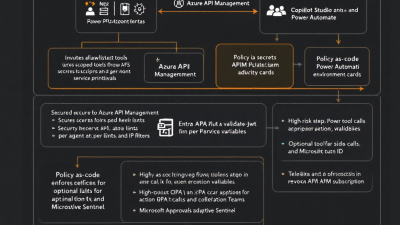
Zero-Trust for AI Agents on Microsoft Power Platform: Identity, Secrets, and Policy-as-Code for Autonomous Workflows
Why Zero-Trust for AI Agents on Power Platform (and why now)
AI agents are no longer cute prototypes; they initiate purchases, generate records, update contracts, and trigger downstream automations. The more capable they become, the more their mistakes and compromises can cost. Zero Trust is the operating model that meets this moment: it rejects implicit trust, requires continuous verification, and limits every action to the least privilege necessary. NIST defines it plainly: no implicit trust from network location, and authentication and authorization must be evaluated explicitly and separately before accessing resources (NIST SP 800‑207). Microsoft’s implementation aligns to three tenets—verify explicitly, use least‑privilege access, and assume breach—that translate cleanly into guardrails for Power Platform and AI agents (Microsoft Zero Trust overview).
In practical terms: every agent has its own identity; every connector call is scoped and verified; every secret lives outside the workflow; every risky action gets a human checkpoint; every decision is logged; and at any time, you can flip a kill switch to contain blast radius. This guide shows how.
Threat model: prompt injection, tool misuse, data exfiltration, lateral movement
AI agents amplify both productivity and risk. Model your threats before you ship:
– Prompt injection: Malicious input instructs an agent to ignore policy and call prohibited tools. Impact: unauthorized spend, configuration drift, or data leaks.
– Tool misuse: Legitimate connectors invoked in the wrong context (e.g., agent submits a purchase order from a test environment to production ERP).
– Data exfiltration: Agents read sensitive Dataverse tables and post snippets to external APIs or chats.
– Lateral movement: Compromised connection or key lets an attacker pivot from one API to others, or from dev to prod.
– Replay and impersonation: Unsigned or unvalidated tool calls allow replay of a prior approved action.
– Shadow automation: Untracked flows or unmanaged connectors bypass governance and logging.
Zero Trust doesn’t eliminate these threats—it boxes them in so the inevitable incident is small, observable, and recoverable.
Core principles: least privilege, explicit verification, separation of duties, assume breach
– Least privilege: Give agents only the permissions and API scopes they need for the current task and no more. Never accept “full control” for convenience.
– Explicit verification: Every call is authenticated and authorized with scoped tokens and runtime validation. No reliance on “internal network” or implicit trust. See NIST’s emphasis on discrete authZ/authN functions (SP 800‑207).
– Separation of duties: Design workflows so the agent proposes high‑impact changes and a human approves them; approvals log to auditable systems.
– Assume breach: Expect keys will leak and identities will be compromised; build throttles, kill switches, and monitoring to constrain fallout—core to Microsoft’s Zero Trust guidance (verify explicitly, least‑privilege, assume breach).
Identity patterns: Entra ID app registrations, service principals, managed identity per agent
Identity is the root of Zero Trust. Concretely:
– App registrations and service principals: Expose your backend APIs as Microsoft Entra applications with defined scopes and app roles. Each AI agent or connector uses its own application registration or client to separate permissions and logs. Design narrow, task‑based scopes and app roles to avoid broad access (Scopes and app roles).
– Managed identity per agent or tool runner: Where the agent calls Azure services (Functions, Logic Apps, Service Bus, Storage), use managed identities for secretless authentication and simple, revocable RBAC (Managed identities overview). Assign a distinct managed identity per agent or per high‑risk tool to isolate blast radius.
– Connection isolation across environments: Use separate app registrations and managed identities per environment (Dev/Test/Prod). Never reuse a dev client ID/secret in prod.
– Conditional Access for non‑headless flows: For agent actions that run with user context (delegated permissions), enforce step-up conditions or device compliance on the user’s session.
Outcome: every workflow and tool invocation is traceable to a discrete identity with least privilege baked in.
Token-scoped connectors: OAuth scopes, minimal APIs via Azure API Management, consent boundaries
Custom connectors are the hands of your agent. Make those hands safe:
– Expose minimal APIs behind Azure API Management (APIM): Design “thin” APIs that expose only approved tool actions as routes (e.g., /po/create, /invoice/read). Place APIM in front to enforce auth, policy, and throttles.
– OAuth 2.0 with scoped tokens: Define fine‑grained delegated scopes and application roles in your Entra app so tokens can be scoped per connector and per operation (Scopes vs app roles). In APIM, reject tokens missing required scopes.
– Consent boundaries: Use separate app registrations for sensitive domains (finance, HR). Make connections in Power Platform environments with least privilege and environment‑specific consent, not tenant‑wide.
– Short‑lived tokens: Favor short token lifetimes and rotate client secrets/keys regularly; better yet, prefer managed identities or client certificates over client secrets where possible.
Result: the connector cannot call what the token doesn’t permit, and APIM refuses anything outside the contract.
Secrets and rotation: Azure Key Vault + Power Platform environment variables, automated rotation runbooks
Secrets don’t belong in flows or code. Store them centrally and rotate often:
– Central storage: Put API keys, certificates, and client secrets in Azure Key Vault. Follow best practices: enable soft delete and purge protection, use RBAC with managed identities, and segregate vaults by environment (Key Vault best practices).
– Access without secrets: Where possible, switch automation to managed identity and remove secrets entirely (Managed identities).
– Power Platform integration: Reference secrets via a secure custom connector or a small Azure Function fronted by APIM that reads from Key Vault at runtime. Use Power Platform environment variables to parameterize endpoints and secret identifiers so solutions deploy cleanly across environments.
– Automated rotation: Use Azure Automation or Functions as rotation runbooks that:
1) Create a new secret version.
2) Update dependent configurations or APIM named values.
3) Verify liveness via a health check.
4) Retire the old version on a schedule.
Net effect: compromise windows shrink, and rollovers are routine rather than emergencies.
Signed tool-use: JWT/HMAC verification, allowlisted functions, APIM validate-jwt and check-header policies
Prompt injection is inevitable. Signed tool-use ensures that even if an agent “wants” to do something dangerous, the platform refuses unless the call is cryptographically valid and contextually allowed.
– Sign every tool call: Have the caller produce a detached signature (HMAC or JWT) over critical fields (action name, parameters, timestamp, nonce, correlation ID). Include a short TTL to deter replay.
– Verify at the edge in APIM: Use the validate-jwt policy to check issuer, audience, and required claims (including scp/roles), and use check-header or custom policy expressions to validate HMAC, timestamps, and nonces. Reject any call missing the correct scope or signature.
– Enforce an allowlist: Maintain the definitive list of permitted functions and parameter constraints in APIM policies (or an external policy engine—see next section). If the action isn’t on the allowlist, it doesn’t run.
– Anti‑replay and idempotency: Require unique nonces and enforce idempotency keys per action; cache seen nonces at APIM or backend for the TTL.
This is least privilege in motion: valid token, valid signature, valid action, valid time—otherwise, no dice.
Policy-as-code guardrails: OPA/Rego, APIM policies-as-code, Power Platform DLP, Purview sensitivity labels
Static scopes aren’t enough; context matters. Externalize guardrails:
– OPA/Rego for dynamic decisions: Use Open Policy Agent as an authorization service to decide allow/deny for each tool call based on attributes (actor, environment, sensitivity, risk score). OPA exposes HTTP APIs that APIM can call inline to fetch a policy decision (OPA HTTP API authorization). Example: deny “create PO” after business hours unless a human approval token is present.
– APIM policies-as-code: Keep APIM policy XML, named values, and backends in Git. Deploy via CI/CD so changes are reviewable and auditable. Treat policies like application code with PRs and tests.
– Power Platform DLP policies: Block connectors that egress data to untrusted services; separate business vs non‑business connectors; scope DLP by environment to avoid accidental data movement.
– Purview sensitivity labels: Label data sources and propagate those labels into Dataverse and downstream analytics. Policies can then read labels to require approvals or deny high‑sensitivity operations.
Outcome: business rules live in code, not in tribal memory, and they evolve safely through peer review.
Human-in-the-loop: Power Automate Approvals, Teams adaptive cards, risk-based approval gates
Autonomy is great—until it isn’t. Insert humans where risk warrants:
– Approvals in Power Automate: Use out‑of‑the‑box Approvals to capture decisions with full history stored in Dataverse (Approvals overview).
– Teams adaptive cards: Present context‑rich requests (diffs, totals, linked records, PII indicators) right where approvers live. Include an “elevated reason” field for auditability.
– Risk‑based gates: Drive whether to require approval based on OPA/telemetry signals—e.g., high amount, unusual vendor, data sensitivity, or after-hours execution. Approvals produce a signed token or code that the agent must include in its subsequent tool call, which APIM verifies.
This converts scary actions into safe, accountable ones without crushing velocity.
Audit trails and telemetry: Dataverse auditing, correlation IDs, App Insights + Azure Monitor + Microsoft Sentinel
You can’t defend what you can’t see.
– Dataverse auditing: Enable table and field auditing for sensitive records; link approval records to the actions they authorize.
– Correlation IDs everywhere: Generate a correlation ID at the start of each agent run. Pass it through Power Automate, custom connectors (as headers), APIM, and backends so logs stitch into a single trace.
– APIM to Azure Monitor: Configure APIM diagnostics to emit request/response logs, metrics, and policies to Azure Monitor (Log Analytics) for centralized visibility (Monitor APIM with Azure Monitor). Add Application Insights to backend services for dependency and trace telemetry.
– SIEM integration: Stream logs to Microsoft Sentinel for detection analytics, UEBA, and incident response. Correlate anomalies such as repeated denied tool calls, spikes in throttling, or out‑of‑policy approvals.
When something goes wrong, you’ll know what, when, who, and how—fast.
Kill switches and blast radius limits: feature flags, APIM throttles, token revocation, disable flows/solutions
Assume breach. Design containment:
– Feature flags: Wrap risky agent capabilities behind flags (e.g., Azure App Configuration). Turn off problematic tools without redeploying.
– APIM throttles and quotas: Apply per‑client rate limits and burst controls to keep spend and damage bounded.
– Subscription keys and revocation: If connectors authenticate to APIM with subscription keys, disable or regenerate keys instantly to cut access (APIM subscriptions).
– Token and identity kill: Disable or restrict the service principal/managed identity used by the agent; remove app role assignments.
– Power Platform controls: Disable specific flows, turn solutions off, or set environment lockdown policies to stop execution quickly.
Containment shouldn’t require a war room—flip, revoke, done.
Reference architecture: end-to-end secure agent execution on Power Platform
Picture the flow:
1) A user prompt triggers an agent flow in Power Automate. The run generates a correlation ID.
2) The agent decides it needs to perform “Create PO.” It requests a signed tool token from a signing service that uses the agent’s managed identity. The token embeds action, parameters hash, nonce, and TTL.
3) The agent calls a custom connector that points to APIM. The connector uses OAuth to obtain a scoped token with the “PO.Create” scope.
4) APIM inbound policies execute in order:
– validate-jwt checks issuer, audience, and scope scp=PO.Create (validate-jwt).
– check-header and policy expressions verify the signed tool token, timestamp, and nonce.
– A send-request calls OPA with context (actor, environment, amount, sensitivity) to get an allow/deny decision (OPA authorization).
– If high‑risk, APIM returns a “approval required” status. The flow triggers a Power Automate Approval and, on approval, receives a short‑lived approval code to include in the next call.
5) The request passes through to an Azure Function with a system‑assigned managed identity, which calls downstream services and Dataverse using RBAC—no secrets (managed identities).
6) All calls log to APIM diagnostics and Application Insights, streaming to Azure Monitor and Sentinel for analytics (APIM + Azure Monitor).
7) At any time, admins can disable the APIM subscription or app role, throttle the route, or disable the flow to contain issues (APIM subscriptions).
This pattern enforces identity, verification, policy, audit, and containment at every hop.
DevSecOps pipeline: GitOps for policies, CI/CD for solutions, pre-deployment security gates
Security that relies on manual steps will drift. Automate it:
– GitOps for APIM and OPA: Keep APIM policy XML, named values, and gateway configurations in Git; keep Rego policies in a separate repo. Use pull requests, code reviews, and automated tests. Deploy via pipelines to each environment.
– CI/CD for Power Platform: Use solution‑based ALM with pipelines (Power Platform Build Tools or equivalent) to deploy apps and flows. Parameterize with environment variables.
– Pre‑deployment gates:
– Validate APIM policies and OPA decisions in test.
– Run Solution Checker and DLP compliance checks.
– Scan IaC (Bicep/Terraform) and secrets in repos.
– Rotate test secrets and validate that runtime picks new versions automatically (Key Vault best practices).
– Continuous verification: Canary routes in APIM, synthetic probes, and approval latency SLAs to ensure guardrails stay healthy.
Implementation checklist and a maturity model (L1 to L3)
Start where you are. Level up deliberately.
Level 1: Foundation
– Per‑agent identity: distinct app registration or managed identity per agent or tool.
– APIM front‑door for custom connectors with JWT validation on issuer/audience/scope (validate-jwt).
– Secrets centralized in Key Vault; purge protection on; no secrets in flows (Key Vault best practices).
– Power Platform DLP in place; basic auditing enabled; correlation IDs propagated.
– APIM diagnostics to Azure Monitor for logs and metrics (APIM + Azure Monitor).
Level 2: Guardrails
– Fine‑grained scopes and app roles; short‑lived tokens (Scopes & roles).
– Signed tool-use with timestamp/nonce; allowlist enforcement in APIM.
– OPA in the loop for risk‑ and context‑aware decisions (OPA authorization).
– Human‑in‑the‑loop for high‑risk actions with Teams adaptive cards; approvals logged to Dataverse (Approvals).
– Rotation runbooks for secrets/keys; blue/green secrets pattern to minimize downtime.
Level 3: Resilience and containment
– Default‑deny policies: tools disabled unless policy explicitly allows with current context.
– Full managed identity adoption for backends; Key Vault references at runtime where secrets remain necessary (managed identities).
– Advanced throttling and quotas per agent; anomaly detection in Sentinel.
– Instant kill switches: APIM subscription disable/regenerate, flow/solution disable, app role revocation (APIM subscriptions).
– GitOps across policies and solutions; policy and connector contract tests in CI; regular chaos/containment drills.
Closing thought
Zero Trust for AI agents on the Power Platform isn’t just a security upgrade—it’s how you scale autonomy responsibly. Start by making identity and scopes boringly precise, move policy into code, sign every tool call, and put humans in the loop when the stakes rise. With strong audit trails and easy kill switches, you’ll ship faster, sleep better, and keep AI doing the work you asked—no more, no less.






