
Modernizing RPA to Agentic Automation: A Blueprint for Low-Risk, High-ROI Transitions
TL;DR: Why upgrade RPA now—and how to do it safely with Power Platform + AI agents
– Why now: Generative AI materially expands the automation frontier and unlocks major operational upside. Independent analysis estimates it could add $2.6–$4.4 trillion to global GDP annually, particularly across customer operations, software engineering, and marketing—exactly where SMBs feel cost and speed pressure. See the research from McKinsey.
– What to change: Move from brittle, UI-scraping scripts to resilient, tool-using AI agents that plan, call APIs and flows, ground on enterprise knowledge, and keep humans in the loop for judgment calls.
– How to de-risk: Use Power Platform as your modernization rail. Start with process/task mining to pick the right targets, orchestrate agents in Copilot Studio, run hybrid with existing desktop RPA, add human approvals, and ship via governed ALM pipelines. Evaluate offline before you go live and track ROI with a CoE.
– Blueprint in one line: Inventory → score candidates → design reference architecture → coexist with RPA → build agent brain + toolbelt → add knowledge + guardrails → offline evals → shadow mode → phased cutover → measure and iterate.
From Scripts to Skills: RPA vs. Agentic Automation (what changes, what stays)
– What stays: The business outcome, SLAs, compliance boundaries, and the need for reliable, observable automation.
– What changes: Instead of deterministic click-by-click scripts, agents plan tasks, choose tools, and adapt to variability in inputs (emails, documents, customer messages). They reason, call functions (flows/connectors), and cite knowledge. Copilot Studio’s agent capabilities are designed for this orchestration—letting you expose connectors and Power Automate flows as actions with enterprise controls. See Microsoft Copilot Studio.
– Why this matters: UI-bound RPA breaks when layouts shift. Agentic automation prefers APIs, schemas, and reusable skills. It brings higher resilience, faster iteration, and a straighter path to AI-driven operational optimization.
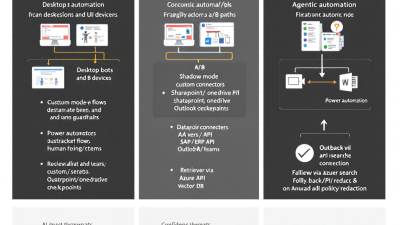
– The coexistence reality: You won’t rip-and-replace overnight. Desktop RPA remains valuable where no API exists. Power Automate’s hybrid model lets cloud flows orchestrate desktop flows so you can migrate incrementally. See the desktop RPA overview in Power Automate.
Readiness Scan: Inventory bots, SLAs, error rates, and costs (Process Advisor & telemetry)
– Build your baseline: Catalog every bot and flow with owner, process, SLA, volume, step count, exception rate, and hard dependencies (UI selectors, specific machines, licenses). Pull run histories and failure codes.
– Mine the work: Use process and task mining to discover the real “as-is,” bottlenecks, and variation. Power Platform’s process mining (formerly Process Advisor) records user actions, correlates paths, and surfaces automation opportunities with analytics. Start here to find high-ROI, low-risk candidates. Learn more in Process mining in Power Automate.
– Telemetry sources: Power Automate run history, desktop flow logs, error traces, and CoE dashboards. The Power Platform CoE Starter Kit includes Power BI reporting on adoption, usage, and time-saved metrics—perfect for establishing your baseline. See the CoE Starter Kit.
Candidate Selection: Impact–risk matrix, quick wins, and no-go patterns
– Scoring model:
– Impact: volume x cycle-time saved x error reduction x compliance benefit.
– Risk: data sensitivity, regulatory exposure, UI fragility, API availability, and stakeholder criticality.
– Quick wins:
– Email-to-system triage where APIs exist.
– Document classification/extraction with clear templates and approvals.
– Data syncs between systems that already have stable connectors.
– No-go (for first wave):
– Mission-critical processes with no rollback path.
– Tasks dependent on ultra-fragile UI selectors.
– Processes with unbounded scope or inconsistent inputs without human checkpoints.
Reference Architecture: Agent + Tools + Knowledge + Guardrails on Microsoft Cloud
– Agent brain: Copilot Studio agent for orchestration, planning, and function calls to your “skills” library (flows, connectors, APIs). See Copilot Studio.
– Toolbelt: Power Automate cloud flows, desktop flows for UI-only apps, and custom connectors for line-of-business APIs. Hybrid orchestration is supported in Power Automate.
– Knowledge: SharePoint/Dataverse content indexed via Azure AI Search; retrieval-augmented generation (RAG) to ground answers and tool choices on current, governed content.
– Guardrails: DLP policies and Managed Environments enforce data boundaries, solution quality, and safe connector usage. See DLP policies and Managed Environments. Use Azure AI Content Safety for policy checks and harmful content filtering per Azure AI Content Safety.
– ALM and rollout: Pipelines for Power Platform deliver governed dev/test/prod movement with approvals and gates. See Pipelines for Power Platform.
– Observability: Power Automate analytics, Application Insights for custom endpoints, and CoE dashboards form your operational cockpit. See CoE Starter Kit.
Coexistence Patterns: Wrap, call, and replace—keeping RPA in the loop
– Wrap: Put an agent in front of a legacy desktop flow. The agent handles intake, validation, and knowledge lookups; the desktop flow executes the UI steps. If the agent’s confidence is low, route to human approval first.
– Call: Cloud flow calls a desktop flow only for the gap step (e.g., an old on-prem app), then continues with API-first steps. This trims brittleness while preserving value. See desktop flow orchestration in Power Automate.
– Replace: As soon as a stable API or connector appears, retire the UI step and swap in a cloud action. Keep the desktop flow as a feature-flagged fallback during the burn-in period.
Task Mining to Design: Using Process Advisor to extract tool calls and golden paths
– Record and analyze: Capture user sessions for the target process. Process mining reveals the frequent “golden path,” variants, and where exceptions spike. See process mining.
– From clicks to calls: Translate repeatable groups of steps into tool calls (flows and connectors). Unpack each step’s input/output contract and error modes.
– Define the playbook: Draft agent behaviors: intent detection, pre-checks, tool selection, post-conditions, and escalation rules. These become your agent’s action library and guardrails.
Building the Agent Brain: Copilot Studio orchestration, function calling, and tool libraries
– Skills as actions: Expose Power Automate flows and connectors as Copilot Studio actions. Define strict schemas, required parameters, and timeout/retry logic so the agent plans deterministically. See Copilot Studio agents.
– Planning and grounding: Prompt the agent to choose actions only from the allowed tool library and to cite retrieved knowledge when answering or deciding.
– Determinism where it counts: Use guardrails like max tool hops, approval checkpoints, and policy filters before committing write operations.
Toolbelt Setup: Power Automate flows, PAD actions, custom connectors, and Dataverse
– Cloud-first: Prefer cloud flows with standard connectors for reliability and scale. Use Dataverse for state, audit, and idempotency keys.
– Desktop when necessary: For UI-only apps, encapsulate desktop flows behind a cloud action with explicit pre/post conditions to reduce brittleness. See desktop flows.
– Custom connectors: Wrap SAP, ERP, or bespoke APIs with OpenAPI specs, policy templates, and environment variables for endpoints and secrets.
– Governance: Classify connectors and enforce DLP. Managed Environments add solution checker, sharing limits, and risk insights. See DLP policies and Managed Environments.
Knowledge-Rich Automation: RAG with SharePoint/Dataverse + Azure AI Search; caching and grounding
– Sources: Use SharePoint libraries, Dataverse tables, and system-of-record data indexed in Azure AI Search for retrieval-augmented generation.
– Caching and freshness: Cache embeddings and retrieved chunks; stamp responses with data freshness and source links. Revalidate critical facts against systems of record before writes.
– Guarding the context: Cap context windows, filter PII/PCI from retrieved content, and prefer structured facts over free text when deciding actions.
Human-in-the-Loop: Confidence thresholds, approvals in Teams, and escalation routing
– Confidence gates: If the agent’s confidence or groundedness is below threshold, route to an approver with a structured summary, source citations, and proposed action.
– Approvals where people work: Power Automate Approvals integrates with Teams and Outlook and maintains audit trails—ideal for exceptions and spend thresholds. See Approvals in Power Automate.
– Clear exits: On repeated low-confidence or policy violations, escalate to a queue or assign to a named owner with SLA timers.
Quality & Safety: Eval datasets, red-teaming, content safety, PII/PCI redaction
– Offline first: Evaluate prompt/agent changes against a curated dataset for groundedness, relevance, and safety before shipping. Azure AI Studio supports offline/online evals, custom metrics, and A/B comparisons. See Azure AI Studio evaluations.
– Responsible AI: Apply human oversight, fail-safes, and policy checks per Microsoft’s guidance; add Azure AI Content Safety for toxicity and policy filtering. See Responsible AI principles and Content Safety.
– Data hygiene: Redact sensitive fields at ingestion, segregate evaluation transcripts, and log minimal necessary data for audits.
Shadow Mode & Cutover: Side-by-side runs, SLO gates, blue/green deployment, rollback
– Shadow mode: Run the agent in parallel with the RPA for 1–2 weeks. Compare outputs and measure accuracy, latency, and exception rates without impacting production.
– SLO gates: Promote only when the agent meets thresholds (e.g., ≥99% action parity, ≤1% regression in exceptions).
– Blue/green: Release via Pipelines for Power Platform with stage approvals and feature flags; maintain rollback to the previous version and, if needed, to the desktop flow. See Pipelines.
Observability & Governance: App Insights, Power Platform CoE, DLP policies, environment strategy
– Telemetry: Track tool calls, latency, token use, success/failure codes, and confidence scores. Centralize metrics in Power BI via CoE Starter Kit. See CoE Starter Kit.
– Governance: Enforce Managed Environments and DLP to keep data where it belongs and ensure solution quality. See Managed Environments and DLP.
– Environment strategy: Separate dev/test/prod, restrict who can create connectors, and require approvals for high-risk deployments.
Cost & ROI: Token budgets, throughput, success rates, cycle times, and financial outcomes
– Cost pillars: LLM tokens, connector/flow runs, desktop runtime minutes, storage, and human review time. Set token budgets per operation and cap retries.
– ROI equation: (Time saved x loaded labor rate + error cost avoided + revenue acceleration) − (infrastructure + tokens + maintenance + oversight).
– Tracking: Use CoE dashboards for time-saved and adoption, plus custom Power BI for cycle-time, first-pass yield, and exception costs. Anchor the business case in the broader AI productivity opportunity quantified by McKinsey.
Case Snapshot: Replacing a brittle invoice bot with an agent that uses SAP + Outlook + SharePoint
– The pain: A desktop bot scraped invoice PDFs from Outlook, keyed data into SAP, and saved to SharePoint. Any UI change or malformed invoice caused failures, leading to backlog and manual rework.
– The agentic redesign:
– Intake: Agent watches the mailbox, grounds on a knowledge base of supplier formats, and classifies invoices.
– Extraction: Uses a document skill; validates totals and PO numbers; low-confidence cases go to Approvals in Teams. See Approvals.
– Posting: Calls SAP via connector/custom connector; on missing fields, asks for confirmation.
– Filing: Saves artifacts and metadata to SharePoint/Dataverse; writes audit trails.
– Safety: Content Safety checks on free-text notes; PII redaction in logs per Azure AI Content Safety.
– Evaluation: Offline dataset of 200 historical invoices used to tune extraction and thresholds via Azure AI Studio evaluations.
– The rollout: Two-week shadow mode with 98–99% parity; blue/green cutover with a rollback flag. Result: Reduced average handling time by ~55%, near-zero UI breakages, and clearer auditability.
Delivery Playbook: 6-week sprint plan with milestones, risks, and stakeholder comms
– Week 0–1 Discover and baseline
– Inventory bots, SLAs, error rates, costs. Run process/task mining on 1–2 target processes. See process mining.
– Confirm governance: Managed Environments, DLP, environment strategy.
– Week 2 Design and architecture
– Draft reference architecture, tool library, RAG sources, and human-in-loop thresholds.
– Build evaluation datasets and success metrics.
– Week 3 Build skills and scaffolding
– Implement cloud flows, wrap necessary desktop steps, create custom connectors, set Dataverse schema.
– Stand up telemetry and dashboards (CoE kit).
– Week 4 Orchestrate agent and guardrails
– Wire actions in Copilot Studio, add content safety, approvals, and policy checks.
– Run offline evals and red teaming via Azure AI Studio.
– Week 5 Shadow mode and tuning
– Parallel runs, variance analysis, tighten prompts/tools, adjust thresholds.
– Week 6 Phased cutover and ALM
– Promote via Pipelines with stage approvals; blue/green release and rollback plan. See Pipelines.
– Risks and comms
– Risks: scope creep, missing APIs, data leakage, stakeholder fatigue.
– Mitigations: strict scope control, hybrid pattern, DLP/Managed Environments, weekly executive readouts.
Common Pitfalls & Anti-Patterns: Prompt-only bots, UI scraping over APIs, unbounded context
– Prompt-only “magic”: Agents without explicit tools devolve into guesswork. Always expose a curated action library.
– UI when API exists: Prefer connectors/APIs to minimize flakiness and maintenance toil.
– Unbounded context windows: Cap context, ground on authoritative sources, and pre-validate critical fields.
– Skipping evals and HITL: Don’t ship without offline evals and human approvals for material changes.
– Weak governance: Enforce DLP, connector classification, and solution checks via Managed Environments.
Checklist & Templates: Readiness checklist, eval rubric, and cutover runbook
– Readiness checklist
– Bot inventory complete with SLAs, error rates, costs
– Process/task mining sessions recorded and analyzed
– Governance in place: DLP, Managed Environment, environment strategy
– Tool library mapped; APIs/connectors identified; desktop gaps noted
– Knowledge sources approved; PII/PCI handling defined
– Evaluation rubric
– Groundedness/relevance thresholds met on offline datasets (Azure AI Studio)
– Action parity vs. legacy ≥ target; exception rate ≤ benchmark
– Safety: content policy passes; PII redaction verified
– Human-in-loop outcomes within SLA; reviewer load acceptable
– Cutover runbook
– Shadow mode start/stop dates; monitoring dashboards live
– SLO gates and decision owners
– Blue/green steps in Pipelines; rollback criteria and switchback steps
– Hypercare plan and daily standups for week one
How B. Cobra Systems Helps: Fast-start kit, architecture reviews, and managed rollout support
– Fast-start kit: Candidate scoring templates, agent scaffolds for Copilot Studio, RAG patterns for SharePoint/Dataverse, and governance assets pre-configured for DLP and Managed Environments.
– Architecture and build: Reference designs, connector development, desktop-to-cloud coexistence patterns, and evaluation harnesses using Azure AI Studio.
– Managed rollout: Shadow-mode coaching, SLO gate reviews, CoE-driven ROI dashboards, and Pipelines-based cutovers with rollback safety.
– Business outcome focus: We tie AI workflow automation tools to measurable, AI-driven operational optimization—shorter cycle times, higher first-pass yield, and reliable compliance.
The bottom line: You don’t have to choose between innovation and safety. With Microsoft Power Platform and a disciplined blueprint, you can evolve brittle RPA into resilient, tool-using AI agents—coexisting first, then compounding ROI as you modernize step by step.






