
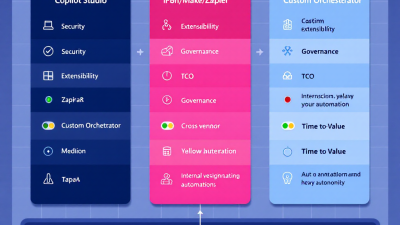
Title: Build vs. Buy for Agentic Workflows: Copilot Studio vs. n8n/Make/Zapier vs. Custom Orchestrators
Why this decision matters now: agentic workflows meet enterprise reality
Agentic workflows have moved from demo videos to board-level agendas. Sales teams want copilots that triage leads in Dataverse, field ops want Dynamics 365 service agents that schedule and summarize work orders, and finance wants AI to reconcile vendors without blowing the cloud budget. The question has shifted from “Can we?” to “What’s the fastest, safest, and most economical way to productionize?” For Power Platform teams and SMB leaders, three viable paths are emerging:
– Build on Microsoft Copilot Studio and the Power Platform for deep Microsoft 365, Dataverse, and Dynamics 365 alignment.
– Assemble with no-code iPaaS tools (n8n/Make/Zapier) that bring speed and a broad ecosystem.
– Engineer custom orchestrators (LangGraph, Semantic Kernel, AutoGen) for maximum control, complex coordination, and portability on Azure.
Picking the right path isn’t just a tooling choice; it determines your security posture, governance model, total cost of ownership (TCO), time-to-value, and how much vendor lock-in you accept. Microsoft’s platform continues to demonstrate enterprise maturity, with Microsoft recognized as a Leader in low-code by Gartner, reaffirming long-term viability for regulated and at-scale automation programs, as highlighted in the Microsoft summary of the 2023 Gartner Magic Quadrant for Low-Code Application Platforms (Gartner MQ recognition). Meanwhile, iPaaS tools have matured compliance options for SMBs, and custom orchestrators have exploded in capability with stateful agent frameworks.
What is an agentic workflow: definitions, examples, and anti-patterns
Definition: An agentic workflow uses an AI agent (or set of agents) that can plan and decide next steps, call tools and APIs, and loop until objectives are met—often with human-in-the-loop checkpoints. Unlike linear automation, agentic systems maintain state, reason across steps, and adapt as new data arrives.
Examples you can ship this quarter:
– Customer service triage: A Copilot in Dynamics 365 reads an email, classifies intent, summarizes context, creates or updates a Dataverse case, and triggers a Power Automate flow to notify the right queue. The Copilot can ask for missing details before proceeding.
– Collections assistant: An iPaaS workflow aggregates invoices, drafts a personalized reminder using an LLM, logs the interaction in Dataverse, and schedules follow-up if unpaid.
– Supplier onboarding: A custom orchestrator validates documents, extracts fields with Azure OpenAI, checks sanctions lists, requests human approval, then posts to ERP via Dataverse or custom connectors.
Anti-patterns to avoid:
– Unbounded loops with no guardrails. Always set token, time, and step limits.
– Black-box decisioning with no logging. If you can’t explain why an agent acted, auditors won’t sign off.
– Prompt spaghetti in production. Version prompts like code; don’t hotfix in chat windows.
– Mixing confidential and public connectors without policy. Use DLP and environment separation.
– Forcing “agentic” where a deterministic flow is cheaper and safer. If-then automation is still a superpower.
Evaluation criteria: security, extensibility, governance, observability, TCO, time-to-value, lock-in
Use these lenses to compare options:
– Security and compliance: Tenant isolation, secrets management, data residency, audit trails, HIPAA/SOC/GDPR coverage.
– Extensibility: Built-in connectors and SDKs; ability to call any REST API; plugin model for tools/functions; vector search; eventing.
– Governance: DLP, RBAC, environment isolation, ALM, approvals, solution packaging, managed environments.
– Observability: Run telemetry, prompt/response logs with redaction, metrics, traceability, human-in-the-loop outcomes.
– FinOps and TCO: Token budgets, model routing, throttling, metering, and cloud costs vs. subscription fees; ROI feedback loops.
– Time-to-value: How quickly you can go from idea to pilot to production.
– Vendor lock-in and portability: Can you export, self-host, or migrate the logic?
Option 1 — Copilot Studio and Power Platform: strengths, limits, best-fit scenarios
Why choose it
– Deep Microsoft integration: Copilot Studio can connect to data and take actions via plugins such as Power Automate flows and Dataverse, allowing action-taking agents without bespoke plumbing (Copilot Studio fundamentals).
– Massive connector ecosystem: Power Platform ships with 1,000+ prebuilt connectors and supports custom connectors for any REST API, speeding hybrid patterns with Azure services, Dynamics 365, and third-party apps (Power Platform connectors).
– Governance at scale: Data loss prevention (DLP) policies restrict which connectors can be used together to protect organizational data (Power Platform DLP). Managed Environments provide usage insights, sharing limits, and solution checks that enterprises and SMBs can apply consistently (Managed Environments overview).
– Compelling economics and time-to-value: Forrester found a 199% ROI over three years and sub-6-month payback for Power Automate, signaling that the Power Platform path can beat custom builds on cost and speed (Forrester TEI of Power Automate).
Limits to consider
– Advanced agent choreography (multi-agent negotiation, custom memories) may require extensions or offloading to Azure Functions/AKS using frameworks like Semantic Kernel or LangGraph.
– Fine-grained, code-first observability across long-running, branching agent loops may need custom telemetry beyond standard Power Platform analytics.
– Lock-in tradeoff: While connectors and Dataverse accelerate delivery, core logic lives on the platform; portability is lower than code-first orchestrators.
Best-fit scenarios
– You run on Microsoft 365, Dataverse, and Dynamics 365, and want AI agents embedded where your users already work.
– You need policy guardrails (DLP, Managed Environments) and ALM that align with existing Power Platform governance.
– You want to leverage Azure OpenAI with enterprise controls. Microsoft clarifies that data sent to Azure OpenAI isn’t used to train OpenAI models, a key privacy assurance for CIOs (Azure OpenAI data privacy).
Option 2 — iPaaS (n8n/Make/Zapier) with LLM steps: strengths, limits, best-fit scenarios
Why choose it
– Fast iteration and broad app coverage. iPaaS tools excel at quick wiring of SaaS-to-SaaS flows and offer native steps to call LLMs for classification, generation, and extraction.
– Compliance options for SMBs. Make states SOC 2 Type II certification and offers data residency in the EU or US, helpful for regional requirements (Make security and compliance). Zapier is SOC 2 Type II compliant, though not HIPAA compliant, which matters for healthcare scenarios (Zapier security; Zapier HIPAA stance).
– Open-source leverage. n8n can be self-hosted, keeping data in your infrastructure, and workflows export/import as JSON—mitigating lock-in and enabling GitOps-style management (n8n self-hosting; n8n export/import).
Limits to consider
– Limited deep integration with Dataverse/Dynamics 365 security and RBAC compared to native Power Platform experiences.
– Portability varies widely. You cannot export a Zap to run outside Zapier, creating higher lock-in for some flows (Zapier export limitations).
– Governance gaps at enterprise scale. You may need to layer your own DLP equivalents, secrets rotation, and approval workflows.
Best-fit scenarios
– SMB teams needing quick wins across many SaaS tools, with moderate security needs and pragmatic compliance.
– Hybrid “edge” automation—simple LLM steps for triage or content generation that hand off to Power Automate or Azure Functions for system-of-record updates.
Option 3 — Custom orchestrators (LangGraph, Semantic Kernel, AutoGen) on Azure: strengths, limits, best-fit scenarios
Why choose it
– Full control of agent behavior. LangGraph enables stateful, multi-actor agent workflows with cycles, coordination, and human-in-the-loop patterns that surpass linear automation (LangGraph documentation).
– First-class Microsoft integration via SDK. Semantic Kernel orchestrates AI “skills” (plugins/functions), planning, and memory across C#, Python, and JavaScript—an Azure-native path that can still interoperate with Power Platform and Dataverse through APIs and connectors (Semantic Kernel overview).
– Observability and FinOps by design. You can implement OpenTelemetry, custom redaction, per-tenant throttling, and meter token usage against cost centers. Azure OpenAI enforces quotas and rate limits at the deployment/model level, helping you cap spend and protect capacity (Azure OpenAI quotas and limits).
Limits to consider
– Higher engineering lift. You own orchestration logic, vector stores, secrets, retries, and long-running state.
– Time-to-value is slower unless you have strong engineering and MLOps practices in place.
Best-fit scenarios
– Regulated enterprises requiring strict isolation, on-VNet hosting, and bespoke agent logic that can be audited exhaustively.
– Complex, multi-agent workflows where planning, tool-use optimization, and memory are core to the business process.
Integration deep dive for Power Platform: Dataverse, Dynamics 365, connectors, DLP, RBAC
– Dataverse as the system of record: Use Dataverse tables for cases, accounts, and custom entities. Copilot Studio can ground responses on Dataverse and take actions through Power Automate. With 1,000+ connectors and custom connectors for any REST API, Dataverse can orchestrate across ERP, HRIS, and third-party apps without custom scaffolding (Connectors overview; Copilot Studio actions).
– Dynamics 365 alignment: Agents can create and update Dynamics 365 records, summarize cases, and trigger SLAs through Power Automate or Dataverse events. RBAC flows from Azure AD into Dataverse security roles, ensuring agents operate with least privilege.
– DLP and connector boundaries: Enforce DLP policies to segregate “business” from “non-business” connectors so that sensitive Dataverse data isn’t exfiltrated to consumer SaaS (Create and manage DLP policies).
– Managed Environments and ALM: Use managed environments for solution checker, usage insights, sharing limits, and standardized ALM. This reduces environment sprawl and simplifies auditability (Managed Environments).
Security and compliance: tenant isolation, secrets, data residency, audit, prompt/data redaction
– Tenant isolation: Keep AI agents inside your Microsoft 365 and Azure boundary where possible. With Azure OpenAI, Microsoft states that your inputs aren’t used to train OpenAI models, a key privacy protector when agents process PII or sensitive business data (Azure OpenAI privacy).
– Secrets management: Prefer Azure Key Vault or platform secret stores; rotate regularly. For iPaaS, confirm how encryption-at-rest and in-transit is handled and whether you can bring your own keys.
– Data residency and certifications: Make offers EU/US residency and SOC 2 Type II; Zapier is SOC 2 Type II but not HIPAA; n8n self-hosting keeps data on your infra. Choose per compliance need (Make compliance; Zapier security; Zapier HIPAA; n8n self-hosting).
– Audit and logging: Log prompts, tool calls, and outcomes with PII redaction. For Power Platform, leverage Managed Environments insights and Dataverse auditing; for custom orchestrators, instrument with Application Insights or OpenTelemetry.
– Prompt/data redaction: Redact identifiers before LLM calls; rehydrate after. Maintain allow/deny lists for tools and ground only on approved data sources.
Operational governance: environments, ALM, CI/CD, prompt and model versioning, approvals
– Environments and ALM: Use dev/test/prod Power Platform environments, solution-aware flows, and Managed Environments to enforce lifecycle best practices (Managed Environments).
– Prompt and model versioning: Treat prompts like code. Store versioned prompts in Git with change history; tag model versions and track vendors. For iPaaS, keep prompt fragments in repo-backed variables; for custom orchestrators, tie versions to release pipelines.
– Approvals and human-in-the-loop: Require approvals for irreversible actions—payments, PII messaging, ERP changes. Log who approved, when, and the prompt context used.
FinOps for AI agents: token budgets, model routing, throttling, metering, ROI feedback loops
– Token budgets: Cap tokens per step and per conversation; set max turns for agent loops. Quotas and rate limits in Azure OpenAI help enforce hard boundaries on spend and protect capacity bursts (Azure OpenAI quotas).
– Model routing: Use cheaper models for classification/extraction and reserve premium models for reasoning-heavy steps. Cache deterministic outputs.
– Throttling and concurrency: Throttle by user, environment, and tenant. Queue long jobs; fall back gracefully when limits are hit.
– Metering and chargeback: Tag each run with cost center and scenario; surface cost per outcome in dashboards. In Power Platform, combine flow run data with Azure OpenAI usage metrics; in custom orchestrators, emit cost metrics per trace.
– ROI feedback loops: Track business outcomes (cases resolved, hours saved, revenue lift) and compare against metered costs. The Forrester TEI signals the kind of payback possible when governance controls and high-leverage connectors minimize custom effort (Forrester TEI of Power Automate).
Cost and time scenarios: SMB quick wins vs. regulated enterprise scale
– SMB quick wins: If you need cross-SaaS glue and basic LLM steps, iPaaS can ship in days with low upfront cost. For Microsoft-centric SMBs, Copilot Studio plus Power Automate often wins on TCO because of built-in connectors and governance.
– Regulated enterprise scale: Power Platform provides runway with DLP, Managed Environments, and Dataverse alignment, while Azure OpenAI privacy assurances reduce infosec friction (Azure OpenAI privacy). When agent complexity and observability needs grow, layer or migrate to custom orchestrators for fine-grained control.
Hybrid patterns: Copilot Studio front-end with Azure Functions and vector stores; iPaaS triggering Power Automate; Dataverse as system of record
– Copilot Studio + Azure Functions: Use Copilot Studio as the conversational and workflow front-end; delegate complex reasoning or multi-agent coordination to Azure Functions running Semantic Kernel or LangGraph, backed by a vector store for retrieval-augmented generation (Semantic Kernel; LangGraph).
– iPaaS → Power Automate: Trigger Power Automate from iPaaS for system-of-record updates in Dataverse, keeping data governance intact while benefiting from iPaaS’s fast SaaS connectivity.
– Dataverse as the truth layer: Regardless of orchestration, centralize critical records in Dataverse. Leverage Power Platform connectors, DLP, and RBAC to keep sensitive data controlled (Connectors; DLP policies).
Case vignettes: 50-employee services firm vs. 5,000-employee manufacturer
– 50-employee services firm: Need lead triage, proposal drafting, and invoice reminders across Google Workspace, HubSpot, QuickBooks. Pick Make or n8n to ship in a week; apply basic redaction and approval steps. If Microsoft 365-centric, Copilot Studio plus Power Automate can match speed and give stronger governance. Revisit custom orchestrators only if you outgrow iPaaS limits.
– 5,000-employee manufacturer: Use Copilot Studio to add conversational agents in Dynamics 365 Field Service and Sales, grounded on Dataverse. Enforce DLP and Managed Environments; connect to Azure OpenAI with privacy assurances (Azure OpenAI privacy). For plant maintenance agents needing multi-agent coordination and deep observability, introduce a custom orchestrator on Azure with Semantic Kernel and LangGraph. iPaaS remains useful at the edges for departmental SaaS, but keep core workflows inside the tenant.
Decision matrix and scorecard: how to choose and when to switch paths
Score each dimension from 1 (low) to 5 (high). Pick the option with the highest weighted score for your context.
– Security and compliance needs (HIPAA, residency, isolation): Copilot Studio/Power Platform: 4–5; iPaaS: 2–4 (Make and n8n higher with residency/self-host); Custom orchestrator: 5.
– Extensibility and deep Microsoft integration: Copilot Studio/Power Platform: 5; iPaaS: 3; Custom orchestrator: 5.
– Governance and ALM maturity: Copilot Studio/Power Platform: 5 with DLP and Managed Environments; iPaaS: 2–3; Custom orchestrator: 4–5 if you invest.
– Observability and agent complexity: Copilot Studio/Power Platform: 3–4; iPaaS: 2–3; Custom orchestrator: 5.
– TCO and time-to-value: Copilot Studio/Power Platform: 5 per Forrester’s ROI findings (Forrester TEI); iPaaS: 4 for simple use cases; Custom orchestrator: 2–3 initially, rising as scale increases.
– Lock-in and portability: Copilot Studio/Power Platform: 3–4; iPaaS: Zapier 2 (no export), Make 3, n8n 4–5 (self-host/export); Custom orchestrator: 5.
Switching signals:
– From iPaaS to Power Platform: When Dataverse/Dynamics 365 becomes your center of gravity and governance gaps slow adoption.
– From Power Platform to custom orchestrator (or hybrid): When you need multi-agent planning, fine-grained observability, or bespoke FinOps control.
– From custom to platform: When engineering overhead outpaces the complexity you truly need.
Implementation checklist and next steps with B. Cobra Systems
1) Define the business case
– Select 2–3 agentic workflows tied to measurable outcomes (CSAT improvements, cycle-time reduction, revenue lift).
– Estimate volume and concurrency to size model and runtime needs.
2) Choose the starting path
– Microsoft-centric with Dataverse/Dynamics 365: Start with Copilot Studio and Power Automate; plan for hybrid offloads when needed.
– Broad SaaS glue with light governance: Start with Make or n8n; consider n8n self-hosting if data sensitivity is high.
– High complexity/regulatory bar: Start with a custom orchestrator on Azure using Semantic Kernel and/or LangGraph.
3) Architecture and guardrails
– Data and privacy: Ground on approved sources; redact sensitive fields; rely on Azure OpenAI privacy assurances when applicable (Azure OpenAI privacy).
– Governance: Set up DLP policies, Managed Environments, and environment strategy in Power Platform (DLP; Managed Environments).
– FinOps: Implement token budgets, quotas, and throttles; track cost per outcome using Azure OpenAI limits and internal metering (Quotas and limits).
4) Build the MVP
– Prompts and tools: Version prompts in Git; define tool contracts (inputs/outputs) and test deterministically.
– Human-in-the-loop: Add approvals for irreversible steps; log every decision with context.
– Observability: Instrument run IDs, prompt and tool traces with redaction; publish dashboards.
5) Harden and scale
– Security reviews, penetration testing, and secrets rotation.
– ALM: Solution packaging, CI/CD, environment-based feature flags.
– Model lifecycle: Document model versions and routing policies; rehearse rollback.
6) Prove and expand ROI
– Baseline business metrics; compare monthly against metered costs.
– Apply the TEI-inspired framing to prioritize the next wave of automations (Forrester TEI).
B. Cobra Systems can help you choose and execute the right path. We design decision matrices, stand up Copilot Studio agents with Dataverse and Dynamics 365, wire hybrid architectures with Azure Functions and vector search, and build custom orchestrators on Azure using Semantic Kernel, LangGraph, or AutoGen—complete with governance, FinOps, and ALM that your auditors will love. Ready to turn agentic workflows into production results? Let’s map your scorecard, ship a pilot in 30 days, and scale with confidence.






