
Real-Time Agent Mesh: Event-Driven AI Workflow Automation for Enterprise Ops
Why an Agent Mesh Now: From brittle point-to-point automation to event-driven, AI-powered operations
Point-to-point workflows feel fast to start and slow to scale. As soon as multiple AI agents, apps, and data stores enter the scene, the tangle of direct calls, webhook retries, and custom connectors begins to creak under load. Event-driven architecture (EDA) is the antidote because it decouples producers from consumers, allowing systems to respond in real time while remaining resilient to change. As Microsoft’s architecture guidance puts it, EDA “enables real-time and scalable applications by decoupling producers and consumers… improving resilience and agility.” See the Azure Architecture Center’s perspective on event-driven choices for detail in the Event-Driven Architecture guide.
For an agent mesh—multiple AI agents cooperating on business outcomes—your backbone must be both low latency and elastic. Azure Event Hubs is built exactly for this, “capable of receiving and processing millions of events per second,” which means you can ingest spikes from LLM-driven workloads without sacrificing throughput. When workloads prefer Kafka tooling, you can still run on Azure’s managed platform because Event Hubs speaks Kafka protocol out of the box; see Kafka on Event Hubs.
Why now? AI is moving from “assistive” to “autonomous,” and autonomy demands coordination. Streams have become the data fabric for real-time AI—fueling feature freshness, orchestration, and backpressure control—exactly as emphasized in Confluent’s guidance on streaming-for-AI patterns in Streaming Data for AI.
Audience and Outcomes: For Power Platform makers, AI agent developers, and SMB IT leaders
This guide is for:
– Power Platform makers who need resilient, low-latency patterns beyond classic point-to-point flows.
– AI agent developers orchestrating planners and workers across cloud-native infrastructure.
– SMB and enterprise IT leaders seeking standardization, governance, and cost control.
Outcomes you can expect:
– A reference architecture you can deploy today with Azure Event Hubs or Kafka as the backbone.
– Practical patterns for CloudEvents contracts, JSON Schema, retries, and SLAs.
– Concrete integration points for Power Apps, Power Automate, and Dataverse with an event gateway.
– Operations playbooks for spike handling, observability, and governance.
Event-Driven Foundations for AI Agents: Events vs commands, CloudEvents, contracts, and schemas
In an agent mesh, an event announces what happened (immutable fact), while a command requests what should happen next (intent). Events enable loose coupling; commands require routing and responsibility assignment. Use both, but bias toward events for scalability and replay.
To ensure every agent understands event envelopes consistently, use the CloudEvents specification. CloudEvents defines standard attributes—id, source, type, subject, time, and datacontenttype—across transports, with official bindings for HTTP, AMQP, and Kafka (see the Kafka protocol binding). For distributed tracing, CloudEvents has extensions (for example, trace context) so you can propagate “traceparent” through asynchronous hops, as covered in the CloudEvents Extensions.
For payload contracts, prefer strongly typed schemas with compatibility rules. Confluent Schema Registry supports Avro, JSON Schema, and Protobuf, including evolution strategies and versioning, which is crucial when agents evolve independently. Explore Confluent Schema Registry. JSON Schema is an excellent choice for Power Platform interop and OpenAPI alignment.
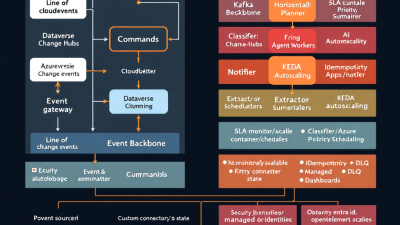
Reference Architecture on Microsoft Stack: Kafka or Azure Event Hubs backbone, Event Grid/Gateway, Power Platform integration
Core components:
– Streaming backbone: Azure Event Hubs (with or without Kafka protocol) or Kafka. Event Hubs provides at-least-once delivery, partitions, consumer groups, autoscale via throughput units, capture, and geo-DR—see Event Hubs features. Enterprise planning can anchor on availability SLAs—99.95% (Standard) and 99.99% (Dedicated)—published in the Event Hubs SLA.
– Event gateway: A lightweight HTTP ingress/egress layer (e.g., Azure Functions + API Management) that validates CloudEvents, enforces auth, and publishes/consumes to the backbone. This gateway is where Power Automate custom connectors plug in.
– Power Platform integration: Dataverse emits and consumes events through webhooks/plug-ins and change-tracking; see Dataverse webhooks and Change Tracking. Flows can act as producers and consumers via custom connectors or built-in triggers where available.
– Compute for agents: Azure Functions and containerized agents that scale on events. Functions integrate natively with Event Hubs triggers and checkpointing; see Event Hubs trigger for Azure Functions.
Want Kafka clients with Azure operations and billing? Use Kafka protocol on Event Hubs and layer CloudEvents for portable semantics.
Designing the Agent Mesh: Roles (planner vs workers), topic taxonomy, correlation IDs, and JSON Schema contracts
– Roles and responsibilities: Use a “planner” agent to break business intents into tasks; “worker” agents execute domain-specific actions (classification, enrichment, validation, fulfillment). The planner emits task events; workers consume and publish status/progress events.
– Topic taxonomy: Organize by domain and lifecycle. For example: business.customer.intent, business.customer.task.created, business.customer.task.completed, business.customer.error. Separate priority lanes (e.g., .priority) and dead-letter topics (e.g., .dlq).
– Correlation and traceability: Put correlation-id and causation-id in CloudEvents extensions or as part of the data. Use CloudEvents id and subject for uniqueness and sharding hints, and include trace context via the traceparent extension.
– Partitioning and ordering: Select partition keys that preserve ordering where required (e.g., entity id) and maximize parallelism elsewhere. Event Hubs partitioning and consumer groups give you the levers; see Partitions and Consumer groups.
– Contracts via JSON Schema: Publish schemas for each event type (CloudEvents data conforms to JSON Schema), version them, and enforce compatibility using a registry such as Confluent Schema Registry. This shrinks integration risk and enables CI-based contract testing.
Resilience by Default: Idempotency keys, retries with exponential backoff, dead-letter queues, and circuit breakers
– Delivery semantics: Event Hubs provides at-least-once delivery, so plan for duplicates. Use idempotency keys (e.g., CloudEvents id) and maintain processed-event logs or natural keys in Dataverse to ensure operations are safe to retry; see Event Hubs features.
– Retries: For Power Automate, configure built-in exponential retry and control concurrency for loops; refer to retry and concurrency settings. For agents, use exponential backoff with jitter and cap retries based on SLA.
– Dead-letter queues: Route poison messages and exhausted retries to a .dlq topic with full context for later inspection and replay.
– Circuit breakers: When downstream services (e.g., Dataverse) throttle, trip a breaker to shed load. Dataverse enforces service protection limits; follow guidance on batching and backoff in Dataverse service limits.
SLA-Aware Orchestration: Priority lanes, deadlines, admission control, and KEDA-based autoscaling
Treat SLAs as design inputs:
– Priority lanes and deadlines: Encode priority in event attributes and route high-priority to dedicated topics/partitions. Include a deadline timestamp; drop or downgrade tasks that miss it to avoid queuing debt.
– Admission control: Gate acceptance of low-priority work when backlogs breach thresholds. Apply token buckets at the gateway.
– Autoscaling: Event-driven compute should elastically scale. Azure Functions with Event Hubs triggers scale with event load and leverage checkpoints; see Functions + Event Hubs. For Kubernetes, use KEDA’s Event Hubs scaler to scale deployments on backlog depth; see KEDA Azure Event Hubs scaler.
– Platform capacity: Size Event Hubs throughput units and enable autoscale to absorb spikes as described in Event Hubs features. Anchor expectations to the Event Hubs SLA.
Power Platform Patterns: Using Dataverse as state, Power Automate as source/sink, custom connectors to an event gateway
– Dataverse as durable state: Use Dataverse to track task lifecycle and idempotency while emitting change events via Change Tracking or webhooks/plug-ins.
– Power Automate as event producer/consumer: Trigger flows on Dataverse changes; publish CloudEvents through a custom connector to the event gateway. Consume events by polling/subscribe endpoints, honoring retry and concurrency controls.
– Throughput considerations: Follow flow design best practices and respect service limits and licensing constraints for high-volume patterns; shape concurrency and pagination to stay within budget.
– Governance guardrails: Apply DLP and environment policies to keep connectors and data movement safe; see Power Platform governance and DLP policies.
Portable by Design: CloudEvents + OpenAPI/JSON Schema to avoid vendor lock-in and enable multi-cloud
Portability is a product decision. Use:
– CloudEvents for the envelope so any HTTP/Kafka/AMQP system can interoperate; see CloudEvents and the Kafka binding.
– JSON Schema for payloads and OpenAPI for gateway endpoints.
– Kafka protocol on Event Hubs to run Kafka clients without managing brokers; see Kafka on Event Hubs.
– A schema registry (e.g., Confluent Schema Registry) for compatibility enforcement and tooling support.
This combination gives you cloud choice without rewriting agents.
Observability and Quality: OpenTelemetry traces, structured logging, event replay, and contract testing
– Tracing and logs: Adopt OpenTelemetry for unified traces, metrics, and logs across agents, the gateway, Functions, and Power Automate. Azure Monitor and Application Insights ingest OTel signals; see Azure Monitor OTel support. Propagate traceparent via CloudEvents extensions to stitch async hops end-to-end.
– Platform metrics: Monitor Event Hubs throughput, throttling, and errors via Azure Monitor metrics for Event Hubs and alert on backlog depth, processing latency, and DLQ rate.
– Replay and forensics: Enable Event Hubs Capture to land events in Storage/ADLS for audit, model reprocessing, and post-incident analysis.
– Contract quality: Enforce schema validation at the gateway and apply consumer-driven contract tests in CI. Use a canary consumer group to validate new schema versions before promoting.
Security and Compliance: Entra ID, managed identities, least-privilege topics, PHI/PII boundaries
– Identity and secrets: Use Entra ID app registrations and managed identities for agents and Functions; avoid shared keys.
– Least privilege: Scope access by namespace, topic, and consumer group. Separate high-sensitivity topics (e.g., PHI/PII) and encrypt at rest/in transit.
– Power Platform governance: Apply environment strategy, DLP, and solution-based ALM with Managed Environments to keep sprawl and risk in check; see Managed Environments, the broader governance guidance, and DLP policies.
Step-by-Step Build: Stand up the event backbone, define schemas, implement two agents, wire retries and DLQ
1) Provision the backbone
– Create an Event Hubs namespace and event hub(s). Enable autoscale via throughput units and configure consumer groups for planners, workers, and observability. Review capabilities and SLAs in Event Hubs features and the SLA.
– If you prefer Kafka clients, enable the Kafka endpoint on Event Hubs; see Kafka on Event Hubs.
– Turn on Event Hubs Capture for audit and replay.
2) Define CloudEvents and JSON Schemas
– For each event type (e.g., customer.task.created), write a JSON Schema with required fields, enums, and semantic constraints. Store in a registry such as Confluent Schema Registry and enable compatibility rules.
– Standardize CloudEvents attributes (type, source, subject) and extensions (correlation-id, traceparent).
3) Build the event gateway
– Implement an Azure Functions-based HTTP endpoint that validates CloudEvents and schemas, authenticates via Entra ID, and publishes to Event Hubs. Expose it through API Management for throttling, quotas, and analytics.
4) Implement two agents
– Planner (Azure Functions): Consumes business.intent events; expands into tasks; publishes task.created events. Use Event Hubs triggers and checkpointing.
– Worker (container or Functions): Subscribes to task.created; executes business logic (could call LLMs, RPA, or line-of-business APIs); emits task.completed or task.failed. Add idempotency checks and exponential backoff.
5) Integrate Power Platform
– Dataverse: Create a table for task state; emit webhooks on status changes using webhooks/plug-ins.
– Power Automate: Use a custom connector to post CloudEvents to the gateway; configure retries and concurrency per retry/concurrency guidance. Respect service limits.
6) Reliability wiring
– DLQ: Route failures to a .dlq topic with enriched error context and original payload. Build a replay tool that reads DLQ events and republishes after fixes.
– Backpressure: Implement admission control in the gateway; scale workers using KEDA as needed with the Event Hubs scaler.
7) Observability
– Emit OpenTelemetry traces/logs; propagate CloudEvents traceparent; monitor Event Hubs via Azure Monitor metrics. Ingest OTel into Application Insights per Azure Monitor OTel support.
Handling Spikes and Cost Control: Backpressure strategies, batch vs streaming trade-offs, egress/ingress budgets
– Backpressure: Apply quotas and token buckets at the gateway. Shed low-priority load under pressure. Use separate topics/partitions for bursty workloads.
– Batch vs streaming: Stream for immediacy and SLA-sensitive work; batch for large, non-urgent backfills. Functions support batch processing with Event Hubs triggers; see Event Hubs trigger.
– Platform knobs: Right-size Event Hubs throughput units; leverage partitions to increase parallelism; monitor throttling via metrics.
– Power Platform economics: Shape flow concurrency, use trigger conditions to filter noise, and offload heavy processing to Functions to respect limits and best practices.
– Dataverse protection: Honor service protection limits with bulk/batch operations and exponential backoff.
Example Use Cases: Invoice triage, order exceptions, SOP-driven approvals, proactive customer updates
– Invoice triage: Ingest invoices into the mesh; a classification worker extracts vendor/amount, a risk worker flags anomalies, and a planner routes to approval. Power Automate posts CloudEvents and updates Dataverse state; exceptions go to DLQ with replay.
– Order exceptions: Real-time anomaly detection flags orders with stock or fraud risk. Workers orchestrate holds, customer comms, and restocking, while SLA-aware priorities ensure high-value orders get first pass.
– SOP-driven approvals: A planner decomposes a complex onboarding request into checklist tasks. Workers gather documents, verify identities, and schedule reviews. Dataverse tracks state; Power Apps provides dashboards.
– Proactive customer updates: Events from shipments and support tickets trigger LLM-crafted messages in the right channel. Backpressure ensures marketing blasts don’t starve critical alerts.
Launch Checklist and Next Steps: Readiness checks, rollout plan, and a roadmap to scale across business units
Readiness checklist
– Contracts: CloudEvents attributes standardized; JSON Schemas versioned and validated in CI via a registry such as Confluent Schema Registry.
– Resilience: Idempotency implemented; retries configured; DLQ and replay tested end-to-end.
– SLA: Priorities, deadlines, and admission control rules defined; KEDA/Functions autoscaling proven under load.
– Observability: OpenTelemetry traces from gateway → agents → Dataverse; alerts on backlog, error rate, and latency via Azure Monitor metrics.
– Governance: DLP, environments, and ALM pipelines configured; Managed Environments enabled where appropriate; see Managed Environments.
– Security: Entra ID and managed identities in place; least-privilege access to topics and consumer groups.
Rollout plan
– Start with a single domain (e.g., invoice exceptions), measure baseline SLAs, and iterate on partitioning and autoscale.
– Expand to adjacent domains by reusing topics, schemas, and agent workers.
– Introduce shared platform services (gateway, schema registry, observability) as paved roads.
Roadmap
– Add model-in-the-loop governance (A/B routing via priorities).
– Enrich with feature stores and real-time analytics using Capture outputs.
– Evolve toward multi-cloud clients using CloudEvents on Kafka and Kafka on Event Hubs.
Final thought: an agent mesh isn’t just architecture—it’s an operating model. With CloudEvents for portability, Event Hubs for scale, Dataverse for state, and Power Automate for business reach, you can deliver real-time, resilient AI operations without brittle point-to-point plumbing.






