
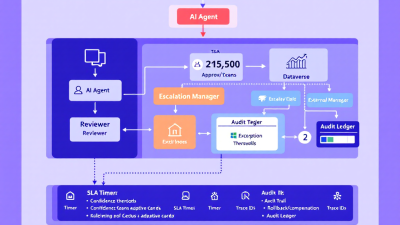
Human-in-the-Loop by Design: How to Structure AI Agents for Approvals, Escalations, and Accountability
Automation is only as trustworthy as the controls around it. As AI agents start making recommendations and taking actions across your stack, “human-in-the-loop” (HITL) cannot be an afterthought—it must be a design principle. This guide lays out a practical, platform-agnostic framework to embed approvals, SLA-aware escalations, exception handling, and fully auditable decision trails into AI agent workflows—anchored in Microsoft Power Platform and extended to Zapier, n8n, and Make.
Why Human-in-the-Loop (HITL) Matters for AI Agents — Reliability, accountability, and trust for Power Platform and SMB automation initiatives
AI’s value compounds when it decisively acts, but that’s also where risk accumulates. HITL brings three non-negotiables to your automation portfolio:
– Reliability: Humans catch edge cases and contextual nuances agents miss.
– Accountability: Decisions are traceable, reversible, and explainable.
– Trust: Stakeholders see explicit controls aligned to risk, not blind faith.
Regulators and standards bodies agree. The EU AI Act requires that “High-risk AI systems shall be designed and developed in such a way that they can be effectively overseen by natural persons…”—including the ability to intervene or override during use. See the official text in the Council’s publication of the Act: EU AI Act human oversight requirement. Similarly, the NIST AI Risk Management Framework lists human oversight, transparency, and continuous monitoring as core practices, emphasizing documented fallback and intervention processes. Together, they set the tone: design for oversight from day one.
HITL vs. Human-on-the-Loop — When to require approvals, reviews, or post-hoc audits based on risk and impact
You don’t need a human for every decision—just the risky ones. Use these modes judiciously:
– Human-in-the-loop (pre-approval): A person must approve before an action executes. Best for high dollar impact, legal exposure, irreversible actions, or policy-sensitive contexts.
– Human-on-the-loop (real-time supervision with fast intervention): The agent acts, but a human can step in if risk signals spike. Useful for time-sensitive operations with safety nets.
– Human-in-the-audit-loop (post-hoc review): No pre-approval; decisions are logged and sampled for audit. Suited for low-risk, high-volume tasks where speed matters but accountability remains.
A simple decision guide:
– Require pre-approval if any of the following apply: irreversible effect, exceeds $X impact, changes compliance posture, or a low confidence score.
– Use on-the-loop when decisions are reversible and time-sensitive, but still material to customers or spend.
– Use audit-loop for reversible, low-risk actions with robust monitoring and high-quality logging.
Risk-Based Gating — Confidence thresholds, dollar limits, PII/sensitive data flags, and business policy triggers for human checkpoints
Operationalize HITL with objective gates:
– Model confidence: Require approval when confidence < 0.75 (example), or when the model abstains/flags uncertainty.
- Financial exposure: Route to human if refund, spend, discount, or write-off exceeds policy thresholds (e.g., > $250).
– Data sensitivity: Trigger human review on PII/PHI handling, cross-border transfers, or content moderation flags.
– Business rules: Apply policy-based stops for VIP accounts, chargebacks, regulated products, or negative sentiment with churn risk.
– Novelty/variance: Require approval when the action deviates from historical norms (e.g., >3 standard deviations from average order adjustment).
Pattern: combine multiple gates into a risk score. For example:
– Risk score = (1 – confidence) × weight + financial impact × weight + PII flag × weight + novelty score × weight
– If risk score > threshold → require approval; else → auto-approve with audit logging.
Tie all gates to a single trace ID so the reasoning is evident in the audit trail.
Reference Architecture (Power Platform First) — Copilot Studio agent → Power Automate flow → Teams Approvals → Dataverse audit trail
Anchor your architecture where your people already work—Teams, Outlook, Dataverse—and wire in durable logging from the start.
Core flow:
1) Agent entry point: The Copilot/Power Virtual Agents experience captures user intent and context. For complex or sensitive interactions, use conversational handoff to a human agent with full context transfer via Omnichannel. See Microsoft’s pattern for escalation: Copilot Studio human handoff.
2) Orchestration: The agent calls a Power Automate flow with a signed payload (trace ID, intent, evidence bundle, risk score).
3) Approval checkpoint: Use Power Automate Approvals integrated with Teams/Outlook to request and record human decisions, with comments and history. Microsoft documents the native pattern here: Power Automate Approvals overview.
4) Durable audit: Because run details expire (Power Automate run history is commonly retained for 28 days), immediately persist prompts, tool calls, inputs/outputs, evidence, decision, and config version to Dataverse with a stable trace ID. See retention limits: Power Automate limits and retention.
5) Enterprise audit and retention: Stream key events to Microsoft Purview Advanced Audit for long-term retention (up to 10 years) and higher-fidelity audit events: Purview Advanced Audit.
6) Execution: On approval, the flow executes downstream actions; on rejection, it records rationale and triggers compensating steps.
Designing Approvals that Don’t Slow the Business — Single vs. parallel approvers, dynamic approver resolution, and editable diffs
Approvals must be precise and lightweight—or they’ll become the bottleneck your teams bypass.
Design choices:
– Single vs. parallel approvers:
– Single approver for routine gates below a threshold.
– Parallel approvers (e.g., finance and compliance) for high-risk changes—complete on “all must approve” or “first to approve,” depending on policy.
– Dynamic approver resolution:
– Resolve approvers via Dataverse policy tables (by business unit, product line, dollar amount).
– Respect out-of-office and delegation settings; fall back to a role-based group if individuals aren’t available.
– Editable diffs:
– Don’t force “approve or reject” only. Include a “proposed change set” with fields reviewers can edit (e.g., refund amount from $380 → $250).
– Implement an “Approve with edits” pattern by capturing the delta and writing back to the payload before execution.
– Crisp payloads:
– Show why: risk score drivers, policy triggers, model confidence.
– Show what: current state, proposed change, impacted records.
– Show how: links to evidence and past similar decisions for consistency.
– Keep the approver in their flow:
– Use Teams approvals with a concise card and deep links to a detail page when needed. The native approvals capability provides request/response and centralized history in Microsoft 365: Teams/Outlook Approvals.
SLA-Aware Escalations — Timers, reminders, out-of-office routing, and tiered escalation to Teams channels or managers
Build time into your control plane. Escalate before you miss a promise to customers or regulators.
Pattern:
– Start a timer when an approval is sent. Send reminders at T+X and T+Y.
– If no response at T+SLA, route to the next tier (backup approver → manager → Teams channel with @mentions).
– Respect out-of-office and handoffs automatically via approver resolution logic.
– Mirror proven SLA patterns from Dynamics 365 Customer Service: define KPIs with success, warning, and failure actions to trigger escalations before deadlines. See: Dynamics 365 SLAs with timers and escalations.
Exception Handling & Containment — Safe fallbacks, dead-letter queues, retries, and creating Cases/Tickets in Dynamics 365 or Service Desk
Agents will fail. What matters is graceful degradation and containment:
– Retries with backoff: Retry transient errors (e.g., API 429/503) with capped exponential backoff.
– Branching on failure: Power Automate’s “Configure run after” lets you route to alternative branches on failure, timeout, or skipped actions—perfect for controlled exception paths and escalations: Configure run-after.
– Dead-letter queue: When a run exceeds retry limits or violates constraints, write a record to a Dataverse DeadLetter table with trace ID, error, and a link to the evidence bundle. Alert owners and optionally auto-create a Case in Dynamics 365 or a ticket in your service desk.
– Safe fallbacks: Prefer “ask a human” or “do nothing” over risky, silent failures. If the agent can’t prove it is safe, it should punt.
Auditability & Evidence — Structured logging of prompts, tool calls, inputs/outputs, and human decisions in Dataverse with trace IDs
If you didn’t log it, it didn’t happen. Build a first-class evidence trail:
– What to log:
– Agent metadata: model version, prompt template/version hash, tools enabled.
– Inputs/outputs: sanitized request/response, with PII handling controls.
– Tool calls: endpoint, parameters, response metadata (status, duration).
– Risk gating: thresholds in effect; which gates fired.
– Human decisions: approver identity, decision, comments, timestamp.
– Final outcome: executed actions, compensations, exceptions, retries.
– Where to store:
– Dataverse: primary system of record tied to business context and relationships.
– Purview Advanced Audit: for durable, immutable audit retention and investigative depth: Advanced Audit retention and high-fidelity events.
– Remember Power Automate run details are time-limited—export what matters immediately: Flow history retention limits.
– How to correlate:
– Use a trace_id propagated through every call, approval, and log entry.
– Add parent_child_trace_id for sub-flows and cross-system calls.
Cross-Tool Patterns (Zapier, n8n, Make) — Webhooks, idempotency keys, and mutual approvals when orchestration spans multiple platforms
You can achieve the same control plane beyond Power Platform—just bring your own plumbing.
Zapier:
– Approvals: Use Filters/Paths + human inputs via email or Slack to create approval checkpoints; Zap history provides step-by-step detail: Zapier approval workflow patterns.
– Retention: Zap run/history retention is time-limited by plan—export decision logs to a database or data warehouse for long-term auditability: Zapier data retention policy.
n8n:
– Waits and escalations: The Wait node can pause a workflow until a time or external event (e.g., Slack/Email/Webhook), enabling HITL and SLA escalations: n8n Wait node.
Make (Integromat):
– Accountability: Organization-level audit logs and execution histories help trace who changed what and when: Make audit log.
Cross-platform hygiene:
– Webhooks everywhere: Use signed webhooks to bridge platforms, ensuring each side emits and consumes events with a shared trace_id.
– Idempotency keys: Guarantee that retried webhook deliveries and replays do not duplicate actions.
– Mutual approvals: For critical actions, require “two-party” confirmation (e.g., approval in Teams plus click-to-confirm in Slack) before committing.
Roles, Permissions, and Separation of Duties — Mapping RACI, using Entra ID groups and PIM for privileged actions without rehashing zero-trust
Good controls are as much about “who” as “how.”
– Map RACI:
– Responsible: agent/flow owners.
– Accountable: business process owner.
– Consulted: InfoSec/Compliance.
– Informed: frontline managers and support.
– Enforce SoD: Separate who develops agents from who approves high-risk actions and who administers connections/credentials.
– Entra ID alignment: Drive approver resolution from Entra ID groups; use Privileged Identity Management (PIM) for time-bound elevation to approve or execute privileged actions.
– Least privilege: Service principals and connectors get only what’s needed. Rotate and monitor credentials.
User Experience for Reviewers — Clear rationale, risk highlights, linked evidence, one-click Approve/Reject, and feedback capture for model tuning
Reviewers need signal, not noise.
– Present the “why”: top risk flags, triggered policies, model confidence, variance from norms.
– Show the “what”: proposed action and editable fields, with before/after diffs.
– Link the “evidence”: conversation transcript snippets, entity records, prior similar approvals, and policy references.
– Make action effortless: One-click Approve/Reject in Teams/Outlook; deep link to a detail page for complex cases.
– Capture feedback: Require a reason on rejection or overrides and feed this into model prompt refinements and policy updates.
Metrics that Matter — Human touch rate, first-pass approval rate, MTTA/MTTR for escalations, override frequency, and post-approval error rates
Measure to improve:
– Human touch rate: % of agent runs requiring human involvement (target down over time in mature scenarios).
– First-pass approval rate: % approved without revision (indicator of agent accuracy and policy fit).
– MTTA (Mean Time to Acknowledge): From approval request to first human action.
– MTTR (Mean Time to Resolution): From request to final decision or completion.
– Override frequency: % of approvals that change the agent’s proposed action.
– Post-approval error rate: Failures after approval (process gaps or unclear instructions).
– Rework rate: % of rejections that later get approved after changes (signals learnable patterns).
– SLA breaches avoided: How many escalations prevented a breach.
Safe Rollouts and Change Control — Shadow mode, canary cohorts, feature flags, and policy-driven kill switches
Mitigate deployment risk like a pro:
– Shadow mode: Run the agent in “recommend-only” for 2–4 weeks; compare against human decisions to calibrate thresholds.
– Canary cohorts: Roll out to one team or product line first; expand as metrics stabilize.
– Feature flags: Toggle risky capabilities or new tools without redeploying flows.
– Kill switches: Policy-based stop mechanisms to disable an agent or scenario instantly.
– Governance guardrails: The Power Platform CoE Starter Kit provides inventory, auditing, and DLP insights to operationalize oversight: Power Platform CoE Starter Kit.
Worked Example: Refunds & Adjustments — End-to-end design with thresholds, approvals in Teams, Dataverse audit, and compensating actions
Scenario: An ecommerce COPILOT recommends refunds or credits to resolve customer issues.
1) Gating:
– If refund ≤ $50 and model confidence ≥ 0.85 with no PII/policy flags → auto-approve with audit.
– If $50 < refund ≤ $250 or confidence < 0.85 → single approver (team lead).
- If > $250 or VIP account or PII flagged → parallel approvers (finance + compliance).
2) Orchestration:
– Copilot collects context and generates a proposed resolution with rationale.
– Power Automate flow receives the payload (trace_id, proposal, evidence bundle).
– Approval sent in Teams with editable refund amount and reason code.
– SLA: 2-hour MTTA target; reminder at 60 minutes; escalation to manager at 2 hours.
3) Decision logging:
– Log prompts, embeddings/tool calls, similarity evidence, and policies triggered to Dataverse (AgentRun, Evidence tables).
– Store human decision, comments, edited refund amount in Decision table.
– Emit security-relevant events to Purview Advanced Audit.
4) Execution:
– On approval: issue refund in ERP; send customer email; update CRM case.
– On rejection: suggest alternative (coupon/expedited ship); notify agent for manual handling.
– On timeout: escalate or open a Dynamics 365 Case automatically.
5) Compensations:
– If downstream refund fails, create DeadLetter record; notify finance channel; roll back CRM dispositions if needed.
Templates & Data Model — Tables for AgentRun, ReviewTask, Evidence, Decision; JSON schemas for evidence bundles and approval payloads
Dataverse tables (minimum viable):
– AgentRun
– agent_run_id (GUID, trace_id)
– scenario (string)
– model_version, prompt_version
– risk_score, gates_fired (array/string)
– status (pending, approved, rejected, executed, failed)
– started_at, completed_at
– ReviewTask
– review_task_id (GUID)
– agent_run_id (lookup)
– approver_upn/group_id
– sla_due_at, escalated_to
– decision (approved, rejected, edited), decision_at
– comments
– Evidence
– evidence_id (GUID)
– agent_run_id (lookup)
– type (transcript, retrieval, tool_call, policy)
– hash/checksum, storage_uri
– pii_flags (bool/enum)
– Decision
– decision_id (GUID)
– agent_run_id (lookup)
– approver
– final_payload (JSON)
– override_reason
– outcome (succeeded, failed, compensated)
Evidence bundle schema (compact JSON example):
{
“trace_id”: “7d2a0a7e-…”,
“proposal”: {
“action”: “refund”,
“amount”: 380,
“currency”: “USD”,
“confidence”: 0.72,
“rationale”: “Delivery delay + damaged item”,
“policy_triggers”: [“HighAmount”, “PII_Present”]
},
“context”: {
“customer_tier”: “VIP”,
“order_age_days”: 8,
“prior_refunds_12mo”: 1
},
“evidence”: [
{“type”: “transcript”, “uri”: “dv://evidence/…”, “sha256”: “…”},
{“type”: “tool_call”, “name”: “ERP.getOrder”, “status”: 200, “duration_ms”: 182}
]
}
Approval payload (editable fields indicated):
{
“trace_id”: “7d2a0a7e-…”,
“proposed”: {“refund_amount”: 380, “reason_code”: “DAMAGED”},
“editable”: [“refund_amount”, “reason_code”],
“risk”: {“score”: 0.64, “drivers”: [“LowConfidence”, “HighAmount”]},
“links”: {“evidence”: “https://…”, “run_detail”: “https://…”}
}
Cross-platform implementation notes:
– Include idempotency_key in every payload to avoid duplicate execution.
– Maintain version fields (policy_version, prompt_version) to support audits and rollbacks.
Governance & Lifecycle — Versioning approval policies, deprecations, test harnesses, and periodic reviews with stakeholders
Treat HITL as living policy, not one-and-done configuration:
– Version everything: prompts, tools, thresholds, approval routing rules. Store versions on each AgentRun.
– Deprecate safely: Mark old policies “retiring,” keep compatibility for in-flight runs, and set a sunset date.
– Test harness: Build unit tests and replay harnesses that run historical cases through new policies/prompts to quantify impact before rollout.
– Periodic reviews: Quarterly stakeholder sessions (Ops, Finance, Legal, Support) to review metrics, exceptions, and update gates.
– Platform governance: Use the Power Platform CoE Starter Kit to track inventory, ownership, and DLP compliance across apps and flows: CoE governance assets.
Checklist & Next Steps — A ready-to-use HITL design checklist for Power Platform and guidance for SMBs to pilot in 2–4 weeks
Design checklist:
– Scope and risk
– Define the decision types and impact categories.
– Set confidence thresholds and dollar limits.
– Enumerate policy triggers (PII, VIP, regulated product).
– Architecture
– Copilot Studio entry → Power Automate orchestration → Teams Approvals.
– Persist logs to Dataverse with trace_id; stream to Purview Advanced Audit.
– Implement SLA timers, reminders, and escalation tiers (inspired by Dynamics 365 SLA patterns: SLA timers and actions).
– Approvals UX
– Concise card with rationale, diffs, and editable fields.
– Dynamic approver resolution with OOF/delegation handling.
– Exception handling
– Run-after branches for failure/timeouts: Configure run-after.
– Dead-letter queue in Dataverse; auto-create Cases for manual follow-up.
– Audit and retention
– Export flow context early due to retention limits: Flow history limits.
– Enable Purview Advanced Audit where applicable: Advanced Audit.
– Metrics and rollout
– Instrument touch rate, first-pass approval rate, MTTA/MTTR, overrides.
– Run shadow mode and canary; add feature flags and kill switch.
– Cross-tool ops (if applicable)
– For Zapier: build approval gates and externalize logs: Approval patterns, data retention.
– For n8n: use Wait for HITL and SLAs: Wait node.
– For Make: review audit logs and scenario histories: audit log.
– Compliance alignment
– Map controls to NIST AI RMF oversight and monitoring practices: NIST AI RMF.
– Document human override and stop mechanisms in line with the EU AI Act’s oversight requirement: EU AI Act.
Pilot in 2–4 weeks:
– Week 1: Select one decision type, define gates, draft approval UX, and model evidence bundle.
– Week 2: Build Power Automate flow with Teams Approvals and Dataverse logging; wire SLA timers and run-after exceptions.
– Week 3: Shadow mode with real data; iterate thresholds and UX; integrate Purview Advanced Audit events.
– Week 4: Canary launch to a small team; monitor metrics; add playbooks for escalations and compensations.
Closing thought
HITL isn’t a brake on progress. It’s traction. With approvals, escalations, and auditability by design, your AI agents will earn trust, scale faster, and keep you in control when it counts.
If you’d like an implementation-ready blueprint or templates for the Dataverse schema and Power Automate flows described here, B. Cobra Systems, LLC can help your team move from concept to governed production in weeks—not months.






