
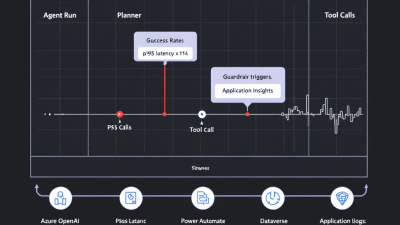
Agent Observability Playbook: How to Instrument, Trace, and Debug AI Agents in Production
Summary
Most teams can launch an agent; few can reliably run one. This playbook shows Power Platform and AI agent developers—and the SMBs they support—how to make agents production-ready with pragmatic observability. You’ll learn what to log, how to trace multi-step tool calls, and how to detect failure patterns before customers do. We map agent runs, prompts, function/tool calls, and safety events into a clean telemetry model using OpenTelemetry-style spans, Azure Monitor/Application Insights, Dataverse, and Power BI. We also cover latency SLA tracking, hallucination/guardrail telemetry, incident response, and post-incident root cause workflows—all aligned to real-world Microsoft Power Platform and Azure OpenAI deployments.
Why Observability Is Non‑Negotiable for AI Agents (and What “Good” Looks Like)
AI agents are probabilistic systems orchestrating prompts, tools, data, and policies. In production, “works on my machine” is not a strategy; it’s a liability. Good observability is the difference between trust and churn.
What good looks like:
– You can replay any agent run end-to-end, including prompts, tool calls, retries, and safety decisions.
– You can pinpoint where latency or errors originate—LLM, tool API, database, function execution, or policy.
– You can see safety/guardrail hits and adversarial attempts and correlate them with outcomes.
– You have SLAs/SLOs for latency, success rate, retry rate, guardrail hit rate, and cost—and they’re on dashboards with alerts.
– You practice incident response with trace replays, version comparisons, and fast rollback.
You don’t need to reinvent the tracing wheel. Azure Monitor’s native OpenTelemetry support lets you capture distributed traces, metrics, and logs from common runtimes and unify them in Application Insights, using spans and correlation that map perfectly to agent behavior. See the Azure Monitor OpenTelemetry Distro overview for the standards-based approach that underpins this playbook: Azure Monitor OpenTelemetry support.
Reference Architecture: Power Platform + Azure OpenAI + App Insights + Dataverse
A pragmatic, production-ready stack for SMBs and enterprise teams:
– Front door: Power Apps or Power Pages for user interfaces; Power Virtual Agents or custom apps invoking agents.
– Orchestration: Power Automate flows or Azure Functions hosting agent policies, planner/router/executor logic, and tool adapters.
– AI services: Azure OpenAI for chat/completions, embeddings, and function calling.
– Tools: APIs behind Azure API Management, connectors to SaaS, Dataverse operations, Azure Functions, and SQL/SharePoint.
– Observability: Application Insights for traces, dependencies, exceptions, and proactive diagnostics; Log Analytics for queryable logs; Power BI for executive dashboards; Dataverse for durable business context and audit trails.
Key integrations:
– OpenTelemetry spans emitted by your agent orchestrator flow or Functions, shipped to Application Insights via Azure Monitor’s OpenTelemetry distro: OpenTelemetry in Azure Monitor.
– Automatic dependency tracing and call flow visualization via Application Map helps you see the planner → tools → data path without manual stitching: Application Map.
– Smart Detection flags spikes in latency and failures so you can “detect failure patterns before customers do”: Smart Detection (Proactive Diagnostics).
– Dataverse server-side code (plug-ins/custom workflow activities) can emit telemetry directly to Application Insights for end-to-end correlation: Dataverse → Application Insights telemetry.
– Azure Functions auto-collects requests, dependencies, and exceptions—perfect for tool adapters: Monitor Azure Functions.
– API tools behind APIM inherit consistent telemetry, sampling, and correlation: API Management + App Insights.
– Power BI connects to Azure Monitor Logs (Kusto) for real-time dashboards and SLO views: Power BI + Azure Monitor Logs.
Telemetry Model 101: Traces, Spans, Events, and Correlation IDs for Agent Runs
Think of an agent run as a distributed trace:
– Trace (operation_id): One user task or conversation turn (e.g., “Create invoice draft and email it”).
– Spans: Steps inside the run—prompt to LLM, tool call to CRM, safety decision, retry attempt.
– Events: Point-in-time markers attached to spans—guardrail hit, schema mismatch, timeout fired.
– Attributes: Key-value context—model, tool_name, prompt_token_count, retry_count, user_tenant_id (hashed), cost_usd.
– Links: When multiple traces need correlation (e.g., parent chat thread or prior runs feeding context).
This structure maps naturally to OpenTelemetry and “just works” in Application Insights. Use it consistently so your dashboards are accurate and your investigators can replay runs. For multi-step routes, Application Map will visualize your planner/router/executor dependencies automatically: Application Map.
What to Instrument: Prompts, Tool/Function Calls, Retries, Safety Decisions, and Outputs
Instrument the whole lifecycle:
– Prompts and completions
– Record model, temperature, system/instruction version, input and output token counts, and latency.
– Log a redacted prompt preview and output summary for debugging, not full PII-laden text. Token usage comes with the API response and should be captured: Token usage metadata.
– Tool/function calls
– Create a span per call with tool_name, endpoint, request_size, response_size, latency, status_code, and retry_count.
– If behind APIM or Functions, you’ll get dependencies and exceptions auto-captured: APIM telemetry, Functions observability.
– Safety and policy decisions
– Capture content filter categories/severities for both request and response: Azure OpenAI content filtering.
– Log prompt-shield detections for injection/jailbreak attempts: Prompt Shields.
– Retries and fallbacks
– Record backoff strategy, reason, attempt number, and outcome. Mark final failure with outcome = failure and failure_reason.
– Outputs
– Store an output hash, structured result shape, and a brief preview; avoid storing full sensitive outputs unless governed.
Standard Event Schema for Agents (run_id, parent_id, tool_name, tokens, p95, outcome, cost)
Adopt a minimal, consistent schema so every span is queryable:
– run_id: GUID for the end-to-end agent run (maps to trace/operation_id).
– span_id: Unique per span; parent_id links to the caller.
– span_type: agent_run | prompt | tool_call | safety | retry | postprocess.
– tool_name: CRM.CreateInvoice, Email.Send, Planner.Route, etc.
– model: gpt-4o, gpt-35-turbo, etc.
– input_tokens, output_tokens, total_tokens.
– latency_ms, start_time_utc, end_time_utc.
– outcome: success | failure | partial | blocked.
– failure_reason: timeout | rate_limit | schema_mismatch | safety_block | tool_error.
– http_status, dependency_type: http | function | database.
– guardrail: content_filter_hit (true/false), categories[], severities[].
– prompt_version, tool_version, policy_version.
– retry_count, backoff_ms.
– cost_usd (derived from tokens and tool pricing).
– user_scope: tenant_id_hash, user_role.
– environment: dev | test | prod; region.
– correlation_ids: conversation_id, message_id, workflow_id.
Note “p95” belongs to dashboards, not events—compute p50/p95 in Kusto/Power BI from latency_ms.
Latency & Reliability SLAs: p50/p95, success rate, retry rate, guardrail hit rate, cost budgets
Define SLIs and SLOs you can automate:
– Latency SLI: time from user request to final agent output. Track p50, p90, p95. Alert on p95 breach.
– Success rate: fraction of runs with outcome = success. Track by workflow and environment.
– Retry rate: fraction of spans with retry_count > 0; high means flaky tools.
– Guardrail hit rate: content filter or prompt shield hits per 1000 runs.
– Cost per run: usd per run; budget per workflow/tenant to avoid runaway spend.
Automate anomaly detection and alerting:
– Use Smart Detection to catch spikes without hand-tuned thresholds: Smart Detection.
– Feed Azure Monitor Logs to Power BI for executive SLO dashboards and cost governance: Power BI with Log Analytics.
Tracing Multi‑Agent Flows: Planner–Router–Executor with Shared Memory and Context IDs
For multi-agent patterns:
– Planner span: decides strategy, selects tools/skills, sets route_id and context_id.
– Router span(s): dispatch per sub-goal; each child span has parent_id = planner.span_id and shares conversation_id and context_id.
– Executor spans: do the work (prompt, tool_call). Each includes memory_version and context_window_bytes.
– Shared memory: log memory read/write sizes and source (Dataverse, Vector DB). Use links to relate memory fetch traces if they originate from other systems.
– Finalizer span: aggregates results, validates schema, applies policies.
Application Map will visualize these relationships across services and show bottlenecks automatically: Application Map.
Guardrails Beyond Prompts: Logging policy decisions, access scopes, and safety filter outcomes
Guardrails aren’t just “be safe, please” in the system prompt. Instrument policy:
– Azure OpenAI content filter: capture category and severity on both request and response for every LLM call: Content filter telemetry.
– Prompt Shields: log detection_type (injection, jailbreak), confidence, and mitigation applied (strip tool instructions, sanitize URL): Prompt Shields signals.
– Access scopes: record effective permissions (resource_scopes[]) and reason (“least privilege” grant path).
– Safety outcomes: blocked vs allowed-with-warning; downstream effect (fallback model, human handoff).
Failure Pattern Catalog: Timeouts, loops, context overflows, schema mismatches, rate limits
Name failures so you can find and fix them:
– Timeouts: long-tail tool latency; correlate with dependency_type and endpoint. Mitigate with circuit breakers and caching.
– Retry storms: high retry_count; usually flaky APIs or aggressive backoff. Add jitter, cap attempts.
– Infinite or long loops: repeated planner decisions. Log loop_guard_triggered and route_id.
– Context overflows: prompt_tokens too high; cut by summarization span or memory eviction.
– Schema mismatches: tool contract vs model output; add JSON schema validator spans and capture first error.
– Rate limits: 429s from LLM or APIs; log quota headers and apply queueing.
– Safety blocks: content filter or shield blocked; surface user-friendly errors and track false positives.
Debugging Playbook: From Alert to Fix—replay traces, compare prompt/model versions, isolate tool
When an alert fires:
1) Open the failing run’s trace in Application Insights. Use Application Map to identify the slow or broken dependency and see the entire call chain: Application Map.
2) Check span attributes for prompt_version, tool_version, model, and environment. Compare with last known-good run.
3) Replay the run by feeding the same inputs and prompt_version into a shadow environment. Diff outputs, latencies, and safety events.
4) Isolate the culprit: disable tool via feature flag; swap model; pin prompt_version; reduce temperature.
5) Verify fix in canary; watch p95 and error rate regress to baseline. Smart Detection will also confirm anomalies subsiding: Smart Detection.
Post‑Incident RCA: Timeline, change log, action items, and version pinning for prompts/tools
A good RCA is boring and repeatable:
– Timeline: user impact start/stop; first alert; mitigation; resolution; verification.
– What changed: prompt/tool/model/connector versions, configuration, quotas, data distribution.
– Contributing factors: missing guardrails, sampling too low, noisy retries, unbounded context.
– Permanent fixes: schema validators, stricter timeouts, improved caching, version pinning, new alerts.
– Artifacts: trace links, KQL queries, dashboards screenshots, PRs, and change tickets.
Dashboards & Alerts: KQL and Power BI quick wins for SLAs, outliers, and anomaly detection
Quick wins you can ship this week:
– Latency SLO dashboard: p50/p95 per workflow and environment; alert when p95 exceeds threshold for 10 minutes.
– Success vs guardrail blocks: stacked chart of outcomes with filter categories over time.
– Cost per run and per tenant: track top outliers; alert on budget burn rate.
– Retry heatmap: tool_name by hour; spot flaky dependencies.
– Safety attempts: prompt-shield detections and blocked categories trending.
Use Azure Monitor Logs queries in Power BI via the built-in connector to create shared views for engineering and business leaders: Power BI + Azure Monitor Logs.
CI/CD & Change Control: Feature flags, shadow mode, canaries, and blue/green for agent skills
Treat prompts and tools like code:
– Feature flags: toggle tools, skills, and guardrails per environment/tenant.
– Shadow mode: run new prompt/tool in parallel, don’t expose results, log everything.
– Canaries: rollout to 1–5% of traffic; compare p95, success rate, and safety deltas.
– Blue/green: swap orchestrators or model deployments without downtime.
– Version artifacts: store prompt_version and tool_version in source control; include in every span.
– Rollback plan: one click to pin previous prompt_version/model.
Cost Observability: Token, tool API, and infrastructure spend with per-workflow budgets
Costs sneak up on teams—make them visible:
– Capture token usage per LLM call (prompt_tokens, completion_tokens, total_tokens) and compute cost_usd based on your price sheet: Usage metadata.
– Attribute tool API costs per span via APIM or Function metadata (billable calls, size tiers).
– Aggregate per run, per workflow, per tenant, and per environment.
– Alert on budget thresholds; trigger auto-mitigation (use cheaper model, shorter context, summarize first).
Power Platform How‑To: Custom connectors, Dataverse logging tables, and environment routing
Practical steps for Power Platform teams:
– Correlation in Power Automate
– Generate a run_id at flow start; pass it as traceparent headers to custom connectors and Azure Functions.
– Record span_id per action; store parent_id to maintain the chain.
– Custom connectors
– Add Request-Id/traceparent propagation so downstream APIs appear as dependencies in Application Insights via APIM: APIM + App Insights integration.
– Dataverse server-side telemetry
– Enable plug-in telemetry to Application Insights to capture timing, exceptions, and correlation with the originating agent run: Dataverse telemetry.
– Azure Functions tool adapters
– Use the Functions integration to auto-capture spans and enrich with agent context (run_id, tool_name): Monitor Functions.
– Environment routing
– Route dev/test/prod via Power Platform environments; include environment in telemetry. Use APIM to route to environment-specific backends, preserving correlation.
– Visualization
– Use Application Map to see your flow → connectors → APIM → Functions → Dataverse path: Application Map.
Security & Compliance: Audit trails, data retention, PII redaction, and access scoping in prod
Operate safely by default:
– Redaction: hash tenant_id/user_id; mask emails, phone numbers, and IDs in logs; store prompt/output previews, not full text.
– Access scoping: include user_scope and resource_scopes in spans; audit who could access what.
– Guardrail logging: persist content filter and shield decisions for incident investigation: Content filtering, Prompt Shields.
– Retention: set Log Analytics retention tiers by environment; export summaries to Dataverse for long-term audit.
– Least privilege: restrict who can query raw telemetry; publish curated Power BI datasets for broader audiences: Power BI integration.
Getting Started Checklist + Sample KQL Queries and JSON Schemas (downloadable)
Checklist
– Create an Application Insights instance and connect your orchestrator runtime with OpenTelemetry exporters: OpenTelemetry in Azure Monitor.
– Assign a run_id at the start of every agent run; propagate traceparent to all tools.
– Instrument LLM calls: log model, tokens, latency, and content filter results: Content filter details.
– Wrap tool calls with spans; capture retries, status codes, payload sizes. Use APIM or Functions to auto-capture dependencies: APIM, Functions.
– Enable Dataverse plug-in telemetry to correlate platform events: Dataverse telemetry.
– Publish Power BI dashboards from Azure Monitor Logs for SLAs and cost: Power BI connector.
– Turn on Smart Detection to catch anomalies early: Proactive diagnostics.
– Add feature flags and canaries; record prompt_version and tool_version on every span.
– Define SLOs for p95 latency, success rate, guardrail hit rate, and cost/run; wire alerts.
Sample KQL queries
– p95 latency by workflow (last 1 hour):
KQL: requests | where timestamp > ago(1h) | summarize p95_duration_ms = percentiles(duration, 95) by customDimensions.workflow, cloud_RoleName
– Success rate by environment (last 24 hours):
KQL: customEvents | where name == “agent_run_completed” and timestamp > ago(24h) | summarize success_rate = 100.0 * countif(customDimensions.outcome == “success”) / count() by customDimensions.environment
– Retry rate for tools (last 24 hours):
KQL: dependencies | where timestamp > ago(24h) | summarize retry_rate = 100.0 * countif(totolong(customDimensions.retry_count) > 0) / count() by name, target
– Guardrail hit rate and categories:
KQL: customEvents | where name == “safety_event” and timestamp > ago(24h) | summarize hits = count() by tostring(customDimensions.category), tostring(customDimensions.severity)
– Cost per run and top offenders:
KQL: customEvents | where name == “agent_run_completed” and timestamp > ago(24h) | summarize total_cost_usd = sum(todouble(customMeasurements.cost_usd)) by customDimensions.workflow | top 10 by total_cost_usd desc
– Outlier runs over p95:
KQL: requests | where timestamp > ago(1d) | summarize p95 = percentiles(duration, 95) by customDimensions.workflow | join kind=inner (requests | where timestamp > ago(1d)) on customDimensions_workflow | where duration > p95
Sample JSON schemas (attributes on spans/events)
– agent_run (root span)
{ “run_id”: “guid”, “span_id”: “guid”, “span_type”: “agent_run”, “workflow”: “string”, “environment”: “prod|test|dev”, “user_scope”: “tenant_hash:role”, “start_time_utc”: “iso8601”, “end_time_utc”: “iso8601”, “outcome”: “success|failure|partial|blocked”, “failure_reason”: “string|null”, “cost_usd”: 0.0, “conversation_id”: “string”, “message_id”: “string”, “prompt_version”: “string”, “policy_version”: “string” }
– prompt span
{ “run_id”: “guid”, “parent_id”: “span_id”, “span_id”: “guid”, “span_type”: “prompt”, “model”: “string”, “temperature”: 0.0, “input_tokens”: 0, “output_tokens”: 0, “total_tokens”: 0, “latency_ms”: 0, “content_filter”: { “request”: [{ “category”: “string”, “severity”: “low|medium|high”}], “response”: [{ “category”: “string”, “severity”: “low|medium|high”}] }, “prompt_version”: “string”, “outcome”: “success|blocked|failure” }
– tool_call span
{ “run_id”: “guid”, “parent_id”: “span_id”, “span_id”: “guid”, “span_type”: “tool_call”, “tool_name”: “string”, “dependency_type”: “http|function|database”, “endpoint”: “string”, “http_status”: 200, “request_bytes”: 0, “response_bytes”: 0, “latency_ms”: 0, “retry_count”: 0, “outcome”: “success|failure”, “failure_reason”: “timeout|rate_limit|schema_mismatch|tool_error”, “tool_version”: “string” }
– safety_event (event on span)
{ “run_id”: “guid”, “span_id”: “guid”, “event_type”: “safety_event”, “detector”: “content_filter|prompt_shield”, “detection_type”: “injection|jailbreak|toxicity|pii”, “categories”: [“string”], “severities”: [“low|medium|high”], “action”: “allow|block|sanitize” }
– retry event
{ “run_id”: “guid”, “span_id”: “guid”, “event_type”: “retry”, “attempt”: 2, “reason”: “timeout|rate_limit|transient_error”, “backoff_ms”: 500 }
Where this goes next
– Wire up OpenTelemetry to Application Insights and instrument your first agent workflow end-to-end: OpenTelemetry in Azure Monitor.
– Turn on automatic component visualization via Application Map: Application Map.
– Capture safety telemetry from day one using content filtering and Prompt Shields: Content filter, Prompt Shields.
– Publish an SLO dashboard in Power BI and set Smart Detection alerts: Power BI connector, Smart Detection.
With this playbook, your agents won’t just launch—they’ll run reliably, safely, and cost-effectively in production, with the evidence to prove it. If you’d like the downloadable KQL and JSON pack as files, let us know and we’ll send the bundle used in our B. Cobra Systems reference dashboards.






