
Hardening Autonomous AI Systems in Business: A Reliability Playbook for Regulated Enterprises
Introduction: Reliability as the unlock for autonomous AI in regulated environments
Autonomous agents are only as useful as they are predictable. In regulated enterprises and ambitious SMBs, “cool prototype” isn’t the bar—reliability, auditability, and cost control are. The good news: a Microsoft-first stack gives you the building blocks to run agentic automation with enterprise-grade security, observability, and governance. Azure OpenAI offers a compliance posture aligned to SOC 2, ISO 27001-series, PCI DSS, HIPAA eligibility, and even certain FedRAMP High and DoD IL5 authorizations, making it suitable for highly regulated scenarios when configured correctly. See the security and compliance position in the Azure OpenAI documentation for details: Azure OpenAI Service security and privacy.
Two standards frameworks should guide your playbook. Microsoft’s Responsible AI Standard defines requirements for transparency, safety-by-design, data governance, human oversight, and impact assessments across the AI lifecycle—practices we will implement as controls in this guide: Microsoft Responsible AI Standard (v2). Similarly, the NIST AI Risk Management Framework encourages measurable SLOs for trustworthiness characteristics and continuous monitoring—which we’ll translate into dashboards, alerts, and runbooks: NIST AI RMF 1.0.
What follows is a practical blueprint, mapped to Power Platform and Azure, to move from promising pilots to production-grade, compliant, and cost-controlled autonomous agents.
Autonomy spectrum, criticality tiers, and defining SLOs (latency, success rate, cost per task)
Before building, decide how much freedom your agent should have and how much risk you can tolerate.
– Autonomy spectrum
– Assisted: The model drafts; humans decide and execute.
– Copilot: The model drafts and executes reversible actions; humans can intervene.
– Semi-autonomous: The model executes within a constrained sandbox; approvals for sensitive actions.
– Autonomous with HITL gates: The model operates independently but requires approvals on high-risk edges.
– Fully autonomous: The model acts end-to-end within strict guardrails and monitoring.
– Criticality tiers
– Tier 0: Safety-critical or regulated record changes (e.g., PHI, financial postings).
– Tier 1: Customer-facing actions (emails, refunds, service orders).
– Tier 2: Internal productivity workflows (summaries, ticket triage).
– Tier 3: Non-critical experiments and A/B shadow traffic.
– SLOs and SLIs (aligned to NIST AI RMF trustworthiness dimensions)
– Latency: p95 time-to-decision and time-to-execute (e.g., ≤ 4s decision, ≤ 30s workflow).
– Success rate: task completion rate without human rework (e.g., ≥ 98% Tier 2, ≥ 99.5% Tier 1).
– Safe completion rate: percentage of actions passing safety checks (e.g., ≥ 99.9% Tier 0/1).
– Cost per task: tokens and external API cost budget (e.g., ≤ $0.05 per Tier 2 task).
– Factuality/groundedness: for RAG or knowledge tasks, hallucination rate ≤ 1% with groundedness ≥ 0.9.
– Drift tolerance: allowable change in success rate or safety flags over a rolling 7-day window (e.g., ≤ 0.5%).
Define error budgets (e.g., 0.5% for Tier 1) and tie them to change policies: when the budget is exhausted, freeze feature rollouts and focus on reliability until recovered.
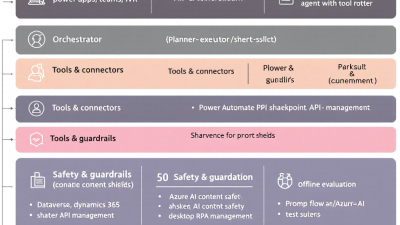
Reference architecture on Power Platform + Azure for hardened AI agents
This blueprint uses the Microsoft stack to balance autonomy with control:
– Orchestration and workflow
– Power Automate as the primary orchestrator of agent steps and approvals.
– Dataverse as the system of record for agent state, decisions, artifacts, and audit trails; leverage Dataverse business rules and plugins for policy enforcement.
– Model and safety
– Azure OpenAI for model inference, deployed behind private networking and role-based access; customer data is not used to train Microsoft models by default: Azure OpenAI data, privacy, and security.
– Azure AI Content Safety for input/output filtering, jailbreak/prompt-injection signals, and “prompt shields”: Azure AI Content Safety.
– Governance and data protection
– Microsoft Purview for classification, sensitivity labels, lineage, and access governance across Microsoft 365, Dataverse, and Azure: Microsoft Purview.
– Power Platform DLP policies, tenant isolation, and Managed Environments to constrain connectors and data movement; Dataverse auditing for who-did-what-when: Power Platform governance and DLP.
– Evaluations and experimentation
– Azure AI Studio for offline and online evals, safety metrics, and human review loops; use Prompt flow to operationalize eval pipelines: Evaluate generative AI applications in Azure AI Studio.
– Observability and reliability
– Application Insights and Azure Monitor with OpenTelemetry to capture distributed traces, prompts, tool calls, latencies, token usage, and safety outcomes end-to-end: OpenTelemetry with Application Insights.
– Azure Monitor alerts and workbooks for anomaly detection and incident response: Azure Monitor alerts.
– Change and release safety
– Versioned prompts and tool schemas stored in Dataverse or Git; feature flags via Azure App Configuration or Dataverse configuration tables; staged rollouts with shadow and canary traffic.
Offline evaluations: golden datasets, adversarial tests, and policy checks (Prompt flow/Azure AI Evaluation)
Before you trust an agent live, make it pass tests that reflect reality.
– Build a golden dataset of representative tasks and correct outcomes. Include edge cases and sensitive scenarios.
– Author adversarial tests: prompt injections, irrelevant context, contradictory instructions, and PII enticements.
– Define policy checks—what must never happen—and encode them as automated validators (e.g., “never send bank details”).
– Use Azure AI Studio’s evaluation capabilities to score quality (similarity, groundedness), safety (toxicity, self-harm, sexual content), and business metrics; incorporate human-in-the-loop labeling where ground truth is needed: Azure AI Studio evaluation.
– For retrieval-augmented generation, measure groundedness and hallucination using built-in metrics or frameworks like RAGAS; Azure AI Studio provides RAG evaluation patterns: Evaluate RAG applications.
Automate all of the above with Prompt flow pipelines and run them on every change to prompts, tools, or model versions. Set promotion gates tied to SLOs.
Mining unstructured inputs (tickets, emails, call notes) to build realistic eval sets
Your best eval data is already in your enterprise flows.
– Source data
– Tickets and case notes in Dataverse or ITSM systems.
– Emails and meeting transcripts from Microsoft 365 (respecting permissions).
– Chat logs, CRM timelines, and call-center summaries.
– Steps
– Use Power Automate to sample and de-identify records; apply Purview sensitivity labels to ensure data handling compliance: Microsoft Purview.
– Redact PII/PHI before export using Azure AI Content Safety or data loss prevention connectors: Azure AI Content Safety.
– Normalize into eval templates: task input, expected output, safety constraints, allowed tools.
– Store eval sets in Dataverse or Azure Storage with version tags; link each test to a policy ID for traceability.
Guardrails: prompt hardening, tool whitelists, PII redaction, content safety, and jailbreak resistance
Defense-in-depth is mandatory for autonomous systems.
– Prompt hardening
– Use explicit system messages that restate policy, scope, and refusal behaviors; Microsoft’s safety guidance recommends layered checks and constrained tool use: Guidance for building safer AI apps.
– Tool whitelists and constraints
– Expose only permitted actions via function calling; validate arguments server-side; restrict external connectors using Power Platform DLP policies and tenant isolation: Power Platform DLP.
– PII redaction and content safety
– Filter inputs/outputs with Azure AI Content Safety and redact sensitive fields before persistence or egress: Azure AI Content Safety.
– Injection and exfiltration defense
– Apply “prompt shields,” user-intent confirmation, and escaped tool instructions; keep knowledge sources signed and contextualized; see Microsoft’s safety guidance: Safer AI apps guidance.
– Data governance
– Use Purview for classification, labeling, and access boundaries across data estates: Microsoft Purview.
Human-in-the-loop fail-safes: approvals, reversible actions, and confidence thresholds in Power Automate
For Tier 0/1 actions, make humans the circuit breaker.
– Approvals and checkpoints
– Power Automate Approvals for mandatory human sign-off before sensitive actions (refunds, record changes): Power Automate Approvals.
– Use confidence thresholds (e.g., below 0.8 confidence or above $100 cost triggers approval).
– Ensure actions are reversible by default: use “pending” status updates before final commit.
– Least privilege and evidence capture
– Enforce Dataverse role-based access and field-level security so only approvers can authorize and the agent has scoped permissions: Approvals.
– Persist rationale, inputs, outputs, and safety scores to Dataverse for audit and training.
Observability & audit logging: structured traces, versioning, and evidence for compliance (App Insights, Dataverse audit)
You can’t manage what you can’t see.
– Structured telemetry
– Instrument every step with OpenTelemetry: traceId, sessionId, userId (pseudonymized), promptId, model version, token counts, latency, safety flags, cost.
– Send to Application Insights and Log Analytics for analysis and dashboards: Application Insights with OpenTelemetry.
– Audit and provenance
– Use Dataverse audit logs for CRUD history and who approved what: Power Platform governance.
– Store immutable evidence bundles (input, output, tool calls, policies applied) with versioned prompt/tool IDs.
– Respect privacy commitments—Azure OpenAI does not train on your data by default, and supports private networking and RBAC: Azure OpenAI data privacy.
Synthetic monitoring & drift detection: canary prompts, scheduled probes, and shadow traffic
Production agents need proactive checks.
– Canary prompts
– A small, fixed set of tasks that represent “must-not-fail” scenarios. Run them every 5–15 minutes; alert on latency, correctness, and safety regression.
– Scheduled probes
– Power Automate scheduled flows to ping each capability; log to Application Insights; alert when SLOs are breached: Azure Monitor alerts.
– Shadow traffic
– Route a copy of real requests to a new model/prompt version without affecting users. Compare success and safety metrics before promotion.
– RAG drift detection
– Use Azure AI Studio’s RAG evaluation to watch groundedness and hallucination trends: RAG evaluation.
Change management: versioned prompts and tools, feature flags, staged rollouts, and rollback playbooks
Treat prompts and tool schemas like code.
– Versioning
– Assign semantic versions to prompts, tool schemas, and safety policies. Store in Dataverse or Git and reference the version in every trace.
– Feature flags and rings
– Gate risky actions with flags. Roll out to internal users, then 5%, 25%, 100%. Use Power Automate environment variables or Azure App Configuration.
– Staged rollouts and rollbacks
– Promote only after offline evals, canary success, and error budget checks. Keep a one-click rollback to the prior version and a freeze protocol when SLOs are violated.
– Governance
– Align with Microsoft’s Responsible AI Standard checkpoints (impact assessment, human oversight readiness, transparency notes): Responsible AI Standard.
Compliance by design: DLP policies, data residency, Purview labeling, and model risk management
Bake compliance into the architecture.
– DLP and residency
– Use Power Platform DLP to segment business vs. non-business connectors and enforce data boundary rules; choose Azure OpenAI regions that meet residency requirements: Power Platform DLP, Azure OpenAI compliance.
– Data governance
– Classify and label data with Purview; apply access policies and track lineage across ingestion, processing, and actioning: Microsoft Purview.
– Model risk management
– Keep an inventory of models, prompts, training/eval sets, and intended use. Monitor and attest to safety controls and HITL. NIST AI RMF offers a structured approach: NIST AI RMF 1.0.
Cost and capacity guardrails: budgets, rate limits, and quota-aware planning for Azure OpenAI
Reliable also means predictable spend and throughput.
– Quotas and rate limits
– Size concurrency and throughput to Azure OpenAI quotas; monitor token-rate and request-rate limits and implement client-side backoff and retry: Azure OpenAI quotas and limits.
– Budgets and alerts
– Use Azure Cost Management budgets and alerts by subscription/resource group; break down cost per task via telemetry and tag-based chargeback: Cost and quotas guidance.
– Optimization playbook
– Cache intermediate reasoning, use smaller models for classification, compress context with summaries, and cap max tokens based on task type. Set SLOs for cost per task with weekly review.
SMB quick-start: a minimal secure baseline and checklist to ship in weeks, not months
You don’t need a 12-month program to get value—start with a hardened baseline.
– Minimal architecture
– Managed Power Platform environment with strict DLP.
– Dataverse solution for agent state and approvals.
– Azure OpenAI in-region with private access and logging.
– Azure AI Content Safety for I/O filtering.
– Application Insights with OpenTelemetry for traces and cost.
– Purview sensitivity labels on key data sources.
– Two-week checklist
– Scope: pick 1–2 Tier 2 workflows with clear business value.
– SLOs: define p95 latency, success rate, and cost per task.
– Guardrails: harden system prompts, tool whitelist, and content safety.
– HITL: add Approvals for any external send or data write.
– Eval: build a 50–100 case golden dataset; run Azure AI Studio evals.
– Observability: capture promptId, version, tokens, latency, safety flags.
– Synthetic: schedule canary prompts hourly.
– Cost: set a monthly budget and alerts.
– Go-live: stage rollout to 10 users, then 100, then all.
Dashboards that matter: KQL queries, Power BI views, and alerting for SLO adherence
Focus dashboards on decisions and dollars.
– Core widgets
– SLO status: p50/p95 latency, success rate, safe completion, error budget burn.
– Cost: tokens and $ per task, top workflows by spend, forecast vs. budget.
– Safety: flagged content by category, block rate, top offending prompts/tools.
– Drift: groundedness and hallucination trend for RAG.
– Example Kusto queries (Application Insights)
– Latency p95 by operation
requests
| summarize p95(duration) by operation_Name, bin(timestamp, 1h)
– Success rate and error budget
requests
| summarize successRate = 100.0 * countif(success == true) / count(), total = count() by bin(timestamp, 1h)
| extend errorBudgetBurn = 100 – successRate
– Token and cost per task (assuming customMetrics)
customMetrics
| where name in (“prompt_tokens”,”completion_tokens”,”cost_usd”)
| summarize promptTokens = sumif(value, name == “prompt_tokens”),
completionTokens = sumif(value, name == “completion_tokens”),
costUSD = sumif(value, name == “cost_usd”) by operation_Id, bin(timestamp, 1h)
Wire these queries into Azure Monitor workbooks and Power BI for exec-ready views. For ingestion and tracing patterns, see OpenTelemetry with Application Insights: OpenTelemetry ingestion.
Go-live checklist, weekly ops cadence, and incident response runbook
– Go-live checklist
– All guardrails enabled (Content Safety, DLP, tool whitelist).
– Offline evals passed with defined margins; canary prompts green for 7 days.
– HITL approvals active for Tier 0/1 actions.
– Observability and alerts configured; evidence logging verified.
– Rollback plan tested; previous stable version ready.
– Budget and rate limit alerts configured.
– Weekly ops cadence
– Review SLOs, error budgets, and incidents; decide on rollout gates.
– Inspect top failure modes and safety flags; update prompts/tools accordingly.
– Audit access changes, DLP exceptions, and Purview label coverage.
– Cost optimization review; right-size quotas and model selection.
– Incident response runbook
– Detect: Azure Monitor alerts on SLO breach, 5xx spikes, unsafe content rate, cost anomalies: Azure Monitor alerts.
– Contain: Flip feature flags to safe mode; auto-route all Tier 1 actions to HITL; throttle or pause specific tools.
– Diagnose: Use Application Insights traces to pinpoint prompt/tool/version; compare to shadow traffic.
– Remediate: Roll back prompt/tool version; patch safety rules; add new canary tests.
– Document: Log root cause, evidence bundle, and corrective actions in Dataverse; update the change record.
– Prevent: Add regression tests to Azure AI Studio evals and synthetic monitors: Evaluation approach.
Conclusion + CTA: Partner with B. Cobra Systems to harden and scale your agentic automation
Autonomy doesn’t have to mean anarchy. With a Microsoft-first architecture, measurable SLOs, layered guardrails, HITL fail-safes, and robust observability, you can ship agents that are reliable, compliant, and cost-predictable. Azure OpenAI’s enterprise-grade posture and privacy guarantees provide a strong foundation for regulated use, and frameworks like Microsoft’s Responsible AI Standard and NIST AI RMF turn reliability into a repeatable practice—not a hope.
If you’re ready to go from promising pilot to production-grade autonomous agents in weeks, not months, B. Cobra Systems can help. We’ll bring the playbook, the blueprints, and the hands-on implementation across Power Automate, Dataverse, Azure OpenAI, Application Insights, Azure Monitor, and Purview—so your teams can focus on outcomes, not plumbing. Let’s harden and scale your agentic automation together.






