
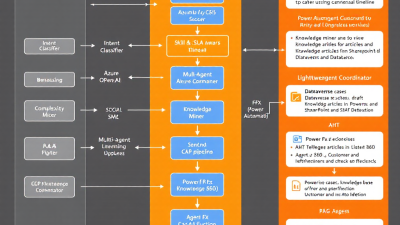
Beyond Bots: AI Agents for Omnichannel Customer Service that Learn from Every Case (Power Platform Reference Architecture)
Summary
Static chatbots have hit their ceiling. Customers want resolutions, not polite detours. This blueprint shows Power Platform and AI developers—and the SMB leaders sponsoring them—how to build a learning, multi-agent system on Microsoft Dynamics 365 Customer Service, Omnichannel, Copilot Studio, Dataverse, Power Automate, and Azure OpenAI. We’ll detect intent, score complexity, route smartly, auto-summarize cases, and mine unresolved interactions into new knowledge via retrieval-augmented generation (RAG). The payoff is measurable: higher first contact resolution (FCR), lower average handle time (AHT), and more deflection—without sacrificing CSAT.
The shift beyond chatbots: why static scripts stall and customers expect real resolution
The traditional bot was a branching tree with manners. It asked questions, matched a pattern, and returned a canned answer or a form. That helped deflect FAQs but struggled with nuance, multi-turn context, cross-channel continuity, and the long tail of edge cases.
What changed:
– Customer expectations: FCR rules customer satisfaction. Benchmarks show FCR is the strongest driver of CSAT; every 1 percent improvement in FCR correlates with a 1 percent lift in CSAT, so deflection must be paired with reliable resolution paths, not dead ends. See the research shared by SQM Group on First Contact Resolution.
– Business value: Customer operations is now a hot zone for generative AI. Independent analysis estimates 30–45 percent of current customer operations activities are automatable and that this function is among the biggest contributors to annual gen AI value creation. See McKinsey’s economic potential of generative AI.
– Labor economics: Conversational AI is projected to reduce contact center agent labor costs by billions, with industry forecasts pointing to significant savings within a few years—underscoring why CFOs are leaning in. Refer to Gartner’s forecast on contact center labor cost reduction.
In short: legacy bots deflect; learning agents resolve. To win on FCR and CSAT you need an omnichannel system that learns from every interaction.
What a learning, omnichannel agent system looks like (and how it differs from legacy bots)
A learning system is not one bot—it’s an ensemble:
– Channel concierge: Greets users across chat, SMS, social, email, and voice, preserves context, and authenticates when necessary.
– Triage and intent detector: Classifies the request, recognizes entities, and understands mood/urgency.
– Complexity scorer: Predicts whether this is an FAQ, a policy exception, a process execution (e.g., warranty), or a true edge case.
– Self-service resolver: Uses retrieval-augmented generation (RAG) to ground answers in enterprise data and orchestrates actions (refunds, resets, lookups) via APIs and Power Automate.
– Agent-assist copilot: When a human steps in, summarizes the thread, suggests next best actions, drafts replies, and searches knowledge in the background.
– Knowledge miner: After the interaction, turns what wasn’t resolved (or what required manual heroics) into new knowledge articles and SOP updates.
This differs from legacy bots in four ways:
1) Omnichannel by design: It continues a conversation seamlessly across channels without losing context (or compliance guardrails). 2) Learning loop: It captures gaps and turns them into content that improves future deflection and FCR. 3) Human-in-the-loop: It elevates agents with on-demand summaries and suggested actions—evidence shows copilot assistance increases resolution speed and consistency, especially for novice agents; see the field results in NBER’s “Generative AI at Work”. 4) Governance: It embeds controls for PII, approval gates, and auditability instead of “set-and-forget” scripts.
Reference architecture on Microsoft Power Platform
This reference architecture uses standard, supported Microsoft components:
– Dynamics 365 Customer Service with Omnichannel: Centralizes cases and conversations; uses AI-based unified routing to classify, prioritize, and assign work by skills, intent, and context across channels. See Unified routing in Dynamics 365 Customer Service.
– Microsoft Copilot Studio: Designs conversational experiences, provides generative answers grounded in your data, orchestrates actions through Power Automate and APIs, and hands off to live agents in Omnichannel with full transcript context. See Copilot Studio documentation.
– Dataverse: The system of record for cases, conversations, summaries, dispositions, knowledge articles, and custom telemetry (e.g., intent and complexity scores).
– Azure OpenAI + RAG via Azure AI Search: Grounds large language model responses in enterprise content (“use your data”) to reduce hallucinations and increase answer relevance and safety. See Azure OpenAI “use your data” and RAG with Azure AI Search.
– Power Automate: Orchestrates back-end actions (e.g., refunds, entitlement checks), triggers summarization, writes artifacts to Dataverse, and coordinates human approval steps.
– Dynamics 365 Copilot for Customer Service: Provides case and conversation summarization, reply suggestions, and knowledge suggestions to speed resolution. See Dynamics 365 Copilot introduction.
– Analytics with Dynamics 365 Customer Service Insights and Power BI: Out-of-the-box KPIs (AHT, CSAT, resolution rates, deflection) plus custom telemetry for experiments and cohorts. See Customer Service analytics and insights.
Multi-agent roles and flow: intent detection, complexity scoring, and smart routing
How requests move through the system:
1) Channel intake and identity: Omnichannel receives the conversation (web chat, WhatsApp, SMS, voice, email). If authenticated, the system enriches context with account, entitlements, and past cases.
2) Intent detection: Copilot Studio classifies the user’s goal and entities. The conversation transcript (with metadata like language, sentiment, and authenticated user) is sent to a triage function.
3) Complexity scoring: A lightweight model (rules + vector similarity + a small LLM classification prompt) scores complexity from 0–3:
– 0–1: FAQ or straightforward transactional (reset, order status)
– 2: Procedural with branching (warranty, billing exception)
– 3: Ambiguous, policy exception, or multi-system dependency
4) Smart routing: Dynamics 365 unified routing uses intent, skills, capacity, SLAs, and complexity to assign:
– Self-service resolver for 0–1, with RAG grounding and action orchestration
– Agent-assist for 2–3, routed to the right skill queue with a Copilot-generated summary and suggested next steps
5) Escalation and guardrails: If confidence is low or a policy boundary is hit, auto-handoff to a human with full context, preserving the customer’s effort. Unified routing handles this across channels—see Microsoft’s unified routing overview.
Auto-summarization: generating clean case notes, dispositions, and follow-ups in Dataverse
After each interaction:
– Conversation and case summaries: Dynamics 365 Copilot drafts a concise synopsis, key facts, resolution status, and proposed follow-ups. This reduces wrap time and after-call work, contributing to lower AHT; see Dynamics 365 Copilot.
– Structured dispositions: A Power Automate flow maps summary outputs to Dataverse fields: Intent, Product, Root Cause, Resolution Type, Complexity Score, and Knowledge Gap Flag.
– Agent validation: Agents approve or edit the summary with one click in the Omnichannel panel; edits improve future prompts.
– Next-best actions: Drafted follow-ups (email/SMS, RMA creation, appointment) are queued in Power Automate for approval and execution.
Mining unresolved cases: auto-drafting KB articles and SOP updates with RAG
When cases aren’t resolved on first contact—or required manual exception handling—the system learns:
– Identify candidates: A nightly job queries Dataverse for cases with low-confidence resolutions, multi-transfer, or long-handle-time tags.
– Draft knowledge: Azure OpenAI, grounded with the entire case transcript and relevant documents via Azure AI Search, drafts a KB article outline (problem, environment, steps, screenshots placeholders, error codes, cautions).
– Human review: Knowledge managers receive drafts for editorial review and publication into the Knowledge base. Dynamics 365 supports creating knowledge from cases, accelerating this loop—see Create knowledge articles from cases.
– Close the loop: Published content is immediately indexed by Azure AI Search. Copilot Studio’s generative answers now cite the new KB during self-service—reducing repeat contacts. The RAG pattern reduces hallucinations by injecting retrieved context into prompts—see RAG with Azure AI Search and Azure OpenAI “use your data”.
Measuring what matters: FCR, AHT, deflection, CSAT—and how to instrument in Power BI
Build measurement in from day one:
– Core KPIs:
– FCR: First contact resolved rate by channel and intent. Strongest driver of CSAT; see SQM Group’s FCR research.
– AHT: Average handle time, with sub-stages (wait, talk, wrap).
– Deflection: Percentage solved by self-service without agent touch.
– CSAT: Transactional survey and sentiment from transcripts.
– Instrumentation:
– Use Dynamics 365 Customer Service analytics for baseline KPIs and cohort views; see Customer Service analytics.
– Log custom telemetry to Dataverse: intent, complexity score, model confidence, RAG citations count, and handoff reason.
– Publish to a Power BI dataset for funnel analysis, topic-level trends, and A/B test comparisons (agent-assist ON vs OFF, new KB enabled vs not).
– ROI framing:
– Agent-assist boosts issues resolved per hour, with the largest gains for novice agents—evidence from NBER’s field study.
– Macro-level value aligns to forecasts for cost reduction and automation potential; see McKinsey and Gartner.
Build guide for developers: Copilot Studio handoffs, Dataverse schema, and Power Automate orchestration
A pragmatic build sequence:
– Copilot Studio front door
– Create a bot per channel or one omnichannel bot with channel-specific policies.
– Define Topics for top intents; for each Topic, configure Generative Answers grounded on your KB and SharePoint sites.
– Add Actions that call Power Automate flows for system operations (order lookup, refund eligibility).
– Implement Handoff: Configure escalation to Omnichannel with full transcript, detected intent, and customer identity.
– Dataverse schema (extend minimally)
– Case (standard): add fields for ComplexityScore, Intent, ModelConfidence, HandoffReason, RAGSources (JSON), SummaryApproved (bool).
– Conversation table (custom): store turn-level metadata, vector IDs for retrieval reference, and sentiment.
– Knowledge Gap entity (custom): tracks topics to be curated, status, owner.
– Power Automate orchestration
– On conversation end: trigger summarization, dispositioning, and follow-ups, then write to Dataverse.
– Nightly knowledge mining: select candidate cases, retrieve related docs from Azure AI Search, draft KB via Azure OpenAI, and create an unpublished knowledge article for review.
– Agent-assist panel: expose quick actions (refund, entitlement check) with guardrails; require approvals where policy dictates.
Models and prompts: grounding with enterprise data, retrieval design, and evaluation loops
Design for accuracy first:
– Retrieval strategy
– Ingest sources: KB, SOPs, product docs, policies, resolved case summaries. Chunk by semantic boundaries (e.g., 400–800 tokens) with product/region/version metadata.
– Index in Azure AI Search with hybrid retrieval (BM25 + vectors) and filters (product, locale, role).
– Use RAG to inject the top k passages with citations into prompts; see Microsoft’s RAG guidance.
– Prompting patterns
– System prompt: Define role, tone, boundaries (“only answer from provided context; if missing, escalate”).
– Few-shot exemplars: Include approved answer style and citation format.
– Safety: Mask PII in prompts; instruct the model to refuse out-of-scope actions.
– Evaluation and continuous improvement
– Golden set: Maintain a labeled set of customer questions with correct answers and expected citations for offline evaluation.
– Metrics: Exactness, groundedness (all claims cited), non-refusal rate, latency, and agent override rate.
– Feedback loop: Capture thumbs-up/down from agents and customers; use edits to retrain prompts and improve chunking.
– “On your data” implementation details are outlined in Azure OpenAI’s use-your-data documentation.
Security and data boundaries: PII handling, channel scopes, and human review checkpoints
Treat trust as a feature:
– PII governance
– Redact or tokenize sensitive fields (card numbers, SSNs) before sending to LLMs.
– Keep transcripts and prompts in Dataverse with role-based access; segment environments by region if required.
– Channel policies
– Define what actions are allowed per channel (e.g., refunds only after authentication; no address changes over public chats).
– Use Omnichannel’s capacity and skills with policy flags to route sensitive interactions to trained teams.
– Human-in-the-loop and audit
– Require agent approval for summaries, refunds, and KB publications.
– Log every automated action with inputs, outputs, and citations; expose audit trails in Power BI.
SMB quick start: a lean setup using Omnichannel + Copilot Studio + Azure OpenAI
A small team can launch a high-impact pilot in weeks:
– Week 1: Connect web chat and email to Omnichannel. Stand up Copilot Studio with two top intents, grounded on your existing FAQ site. Add “talk to an agent” escalation.
– Week 2: Add agent-assist summaries in Dynamics 365 Copilot and a Power Automate flow to save summaries and dispositions into Dataverse. Instrument AHT and FCR baselines.
– Week 3–4: Introduce Azure OpenAI + RAG on your KB and SOPs. Add one transactional action (order status). Start nightly knowledge-mining drafts for review.
– Business case: Expect early gains from agent assist—consistent with field research showing higher issues resolved per hour among assisted agents; see NBER. Budget planning aligns with broader savings forecasts; see Gartner.
Mini case study: an eCommerce support team lifts FCR by 18% and cuts AHT by 22%
Context: A 40-agent eCommerce team handling order status, returns, and warranty claims.
What they implemented:
– Copilot Studio front door for chat and WhatsApp, with RAG grounded on policies and return workflows.
– Unified routing by intent/complexity into specialized queues.
– Dynamics 365 Copilot summaries and suggested replies; Power Automate actions for order lookups and label generation.
– Nightly knowledge-mining to capture edge-case returns (e.g., partial bundles).
Results after 8 weeks:
– FCR: +18% overall, driven by self-service returns and better triage.
– AHT: −22% through instant summaries and prefilled dispositions.
– CSAT: +3 points, consistent with the FCR focus (see SQM Group’s FCR-to-CSAT linkage).
– Coaching: New hires matched the median agent’s resolution pace faster, echoing the productivity gains seen in NBER’s study on agent assist.
Rollout plan: pilot, A/B testing, agent assist first, then deflection—plus change management
– Start with agent assist: Launch summaries, suggested replies, and knowledge suggestions for two intents. Measure impact on AHT and FCR before turning on deflection.
– A/B testing: Randomize which agents use copilot features to create a clean comparison. Use Dynamics 365 analytics and Power BI to report deltas; see Customer Service analytics.
– Expand to deflection: Enable self-service flows for top intents with the highest repeat volume and lowest risk.
– Change management:
– Communicate “copilot, not autopilot.”
– Create a feedback channel for agents.
– Recognize top contributors to knowledge quality.
Optimization playbook: feedback loops, topic clustering, and continuous knowledge curation
– Topic clustering: Use embeddings to cluster unresolved cases; prioritize clusters by volume x handle time x CSAT drag.
– Content lifecycle:
– Draft → Review → Publish → Measure deflection → Refresh on a cadence or when drift is detected.
– Track article precision (does it solve the case?) and freshness (last verified).
– Prompt and retrieval tuning:
– Adjust chunk size, metadata filters, and top-k retrieval.
– Measure groundedness and citation coverage; require citations for non-trivial claims.
– Workforce coaching: Use copilot summaries to highlight common failure modes and policy confusion for targeted training.
Build vs. buy considerations, licensing basics, and a 30–60–90 day roadmap
– Build vs. buy
– Buy if your needs are standard (FAQ, order status, appointment changes) and time-to-value is paramount.
– Build (on Power Platform) when you need deep process integration, data governance alignment, custom KPIs, and a closed-loop knowledge engine.
– Licensing basics to evaluate
– Dynamics 365 Customer Service (and Omnichannel add-on) for case management and live channels.
– Microsoft Copilot Studio for conversational experiences and generative answers grounded in your data.
– Azure OpenAI and Azure AI Search for RAG; consumption-based usage.
– Power Automate for orchestrations; Dataverse capacity for storing transcripts, summaries, and telemetry.
– Always validate current licensing terms with Microsoft or your partner.
– 30–60–90 day roadmap
– 0–30 days: Stand up Omnichannel for one channel; deploy Copilot Studio for two intents; enable agent-assist summaries; instrument KPIs; baseline AHT/FCR/CSAT.
– 31–60 days: Add RAG on top-tier knowledge sources; implement one transactional automation; start knowledge-mining drafts; A/B test agent-assist; begin queue-level routing by complexity.
– 61–90 days: Expand to three more intents; enable safe deflection; publish curated KB; roll out governance (approval flows, audit dashboards); scale to additional channels.
Why now—and what “good” looks like
Generative AI is rewriting the playbook for service operations, but the winners won’t be those with the flashiest bots. They’ll be the teams that turn every case into a learning asset and measure outcomes relentlessly. With Microsoft’s Power Platform, Dynamics 365 Omnichannel, Copilot Studio, Dataverse, Power Automate, and Azure OpenAI—with RAG for accuracy—you can build a pragmatic, governed, and measurable system that improves FCR, reduces AHT, increases deflection where appropriate, and protects CSAT.
References cited in this post
– Unified routing that classifies and routes by skills, intent, and context: Dynamics 365 unified routing overview.
– Copilot summarization and suggested replies: Introducing Dynamics 365 Copilot.
– Copilot Studio generative answers, actions, and live handoffs: Copilot Studio docs.
– Azure OpenAI “use your data” for grounding LLMs: Use your data.
– RAG with Azure AI Search to improve answer quality: RAG overview.
– Create knowledge articles from cases: Dynamics 365 knowledge from cases.
– Customer Service analytics and KPIs: Service analytics.
– FCR as the top CSAT driver: SQM Group on FCR.
– Agent assist boosts productivity in the field: NBER Working Paper 31161.
– Economic upside of gen AI in customer operations: McKinsey’s analysis.
– Macro savings forecast for conversational AI: Gartner forecast.
Interested in turning this blueprint into your roadmap? A short discovery and a two-week pilot can validate gains in your environment—starting with agent assist and instrumented outcomes.






