
Data Quality at the Edge: AI Agents that Enforce MDM in Real Time
Executive Summary
Dirty data is expensive—and fixable. By shifting Master Data Management (MDM) governance to the “edge,” at the exact moment and place where data is created, organizations can validate, standardize, deduplicate, and resolve golden records before bad data leaks into CRM/ERP systems. This post maps a practical, agent-driven reference architecture on Microsoft Power Platform—using Dataverse, Power Automate, Copilot Studio, and Azure services—plus a quick-start path for SMBs and an enterprise-grade pattern with governance and human-in-the-loop control.
The Cost of Dirty Data: Why Quality Must Happen at the Edge
Bad data doesn’t just cause reporting drift; it compounds rework across sales, support, finance, and compliance. Gartner estimates organizations lose $12.9 million each year due to poor data quality. See Gartner’s “What Is Data Quality?” to understand the scale and sources of loss. The longer invalid or duplicate data persists, the more it contaminates downstream analytics, automations, and AI. Edge enforcement—stopping issues at the first touch—minimizes both operational drag and remediation costs and increases trust in every subsequent decision.
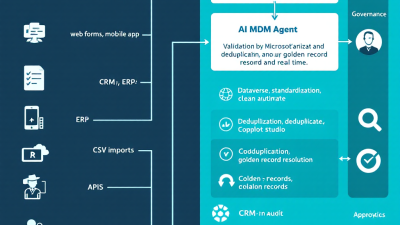
Defining the Edge: Where Data Is Born (forms, APIs, imports, chat, mobile)
“Edge” means the earliest capture point:
– Forms: Power Apps (model-driven and canvas) and Dynamics 365 pages where users create accounts, contacts, products, or cases.
– APIs: Dataverse Web API ingestion from custom apps or partner portals.
– Imports: Dataflows, file drops, or bulk syncs from legacy systems.
– Chat: Copilot or Copilot Studio agents collecting customer details conversationally.
– Mobile: Field apps scanning business cards or barcodes, or capturing service data offline.
Each edge has different latency, UX, and validation needs. The goal is consistent policy, delivered in channel-appropriate ways, with a shared identity strategy and explainable controls.
From Rules to Agents: An Agentic MDM Pattern for Real-Time Enforcement
Classic MDM relied on batch jobs and after-the-fact clean-up. In a modern, real-time environment, we promote a guardrail “agent” that:
– Observes: Intercepts create/update events and captures context (who, where, channel).
– Validates: Applies hard rules (required fields, formats, schema) and soft checks (probabilistic matches).
– Standardizes: Normalizes addresses, phone numbers, names, and product identifiers to canonical formats.
– Deduplicates: Uses alternate keys and fuzzy match logic to detect or prevent duplicates.
– Resolves Golden Records: Links or merges into a single, trusted profile and records a rationale.
– Explains and Escalates: Surfaces why a decision was made and when to request human approval.
This agent pattern blends deterministic rules with AI-assisted judgment and uses human-in-the-loop for ambiguous cases.
Reference Architecture on Microsoft Power Platform
At a high level:
– Dataverse as the transactional core and policy enforcement point.
– Power Apps for edge capture with Business Rules for immediate client/server validation. See Power Apps Business Rules.
– Synchronous, PreOperation plug-ins for do-not-pass checks and standardization before commit. See Plug-ins (Microsoft Dataverse) and the Event framework.
– Alternate keys to enforce uniqueness and fast identity lookups at write time. See Define alternate keys for a table.
– Power Automate for orchestration and approvals; Approvals provide auditable, SLA-backed human-in-the-loop. See Approvals in Power Automate.
– Dataverse webhooks and Azure Service Bus to trigger external microservices (e.g., advanced matching, third-party validation) in near real time. See Use webhooks and Integrate with Azure solutions.
– Copilot Studio agents that collect data via conversation and call flows/APIs as “Actions.” See Actions in Microsoft Copilot Studio.
– Dynamics 365 Customer Insights – Data for unified “golden profiles” across sources and AI-assisted merging. See Unify data to create customer profiles.
Note: Microsoft deprecated classic Duplicate Detection, pushing teams toward modern, real-time patterns such as alternate keys and custom logic. See Duplicate detection is deprecated in Dataverse.
Core Agent Skills: Validate, Standardize, Deduplicate, Resolve Golden Records
– Validate
– Deterministic checks: required fields, legal entity types, email/phone formats.
– Contextual checks: country-specific address requirements; business vs. personal emails.
– Channel-aware UX: explain violations clearly in forms or chat; provide inline fixes.
– Standardize
– Normalize to canonical schema: proper casing, E.164 for phone, ISO country codes.
– Address standardization via trusted references (e.g., postal databases).
– Convert free text to structured fields where possible.
– Deduplicate
– Hard prevention with alternate keys (e.g., email + tenant, product SKU + org). See alternate keys.
– Fuzzy matching (name + domain + address similarity) via Azure microservice triggered by Dataverse webhook. See webhooks.
– Explain near-duplicates and suggest merges with confidence scores.
– Resolve Golden Records
– Determine survivorship (e.g., most recent verified email, longest-lived account ID).
– Write back linkages and lineage for transparency.
– Optionally feed to Customer Insights – Data for multi-source unification. See Customer Insights – Data.
SMB Quick Start: A No-Regret Path with Dataverse, Power Automate, and AI Builder
Start small, ship value fast:
1. Lock in obvious uniqueness with alternate keys (contact: Email + Environment; account: Tax ID or Domain). See alternate keys.
2. Add Business Rules to Power Apps forms for real-time validation and helpful error messages. See Business Rules.
3. Use a simple cloud flow to standardize fields (trim, case, E.164) and log changes; for ambiguous matches, trigger a Power Automate Approval. See Approvals.
4. Introduce AI Builder selectively (e.g., extract entities from an uploaded card image or infer company name from a signature block) to pre-fill and reduce typos.
5. Measure and iterate using KPIs (duplicate rate, rejection reasons) before investing in advanced fuzzy matching.
Enterprise-Scale Pattern: Event-Driven Orchestration with Copilot Studio and Azure
For larger estates and multiple systems of record:
– PreOperation plug-ins for must-pass validations and standardization before commit. See Dataverse plug-ins.
– Event-driven enrichment: Dataverse webhook → Azure Function/Service Bus topic → microservices for AI-based matching, third-party verification, or sanctions checks. See webhooks and Azure integration.
– Conversational capture with Copilot Studio; the bot calls validation/standardization flows as “Actions,” applies the same policies, and returns explanations. See Copilot Studio Actions.
– Unified profiles in Customer Insights – Data power cross-channel identity resolution and golden-record survivorship while edge agents keep write-time quality high. See Customer Insights – Data.
Human-in-the-Loop: Safe Merges, Explainability, and Approval Workflows
Machines are great at finding candidates; people are great at ratifying high-impact merges.
– Route ambiguous merges and potential overwrites to data stewards with Power Automate Approvals (complete with comments, SLAs, and audit trail). See Approvals in Power Automate.
– Show the evidence: side-by-side fields, match scores, source systems, recency, and proposed survivorship rules.
– Provide one-click outcomes: merge, link as household/parent-child, keep separate, or escalate.
Governance & Security: DLP, Role-Based Access, PII Handling, and Audit Trails
– DLP policies: segment business vs. non-business connectors; prevent exfiltration from core data to risky destinations. See Data loss prevention (DLP) policies.
– Role-based access in Dataverse: honor field-level security, team ownership, and environment segmentation.
– PII handling: mask sensitive fields in UX, encrypt at rest, and avoid logging raw PII in diagnostics.
– Auditability: capture plugin decisions, flow IDs, and steward approvals; retain lineage for every merge/split.
KPIs That Matter: Duplicate Rate, Time-to-Trust, Conversion Lift, and Rework Reduction
– Duplicate Rate: percentage of submitted records flagged/blocked as duplicates. Goal: trend down over time as users adopt standards.
– Time-to-Trust: time from initial capture to a verified, standardized, deduped state (including any approvals).
– Conversion Lift: improvement in lead-to-opportunity or quote-to-order rates attributed to cleaner profiles.
– Rework Reduction: fewer data fix tickets and fewer downstream workflow failures.
Implementation Blueprint: Real-Time Account/Contact Creation Guardrail
1. Model the identity keys
– Contacts: alternate key on Email + Environment (and optionally Phone). See alternate keys.
– Accounts: alternate key on Tax ID or Company Domain.
2. Add edge validations
– Business Rules on forms: required fields by country, email regex, phone E.164 hints. See Business Rules.
– PreOperation plugin: normalize casing, trim whitespace, block disposable email domains, and cancel the transaction with meaningful messages if policy fails. See plug-ins.
3. Add fuzzy match checks
– On create/update, fire a Dataverse webhook to Azure; compare against a match index (name + domain + address). Return pass/flag/stop. See Use webhooks.
4. Golden record resolution
– If near-duplicate, start a Power Automate Approval with evidence; on approve, merge/link and store lineage. See Approvals.
– Write back standardized fields and survivorship rationale.
5. Conversational intake
– Copilot Studio agent with “Create Contact/Account” topic; call validation/standardization flows as Actions; explain issues and offer corrections. See Copilot Studio Actions.
6. Optional unification
– Feed to Customer Insights – Data to unify across ERP/marketing data and strengthen survivorship rules. See Customer Insights – Data.
Data Stewardship & Reference Data: Address, Email, and Phone Enrichment Strategies
– Address: standardize to postal formats; confirm geocodes for territory routing; keep original and standardized versions.
– Email: validate domain MX records; flag disposable or role-based addresses; verify opt-in provenance.
– Phone: normalize to E.164; confirm country/line type; use carrier lookup for SMS eligibility.
– Steward playbooks: clear guidelines on when to merge, link, or keep separate; consistent survivorship criteria; re-open procedure for erroneous merges.
Common Pitfalls and Anti-Patterns (Overblocking, Silent Failures, Data Drift)
– Overblocking: too many hard stops frustrate users. Use inline suggestions and soft warnings when possible; escalate only high-risk conflicts.
– Silent failures: always surface actionable error messages and log details; avoid “it just didn’t save.”
– Data drift: retrain and recalibrate fuzzy match thresholds periodically; monitor false positives/negatives.
– Duplicates by design: model households, subsidiaries, and multi-brand entities so they’re linked—not collapsed—by the agent.
Roadmap & ROI: Phased Delivery, Change Management, and Adoption Tactics
– Phase 1 (30 days): alternate keys, core Business Rules, PreOperation plugin for standardization, basic Approvals for merges.
– Phase 2 (60–90 days): webhook-driven fuzzy matching, third-party validation, conversational intake via Copilot Studio Actions.
– Phase 3 (90–180 days): Customer Insights – Data unification, extended governance, and KPI-driven optimization.
– Adoption: empower “quality champions,” publish data entry playbooks, integrate feedback buttons in forms/chat, and celebrate duplicate-rate reductions as a team sport.
– ROI: fewer reversals, faster conversions, and cleaner analytics—validated by KPIs and lower incident tickets, with macro justification anchored to Gartner’s $12.9M annual loss benchmark.
How B. Cobra Systems Helps: Power Platform Accelerators, Agent Templates, and Connectors
We implement data quality at the edge—fast.
– Power Platform accelerators: turnkey Dataverse schema patterns, alternate key sets, and PreOperation plugin packs that enforce policy from day one.
– Agent templates: Copilot Studio topics and Actions that collect, validate, and standardize data conversationally—wired to your approval flows.
– Matching microservices: Azure-backed fuzzy matching and reference-data enrichment triggered by Dataverse webhooks.
– Governance tooling: DLP policy blueprints, audit dashboards, and data steward workbenches with Approvals and lineage views.
– Adoption services: KPI baselining, change management, and enablement for business and IT teams.
The bottom line: Clean data is a habit you can automate. With an agentic MDM guardrail on the Power Platform—rooted in alternate keys, synchronous plug-ins, event-driven checks, and human-in-the-loop approvals—you stop dirty data at the source and turn trust into a feature of every process and report. And yes, your future self (and finance) will thank you.






