
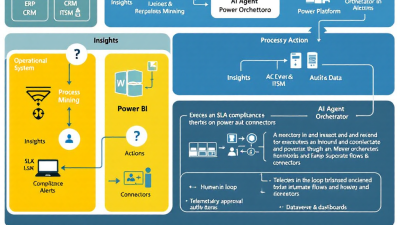
From Process Mining to Self-Healing Operations: Closing the Loop with AI Agents
The problem with dashboards: insights without action create hidden costs
Dashboards are excellent at telling you what went wrong yesterday. Unfortunately, customers, auditors, and cash flow live in today. When teams spend hours reconciling “why” in BI and then swivel-chair into ERP or CRM to fix issues manually, the costs are subtle but compounding: SLA penalties from slow responses, write-offs from late corrections, regulatory risk from inconsistent fixes, and team burnout from repetitive rework. Visual insights without automated actions become a tax on growth.
The good news: your organization already emits the signals required to act—timestamps, status changes, exceptions, and approvals. The missing link is a closed-loop system that detects those signals, decides on the best response, executes a compliant change, and verifies the outcome—all while leaving an auditable trail.
Process mining vs task mining: what each reveals and why both matter
Think of process mining as the satellite view and task mining as the body cam:
– Process mining assembles event logs across systems into an end-to-end picture of throughput, bottlenecks, rework, variants, and KPI leakage. In the Microsoft stack, you can ingest event logs and analyze processes such as purchase-to-pay using templates in Power Automate’s process mining capability, including accelerated scenarios like SAP P2P. See Microsoft’s guidance on process mining in Power Automate.
– Task mining observes user steps on the desktop to reveal micro-inefficiencies (copy/paste, repetitive keystrokes, inconsistent execution). Together, they spotlight both systemic and human friction—ideal inputs for automation design.
Process mining tells you where to intervene; task mining tells you how to intervene. Combine them and you can prioritize high-impact automations and design them with fidelity.
The self-healing loop: detect, decide, do, verify
A self-healing operations loop looks like this:
– Detect: An exception, SLA breach, anomaly, or compliance drift is detected from ERP/CRM events or mining insights.
– Decide: An AI agent evaluates context, deduplicates related signals, classifies the issue, and proposes a fix with rationale and evidence.
– Do: The system executes a change through governed connectors and, when required, synchronous validations that prevent noncompliant transactions from posting.
– Verify: The bot confirms the outcome, updates the incident record, and closes the loop with an audit trail.
Azure OpenAI’s tool-use capabilities (“function calling”) let models determine when to call your APIs or Power Automate actions with structured arguments—transforming analysis into execution. See function calling in Azure OpenAI. For sensitive workflows, enterprise data isolation and compliance are addressed by Azure OpenAI’s governance model (prompts/completions aren’t used to train the base models and data remains in your tenant); see Azure OpenAI data privacy.
Reference architecture on Microsoft Power Platform
At a high level:
– Insight layer: Power Automate process mining identifies bottlenecks and exception hot spots across your processes; see Power Automate process mining.
– Event fabric and system of record: Dataverse acts as the incident backbone. The event-driven trigger “When a row is added, modified or deleted” initiates flows the moment data changes, enabling near-real-time triage. See the Dataverse connector.
– Decision and language layer: Azure OpenAI (or AI Builder with Azure OpenAI) classifies, summarizes, and plans actions; see AI Builder + Azure OpenAI.
– Action layer: Power Automate cloud flows orchestrate changes across Dynamics 365, SAP, Salesforce, and custom APIs via enterprise connectors. See Dataverse/Dynamics, SAP, and Salesforce connectors.
– Guardrails: Real-time (synchronous) cloud flows enforce validations before commits for compliant fixes; see real-time Power Automate cloud flows.
– ERP event sources: Dynamics 365 Finance and Operations publishes Business Events (e.g., vendor invoice posted) that trigger downstream automations; see Dynamics 365 Business Events.
– Observability and audit: Approvals are stored in Dataverse, and Power Automate activities are logged in Microsoft Purview; Dataverse supports field-level auditing. See Approvals, Purview Audit, and Dataverse auditing.
This architecture mirrors the broader industry trend of converting process intelligence into actions, as exemplified by Celonis Action Flows.
Event sources and triggers: SLAs, exceptions, compliance drift, and anomalies
Typical event sources that kick off the loop:
– Dataverse or Dynamics 365: Case created/updated, opportunity stage regression, credit hold applied, duplicate invoice detected using the “When a row is added, modified or deleted” trigger in the Dataverse connector.
– ERP events: Dynamics 365 Finance and Operations Business Events such as payment status changed, sales order backordered, or vendor invoice posted; see Business Events.
– SLA timers: Imminent breach detected by time-based flows or process mining KPIs.
– Anomaly detectors: Outliers identified via BI or mining, feeding Dataverse incident records.
– Compliance drift: Required fields missing, segregation-of-duties conflicts, or blocked products in orders caught by synchronous validations using real-time cloud flows.
Agent pattern 1: Exception triage and deduplication across channels
Goal: Corral noisy exceptions from email, tickets, ERP events, and chat into one deduplicated incident with context.
– Ingest: Standardize inbound signals to a Dataverse “Exception” table keyed by business entity (OrderId, InvoiceId, AccountId) and fingerprint (hash of error code + attributes).
– Deduplicate: On create/update of an Exception, a flow triggered by the Dataverse event checks for open incidents with matching fingerprint and merges threads and evidence.
– Triage: Use AI Builder with Azure OpenAI to classify severity, domain (billing, fulfillment, pricing), and blast radius (revenue-at-risk) for routing; see AI Builder + Azure OpenAI.
– Route: Assign to an agent queue or automated playbook. For regulatory or high-risk categories, kick off a pre-configured approval. Approvals are stored and auditable; see Power Automate Approvals.
Agent pattern 2: Root-cause summarization with evidence linking
Goal: Move beyond “what happened” to “why it happened,” with evidence users can trust.
– Retrieve: The agent gathers relevant records from ERP/CRM via connectors (e.g., SAP deliveries, Salesforce cases, Dynamics invoice lines). See SAP, Salesforce, and Dataverse connectors.
– Summarize: Use AI Builder’s text summarization or Azure OpenAI to produce a root-cause narrative with citations (record IDs, timestamps, event types). See AI Builder integration.
– Plan: With Azure OpenAI function calling, the model proposes sequenced actions (e.g., “Update shipment method, re-rate freight, reissue invoice”). Tool calls carry structured parameters, enabling reliable automation; see function calling.
– Store: Persist the summary and evidence links in the Dataverse incident, making the agent’s thinking auditable.
Agent pattern 3: Automated change implementation with guardrails
Goal: Implement fixes automatically, without violating policy.
– Guardrails before commit: Use real-time cloud flows to validate and transform records synchronously on create/update in Dataverse or Dynamics 365—e.g., block posting if a mandatory control fails or auto-correct data before save.
– Cross-system actions: Execute updates via enterprise connectors for Dynamics/Dataverse, SAP, and Salesforce.
– Human-in-the-loop: For risky changes, require an Approval step. Records are auditable, and approvals show up in Purview; see Approvals and Purview Audit.
– Post-change verification: Read back the source record to confirm the new state, update the incident, and capture field-level changes with Dataverse auditing.
Implementing on Power Platform: Process Advisor, Dataverse, Power Automate, AI Builder, Azure OpenAI, Power BI
– Model your process: Use Power Automate process mining to ingest event logs and visualize bottlenecks, variants, and KPIs; explore templates like P2P for faster time-to-value. See process mining.
– Create an incident backbone: In Dataverse, design tables for Exception, Evidence, Action Plan, Approval, and Remediation Outcome. Trigger flows using the Dataverse change event.
– Orchestrate flows: Build cloud flows for triage, root-cause, action, and verification. Use real-time flows for synchronous controls; see real-time cloud flows.
– Add intelligence: Use AI Builder models or invoke Azure OpenAI via custom connectors/function calling for classification and planning; see AI Builder + Azure OpenAI and function calling.
– Wire in ERP/CRM: Connect to Dynamics 365/Dataverse, SAP, and Salesforce using the enterprise connectors. See Dataverse, SAP, and Salesforce.
– Report and improve: Feed outcomes and KPIs to Power BI and back to process mining for continuous improvement.
Integrations with ERP and CRM: Dynamics 365, Salesforce, SAP via connectors and custom connectors
Power Automate provides native, enterprise-grade connectors that support authenticated, governed read/write operations across:
– Dynamics 365 and Dataverse: CRUD, associate/disassociate, execute custom APIs; see the Dataverse connector.
– SAP: Call BAPIs/RFCs, work with IDocs/OData depending on configuration; see the SAP connector.
– Salesforce: Manage objects, SOQL queries, and composite operations; see the Salesforce connector.
For systems without native support, define custom connectors with your API specs and enforce security policies at the environment level.
Human-in-the-loop controls: approvals, escalation, and safe rollbacks
– Approvals: Use templated approvals for risk-tiered changes; records are auditable and tied to incidents; see Approvals.
– Escalation: Auto-escalate if SLAs are breached—route to managers or compliance officers with justifications and evidence.
– Rollbacks: Encode “safe undo” steps for each playbook (e.g., reverse journal entry, cancel and recreate order, re-open case), and require an approval for rollbacks on financial postings.
Governance and security: environment strategy, DLP, RBAC/ABAC, audit, and policy-as-code
– Environment strategy: Separate Dev/Test/Prod with managed solution pipelines. Use least-privilege service principals for flows.
– DLP policies: Restrict connectors by data classification. Block mixing of business and non-business connectors for sensitive flows.
– RBAC/ABAC: Use Dataverse security roles, teams, and row-level access; tag incidents with attributes (business unit, region) for attribute-based access controls.
– Audit and policy-as-code: Turn on Dataverse auditing and leverage Purview’s unified Audit logs for Power Automate activities; see Dataverse auditing and Purview Audit. Store remediation policies as versioned configuration in Dataverse and validate in real-time flows before execution.
Reliability at scale: idempotency, retries, backoff, and dead-letter handling
– Idempotency: Use deterministic request IDs and state checks to avoid duplicate updates when events re-fire.
– Retries and backoff: Configure retries with exponential backoff for transient errors. Respect source-system rate limits.
– Dead letters: Route failed actions to a Dataverse “DeadLetter” table with payload, error, and next-step guidance; auto-replay or escalate after cooldown.
– Concurrency control: Use optimistic locking (row version) where available and queue-based sequencing for order-dependent operations.
Observability and feedback: metrics, cost controls, and continuous process improvement
– Metrics: Track MTTR, first-contact resolution, change success rate, and automation coverage per process variant.
– Cost controls: Monitor token usage for AI calls, connector call volumes, and flow run durations. Apply usage budgets and alert on spikes.
– Feedback loops: Feed remediation outcomes back into process mining to reveal shrinking rework loops and newly emergent bottlenecks; see process mining.
30-60-90 day rollout plan: pilot, expand, industrialize
– 0–30 days (Pilot)
– Select one process (e.g., order-to-cash invoice exceptions) and map it in process mining.
– Stand up a Dataverse incident model and triage flow with AI Builder classification.
– Wire in one source system (e.g., Dynamics 365 or SAP) and one action playbook behind approval.
– 31–60 days (Expand)
– Add root-cause summarization with Azure OpenAI function calling.
– Implement two more playbooks and at least one synchronous control with real-time flows.
– Introduce metrics dashboard (MTTR, SLA adherence); start Purview Audit review rituals.
– 61–90 days (Industrialize)
– Extend to Salesforce or a second ERP domain; enable deduplication across channels.
– Introduce dead-letter handling, rollback playbooks, and policy-as-code validations.
– Formalize DLP, RBAC, and cost guardrails; create a Center of Excellence playbook.
KPIs that matter: MTTR, SLA adherence, change success rate, automation coverage, and ROI
– MTTR: Mean time to resolution for exceptions.
– SLA adherence: Percentage of incidents resolved within contractual or internal thresholds.
– Change success rate: Percentage of automated changes that verify successfully on first attempt.
– Automation coverage: Share of exception types handled autonomously or semi-autonomously.
– ROI: Cost-to-serve reduction, revenue protected, and working capital unlocked by faster, compliant fixes.
Mini case study: order-to-cash exception handling becomes self-healing
A mid-market distributor struggled with duplicate invoices and shipment misrates. They:
– Used process mining to quantify rework loops and pinpoint the top three exception patterns; see process mining.
– Created a Dataverse incident model and hooked up Dynamics 365 Business Events for invoice posting and payment status changes; see Business Events.
– Deployed an AI-powered triage and summarization agent with function calling to draft fix plans; see function calling.
– Automated fixes through SAP and Salesforce connectors for freight re-rating and credit memo issuance; see SAP and Salesforce connectors.
– Implemented approvals for high-value credits and captured a full audit trail in Dataverse and Purview; see Approvals and Purview Audit.
In 90 days, they cut MTTR by 60%, halved duplicate invoice leakage, and moved from forensic reporting to proactive, self-healing operations.
Common pitfalls and how to avoid them
– Boiling the ocean: Start with one exception type and a thin slice across detect–decide–do–verify.
– Shadow automations: Centralize incident models in Dataverse; avoid one-off Excel/SharePoint trackers.
– Un-governed AI: Use Azure OpenAI with enterprise controls; see data privacy.
– Weak idempotency: Deduplicate at event and action layers to prevent double-fixes.
– Missing guardrails: Use real-time validations to block noncompliant commits; see real-time cloud flows.
– Insight without action: Connect mining outputs to Action Flows or equivalent automations; the industry recognizes this closed loop as best practice; see Celonis Action Flows.
How B. Cobra Systems, LLC can help: solution accelerators, reference flows, and enablement
We help you skip the blank page and the gotchas:
– Solution accelerators: Prebuilt Dataverse incident schema, dedup logic, and approval patterns.
– Reference flows: Triaging, root-cause summarization with function calling, and compliant change playbooks for Dynamics 365, SAP, and Salesforce.
– Guardrail kits: DLP/RBAC templates, policy-as-code validators, idempotency and dead-letter patterns, and Purview/Dataverse audit enablement.
– Enablement: Hands-on enablement for your Power Platform and automation teams, plus a 30-60-90 rollout plan tailored to your process landscape.
Ready to move beyond dashboards? Let’s build your autonomous, auditable, self-healing operations loop—one high-value exception at a time.






