
Executive Summary: From PO to Paid Without Human Touch
The fastest way to improve cash and control in 2025 is to automate the last mile between your ERP and your inbox. This post shows Power Platform and AI agent developers—and SMB finance leaders—how to build a touchless procure-to-pay (P2P) and order-to-cash (O2C) flow using multi-agent patterns that read documents, perform 2-/3-way match, reconcile variances, and communicate proactively with vendors and customers. Best-in-class finance teams already process a majority of invoices straight-through; according to Ardent Partners’ State of ePayables 2023, top performers achieve 60% touchless versus 24% for peers. Those gains translate into real money: AP leaders drive invoice costs toward $2.26 each versus a median of $6.40, per APQC’s benchmarking. On the AR side, digital collections and dispute automation reduce DSO by 3–7 days and cut past-due A/R by 15–25%, says McKinsey.
What follows is a pragmatic blueprint: a Power Platform reference architecture, agent roles with guardrails, Dataverse schema and sample flows, Copilot Studio/Power Pages patterns for vendor and customer portals, and a 30-60-90 day rollout that fits SMB budgets and teams. We’ll ground the solution in Microsoft’s AI Builder and Azure Form Recognizer for document extraction, Azure OpenAI for RAG-grounded communications, and certified connectors to Dynamics 365/Business Central, QuickBooks, and NetSuite.
Why Now: Cash Discipline, Vendor Expectations, and SMB Feasibility
– Cash and control pressures: Late fees, supply risk, and working-capital constraints demand faster, more accurate AP/AR cycles. Leaders with 80%+ electronic invoicing and >70% on-time payment cut cycle time below three days, per The Hackett Group.
– Maturity of the tech stack: AI Builder’s invoice extraction is turnkey and integrated with Dataverse and Power Automate (Microsoft Learn), while Azure Document Intelligence provides confident field- and line-level parsing plus human-in-the-loop review (Azure Document Intelligence).
– Hyperautomation mandate: By 2026, 80% of organizations will be running hyperautomation initiatives that combine low-code, RPA, and AI, per Gartner.
– SMB-ready economics: Certified connectors to your existing ERP and accounting systems minimize custom integration (Power Platform connectors catalog), and AI-driven exception minimization avoids the “hire more people” trap—Ardent notes up to 30% fewer exceptions and 65% faster approvals with e-invoicing and automated matching (Ardent Partners).
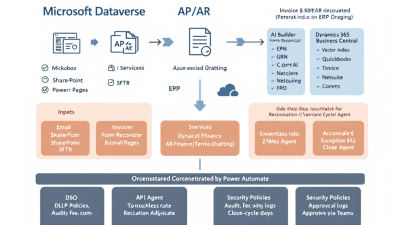
Reference Architecture on Power Platform
Core building blocks:
– Dataverse as the operational brain: Stores POs, receipts/GRNs, invoices, match results, variances, cases, comms threads, and audit logs.
– AI document intelligence: AI Builder prebuilt invoice model orchestrated via Power Automate; optional Azure Document Intelligence for higher-volume or advanced scenarios.
– AI agents: Copilot Studio agents for AP, AR, Reconciler, Variance Adjudicator, and Vendor/Customer Comms—with guardrails, plugins, and connectors (Copilot Studio).
– RAG and function calling: Azure OpenAI for grounded drafting and workflow triggers (Azure OpenAI Service).
– Orchestration: Power Automate cloud flows and Dataverse triggers for event-driven processing.
– Portals: Power Pages for secure vendor/customer self-service, integrated to Dataverse (Power Pages).
– ERP connectors: Dynamics 365 Business Central, QuickBooks Online, and NetSuite integrations through certified connectors (connectors catalog).
Defining Agent Roles and RACI (AP, AR, Reconciler, Variance, Comms, Controller)
– AP Intake Agent (Responsible): Ingests invoices and credit memos from email and portal, classifies, extracts, and posts to Dataverse; invokes match flow; opens variance cases if needed.
– Reconciler Agent (Responsible): Runs 2-/3-way match, updates match results and confidence, and proposes auto-resolution within tolerance.
– Variance Adjudicator (Responsible): Applies policy for price/quantity/tax/freight variances; requests missing GRNs or PO change orders; recommends hold/reject/pay-partial.
– Vendor Communications Agent (Responsible): Drafts and sends grounded messages for missing data, disputes, and remittance notices; escalates only true exceptions via Teams.
– AR Collections Agent (Responsible): Orchestrates dunning, promise-to-pay, and dispute narrative drafting; updates AR cases and customer comms threads.
– Controller/Finance Owner (Accountable): Approves policies, tolerances, and escalations; reviews KPIs and audit.
– AP/AR Managers (Consulted): Curate playbooks, approve exception categories.
– Procurement/Receiving (Consulted): Confirm receipts/GRNs, handle PO amendments.
– IT/Security (Informed): DLP configuration, environment management, audit readiness.
Document Ingestion: Email, Portals, and AI Builder/Form Recognizer
– Email-to-invoice: A monitored mailbox triggers a Power Automate flow that classifies attachments, sends to AI Builder’s prebuilt invoice model, and writes header/line data into Dataverse along with confidence scores and a document blob link (AI Builder invoice processing).
– Portal submission: Power Pages vendor portal supports authenticated uploads (PDF, XML, EDI light), status tracking, and self-service corrections using Dataverse forms (Power Pages).
– Human-in-the-loop: For low-confidence fields or complex tax/freight lines, route to a review app; Azure Document Intelligence provides field-level confidence and feedback loops to improve accuracy (Invoice prebuilt model).
2- and 3-Way Match Logic in Dataverse (PO, Receipt/GRN, Invoice)
– Data model essentials:
– PurchaseOrder and PurchaseOrderLine
– GoodsReceipt (GRN) and GoodsReceiptLine
– VendorInvoice and VendorInvoiceLine
– MatchResult (by line): method (2- or 3-way), status, diffs, confidence
– TolerancePolicy: percent/absolute thresholds by vendor/commodity
– Algorithm outline:
– 2-way: Compare invoice lines to PO lines (price, quantity, UOM).
– 3-way: Add receipt quantities; match by item and line mapping; handle partial receipts.
– Taxes/freight: Validate against PO terms or policy; allocate and pro-rate when needed.
– ERP parity: Dynamics 365 Business Central natively supports 3-way matching and variance tolerances—your agents can orchestrate this via connectors rather than rebuild the logic (Business Central: Match Vendor Invoice Lines).
Variance Handling: Tolerances, Price/Quantity Exceptions, and Auto-Resolutions
– Tolerance policies: Define supplier- or item-level thresholds (e.g., ±2% price, ±1 unit quantity); auto-approve within thresholds; require adjudication otherwise.
– Common patterns:
– Price up to tolerance: Auto-adjust and post difference to PPV account.
– Quantity below receipt: Hold until final GRN or pay partial based on received quantity.
– Freight/tax mismatch: Recompute using policy; request updated invoice if outside tolerance.
– Throughput impact: E-invoicing plus automated match can reduce exceptions by up to 30% and accelerate approvals by 65% (Ardent Partners).
Autonomous Vendor/Customer Communications (Email + Power Pages) with Azure OpenAI
– Drafting with guardrails:
– Retrieval grounding: Pull PO, GRN, and invoice facts from Dataverse; feed only necessary fields to Azure OpenAI; disable free-form generation for numbers/dates; require function-calling for actions (Azure OpenAI Service).
– Tone and policy: Copilot Studio agent enforces style, includes SLA and payment terms, and logs message context (Copilot Studio).
– Use cases:
– Vendor: “We received invoice INV-1029 for PO 4500123. We need the delivery note for line 20 (QTY 18). Please upload via the portal.”
– Customer: “Invoice 300457 is past due by 7 days. If you’ve paid, reply with remittance; otherwise, click to schedule a promise-to-pay.”
– Portal loop: Power Pages shows live case status, lets vendors correct bank/tax details, and supports dispute narratives auto-drafted from evidence. This drives better on-time payment rates (The Hackett Group) and helps reduce DSO (McKinsey).
ERP Integrations: Dynamics 365/Business Central, QuickBooks, NetSuite Connectors
– Connect via certified connectors to read/write vendors, POs, receipts, invoices, bills, payments, and AR transactions (Power Platform connectors catalog).
– Patterns:
– Business Central: Use 3-way match and tolerance APIs; post vendor invoices and receipts; retrieve remittance details (Business Central matching).
– QuickBooks Online: Create bills, vendor credits, and payments; sync vendors and purchase orders.
– NetSuite: Manage vendor bills, item receipts, and payment batches via connector actions or SuiteTalk REST endpoints (through custom connector if needed).
– Sync strategy: Dataverse as the orchestration layer; ERPs remain the system of record for financial postings.
Orchestration with Power Automate and Event-Driven Patterns
– Core flows:
– Intake: Email/portal → AI Builder extraction → Dataverse VendorInvoice(+lines)
– Match: On create/update → Reconciler Agent → MatchResult → either auto-post or variance case
– Comms: On variance/dispute → Comms Agent drafts email/portal message → waits for response → loops back
– Payment: On approval → create ERP bill/posting → schedule payment run → send remittance
– AR dunning: On due date minus N → draft reminders → escalate by risk
– Eventing tips:
– Use Dataverse “When a row is added, modified or deleted” triggers
– Apply queue-based debouncing for duplicate emails
– Maintain idempotency keys (InvoiceID+VendorID+Amount)
Security, Guardrails, and Audit: DLP, Approvals, and Change Tracking
– Environment strategy: Separate Dev/Test/Prod; solution-pack everything.
– DLP and connectors: Restrict data movement; only allow approved business connectors (connectors catalog).
– Least privilege: Row-level and field-level security in Dataverse; separate service principals for agents.
– AI guardrails: Ground prompts, mask PII where not needed, enforce function-calling; log prompts/responses for audit.
– Approvals: Use Power Automate Approvals for policy overrides; capture decision, evidence, and timestamp.
– Audit and compliance: Enable Dataverse auditing; immutable storage for documents and match results; export audit to your SIEM.
KPIs and Telemetry: DSO, Touchless Rate, Late-Fee Avoidance, Close-Cycle Days
– Touchless throughput rate: Invoices auto-posted / total; target 60%+ (benchmark from Ardent Partners).
– Invoice cost and cycle time: Track cost-to-process and hours from receipt to posting; compare to APQC $2.26–$6.40 benchmarks (APQC) and Hackett sub-3-day cycle (Hackett).
– DSO and past-due rate: Aim for 3–7 day DSO reduction and 15–25% drop in past-due AR (McKinsey).
– Variance rate and resolution time: Exceptions per 100 invoices; auto-resolved vs escalated; time-to-close per category.
– Late-fee avoidance and early-pay capture: Dollars avoided/captured per month.
Implementation Blueprint: 30-60-90 Day Rollout for SMBs
Days 1–30 (Pilot scope, AP focus)
– Stand up environments, DLP, Dataverse schema, and intake mailbox.
– Configure AI Builder invoice extraction and portal upload.
– Build 2-way match flow for top 5 vendors; enable human-in-the-loop.
– Launch Vendor Comms Agent for missing docs with grounded prompts.
– Define tolerances; auto-post within thresholds.
Days 31–60 (3-way match + AR basics)
– Add GRN integration and 3-way logic; integrate with Business Central or your ERP.
– Expand to 20–30 vendors; start variance categorization and playbooks.
– Stand up customer portal pages; enable AR dunning templates and promise-to-pay capture.
– Instrument KPIs and dashboards; iterate tolerances based on data.
Days 61–90 (Scale and harden)
– Add full Vendor/Customer Comms automation with escalations to Teams.
– Introduce payment run orchestration and remittance notifications.
– Security hardening, audit exports, and performance tuning.
– Extend to QuickBooks/NetSuite entities if in use; finalize exception SLAs.
– Executive review: touchless rate, cycle time, DSO changes; plan Phase 2.
Cost Model and ROI: Licenses, Run Costs, and Savings Sensitivity
– Cost components:
– Platform: Power Automate, Dataverse/Power Apps capacity, AI Builder credits, Copilot Studio, Power Pages.
– Azure: Azure OpenAI tokens, Document Intelligence calls, storage.
– Connectors: Standard vs premium usage to ERP, email, and storage.
– Run-rate drivers:
– Volume of invoices and AR comms
– Percentage routed to human review
– Number of messages generated by Comms Agents
– Savings levers:
– Labor reduction and redeployment (touchless throughput; see Ardent)
– Lower cost per invoice vs APQC median (APQC)
– Late-fee avoidance and early discount capture (Hackett)
– DSO reduction and cash acceleration (McKinsey)
– Approach: Build a sensitivity model with conservative/expected/aggressive scenarios for touchless rate, exception rate, and DSO change; validate at 60 days and recalibrate.
Testing, Exception Playbooks, and Fail-Safe Escalations via Teams
– Testing tiers: Unit (extraction/match), integration (ERP sync), user acceptance (variance playbooks), and chaos testing (duplicate invoices, missing GRNs).
– Playbooks by category:
– Price variance > tolerance → request credit memo or PO change; auto re-match.
– Quantity variance → request GRN or initiate short-pay.
– Tax/freight → recompute; request updated invoice if out of band.
– Fail-safes:
– Confidence thresholds for posting; require human approval below threshold.
– Duplicate detection: hash file + header tuple (VendorID, InvoiceNo, Amount).
– Teams escalations: Route true exceptions to channel with context card and “Approve/Hold/Request Info” buttons.
Templates and Reusables: Dataverse Schema, Sample Flows, Prompt Patterns
– Dataverse tables:
– Vendor, Customer, PurchaseOrder, PurchaseOrderLine
– GoodsReceipt, GoodsReceiptLine
– VendorInvoice, VendorInvoiceLine
– MatchResult, TolerancePolicy, VarianceCase, ARCollectionCase
– CommunicationThread, Message, DocumentBlob, AuditLog
– Sample flows:
– Invoice Intake: Email → AI Builder → Dataverse → Match trigger
– 3-Way Match: On invoice create → pull PO/GRN → compare → write MatchResult → decide path
– Vendor Missing-Doc: Create Message with Azure OpenAI → send → wait for portal upload → continue
– AR Dunning: Time-based trigger → segment by risk/age → personalize → send
– Prompt patterns (Azure OpenAI + Copilot Studio):
– System: “You are a finance agent. Use only provided facts. Do not fabricate amounts or dates. For actions, call functions.”
– Content grounding: “PO 4500123 line 20 expected qty 20 at $4.50; GRN 987 posted 18; invoice INV-1029 qty 20. Draft a request for GRN or corrected invoice.”
– Safety: “If essential facts are missing, ask for the missing field instead of guessing.”
Future Enhancements: Dynamic Discounting, Cash Forecasting, and Cross-Sell Signals
– Dynamic discounting: Auto-evaluate early-pay discounts vs cash cost; propose pay-early when ROI is positive (ties to Hackett’s on-time and cycle-time metrics: Hackett).
– Cash forecasting: Feed invoice/collection predictions into treasury models; quantify DSO improvements (McKinsey).
– Supplier risk and performance scoring: Use exception and on-time signals to inform sourcing decisions.
– Customer health scoring: Combine dispute frequency and days past due to drive proactive account management.
– Hyperautomation scale-out: Extend multi-agent design to contracts, rebates, and expense audits in line with Gartner’s hyperautomation trajectory.
Call to Action: Start with a Pilot Vendor Cohort and Expand
Pick five vendors or customers that represent 30% of your volume. Stand up the intake, 2-way match, and variance playbooks in 30 days. Add 3-way match and Comms Agents in 60. By 90 days, measure touchless rate, cycle time, DSO, and late-fee avoidance against the benchmarks from Ardent Partners, APQC, The Hackett Group, and McKinsey.
If you want an implementation that’s production-ready, governed, and measurable, B. Cobra Systems, LLC can deliver the reference architecture, Dataverse schema, reusable flows, and agent prompts—plus a pilot that proves value in weeks, not quarters. Let’s go from PO to paid—and from order to cash—without human touch, except where it truly matters.






