
From Process Mining to Autonomous Action: Closing the Loop with AI Agents
TL;DR and Who This Is For (Power Platform devs, AI agent builders, and SMB ops leaders)
If your dashboards keep telling you where work gets stuck but nothing actually changes on the floor, this guide is for you. We show Power Platform developers and SMB operations leaders how to turn process mining insights into prioritized, closed-loop automation using Copilot Studio agents and Power Automate flows. You’ll import outputs from Power Automate process mining or Celonis into Dataverse, score and prioritize opportunities, orchestrate multi-agent workflows that take action across systems, measure KPI impact in Power BI, and continuously optimize. Microsoft’s platform already connects discovery to action—process mining highlights bottlenecks and integrates with Power Automate and Power Apps to turn insights into change (Power Automate process mining). Copilot Studio “agents” can be always-on, event-driven, and take actions via connectors and flows (Ignite Book of News; What is Microsoft Copilot Studio). The payoff is real: Generative AI could automate 60–70% of employees’ time and unlock trillions in value (McKinsey).
Why Process Mining Insights Stall Without Action: The last-mile automation gap
Process mining is great at diagnosing problems—cycle time spikes, rework loops, SLA misses—but diagnosis without execution creates a last-mile gap. Insights pile up while manual follow-ups, swivel-chair fixes, and email nudges erode value. The failure modes are predictable:
– No system of record for opportunities: findings live in slides, not in a backlog with owners and SLAs.
– Orchestration is ad hoc: each fix becomes a one-off script or a heroic manual effort.
– Measurement is detached: teams can’t attribute KPI shifts to specific changes.
The Microsoft ecosystem is uniquely positioned to close this loop. Power Automate process mining is designed to identify bottlenecks and move straight into low-code action via Power Automate and Power Apps (process mining overview). When you add Copilot Studio agents that are always-on and capable of long-running, cross-system work, you shift from insights to AI-driven operational optimization (Copilot Studio agents).
Reference Architecture: From discovered bottlenecks to autonomous action
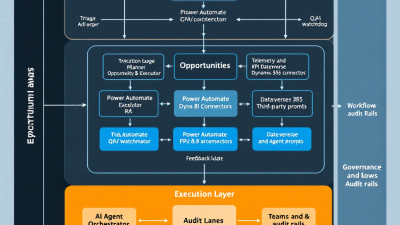
At a high level, you need an end-to-end path that goes: Discover → Normalize → Prioritize → Plan → Execute → Measure → Learn.
– Discover: Power Automate process mining or Celonis surfaces deviations and impact areas (Power Automate process mining).
– Normalize: Ingest findings into Dataverse as a structured backlog.
– Prioritize: Score by Impact × Feasibility × Risk to pick the right fights first.
– Plan: A Copilot Studio “Planner” agent maps opportunities to reusable actions.
– Execute: Power Automate flows (and child flows) perform transactions across systems (child flows).
– Orchestrate: Copilot Studio agents act as Triage, Planner, Executor, and QA/Watchdog, event-driven and “always on” (agents).
– Measure: Log outcomes in Dataverse and analyze in Power BI using the Dataverse connector (Power BI with Dataverse).
– Learn: Use analytics (Power Automate and custom telemetry) to refine prompts, policies, and catalogs (Power Automate analytics).
Core Microsoft Stack: Power Automate Process Mining, Dataverse, Copilot Studio agents, Power Automate flows, Power BI, Azure OpenAI
– Power Automate process mining to discover and quantify issues (overview).
– Dataverse as your canonical backlog and telemetry store.
– Copilot Studio agents to orchestrate, plan, and take actions via connectors and flows (Copilot Studio).
– Power Automate flows to implement transactional steps and reusable sub-flows (child flows).
– Power BI to monitor KPIs and causal impact of changes (Dataverse connector).
– Azure OpenAI (or equivalent) for classification, planning assistance, summarization, and exception reasoning (invoked via Copilot Studio or Power Automate AI actions).
Importing and Normalizing Mining Outputs (Power Automate PM, Celonis) into Dataverse
Create a Dataverse “Opportunities” table to capture:
– Source (Process Mining or Celonis), event time, process area, KPI impact estimate
– Deviation pattern, root-cause signals, recommended action
– Data contract: required fields (e.g., invoice ID, customer, amount), system endpoints
For Power Automate process mining, export or query the findings and ingest them via a Power Automate flow. For Celonis, leverage Action Flows to push alerts with payloads into your environment; Celonis can trigger actions through APIs and webhooks when issues are detected (Celonis Action Flows). On the Microsoft side, receive these webhooks using Power Automate’s Request trigger and map the JSON to Dataverse columns (Request trigger). The Celonis–Microsoft partnership means integration across Power Platform and Teams is not theoretical—it’s strategic (strategic partnership).
Prioritization Model: Impact × Feasibility × Risk scoring and backlog management
Give each opportunity a score:
– Impact: expected KPI movement (e.g., days-to-close reduction, cash acceleration, cost avoidance).
– Feasibility: connector availability, data readiness, complexity of business rules.
– Risk: compliance exposure, blast radius, external dependency volatility.
Compute a composite Priority Score = (Impact × Feasibility) ÷ (1 + Risk). Keep it simple and tunable. Store rationale notes, effort estimates, and owner in Dataverse. Build a Power BI report with slicers by process area and a ranked backlog so leaders can commit weekly to the top items (Power BI with Dataverse).
Agent Design Pattern: Triage, Planner, Executor, and QA/Watchdog roles
Use Copilot Studio to define a small team of specialized agents:
– Triage: Ingests new opportunities from Dataverse, de-duplicates, and confirms data contracts are complete. If not, it requests enrichment via Teams.
– Planner: Maps an opportunity to an action plan: which flows/child flows to call, what parameters, and the expected outcomes. It leverages your action catalog and can use generative reasoning to select variants (Copilot Studio).
– Executor: Calls Power Automate flows to perform transactional changes and writes back outcomes and evidence (record IDs, timestamps, diffs).
– QA/Watchdog: Monitors execution logs, compares results to policies, and triggers rollback or human review when thresholds are breached. Because Copilot Studio agents can be event-driven and long-running, they can watch processes continuously (agents are “always on”).
Standardize flow calls via child flows to keep the surface area small and reusable (child flows).
Planning to Action: Mapping opportunities to flows, connectors, and data contracts
The key to repeatability is an action catalog:
– For each action, document: prerequisites, required fields, connector(s), environment, RBAC role, happy-path, and failure modes.
– Implement each action as a child flow with a consistent interface (input JSON, output JSON with status and evidence).
– Register each action in Dataverse with versioning and a “deployed-to” environment list.
Your Planner agent selects an action, validates that the data contract is satisfiable from the payload, and invokes the child flow via a parent orchestration flow. For external triggers (e.g., Celonis), fire the orchestration via the Request trigger; include correlation IDs for end-to-end traceability (Request connector).
Human-in-the-Loop: Teams Adaptive Cards for approvals, escalations, and exceptions
Not every fix should be fully autonomous. Use Teams Adaptive Cards to:
– Approve medium-risk actions (e.g., over-threshold write-offs).
– Provide missing data (e.g., select account owner for reassignment).
– Escalate exceptions with context (payload, recommended action, risk notes).
The Triage or QA agent posts the card, awaits structured input, and resumes the flow. This keeps humans in control where it matters while maintaining velocity.
Governance and Compliance-by-Design: Audit trails, data minimization, and guardrails
Bake governance into the design:
– Audit trails: Log every decision and action to Dataverse, including prompts, parameters, outcomes, and operator IDs.
– Data minimization: Pass only necessary fields into agents and flows; mask PII when not essential.
– Guardrails: Implement allowlists for systems and actions; enforce per-action RBAC and environment isolation.
– Change control: Version prompts, policies, and action definitions. Require approvals for high-risk changes.
– Monitoring: Use Power Automate analytics for run reliability and failure trends (Power Automate analytics).
KPI Instrumentation: Baselines, control groups, and causal impact analysis in Power BI
Measuring impact is non-negotiable:
– Baselines: Snapshot pre-automation KPIs (cycle time, SLA hit rate, rework rate, DSO) and store alongside cohort IDs in Dataverse.
– Control groups: Randomly hold out a portion of cases from automation to create a counterfactual.
– Attribution: Stamp each case with action IDs and versions so you can roll up performance by intervention.
– Analysis: Use the Power BI Dataverse connector to model business outcomes and flow run logs, then compare treated vs. control cohorts over time (Power BI + Dataverse). Combine with flow analytics for reliability and latency insights (Power Automate analytics).
– Causal thinking: Even if you don’t deploy a formal causal model, time-sliced comparisons and holdouts will keep you honest about true gains.
Closed-Loop Learning: Using telemetry to refine prompts, policies, and action catalogs
Treat your automations like products:
– Prompts: Log LLM prompts and responses; fine-tune instructions when failure categories recur.
– Policies: If QA flags increase, tighten thresholds or route more to human review.
– Catalog: Consolidate overlapping actions, delete unused ones, and add missing variants as patterns emerge.
– Feedback: Add a “Was this helpful?” control on Adaptive Cards; feed results to your Triage agent to update heuristics.
– Retraining cadence: Review weekly in a lightweight ops ritual with engineering and business owners.
Use Cases That Pay Off Fast: AP exceptions, lead routing, order-to-cash SLA recovery
– Accounts Payable exceptions: Auto-classify exception types, request missing fields from requesters, and post GL adjustments for low-risk cases. Process mining spots loopbacks; agents resolve the common ones (process mining).
– Lead routing: When mining exposes handoff delays, auto-reassign or escalate high-intent leads; update CRM and notify via Teams.
– Order-to-cash: Trigger SLA recovery actions when delivery blockers appear; create cases, credit expedited shipping, and communicate proactively. Celonis Action Flows or mining alerts can kick off the orchestration (Celonis Action Flows).
Build Walkthrough: A 1–2 day implementation recipe on the Power Platform
Day 0.5: Foundation
– Create Dataverse tables: Opportunities, Actions, Executions, Telemetry, Policies.
– Build a Request-triggered orchestration flow that upserts Opportunities (Request trigger).
– Set up a basic Power BI report connected to Dataverse (Dataverse connector).
Day 1: Actions and Agents
– Implement 2–3 high-value child flows (e.g., “Update Vendor Master,” “Reassign Lead,” “Create Credit Memo”) (child flows).
– Stand up a Copilot Studio agent with Triage and Planner capabilities to map Opportunities to Actions (Copilot Studio).
– Add Teams Adaptive Card for a single approval path.
Day 2: Integration and Measurement
– Connect your mining source: Power Automate process mining export or Celonis Action Flows webhook (process mining; Action Flows).
– Instrument telemetry: execution outcomes, durations, exception reason codes.
– Publish Power BI visuals: throughput, success rate, and early KPI deltas. Turn on Power Automate analytics views for reliability tracking (analytics).
Risk Mitigation: Fail-safes, rollback patterns, rate limits, and drift detection
– Fail-safes: Default to “no-op” on confidence below threshold; route to human.
– Rollback: Where possible, make actions idempotent and implement compensating actions (e.g., reverse GL entry, reopen case).
– Rate limits: Throttle per-connector and per-entity updates; queue bursts with backoff to respect API limits.
– Drift detection: Monitor prompt performance and outcome distributions; if variance spikes, freeze autonomous mode and require approvals.
– Blast-radius controls: Start with low-risk cohorts and gradual ramp-ups; enforce per-action caps per day.
ROI Model: Days-to-close reduction, throughput gains, deflection rates, and leakage control
Quantify value with a simple but defensible model:
– Days-to-close reduction (e.g., AP, O2C): Δ cycle time × case volume × cost of delay.
– Throughput gains: Additional cases processed per FTE × fully loaded cost.
– Deflection rates: % exceptions resolved without analyst intervention × handling time saved.
– Leakage control: Avoided revenue loss, discounts, or penalties from SLA breaches.
Tie each metric to specific actions using your Dataverse attribution fields and validate with control cohorts in Power BI (Power BI + Dataverse). Contextualize with the macro opportunity for AI in business process management (McKinsey).
Assets and Next Steps: Solution template, prompt snippets, Dataverse schema, and checklist
To kickstart your closed-loop automation:
– Solution template: Dataverse tables (Opportunities, Actions, Executions, Telemetry), orchestration flow, and sample child flows.
– Prompt snippets: Triage and Planner agent instructions for classifying opportunities and selecting actions, including safety policies.
– Dataverse schema: Column definitions, relationships, and recommended audit fields.
– Checklist: Environment setup, connectors, DLP policies, action catalog baseline, KPI instrumentation, and change control.
Where to go from here
– Start with one high-impact use case and one or two actions.
– Wire your mining output to the Request-triggered flow.
– Stand up the Triage/Planner agent in Copilot Studio and prove value within two weeks.
– Scale by adding actions, tightening governance, and expanding KPI measurement.
Remember: the loop is the product. Discover, act, measure, and learn—continuously. With Power Automate process mining feeding a Microsoft-first automation stack and always-on Copilot Studio agents taking action, you can turn insights into durable operational wins (process mining; Copilot Studio; child flows; Power Automate analytics).






