
Field Service Autopilot: AI Agents that Reoptimize Schedules, Parts, and SLAs in Real Time
Why Field Service Needs an Autopilot Now
The ground truth in field operations is simple: uncertainty is the only constant. A technician’s day can be derailed by a late part, a high-priority outage, a traffic incident, or a missed SLA timer. Traditional dispatch models respond to chaos with more people, more meetings, and more overtime. That works—until it doesn’t. An “autopilot” layer changes the equation by continuously absorbing signals (device telemetry, ERP stock, travel times, SLA timers) and reshuffling schedules and parts allocations before the chaos hits the customer.
Microsoft’s field platform is already moving this way. With Connected Field Service, organizations can stream IoT telemetry and automate detection, triage, and even remote resolution so a truck rolls only when necessary. This proactive posture is the perfect foundation for autonomous agents that make minute-by-minute adjustments to keep commitments while reducing cost. See how Connected Field Service integrates Dynamics 365 with Azure IoT to detect and resolve issues remotely.
What ‘Autonomous’ Really Means for Field Ops
“Autonomous” doesn’t mean “no humans.” It means the routine 90% is handled by software agents that:
– Continuously listen for new signals and constraints
– Recompute the optimal plan against business objectives
– Act safely within guardrails (and ask for approval when it matters)
– Prove their decisions with an audit trail
In practice, that looks like:
– Dynamic schedules that re-balance every time risk changes
– Parts reservations that follow the schedule (and vice versa)
– SLA timers that trigger early warnings and automatic mitigations
– Humans-in-the-loop for exceptions, high-impact customers, and policy overrides
Signal Sources: IoT Telemetry, ERP Inventory, and Work Orders
An autopilot is only as good as the signals it ingests.
– IoT telemetry: Device rules can create incidents or work orders before a failure, or escalate the priority of active jobs. You can wire this up with IoT Central rules that invoke Power Automate whenever a threshold is crossed; Microsoft documents how to trigger workflows in Power Automate directly from IoT Central rules. Connected Field Service extends this pattern by linking device alerts to work orders and proactive dispatch. Learn how Connected Field Service brings IoT signals into Dynamics 365.
– Work orders and schedule data: Dynamics 365 Field Service captures skills, territories, booking windows, and SLA targets out of the box. The Optimization add-in uses that context to place work on the right technician. Microsoft’s Optimization add-in automatically schedules work orders based on travel, priority, skills, and SLAs—a great baseline for an AI Scheduling Agent to extend.
– Inventory and ERP: Parts availability is the invisible hand behind first-time fix. Field Service tracks stock at warehouses and trucks and consumes parts on work orders; see inventory and purchasing features in Dynamics 365 Field Service. For a full picture (on-hand, costs, POs, lead times), link ERP using dual-write. Microsoft explains how dual-write provides near real-time sync between Dataverse and Finance & Operations apps.
The Three-Core-Agent Pattern: Scheduler, Parts Forecaster, SLA Guardian
We recommend a modular “three-agent” pattern that aligns with how field organizations already operate:
1) Scheduling Agent
– Goal: Minimize travel and overtime while hitting SLA targets and honoring constraints (skills, windows, customer priority).
– Behavior: Recomputes the day’s routes when any event occurs—new work order, technician callout, traffic spike, part delay, or SLA risk change. It builds on Dynamics 365’s Optimization add-in and augments it with real-time traffic, parts-aware penalties, and customer impact scoring. The Optimization add-in provides the optimization backbone; the agent adds continuous recalculation and business logic tuning.
2) Parts Forecasting Agent
– Goal: Ensure the right part is available where and when the job happens—pre-positioned on the truck or staged at the local warehouse—without bloating inventory.
– Behavior: Trains demand models on historical consumption, seasonality, and IoT failure signatures. It reserves parts with soft holds aligned to the schedule and proposes substitutions or cross-ships when stock is tight. It leverages Field Service inventory records and ERP lead times via dual-write. You can also draw on SCM’s demand forecasting with Azure Machine Learning to improve accuracy.
3) SLA Guardian Agent
– Goal: Prevent breaches, protect customer commitments, and escalate gracefully when risk is high.
– Behavior: Watches SLA KPIs and timers on every case/work order and emits a “risk score” continuously. It triggers schedule reshuffles, customer comms, or soft-commit updates. Dynamics 365’s service-level agreements with KPI targets and breach actions give you the native timers the agent listens to. For low-code modeling, Power Platform’s AI Builder prediction models can classify which jobs are likely to breach based on live signals.
Reference Architecture on Microsoft Power Platform
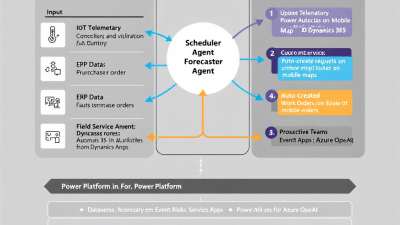
At a glance:
– Dynamics 365 Field Service + Dataverse: System of record for work orders, bookings, inventory locations (warehouses, trucks), assets, and SLAs.
– Connected Field Service + IoT Central: Telemetry pipeline into Dataverse, auto-creating incidents/work orders.
– ERP (Finance & Supply Chain): On-hand inventory, POs, vendor lead times, part costs via dual-write synchronization.
– Azure Maps: Real-time travel-time estimates via the Route Matrix API.
– Power Automate + Event Grid: Event-driven orchestration that kicks off agent decisions when signals arrive.
– AI Layer: Optimization add-in, AI Builder models, and optionally Azure ML models for parts demand and SLA risk.
– Human Interfaces: Teams approvals, technician mobile app/Copilot, and customer updates via SMS/email.
Data Backbone: Dataverse Schemas for Technicians, Assets, Parts, and SLAs
Solid schemas are the difference between a clever demo and a reliable autopilot.
– Technicians and skills: Use Bookable Resources, Resource Characteristics, Territories, and Working Hours. Capture overtime cost multipliers and union rules as custom fields for the Scheduling Agent to price late bookings appropriately.
– Work orders and assets: Use Work Order, Incident Types, Functional Locations, and Customer Assets. Attach IoT Device references to assets for signal correlation from Connected Field Service.
– Inventory and parts: Use Product, Inventory Journal, Inventory Adjustment, Warehouse, and Work Order Product. Field Service’s inventory capabilities track stock by warehouse and truck; add custom tables for “soft reservations” and “substitution sets.”
– SLAs: Use SLA, SLA KPI Instances, and Entitlements. The SLA Guardian listens to these records and uses the native timers and thresholds to compute risk scores.
Real-Time Orchestration: Event-Driven Flows with Power Automate and Event Grid
The orchestration pattern is “publish, score, act”:
– Publish: IoT Central raises a rule event; ERP updates on-hand; a work order changes status; traffic conditions change. Use IoT Central–to–Power Automate integration to publish events, as documented in IoT Central rules and workflows. For high throughput signals, Azure Event Grid can fan-out to multiple subscribers (Power Automate flows, Azure Functions) reliably.
– Score: The agents calculate updated metrics—ETA deltas from Azure Maps, parts availability likelihood, SLA breach probability from AI Builder or ML.
– Act: The Scheduling Agent posts updated bookings, the Parts Agent places reservations or creates transfer orders, and the SLA Guardian triggers escalations or customer comms—all with Dataverse writes and child flows.
Use correlation IDs across events, agent outputs, and final write operations so you can reconstruct “why the autopilot did X” in audit logs.
Route Reoptimization: Constraints, Travel Time, Skills, and Urgency Scoring
A practical scoring model makes agent decisions transparent and tunable.
– Travel time and traffic: Pull a fresh route matrix for candidate assignments before each replan. The Azure Maps Route Matrix API returns travel times considering current traffic. Penalize assignments with high travel-time variance to reduce volatility.
– Skills and certifications: Treat skills as hard constraints (must-have) and certifications as time-bounded constraints (e.g., “HVAC C license required if job > 50 tons”).
– Urgency and business value: Create a composite “job priority” score: SLA risk + customer tier + downtime cost + safety risk. Feed risk from the SLA Guardian and recency-weight it.
– Overtime and technician well-being: Price bookings that push beyond working hours with a cost multiplier. This nudges the optimizer to choose closer jobs or swap resources earlier.
– Optimization workflow: Let the Optimization add-in compute a base schedule. The Scheduling Agent then applies adjustments using live maps, parts penalties, and SLA risk—only committing changes that improve the global score by a defined threshold to avoid thrashing.
Parts Forecasting: Usage Curves, Lead Times, Substitutions, and Truck Stock
A brilliant route with the wrong part still fails. The Parts Agent closes the loop.
– Forecasting: Use historical consumption by incident type, asset model, and seasonality. If you run Dynamics 365 Supply Chain Management, tap its demand forecasting to generate part-level predictions; sync results into Dataverse via dual-write. For Power Platform–native teams, build an AI Builder model to predict “part needed” probability per work order.
– Lead times and reservations: Use ERP vendor lead times and current PO ETAs to compute fulfillment risk. Reserve high-probability parts as “soft holds” on warehouse or truck locations, decaying reservations if the schedule changes.
– Substitutions and alternates: Model approved substitution sets and add a lower penalty score for alternates. The agent proposes the cheapest acceptable path that meets SLA.
– Truck stock optimization: Seed each technician’s truck with a “par level” list. The agent auto-generates replenishment requests nightly based on tomorrow’s route and risk. Field Service’s inventory tracking at the truck level makes this straightforward.
SLA Protection: Early-Warning Risk Scores, Auto-Escalations, and Soft-Commit Adjustments
SLA protection is about time and truth.
– Early warnings: Monitor SLA KPI instances in Dataverse and compute a live “breach probability” using AI Builder predictions or ML models. Input features include current ETA, travel-time variance, technician workload, part availability confidence, and customer access constraints.
– Auto-escalations: If risk exceeds thresholds, trigger a replan (Scheduler) or a parts expedite (Parts Agent). Use Dynamics 365’s SLA actions as a safety net.
– Soft-commit updates: When risk passes a “notice” threshold, send proactive updates with new ETAs and options (e.g., “earlier slot with another tech,” “approve alternate part”). Honesty buys forgiveness and preserves CSAT.
Human-in-the-Loop Controls: Approvals in Teams and Mobile Technician Copilot
Autonomy thrives with smart touchpoints.
– Dispatcher and manager approvals: Pipe high-impact changes to Teams adaptive cards. Offer Approve/Reject/Ask for details. For routine rebalances, auto-approve; for VIP customers or large estimated cost deltas, require a human nudge.
– Technician experience: Push updated routes and parts picks to the Field Service mobile app. Use Microsoft’s native AI to reduce admin: Copilot for Dynamics 365 Field Service can create and schedule work orders from Outlook/Teams and draft service summaries. Pair Copilot with your agents so techs see “why” a change happened and can request an override with one tap.
Governance and Safety: DLP, Connector Risk, and Audit Trails in M365
Governance is how you move from clever to compliant.
– Environment strategy and solutions: Use Dev/Test/Prod environments with managed solutions. Isolate connectors that reach ERP or IoT.
– DLP policies: Classify connectors into Business/Non-Business/Blocked and prevent data egress from Dataverse to risky endpoints. Keep Azure Maps, Dataverse, and Microsoft 365 in the Business group; block unsanctioned file shares.
– Least privilege and secrets: Use application users for agents with minimal permissions. Store API keys (e.g., Azure Maps) in Azure Key Vault; reference securely from flows.
– Auditability: Stamp correlation IDs on every agent decision and write a compact Decision Log table in Dataverse. Leverage Microsoft 365 audit logs for Power Automate and Dataverse operations. This makes compliance reviews and root-cause analysis fast.
Measuring Impact: KPIs for First-Time Fix, Overtime, SLA Attainment, and Cost per Work Order
An autopilot should pay for itself quickly. Track:
– First-Time Fix (FTF): Percentage of work orders resolved without return visits. Expect a lift from parts forecasting and skill-aware scheduling.
– Overtime hours: Total weekly overtime; aim for a 15–25% reduction via better routing and earlier SLA interventions.
– SLA attainment: Percent of KPIs met. Monitor breaches per 100 work orders and the distribution of early/late arrivals.
– Cost per Work Order: Fully loaded cost including travel, labor, and parts. Include “avoidance” metrics (prevented truck rolls via IoT remote resolution).
– Volatility and stability: Number of route changes per tech per day; cap to maintain morale.
Wire these into Power BI from Dataverse and ERP. Compare baseline (4–8 weeks) to pilot (8–12 weeks).
Build Guide: From POC to Pilot—Step-by-Step on Power Platform and Azure
Here’s a pragmatic path you can complete in 6–10 weeks.
Phase 0: Foundations
– Stand up Dev/Test/Prod environments; define DLP.
– Install Dynamics 365 Field Service; configure basic entities, skills, SLAs, and the Optimization add-in.
– Connect ERP via dual-write for products, on-hand, and POs.
Phase 1: Signals and Telemetry
– Enable Connected Field Service.
– In IoT Central, create rules and trigger Power Automate flows to create or update work orders.
Phase 2: Scheduling Agent POC
– Call the Optimization add-in on a test territory.
– Add an Azure Maps custom connector for the Route Matrix API. Compute ETA deltas and replan on “new job” and “tech status changed” events.
– Add a 10–20% improvement threshold to commit replans to avoid thrash. Surface changes in a Teams approval card for the dispatcher.
Phase 3: Parts Agent POC
– Sync on-hand and lead times via dual-write.
– Train a baseline forecast: use AI Builder prediction on past work orders (incident type, asset, symptoms) to predict likely parts.
– Create “soft reservation” logic that holds parts for scheduled jobs and decays holds when routes change.
Phase 4: SLA Guardian POC
– Activate SLAs and KPIs on your work orders; confirm timers and breach actions using SLA configuration.
– Build a risk score flow that recalculates on every schedule/ETA/part change and triggers replan or comms when thresholds are met.
Phase 5: Pilot Hardening
– Add audit logging and correlation IDs.
– Tune thresholds, penalties, and human approval rules.
– Expand to 20–30% of the fleet; run side-by-side with a holdout group.
SMB Case Snapshot: 25 Technicians, 3 Warehouses, 90-Day ROI Story
A regional HVAC services firm with 25 technicians and 3 warehouses piloted this architecture over 12 weeks:
– Scope: 2 territories, ~1,200 monthly work orders, mixed break-fix and preventive maintenance
– What they implemented: Connected Field Service alerts for compressor temps, Optimization add-in with real-time Azure Maps ETAs, parts soft reservations synced via dual-write to ERP, SLA Guardian risk scoring with Teams approvals for VIP accounts
Results after 90 days:
– First-Time Fix: +12 percentage points (from 71% to 83%), driven by better parts staging and skill matching
– Overtime: −22%, as the agent pulled forward nearby jobs and flagged late-day risks earlier
– SLA Breaches: −40% per 100 work orders, thanks to proactive reshuffles and customer comms
– Truck Rolls: −15% via remote resolutions and smarter consolidation
– Payback: Under 3 months, with savings primarily from labor/overtime reduction and avoided repeat visits
Next Steps with B. Cobra Systems, LLC: Templates, Accelerator Pack, and Deployment Options
We’ve turned this pattern into a practical accelerator for SMBs:
– Templates: Prebuilt Dataverse tables (soft reservations, decision logs), Power Automate flows, and Teams approval cards
– Connectors: Ready-to-configure Azure Maps and IoT Central connectors, plus opinionated Optimization add-in settings
– AI Starters: AI Builder models for SLA risk and parts likelihood; optional Azure ML upgrade for advanced forecasting
– Governance Kit: Managed solutions, DLP blueprints, audit dashboards
Deployment options:
– Essentials (4–6 weeks): Single territory, Scheduling Agent + SLA Guardian, baseline KPIs
– Pro (8–10 weeks): Adds Parts Agent with ERP dual-write, warehouse staging, and customer comms
– Managed Autopilot: Ongoing tuning, model retraining, and monthly KPI optimization
If your goal is to cut truck rolls, reduce overtime, and protect SLAs without adding dispatchers, the Field Service Autopilot is the fastest path to a calmer, more profitable operation. Let’s chart your pilot, align the agents to your business rules, and prove the ROI in 90 days.






